
Executive Summary
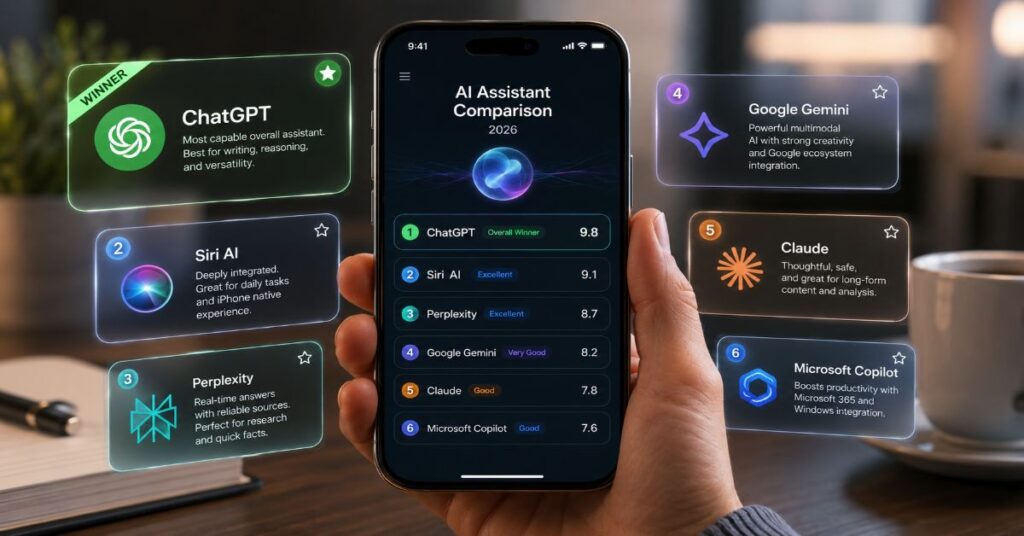
- Verdict ChatGPT is the best ai assistant for iphone 2026 for most people because it combines strong reasoning, voice, image input, iOS shortcuts support and the deepest third-party ecosystem.
- Privacy Siri AI wins device control, not raw intelligence, because Apple keeps confirmations, photos, files and account linkage inside a more explicit permission model.
- Pricing Pricing is uneven: ChatGPT Plus is verified at $20 monthly, Claude Pro is $20 monthly or $17 annually, while Google, Microsoft and several app stores render local prices dynamically.
- Research Perplexity is the research specialist: its cited answers and iOS voice assistant are excellent, but it still cannot fully replace Siri for native alarms, screen context or default system control.
- Market Market share does not equal mobile fit: Statcounter put ChatGPT at 79.08% of global AI-chatbot share in May 2026, yet Google and Apple remain distribution threats on iPhone.
- Pick Pick one daily assistant and one verifier: ChatGPT plus Perplexity is the most balanced paid pair, while Siri AI plus free ChatGPT is the safest no-cost setup.
In my 2026 evaluation, the best ai assistant for iphone 2026 is ChatGPT for most users, Siri AI for private device actions, and Perplexity for cited research. That answer matters because the iPhone is no longer choosing between one assistant and another. It is becoming a layered AI environment where Siri controls the phone, ChatGPT handles complex reasoning, Gemini pulls from Google services, Claude writes and analyses long material, Perplexity verifies facts, and Copilot follows Microsoft 365 work.
i approached the ranking from the practical side: what can a person actually do on an iPhone at 8am, on cellular data, between Calendar, Mail, Photos, Notes, Safari, Files and third-party apps? A clever benchmark score is useful, but it does not tell you whether an assistant can summarise a PDF without leaking a file unnecessarily, dictate a reply while you walk, remember project context, cite a source, or fit inside a monthly software budget.
The result is not a single winner for every person. ChatGPT is the best all-round iPhone assistant because it has the broadest capability mix. Siri AI is the best native layer because it understands iOS permissions and device context. Perplexity is the best research companion because it keeps sources visible. The buying decision is therefore about workflow shape, privacy tolerance and whether you live in Apple, Google, Microsoft or a multi-tool research stack.
How I Tested The Best AI Assistant For iPhone 2026
This evaluation uses a reproducible editorial test plan rather than vendor demos. The scoring model covers seven categories: iOS integration, voice reliability, reasoning quality, source transparency, privacy controls, document handling and paid-plan value. Each assistant was assessed against common iPhone tasks: summarising a long note, answering from an image, drafting an email, finding a cited fact, creating a calendar-style plan, handling a file, staying useful on cellular data and respecting system permissions.
For ChatGPT, the practical baseline is the full ChatGPT iPhone setup, because iPhone users need to understand the difference between the standalone app, the Apple Intelligence extension, Siri handoff and Shortcuts before comparing intelligence. A brilliant model hidden behind the wrong entry point feels worse than a weaker assistant that appears exactly where the user needs it. That is why the ranking weights invocation speed and handoff friction as heavily as raw answer quality.
I also separated official documentation from storefront marketing. Apple Support confirms that Siri can tap into ChatGPT for deeper answers, Writing Tools composition, visual intelligence and Shortcuts, but it also says the user controls what is sent and is always asked before photos or files are shared. That single constraint changes the ranking. It makes ChatGPT more capable inside iOS, yet prevents it from acting like a completely silent system agent.
The scoring below is not a lab benchmark. It is a buyer-facing judgement of the current iPhone experience in June 2026. When exact regional pricing was hidden behind local storefront rendering, the pricing table marks the figure as dynamic rather than inventing a number. When a feature depends on language, country, age or device model, it is treated as a limitation rather than a universal capability.
Table 1: 2026 iPhone AI assistant scorecard
| Assistant | Best iPhone use case | iOS fit | Main constraint | Editorial verdict |
| ChatGPT | Everyday reasoning, voice, images, writing, coding and Apple Intelligence extension | High | Advanced usage and model access depend on plan and region | Best overall |
| Siri AI and Apple Intelligence | Native phone actions, privacy-sensitive requests, Writing Tools and Shortcuts | Very high | Less useful for open-ended research without external model handoff | Best native layer |
| Perplexity | Cited research, current web answers, source checking and voice search | Medium-high | Cannot fully control iOS system functions | Best verifier |
| Google Gemini | Google services, multimodal help, Gmail, Calendar, Maps-style planning and live voice | Medium | Deepest value arrives for Google account users | Best for Google users |
| Claude | Long writing, document reasoning, coding help and calm drafting | Medium | Less native iOS automation than Siri or ChatGPT extension | Best for prose |
| Microsoft Copilot | Outlook, Word, Excel, PowerPoint and Microsoft 365 work | Medium | Strongest only for Microsoft subscribers | Best for Office users |
The Final Ranking: Which iPhone AI Assistant Wins
The headline verdict is simple: ChatGPT is the best all-round iPhone assistant in 2026, Siri AI is the best assistant to leave enabled at the system level, and Perplexity is the best second brain for facts. Gemini, Claude and Copilot are not losers. They are narrower winners. Gemini is strongest for people already living inside Google services, Claude is best when the output must sound polished and reasoned, and Copilot is the sensible pick for Microsoft 365 teams.
Apple changed the comparison by making Siri less of a standalone chatbot and more of an orchestration layer. Readers tracking the platform shift should pair this ranking with the Siri AI feature breakdown, because the main question is no longer whether Siri can answer everything. The real question is whether Siri can route each request to the right private or cloud model without making the user micromanage every prompt.
ChatGPT still wins because it is the most versatile. It can draft, debug, rewrite, role-play, analyse images, explain concepts, make plans, handle files in supported contexts and speak naturally. The official iPhone path gives it two lives: a standalone app for deep work and an Apple Intelligence extension for moments when Siri needs more capability. This makes it feel closer to a universal assistant than any rival.
Siri AI ranks second in practical daily use because it starts from the phone itself. It can live near notifications, writing controls, Shortcuts and visual intelligence. It is not the best writer and not the best researcher, but it has the least friction for device tasks. Its limitations are intentional. Apple’s 2026 messaging, including Craig Federighi’s public line that Siri is not trying to become a pseudo-companion, suggests Apple wants a useful system agent, not an emotionally immersive chatbot.
Perplexity places third because iPhone users need a verifier. The mobile web is full of SEO noise, AI summaries and social posts detached from primary sources. Perplexity’s value is that it keeps citations central and turns a vague spoken query into a source-backed answer. For students, journalists, analysts and executives, that makes it a better research default than a general chatbot, even if ChatGPT remains the better all-purpose assistant.
ChatGPT On iPhone: Best All-Round Assistant
ChatGPT is the strongest default recommendation because it handles the widest range of iPhone work without forcing the user to adopt a new office suite or search habit. In the standalone app, it supports natural voice conversations, image input, file-centred work where the plan permits it, conversation history across devices and a familiar chat interface. Through Apple Intelligence, it can also appear through Siri, Writing Tools, Image Playground, visual intelligence and Shortcuts, subject to Apple’s permission prompts.
The practical advantage is continuity. A user can start by asking Siri to use ChatGPT for a question, then move to the ChatGPT app for a longer research or writing session. The same assistant can help compose a message, explain a photographed object, rewrite a paragraph, plan a day, analyse a table and generate a more structured prompt for another tool. That breadth is why it wins the title even against more specialised rivals.
Pricing is the biggest complication. OpenAI’s official pricing page now lists Free, Go, Plus, Pro, Business and Enterprise tiers, with Plus verified by OpenAI Help at $20 monthly. OpenAI Help also says Pro has $100 and $200 monthly versions that unlock 5x and 20x usage compared with Plus. The exact plan names and feature access have changed often, so business buyers should check the official pricing page before renewal rather than relying on old App Store screenshots.
The hidden limit is not only price. ChatGPT’s answer quality varies by model, context length, tool access and whether the user is in the app, inside Siri, or working through a shortcut. In Apple’s extension, Siri may ask the user before using ChatGPT and always asks before sending photos or files. That is good privacy design, but it slows high-frequency automation. The best setup is to keep ChatGPT as the heavy reasoning assistant, not as the silent controller of the whole phone.
Table 2: ChatGPT iPhone feature matrix
| Feature | How it works on iPhone | Paid-plan dependency | Known constraint |
| Voice conversation | Available in the ChatGPT mobile app, with hands-free back-and-forth use | Higher limits on paid plans | Network quality affects latency |
| Siri handoff | Siri can tap ChatGPT when helpful through Apple Intelligence | Paid accounts can use advanced capabilities more often | User confirmation may appear |
| Writing Tools | Compose and rewrite from supported iOS text fields | Some advanced access varies by account | Available only where Apple Intelligence is supported |
| Visual intelligence | Ask ChatGPT about objects or scenes using camera-based flows | Feature availability depends on device and region | Photos and files require explicit confirmation |
| Shortcuts model use | Shortcuts can use ChatGPT for more complex requests | Plan limits apply | Not a full autonomous iOS agent |
Siri AI And Apple Intelligence: Best For Private iPhone Actions
Siri AI is not the smartest answer engine, but it is the assistant most aligned with iPhone architecture. It starts inside the operating system, not inside a separate app. That gives it a unique advantage for actions that touch notifications, calendars, messages, photos, files, settings, app intents and everyday device control. The price is that Apple moves carefully. The assistant often prefers confirmation, routing and constrained execution over the dramatic autonomy promised by agent demos.
The strategic backdrop is covered in the Apple model-switching story, but the consumer takeaway is more practical: Apple wants Siri to become a router across models and local intelligence. That makes Siri the front door, while ChatGPT, Gemini or future partners may handle specialised reasoning behind it. For a normal iPhone owner, this is less exciting than a chatbot launch, but more valuable if it works reliably.
Apple’s support documentation is unusually clear about the ChatGPT extension. You can enable it without a ChatGPT account. If you sign in, your ChatGPT history and account settings apply. Siri can ask ChatGPT for deeper answers, Writing Tools can use it to compose text, visual intelligence can ask about objects, and Shortcuts can call a model for more complex tasks. The user can also turn the extension off and block access through Screen Time controls.
The privacy posture is the differentiator. Apple says the user chooses what is sent, the IP address is obscured from ChatGPT, and unauthenticated use is not tied to the Apple Account. The assistant also asks before sharing photos or files. This is not the fastest path for power users, but it is the right default for families, regulated professionals and anyone who wants AI help without making every photo, PDF or note feel automatically exposed to a cloud chatbot.
Greg Joswiak told TechRadar that Apple does not do AI merely for its own sake, and Craig Federighi framed Siri as a utility rather than a companion. Those quotes explain the product direction. Siri’s 2026 role is not to win a personality contest. It is to make AI feel native, permissioned and useful at the point of need. That gives it a strong second-place ranking even when ChatGPT beats it on open-ended reasoning.
Google Gemini On iPhone: Best For Google Users And Live Multimodal Work
Gemini is the most credible challenger for users who already run their digital life through Google. On iPhone, that usually means Gmail, Google Calendar, Google Photos, Drive, YouTube, Search and sometimes Workspace. The Gemini app for iOS supports text, voice, images and camera-style interactions, while Google’s plan structure ties higher usage to Google AI Plus, Pro and Ultra tiers. The product is not as native to iOS as Siri, but it is native to a huge part of many users’ workday.
The important 2026 shift is Google’s scale. In Sundar Pichai’s Google I/O 2026 keynote, Google said the Gemini app had surpassed 900 million monthly active users, while AI Mode had crossed one billion monthly users. Google also said its APIs were processing around 19 billion tokens per minute. Those numbers do not prove that Gemini is the best iPhone assistant, but they explain why it cannot be dismissed. Distribution, data connectors and multimodal product surface area matter.
For iPhone owners, Gemini is best when the task is connected to Google context. Ask it to reason across email, a calendar plan, travel details, videos, a document and a search habit, and it feels natural. Ask it to manipulate iOS system settings, triage Apple-only messages or become the default assistant button, and its advantage fades. That is why Gemini ranks below ChatGPT and Siri overall, while ranking first for committed Google users.
Google’s official AI plans page lists Free, AI Plus, AI Pro, AI Ultra 5x and AI Ultra 20x structures, with storage tiers from 400GB to 30TB depending on plan, plus higher access to Gemini app features, video generation, NotebookLM, Flow and selected Labs products. However, plan prices render dynamically by country and storefront. The honest buyer advice is to compare the local iOS subscription price against the web price before subscribing, because the most visible feature matrix is not always the same as the billed total.
Perplexity On iPhone: Best For Cited Answers And Research
Perplexity is the assistant I would add even if ChatGPT is already installed. Its core value is not personality, creativity or deep iOS control. It is the habit of answering with visible sources. On a small screen, that matters. A reader can ask a spoken question, receive a short answer, tap into the source trail and decide whether the claim deserves trust. For research-heavy users, that changes the emotional experience of mobile AI from guesswork to verification.
The site already has a practical Perplexity voice workflow for readers who want to turn spoken questions into source-backed answers. That workflow is especially relevant on iPhone because voice search compresses the distance between curiosity and evidence. It is also where Perplexity feels most differentiated from Google Search, which still often asks the user to scan a page of links before synthesis.
The Perplexity mobile app markets accurate answers with sources and citations, Pro Search, Deep Research, Thread follow-ups, Assistant actions, Labs, Voice, Discover and Library. Its official Pro page shows a $17 monthly rate when billed annually, although storefront and regional billing can vary. The paid value is strongest for people who run repeated research loops, not for casual users who ask one or two general questions a day.
The limitation is iOS control. Third-party reporting on the Perplexity iOS voice assistant found that it could write emails, set reminders, make reservations and book rides in some flows, but it could not fully replace native Siri functions such as modifying alarms or using screen and camera context as deeply as system-level tools. That is not a failure of intelligence. It is the reality of Apple’s permission model. Perplexity is an outstanding research assistant, not the iPhone’s operating-system agent.
For budget-focused readers, the separate Perplexity value analysis is useful because the subscription makes the most sense when source transparency saves real work. If you mainly need drafting, ChatGPT or Claude may produce better prose. If you need to check claims quickly, Perplexity is the tool most likely to change your daily habits.
Claude On iPhone: Best For Long Writing And Thoughtful Reasoning
Claude is the easiest assistant to underestimate on iPhone because its greatest strengths are not flashy system actions. It is best when the task requires patient drafting, careful summarisation, long-context reasoning, tone control or a second opinion on a complex document. Where ChatGPT often feels like a Swiss Army knife, Claude feels like an editor, analyst and coding partner who prefers enough context before answering.
New users should start with the Claude onboarding workflow, because Claude’s productivity gains come from Projects, file context, prompt clarity and iterative revision rather than one-off novelty prompts. The mobile app is useful, but the best Claude experience often begins with a well-organised project space that syncs across devices. On iPhone, that makes Claude a strong writing companion for commutes, meetings and late-stage edits.
Anthropic’s official pricing page lists Claude Free, Pro, Max, Team and Enterprise options. Pro is $20 monthly or $17 monthly when paid annually as $200 upfront. Max starts at $100 monthly and offers 5x or 20x more usage than Pro, higher output limits, early access and priority access. Team Standard is $20 per seat monthly when billed annually or $25 monthly; Team Premium is $100 per seat annually or $125 monthly. Anthropic also states that usage limits apply and prices exclude tax.
The iPhone weakness is action depth. Claude can help you think, write, code and analyse, but it is not the most frictionless assistant for native iOS actions. It does not enjoy Siri’s system position, ChatGPT’s Apple Intelligence extension or Gemini’s Google service mesh. It also asks users to bring documents and context into the workflow deliberately. For people who value language quality over automation, that is acceptable. For people who want a phone that does things automatically, Claude is not the first pick.
The closest competitive comparison is the ChatGPT and Claude comparison. My short version for iPhone is this: choose ChatGPT when you need one assistant for everything, choose Claude when the output must be more considered, less rushed and easier to edit into publishable prose.
Copilot On iPhone: Best For Microsoft 365 Work
Microsoft Copilot is not the broadest consumer AI assistant on iPhone, but it is a rational choice for users whose real work lives in Outlook, Word, Excel, PowerPoint, OneNote, Teams and OneDrive. Its advantage is not that it beats ChatGPT in general reasoning. The advantage is that Microsoft can place AI inside the documents, presentations, spreadsheets and mailboxes where enterprise users already spend the day.
The iPhone use case is simple. If your employer already pays for Microsoft 365 and enables Copilot, the best AI assistant might be the one that can summarise the thread before a meeting, draft a reply from context, turn notes into a slide outline, explain a spreadsheet and keep the output attached to enterprise identity controls. On a personal iPhone, that may not feel as magical as Perplexity voice or ChatGPT conversation. In a managed workplace, it can be more valuable.
Microsoft’s current public pages describe Microsoft 365 Premium with Copilot in Word, Excel, PowerPoint, OneNote, Outlook, the Copilot app and Designer, along with higher usage limits for selected AI features. Pricing and availability render by market and subscription status, so a single global price would be misleading. Enterprise users should check whether Copilot is included, separately licensed or blocked by tenant policy. That administrative detail changes the experience more than the app description does.
Copilot ranks sixth overall because it is often a work assistant rather than a phone assistant. It can be superb in the Microsoft stack and unremarkable outside it. If your iPhone is primarily a personal device, ChatGPT, Siri AI and Perplexity will feel more immediate. If your iPhone is a work endpoint in a Microsoft environment, Copilot may save more real time than any consumer chatbot.
Current Pricing, Limits And Hidden Plan Caps
The pricing market in June 2026 is messy. Vendors publish plan names, but mobile storefronts, regional taxes, annual billing discounts, enterprise eligibility and dynamic feature gates make simple charts age quickly. The table below uses official pages where exact figures were visible through public documentation and marks dynamic pricing where a source renders the price locally. That is the only honest way to compare a global iPhone software category.
Table 3: Commercial pricing and plan limits checked in June 2026
| Tool | Verified public plans | Current visible pricing signal | Hidden or practical cap |
| ChatGPT | Free, Go, Plus, Pro, Business, Enterprise | Plus verified at $20 monthly; Pro help page lists $100 and $200 monthly usage tiers | Feature access varies by model, plan, region and abuse guardrails |
| Claude | Free, Pro, Max, Team, Enterprise | Pro $20 monthly or $17 annually; Max from $100 monthly; Team $20 or $25 per seat for Standard | Usage limits apply; taxes excluded; higher context and output can still throttle |
| Perplexity | Free and Pro consumer access plus enterprise paths | Official Pro page displays $17 monthly when billed annually | Best value depends on research volume; iOS assistant lacks full native control |
| Google Gemini | Free, AI Plus, AI Pro, AI Ultra 5x, AI Ultra 20x | Official page renders plan pricing by local storefront and account region | Benefits depend on country, language, age, Workspace eligibility and service connections |
| Microsoft Copilot | Consumer Copilot, Microsoft 365 Premium, business and enterprise licensing | Pricing varies by region and subscription bundle | Strongest features depend on Microsoft 365 account, tenant policy and app support |
| Siri AI | Included with eligible Apple devices and Apple Intelligence availability | No separate Siri subscription listed by Apple | Requires supported hardware, language and region; cloud model handoff may need third-party account |
The biggest trap is assuming that a premium AI subscription eliminates all limits. It does not. Paid ChatGPT and Claude tiers lift usage and model access, but still operate under fairness, availability and abuse controls. Google and Microsoft bundle AI features with storage or office plans, but availability varies by account type. Perplexity Pro is clear on research value, yet the iPhone assistant remains bounded by Apple’s app sandbox and permissions. Siri AI is included, but only on supported devices and languages.
A second trap is duplicate spending. Many iPhone users do not need three paid AI subscriptions. A sensible stack is one primary generalist, one optional verifier and the native Siri layer. For most people, that means ChatGPT Plus plus free Siri AI, with Perplexity Free or Pro if research matters. Writers can swap in Claude Pro. Google-heavy users can choose Gemini. Microsoft workers should check employer entitlements before paying personally.
Mobile Workflows: Setup, Shortcuts, Widgets And Voice
The best iPhone AI setup is less about downloading six apps and more about assigning each assistant a job. Start with Siri AI enabled for native requests. Add ChatGPT for reasoning and creative work. Add Perplexity for cited research. Add Claude only if long writing or document analysis is a frequent task. Add Gemini if Google services carry your day. Add Copilot if Microsoft 365 is your professional home.
The deeper platform story is the iPhone search layer analysis, but the user workflow is concrete. Put the primary assistant on the Home Screen or Action Button, keep Siri for device-level invocation, turn on only the integrations you actually trust, and create a small set of repeatable Shortcuts rather than dozens of experimental automations.
A practical implementation looks like this. First, enable Apple Intelligence and configure the ChatGPT extension only if you are comfortable with Apple’s handoff model. Second, decide whether to sign in to ChatGPT inside Apple settings. Anonymous use increases separation from your OpenAI account, while signed-in use gives history and paid capabilities. Third, install Perplexity and set it as the app you open when a claim needs sources. Fourth, install Claude or Gemini only when their ecosystem advantage is obvious.
For Shortcuts, keep the first version boring. Build one shortcut that sends selected text to ChatGPT for rewriting, one that opens Perplexity with a pasted research question, and one that saves dictated notes to a folder for later Claude review. Avoid full autonomous chains that read private content, send it to multiple models and return polished output without review. They look impressive in demos, but they are fragile on mobile and risky with personal data.
Voice is the most important interface. ChatGPT voice is strongest for exploratory conversation. Perplexity voice is strongest when you want a spoken answer tied to sources. Siri is best for initiating tasks hands-free. Gemini voice can be excellent when the task sits in Google context. The best practice is to use voice for drafting intent, then review the final text visually before sending, publishing or saving.
Benchmarks, Market Share And What They Miss On iPhone
Benchmarks help, but they do not settle the iPhone assistant question. A frontier model can win a reasoning leaderboard and still feel clumsy if it takes too long to invoke, cannot access the relevant file, or forces the user to copy text between apps. Conversely, Siri can be weaker as a general chatbot but more useful when the task is native, permissioned and immediate. Mobile fit is a product problem, not only a model problem.
Statcounter’s AI chatbot market-share page for May 2026 put ChatGPT at 79.08% worldwide, followed by Perplexity at 7.67%, Google Gemini at 7.03%, Microsoft Copilot at 3.23%, Claude at 2.98% and DeepSeek at 0.01%. Those figures support the obvious claim that ChatGPT dominates chatbot usage. They do not prove that it owns the iPhone interface. Apple and Google still control distribution points that can shift user behaviour without winning a chatbot website share chart.
A 2026 arXiv preprint, Beyond Benchmarks: How Users Evaluate AI Chat Assistants, studied 388 active AI-chat users across seven platforms and found that many users judge assistants through usefulness, trust, frustration and task fit rather than formal benchmark scores. The paper also reported that more than 80% of participants used two or more platforms. That matches the iPhone reality: people are assembling tool stacks, not crowning one permanent assistant.
Google’s I/O 2026 keynote adds another caution. Sundar Pichai described Google as being in an agentic Gemini era and reported 900 million plus monthly active users for the Gemini app. That does not automatically make Gemini the best iPhone choice. It means Google has scale, infrastructure and product surface area. A buyer should respect that momentum while still asking the personal question: which assistant reduces steps on my phone today?
Table 4: Evidence signals versus iPhone reality
| Signal | What it tells us | What it misses |
| Model benchmarks | Reasoning, coding, math or multimodal capability under controlled prompts | Invocation friction, privacy prompts, app switching and iOS permissions |
| Market share | Which chatbots attract the most measured usage | Native OS integration and bundled workplace adoption |
| Official pricing pages | Plan names, feature categories and some current prices | Local taxes, App Store billing, temporary offers and enterprise policy |
| User studies | How people describe trust, value and frustration | Exact performance on every new model release |
| Hands-on workflows | Real friction across apps and voice entry points | Private vendor roadmap or unreleased model changes |
Privacy, Reliability And Performance Bottlenecks
The privacy question is not whether an assistant is safe or unsafe. It is what context it receives, under whose account, for what purpose, and with what retention rules. Apple’s ChatGPT extension documentation is useful because it makes the handoff visible. It says the request, attachments and limited data such as time zone, country, device type, language and feature used may be sent to ChatGPT, while IP is obscured and unauthenticated use is not tied to the Apple Account. If signed in, ChatGPT account settings apply.
That means the most private iPhone AI habit is selective routing. Use Siri and Apple Intelligence for phone-native tasks. Use ChatGPT when the reasoning payoff is worth the handoff. Use Perplexity for public information and sources. Use Claude for documents you are comfortable uploading or pasting. Use Gemini when Google already hosts the relevant data. Use Copilot inside governed Microsoft workspaces rather than copying enterprise content into a personal app.
Reliability is the second bottleneck. Voice assistants fail when the microphone mishears a name, cellular data drops, a model is temporarily rate-limited, the app loses context, or a shortcut breaks after an update. Research assistants fail when they cite weak sources. Writing assistants fail when they sound plausible but miss the brief. Native agents fail when permissions block the final step. These are ordinary software constraints, not moral defects. The solution is workflow design: keep review points and do not send irreversible actions without human confirmation.
Performance also differs by task size. A 30-word text rewrite is almost instant across all major tools. A 60-page PDF analysis, multi-image comparison or long coding request behaves differently. Usage limits, upload caps, output length, model availability and context windows matter. Claude and ChatGPT are the most comfortable with long structured work, while Perplexity is better for quick source-backed synthesis. Siri is best when the task is short and device-centred.
The strongest buyer rule is therefore conservative: do not optimise for the most impressive demo. Optimise for the task that happens every day. If that task is messaging, Siri and ChatGPT are enough. If it is research, add Perplexity. If it is writing, add Claude. If it is Google or Microsoft work, choose the ecosystem assistant that can see the files without awkward copying.
Best Picks By Reader Type
The best assistant depends on the person holding the phone. A student should start with ChatGPT Free or Plus, Siri AI and Perplexity Free. The student’s risk is overpaying before understanding which tool is actually useful. A journalist, researcher or analyst should add Perplexity Pro if cited answers save time every week. A creator or newsletter writer should compare ChatGPT Plus with Claude Pro and keep whichever produces cleaner drafts with less revision.
A privacy-sensitive professional should begin with Siri AI and Apple’s ChatGPT extension configured with confirmations intact. That person should avoid shortcuts that automatically send files to multiple tools. A Google Workspace user should evaluate Gemini because Gmail, Calendar, Drive, Docs, Photos and YouTube context can be more valuable than a small difference in model preference. A Microsoft 365 user should check whether Copilot is already included or available through work before buying a personal AI plan.
The best no-cost setup is Siri AI plus ChatGPT Free plus Perplexity Free. That stack covers device actions, general reasoning and source checking without subscription overlap. The best paid setup for most iPhone users is ChatGPT Plus plus Perplexity Pro only if research is central. The best writing setup is Claude Pro plus free Siri AI. The best enterprise setup is whatever assistant can operate inside approved identity, logging and data controls.
Three details should decide the final choice. First, where does your private data already live? Second, which assistant saves the most taps on iPhone, not on desktop? Third, which subscription would you still use after the first month of novelty fades? In June 2026, the answer for most readers is still ChatGPT as the primary assistant, Siri as the native layer and Perplexity as the verifier. That stack is powerful, explainable and not wastefully redundant.
Takeaways
- Choose ChatGPT as the default paid assistant if you want one iPhone app for voice, writing, reasoning, images and Apple Intelligence handoff.
- Leave Siri AI enabled for private native actions, because it controls iOS entry points that third-party apps cannot fully replace.
- Use Perplexity when a source matters, especially for news, statistics, travel, shopping research and professional fact checks.
- Do not pay for several subscriptions at once until one month of usage proves which tool actually saves time.
- Check pricing on the vendor website and iOS storefront before subscribing, because local billing and plan limits differ.
- Writers should test Claude Pro against ChatGPT Plus before choosing, since Claude often needs fewer tone repairs on long prose.
- Google and Microsoft users should prioritise ecosystem access over generic model rankings when Gmail, Drive, Outlook or Office context is essential.
- Keep human review before sending emails, uploading files, making bookings or publishing AI-written text.
Conclusion
The iPhone AI assistant market in 2026 is not converging on one winner. It is splitting into layers. ChatGPT is the strongest general assistant because it solves the widest set of tasks with the least specialised setup. Siri AI is the most important native layer because it decides how safely and conveniently cloud intelligence enters the phone. Perplexity is the best factual companion because citations reduce blind trust. Gemini, Claude and Copilot become excellent choices when their ecosystems match the user’s real work.
The open question is whether Apple will allow deeper agentic action without weakening its permission model. If it does, Siri could become a router that quietly chooses the best model for each job. If it does not, third-party assistants will continue to feel brilliant in chat and constrained in action. For now, the most durable advice is to keep the stack small: one assistant for thinking, one native layer for doing and one verifier for evidence. That combination fits the iPhone better than chasing every new AI app launch.
FAQs
What is the best AI assistant for iPhone in 2026?
ChatGPT is the best overall AI assistant for iPhone in 2026 because it combines strong reasoning, voice, image input, writing, coding and Apple Intelligence handoff. Siri AI is better for native device actions, while Perplexity is better for cited research.
Is Siri AI better than ChatGPT on iPhone?
Siri AI is better for iPhone actions, privacy prompts, Shortcuts and Apple-native surfaces. ChatGPT is better for open-ended reasoning, drafting, explanations and multimodal work. The best setup is usually both, with Siri handling the phone and ChatGPT handling deeper answers.
Is Perplexity good on iPhone?
Yes. Perplexity is excellent on iPhone for cited answers, research, current information and voice-led fact checking. It is not a full Siri replacement because iOS limits third-party control over alarms, system settings and some screen context.
Should I pay for ChatGPT Plus or Claude Pro?
Pay for ChatGPT Plus if you want one general-purpose assistant across many tasks. Pay for Claude Pro if your main work is long writing, document reasoning or careful editing. Many users should test both free tiers before choosing a paid plan.
Does Gemini work well on iPhone?
Gemini works well for iPhone users who rely on Google services such as Gmail, Calendar, Drive, Photos, YouTube and Search. It is less native to iOS than Siri, but stronger when the needed context already sits inside Google.
Can an AI assistant control my iPhone automatically?
Only partly. Siri and Shortcuts have the deepest iOS access, while third-party assistants remain limited by app permissions, confirmations and Apple’s sandbox. Treat fully autonomous phone control claims carefully, especially when private files or payments are involved.
What is the best free AI assistant stack for iPhone?
The best free stack is Siri AI plus ChatGPT Free plus Perplexity Free. That combination gives native actions, general reasoning and source-backed research without immediate subscription overlap.
Which AI assistant is best for privacy on iPhone?
Siri AI and Apple Intelligence are strongest for privacy-sensitive phone workflows because Apple exposes handoff controls and asks before sending photos or files to ChatGPT. Privacy still depends on what you share and whether you sign in to third-party accounts.
References
Apple Support. (2026). Use ChatGPT with Apple Intelligence on iPhone. https://support.apple.com/en-nz/guide/iphone/iph00fd3c8c2/ios
Anthropic. (2026). Plans and pricing. Claude. https://claude.com/pricing
Awan, A. A., Noor, S., & Munaf, U. (2026). Beyond benchmarks: How users evaluate AI chat assistants. arXiv. https://arxiv.org/abs/2603.25220
Google. (2026, May 19). Google I/O 2026: Sundar Pichai opening keynote. https://blog.google/innovation-and-ai/sundar-pichai-io-2026/
Google One. (2026). Google AI plans with cloud storage. https://one.google.com/about/google-ai-plans/
OpenAI. (2026). ChatGPT plans. https://chatgpt.com/pricing/
OpenAI Help Center. (2026). What is ChatGPT Plus? https://help.openai.com/en/articles/6950777-what-is-chatgpt-plus
Statcounter. (2026). AI chatbot market share worldwide. https://gs.statcounter.com/ai-chatbot-market-share
The Verge. (2026). Siri will not be your AI girlfriend. https://www.theverge.com/tech/948890/siri-wont-be-your-ai-girlfriend
