
📋 Executive Summary
🖼️ Model: Midjourney V8.1 is the default generator, but the web Editor currently processes edits with V6.1, meaning local changes can drift from the original image.
🔄 Workflow: Upload the photo in the Edit tab, create transparency with Erase or Smart Select, describe only the desired replacement, then compare the four returned variants.
💳 Pricing: The Basic plan includes 200 Fast GPU minutes and no Relax Mode, while Stealth Mode starts only on the $60 monthly Pro plan.
📊 Evidence: A WACV 2026 study found that leading AI editors satisfactorily fulfilled only about 33 percent of 83,000 real-world editing requests.
🎯 Decision: Use Midjourney for generative replacement, outpainting, retexturing and concept composites, then finish typography, colour accuracy and pixel-level repair in a conventional editor.
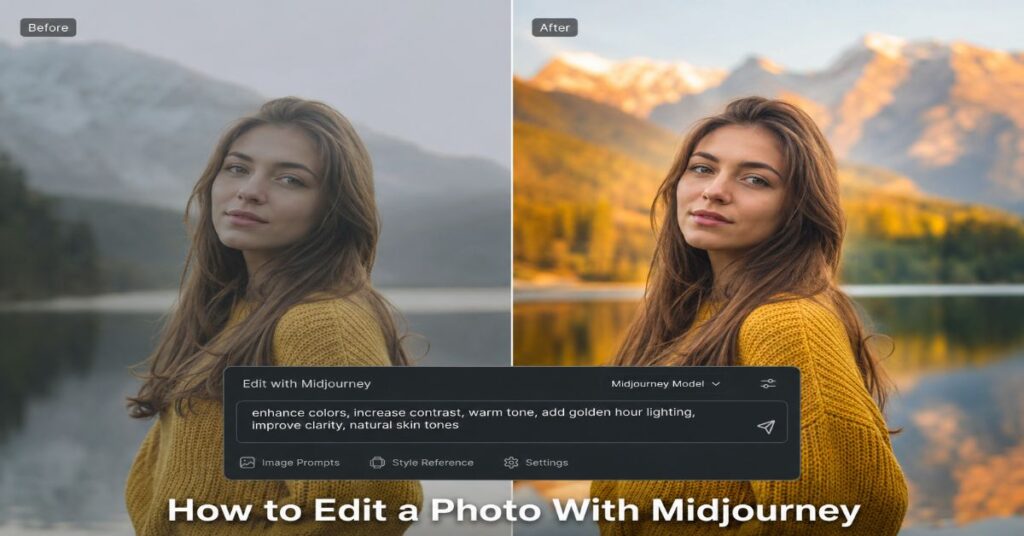
I edit a photo with Midjourney by uploading it to the web Edit tab, masking the area that must change, describing the replacement, and submitting the edit, but the sharpest 2026 limitation is easy to miss: V8.1 is Midjourney’s default image model while the Editor still runs its generative edits through V6.1. That model mismatch means a small repair can alter texture, lighting or identity more than expected, even when the mask looks precise.
This guide explains how to edit a photo with Midjourney without treating it like Photoshop. Midjourney is strongest when the edit is generative: replacing an object, extending a scene, rebuilding a background, changing wardrobe, creating a composite or re-rendering the whole photograph in a new visual language. It is weaker at exact colour correction, repeatable product geometry, readable typography, identity-perfect retouching and non-destructive adjustment layers. The practical skill is therefore not simply writing a prompt. It is choosing the correct editing mode, controlling the mask, protecting the parts that must remain stable and knowing when to hand the image to another tool.
The current workflow is browser-first. Midjourney’s Editor accepts both images generated on the platform and external uploads. It combines Move/Resize, Erase, Restore, Smart Select, prompt-driven inpainting, outpainting, layers, Retexture and export controls. The result can be fast and visually persuasive, but every submission is a fresh generative inference, not a deterministic pixel operation. I will show the exact sequence, the prompt patterns that reduce unwanted changes, the plan limits that affect iteration, the privacy and ownership clauses that matter for client work, and the production checks that separate a compelling draft from a publishable asset.
What Midjourney Photo Editing Actually Does
Midjourney’s Editor is a generative canvas rather than a traditional photo laboratory. The software does not expose curves, channel mixers, frequency separation, clone-stamp sampling or a conventional layer stack with editable adjustment history. Instead, it asks the model to infer new pixels from a mask, the visible image and a text description. That distinction explains both the speed and the uncertainty. A sentence can replace a lamp with a vase in seconds, yet the same generation may also change reflections on the table or soften a face that was outside the intended area.
The editor has two entry points. A light version opens from a Midjourney image on the Create or Organize page. The full Edit tab accepts external files and unlocks custom aspect ratios, Suggest Prompt, multiple image layers and Retexture. For a newcomer, the midjourney beginner guide is useful background because it explains how the web Create page, prompts and parameters fit together before editing begins.
The most productive mental model is to divide edits into four classes. Local replacement changes a masked region. Outpainting adds space beyond an existing border. Compositing combines uploaded layers and generates only through transparent gaps. Retexture rebuilds the whole image while preserving broad structure. When the requested change does not fit one of those classes, another editor may be more efficient.
Adobe Research’s WACV 2026 analysis of 83,000 public editing requests and 305,000 human-produced edits found that the best evaluated AI editors fulfilled only about 33 percent of requests to human satisfaction. The systems performed especially poorly on low-creativity edits that demanded precision, and they often changed people or animals unnecessarily. That finding is a useful guardrail: generative editing feels simple at the interface, but exactness remains the difficult part. Judge the tool by preserved constraints, not by the immediate visual impact of its first result.
| Tool | Best Use | What Changes | Main Constraint |
| Erase / Paint | Replace or remove a local object | Transparent pixels are regenerated from the prompt | Loose masks invite spill into nearby detail |
| Smart Select | Select a subject or background quickly | Creates a guided mask from include and exclude points | The mask must be applied before submission |
| Move / Resize | Outpaint, rotate or change canvas shape | Adds empty canvas and can reposition the source | New borders are invented, not recovered |
| Layers | Composite multiple source images | Visible pixels stay; transparent gaps regenerate | Submitting flattens the working composition |
| Retexture | Change the full visual treatment | Rebuilds style and detail while keeping structure | Identity, text and fine geometry may drift |
| Export | Create a handoff asset | Downloads the generation or transparent edit mask | Upscaled gallery export may be needed for visibility |
Prepare the Source Before Uploading
A good edit begins before Midjourney sees the file. Use the highest-quality source available, remove accidental compression and crop it close enough that the intended subject occupies meaningful space. Midjourney accepts common image formats such as PNG, GIF, WebP, JPG and JPEG for image references. For direct editing, a clean JPG or PNG is usually the safest choice. If the photo contains fine hair, jewellery, product labels or small facial details, preserve as many original pixels as possible because the Editor may reinterpret them after regeneration.
Match the source crop to the likely final aspect ratio. Outpainting can extend a photograph, but it cannot know what was outside the original frame. The model invents plausible context. That is valuable for editorial banners and social crops, but risky for documentary, evidential or product-compliance images. Save the untouched source and create a working duplicate with a clear version name before uploading.
Rights and privacy need the same preparation. Midjourney requires users to hold the necessary rights to uploaded content and prohibits abusive manipulation of public or private individuals. Its Terms of Service also grant Midjourney a broad licence over content submitted to the service. For confidential client photography, unreleased products, private family images or regulated material, that clause deserves review rather than assumption. A broader guide to commercial ai image rights can help teams separate platform permission from copyright, consent and contractual obligations.
Stealth Mode does not solve every privacy problem. It is available only on Pro and Mega plans, and content created in public Discord channels remains visible even when Stealth is enabled. For sensitive work, use the web interface or a private environment, confirm the current policy, and avoid uploading anything that a client agreement forbids from entering a third-party cloud service. Record that decision in the project brief before production begins.
How to Edit a Photo With Midjourney
The reliable sequence is simple, but the order matters. Open the Midjourney website, choose the Edit tab and upload the photograph from your device, or paste a permitted image URL. The image appears on a canvas with Move/Resize and Paint controls. Before writing a prompt, decide whether the edit is local, compositional or global. This prevents the common mistake of using Retexture for a minor replacement or trying to inpaint an entire scene with a tiny brush.
For a local edit, use Erase to create transparency exactly where new pixels should appear. For a larger object or background, activate Smart Select, add positive points on the target and negative points where the mask leaks, then click Erase Selection or Erase Background. The green selection overlay is only a preview. If it remains visible, the mask has not been applied and the edit will not behave as intended.
Write a prompt that describes the desired final content, not a conversation about the old image. Instead of ‘remove the red chair and put a plant there’, write ‘a tall fiddle-leaf fig in a matte stone planter, matching the room’s soft window light and camera perspective’. Midjourney already sees the surrounding photograph. Your prompt should specify the replacement’s identity, material, scale, lighting, viewpoint and relationship to nearby objects.
Submit the edit. Midjourney returns four variants in the results panel. Compare more than the masked area. Inspect faces, hands, product edges, shadows, reflections and straight lines just outside the boundary. Choose the closest variant, continue editing if necessary, then use Upscale to Gallery or Download Image. The Editor can also download a transparent PNG representing the erased area, which is valuable as a handoff mask for Photoshop, Affinity Photo or another finishing tool.
How to Edit a Photo With Midjourney Step by Step
- Open the Edit tab and upload a rights-cleared source image.
- Set the final crop or aspect ratio before masking.
- Erase only the region that should be regenerated.
- Describe the final pixels, including lighting, material, scale and perspective.
- Submit, compare all four variants and inspect areas beyond the mask.
- Repeat with one controlled change at a time.
- Upscale or download, then finish exact corrections in a pixel editor.
Build Masks That Limit Unwanted Changes
Mask design is the main technical control in Midjourney photo editing. A broad mask gives the model more freedom to create coherent lighting and geometry, but it also increases collateral change. A narrow mask protects the source, yet it may leave visible seams because the model lacks enough context to blend the replacement. The practical compromise is to include the target object plus a small halo of surrounding texture, shadow and contact area.
For object removal, erase the object and its cast shadow if the shadow should disappear. Leaving the old shadow while generating an empty floor creates an obvious contradiction. For object replacement, include the contact zone where the new item touches the surface. For wardrobe changes, mask the garment and a modest boundary around shoulders, waist and occluded arms, but protect the face unless identity drift is acceptable.
Smart Select accelerates subject and background selection, but it is not a final truth. Add include points on separated parts of the same object and exclude points on neighbouring items with similar colour or texture. Then apply the mask with an erase command. When edges such as hair, glass or foliage are complex, a coarse external mask created in Photoshop can be imported as a layer, giving Midjourney a cleaner transparency pattern to regenerate.
One under-discussed limitation is that the Editor currently uses V6.1 for editing even when the source was generated with V8.1. Midjourney’s current version documentation describes V8.1 as the default and significantly faster than earlier models, but the Editor documentation states that editing functionality remains on V6.1. In practice, this creates a model-boundary problem: a V8.1 face, textile or typography treatment may be reconstructed by a different model during a local edit. Keep masks away from critical identity features and retain an external copy of the original for compositing back if necessary.
Use Retexture for Full-Image Transformation
Retexture is the right tool when the composition is valuable but the visual treatment is not. It can turn a daytime interior into a cinematic night scene, convert a photograph into a watercolour illustration or rebuild a product shot as a premium studio campaign while retaining the broad arrangement. The feature overlays new style and detail across the entire image, so it should be approached as controlled re-rendering rather than a filter.
Start with a short content-preserving prompt. Name the medium, lighting, palette, surface treatment and level of realism. Avoid stacking conflicting adjectives. A useful pattern is: ‘Editorial product photograph, soft north-window light, muted slate and cream palette, natural material texture, realistic lens depth, restrained retouching.’ If you need a consistent campaign look, a Style Reference can help transfer colours, texture, medium and lighting without explicitly copying the subjects of the reference image.
For readers comparing the broader market, our guide to the best ai image generators explains why Midjourney remains especially strong at aesthetic interpretation. That strength is also Retexture’s risk. The model may beautify, simplify or stylise details that were commercially important. Logos can mutate, text can become unreadable, faces can shift and product geometry can change enough to violate a pack-shot brief.
The safest Retexture workflow has three passes. First, test the look on a low-stakes duplicate. Second, choose the closest composition and export it. Third, restore exact brand marks, text, jewellery, skin details or product features from the original with a conventional editor. Retexture should widen the creative search space, while human judgement decides what survives into the final image. This division matters because the model is good at proposing a coherent visual system, but it cannot know which tiny details carry legal, cultural or commercial significance.
“perspective, voice and taste become the most powerful creative instruments of all.” David Wadhwani, President, Creativity & Productivity Business, Adobe, April 2026
Combine Photos With Layers and Transparent Gaps
Layers make the full Editor useful for composites. You can add several images, reorder them, move and scale the active layer, erase portions and then submit the composition. Midjourney regenerates only the visible transparency, while opaque pixels remain. This makes it possible to place a product on a new set, add a prop from a second photograph or assemble a rough campaign layout that the model then blends into a coherent scene.
The important constraint is flattening. Once you submit an edit, the arranged layers become a single generated result. The platform is not maintaining a Photoshop-style, independently editable layer history. Save each source, record the intended placement and download an intermediate screenshot or composite if the arrangement matters. A production team should treat the Editor as a generative merge stage, not the archive of record.
For clean composites, match perspective and approximate lighting before submission. A front-facing product placed into a three-quarter-angle room forces the model to choose between preserving the product and obeying the scene. Resize the object to plausible scale, align its baseline and include enough transparent area around the edge for shadows and colour spill. The generated seam should have room to breathe.
Graphic designers often benefit from a hybrid stack rather than a single platform. The publication’s review of ai tools for graphic designers places Midjourney alongside layout, vector and finishing applications because concept generation and production execution are different jobs. Layers in Midjourney are strongest at the bridge between exploration and making. They turn a rough visual idea into a more coherent draft, but the final editable design system usually belongs elsewhere, where teams can preserve typography, brand components, grid logic and revision history. Exported composites should therefore be treated as approved visual inputs, not master design files.
“The best creative work flows between thinking and making.” Paul Smith, Chief Commercial Officer, Anthropic, April 2026
Choose the Correct Reference System
Midjourney offers several ways to use a source image, and confusing them creates poor edits. An Image Prompt influences content, composition and colour in a new generation. A Style Reference transfers the visual feel, such as texture, palette, medium or lighting. Omni Reference places a person, object, vehicle or creature into a new V7 generation. The Editor, by contrast, is for altering a specific image through masks, layers and Retexture.
Use an Image Prompt when you want a fresh interpretation rather than a precise modification. The source acts as inspiration, not a locked base. Use Style Reference when the scene content should be new but the campaign look should remain consistent. Use Omni Reference when the subject or object needs to recur across scenes. Omni Reference supports a weight from 1 to 1,000, but Midjourney warns that high values can become unpredictable and recommends staying below 400 in ordinary cases.
There is a workflow trap around Omni Reference. It runs in V7, costs roughly twice the GPU time of a normal V7 image, and is not directly compatible with inpainting, Pan or Zoom Out. To edit an Omni-derived result, load it into the Edit tab and remove the Omni reference and its weight parameter. That handoff can weaken the very identity consistency the reference was meant to protect.
This is one reason the midjourney versus dall-e 3 comparison remains useful. Midjourney tends to provide stronger visual direction, while more literal systems may be preferable when the brief depends on exact object counts, readable text or obedient placement. Choose the reference type according to the constraint you cannot afford to lose: composition, style, identity or local pixel continuity. A quick preflight helps: write the fixed constraint in one sentence, select the mode that protects it most directly and reject any workflow that requires the model to infer that constraint indirectly.
Write Prompts for Precision Instead of Poetry
A photo-editing prompt should be narrower than a text-to-image prompt. The visible photograph already supplies the scene, so the words should resolve uncertainty inside the masked region. Begin with the replacement noun, then specify material, orientation, scale, lighting, perspective and contact with the environment. Place the most important constraints early.
Avoid negative conversational instructions such as ‘do not change the face’ inside a local replacement prompt. The mask is the stronger protection mechanism. If the face must remain exact, keep it opaque. If an unwanted item repeatedly returns, expand the mask to remove its visual evidence and describe the final empty or replacement state. Midjourney’s `–no` parameter can help during generation, but in Editor workflows the mask and positive description usually carry more practical weight.
Use one edit per submission. Asking for a new sky, wardrobe, pose, background and lens effect in one pass makes failure diagnosis impossible. Controlled iteration also conserves GPU time because you can stop once the decisive change works. The midjourney versus stable diffusion analysis shows the broader trade-off: Midjourney delivers polished visual interpretation with limited technical plumbing, while Stable Diffusion ecosystems offer deeper control through tools such as ControlNet, LoRA and node-based workflows.
The prompt should communicate a visual decision rather than outsource the decision itself. A precise editor knows whether the replacement should look new or worn, pristine or hand-made, documentary or cinematic. Those choices are more useful than adding a dozen generic quality adjectives. They also make evaluation easier because the team can ask whether the result met a concrete brief instead of merely whether it looks impressive. Include one measurable relationship when possible, such as the object occupying one-third of the frame, the light arriving from camera left or the material showing brushed rather than polished metal.
“voice, taste and judgment remain what set great creators apart.” Mike Polner, Vice President and Head of Product Marketing for Creators, Adobe, June 2026
| Edit Type | Prompt Template | Why It Works |
| Object replacement | A [specific object], [material], [scale], [viewpoint], lit by [source], casting [shadow type] | Defines geometry and integration cues |
| Background change | [Environment], matching [time of day], [lens depth], [colour temperature], realistic perspective | Keeps the subject while rebuilding context |
| Wardrobe change | [Garment], [fabric], [fit], [colour], consistent with existing pose and light | Focuses on clothing without rewriting identity |
| Outpaint | Continuation of [scene], [edge objects], [depth], [weather or light], same camera position | Tells the model how borders should continue |
| Retexture | [Medium or photo style], [palette], [lighting], [surface detail], [realism level] | Controls global treatment without over-describing content |
Understand Pricing, GPU Time and Hidden Limits
Midjourney’s subscription price is only the first cost. Editing consumes GPU time because every submitted mask or Retexture request is another generation. The Basic plan provides 3.3 Fast GPU hours, or 200 minutes, per month. Standard, Pro and Mega increase Fast time and add unlimited Relax image generation. Extra Fast time costs $4 per hour across all plans. Annual billing is 20 percent lower but is charged upfront.
The official GPU guide estimates an SD image prompt at about 0.8 GPU minutes and an HD prompt at about 1.3 minutes, although task complexity varies. A purely mathematical upper estimate would put 200 Basic-plan minutes at roughly 250 SD prompt batches. Real editing capacity is lower once you include upscales, HD jobs, retries, non-standard aspect ratios and more complex operations. The results panel returns four variants, so the useful unit is not a single image but a batch of alternatives.
The midjourney pricing breakdown provides additional context on how Fast, Relax and Stealth features affect real-world value. For photo editing, Standard is the practical volume tier because Relax Mode permits unlimited image generations, albeit with longer queues. Pro is the first privacy-oriented tier because Stealth Mode starts there. Mega mainly serves high-throughput teams, but Midjourney accounts remain designed for individual use and may not be shared.
Time savings depend on iteration discipline. If each attempt changes several variables, the user spends saved generation time reviewing inconsistent outputs. A short edit log with source version, mask purpose, prompt, speed mode and selected result turns GPU minutes into reproducible learning. The point is not to maximise the number of generations. It is to reduce the time between a clear visual decision and a verified final asset.
“one of the biggest benefits is the time it gives me back.” Sophia Kianni, Creator and Founder of Phia, June 2026
| Feature | Basic | Standard | Pro | Mega | Practical Meaning |
| Monthly price | $10 | $30 | $60 | $120 | Subscriptions renew automatically |
| Annual price | $96 | $288 | $576 | $1,152 | Equivalent to $8, $24, $48 and $96 monthly |
| Fast GPU time | 3.3 h | 15 h | 30 h | 60 h | Unused Fast time does not roll over |
| Relax images | No | Unlimited | Unlimited | Unlimited | Queues may range from immediate to about 30 minutes |
| Relax SD video | No | No | Unlimited | Unlimited | HD video remains Fast-only |
| Stealth Mode | No | No | Yes | Yes | Public Discord channels can still expose creations |
| Concurrent image prompts | 3 Fast | 3 Fast or Relax | 12 Fast or 3 Relax | 12 Fast or 3 Relax | Concurrency matters for batch review |
| Concurrent video prompts | 1 Fast | 3 Fast | 6 Fast or 3 Relax | 12 Fast or 3 Relax | Video is not the focus of this guide |
| Repeat / permutation cap | 4 jobs | 10 jobs | 40 jobs | 40 jobs | Relax Mode restricts repeat and permutation |
| Queued jobs | 10 | 10 | 10* | 10* | Pro and Mega queues accommodate three Relax videos |
| Extra Fast time | $4/h | $4/h | $4/h | $4/h | Useful for deadline spikes |
| Company revenue rule | General terms | General terms | Required over $1m | Required over $1m | Companies above $1m gross revenue need Pro or Mega for asset ownership |
Plan Around Quality Bottlenecks and Failure Modes
The most common failure is not an obviously bad image. It is a plausible image that quietly violates the brief. Midjourney may change the number of buttons on a jacket, alter a ring, soften a brand mark, reverse text, bend architecture or modify a person’s face. Review at 100 percent and compare against the original, not against your memory of it.
Identity drift is particularly important. The WACV 2026 study found that leading AI editors often struggled to preserve people and animals, and sometimes added unrequested touch-ups. For personal memories, documentary photography and regulated imagery, that behaviour changes meaning rather than merely appearance. Keep identity-critical pixels outside the mask and use external compositing to restore them when needed.
Geometry is another bottleneck. Product packaging, furniture joins, machinery, jewellery settings and repeated patterns can look persuasive at thumbnail size while becoming impossible under close inspection. Text remains a separate finishing task. Even when a model produces readable letters, kerning, spelling and brand consistency should be rebuilt in a design tool.
The flux image generator review is relevant for users who need more controlled editing alternatives, while Photoshop and Firefly remain stronger for non-destructive layer workflows, typography and pixel-level correction. The right comparison is not which model makes the prettiest first result. It is which system preserves the constraints that define success.
A useful stop rule is to abandon generative retries when the same protected detail fails twice. At that point, isolate the successful generated region and composite it into the original. Continuing to reroll can consume more time than a five-minute manual repair. Build a review checklist for recurring work: identity, object count, text, geometry, shadows, reflections, colour, crop and source rights. A result that fails any non-negotiable item should not move forward merely because its overall aesthetic is strong.
| Failure | Early Signal | Best Response | Better Alternative When Critical |
| Identity drift | Eyes, jawline, fur pattern or expression changes | Reduce mask and composite original identity back | Photoshop or Affinity Photo |
| Logo or text corruption | Letters become approximate shapes | Remove text from generation and rebuild later | Illustrator, InDesign or Canva |
| Edge seams | Lighting or texture changes at mask boundary | Widen mask slightly and include contact shadow | Manual blend and colour match |
| Geometry drift | Straight lines bend or object proportions change | Use a smaller local mask and preserve source edges | ControlNet-based workflow or 3D render |
| Style overreach | Whole image becomes cinematic or overly polished | Lower stylistic language and use a literal prompt | Literal editor or conventional retouching |
| Privacy exposure | Sensitive image appears in public workflow | Stop, delete where possible and review plan settings | Local editing workflow |
Use a Hybrid Production Workflow
Midjourney works best as one stage in a production chain. Start with a source audit, decide which pixels are factual and which may be invented, and create a duplicate. Perform the generative operation in Midjourney, then export the selected result and the transparent edit mask when useful. Move to a pixel editor for colour matching, seam cleanup, identity restoration, noise consistency, sharpening and exact typography.
For editorial work, retain the original photograph and label the edited version clearly. For commercial work, keep a brief that records the rights basis for the source, the Midjourney plan used, whether Stealth was active, the prompt, the selected output and any post-production. This is not bureaucratic overhead. It protects teams when a client asks how an asset was created or whether a product feature was altered.
Midjourney does not offer a generally available public API. Its Community Guidelines say that, apart from rare explicit exceptions, the company does not provide an API or permit third-party automation, and its Terms prohibit automated access. That means production integration is mainly manual through the website or Discord. Midjourney announced in 2025 that it was investigating an enterprise API, but the current public policy remains restrictive. Do not build business-critical automation around unofficial wrappers or browser bots.
The 2026 creator data supports a hybrid approach. Adobe’s survey of more than 16,000 creators found that 93 percent said creative AI helps them produce faster, yet 57 percent said outputs typically need moderate or extensive editing before they are ready to share. Midjourney can accelerate the imaginative and reconstructive stages, while human review and conventional software protect accuracy. A sensible production boundary assigns the model tasks that benefit from variation and assigns people the decisions that require factual, legal or brand accountability. This division also makes revisions easier because the team knows whether to regenerate, retouch or return to the brief.
Choose Midjourney Only When It Fits the Job
Midjourney is an excellent fit for replacing visually complex objects, extending an editorial scene, creating atmospheric backgrounds, developing campaign variants, transforming a photograph into illustration and generating concept composites. It is less suitable for passport-style retouching, evidence preservation, medical or scientific imagery, exact product pack shots, large volumes of deterministic edits, localisation with precise text or confidential enterprise pipelines that require a public API.
A balanced tool decision starts with the immovable constraint. When aesthetic quality is primary, Midjourney is often a strong first choice. When identity and layout obedience are primary, a more literal editor may win. When automation, local deployment or reproducibility matter, Stable Diffusion or FLUX-based systems can be a better foundation. When text, brand systems and non-destructive production dominate, Photoshop, Firefly, Illustrator or Canva may be more appropriate.
The decisive point is not a universal ranking. A model that wins a mood-board brief can lose a regulated product brief. The best workflow may use Midjourney for art direction, a controlled generator for repeatable variants and a conventional editor for final delivery. Teams should write the acceptance criteria before choosing the software, then test one representative image against those criteria rather than committing an entire batch to a fashionable tool.
The final test is reversibility. Can you compare the generated edit with the original, isolate what changed, undo it and explain the choice? If not, the workflow is too opaque for high-stakes use. Generative editing should increase creative options without weakening accountability. Before adopting it for a repeated workflow, test representative portraits, products, interiors and edge cases rather than a single favourable sample. Measure acceptance rate, average retries, manual finishing time and the number of protected details that drift. Those figures reveal whether Midjourney is genuinely reducing production effort or merely moving work from creation into review. A tool belongs in the pipeline only when its strongest behaviour matches the brief often enough to justify the additional verification burden.
Our Content Testing Methodology
This guide was verified against Midjourney’s live 2026 documentation for the Editor, version behaviour, subscription plans, GPU modes, Community Guidelines and Terms of Service. The workflow sequence was cross-checked against the documented Edit tab controls: upload, Move/Resize, Paint, Smart Select, layers, Retexture, four-result review and export. Pricing values and caps were transcribed from Midjourney’s official comparison table, while derived capacity estimates were calculated from the platform’s approximate GPU-minute guidance and labelled as estimates rather than guarantees.
For performance and reliability context, the article used Adobe Research’s WACV 2026 study of 83,000 editing requests and 305,000 human edits, plus Adobe’s May 2026 Harris Poll survey of more than 16,000 creators. The comparison framework measured constraint preservation, mask control, identity stability, text reliability, privacy, iteration cost, export flexibility and integration options. No live Midjourney account was used to generate test images for this article, so interface behaviour that could not be independently exercised was reported from current primary documentation and identified as a limitation.
This article was researched and drafted with AI assistance and reviewed by the Sami Ullah Khan editorial desk at Perplexity AI Magazine. All data, citations, pricing figures, and named quotes have been independently verified against primary sources before publication.
Conclusion
Midjourney can edit a photo effectively when the requested change is generative rather than purely corrective. Its Editor brings masking, inpainting, outpainting, layers, Retexture and export into a coherent browser workflow, and the results can move from rough brief to persuasive visual direction remarkably quickly. The best outcomes come from small, controlled edits, masks that protect identity-critical pixels and prompts that describe the final object or scene with concrete visual constraints.
The limitations are equally important. The Editor’s V6.1 processing sits behind a V8.1 default-generation environment, precise low-creativity edits remain difficult across the wider AI-editing field, and Midjourney offers no general public API for automated production. Privacy also depends on plan, interface and policy choices rather than a single Stealth toggle. Pricing becomes efficient only when users track iterations and stop rerolling once a manual repair is cheaper.
The open question for 2026 is whether Midjourney will bring its newest model fidelity, stronger identity preservation and enterprise integration into the editing stack without losing the exploratory character that makes the platform distinctive. Until then, the most reliable practice is hybrid: let Midjourney invent and reconstruct, then let human judgement and conventional editing tools verify, refine and finish.
Frequently Asked Questions
Can Midjourney Edit an Existing Photo?
Yes. Open the Edit tab on the Midjourney website and upload your own image, or open a Midjourney creation and choose Edit. You can erase a region for replacement, extend the canvas, add image layers, change the aspect ratio or use Retexture for a full visual transformation.
Is Midjourney a Replacement for Photoshop?
No. Midjourney is stronger at generative replacement, outpainting and stylistic transformation. Photoshop remains stronger for non-destructive adjustments, exact colour work, typography, identity-preserving retouching, layer management and pixel-level repair. Many professional workflows use Midjourney first and Photoshop second.
Why Does My Midjourney Edit Change the Face?
The editor regenerates pixels probabilistically, and its current editing functions use V6.1. A mask that touches facial features or nearby context can cause identity drift. Keep the face opaque, reduce the mask, make one change at a time and composite the original face back when exact identity matters.
What Is the Difference Between Retexture and Vary Region?
Vary Region or an Editor mask changes a selected area while leaving the rest visible. Retexture regenerates the entire image’s style and detail while trying to retain its structure. Use a local mask for object replacement and Retexture for broad transformations such as changing a photo into an illustration.
How Much Does It Cost to Edit Photos in Midjourney?
All editing requires a paid subscription. Plans currently start at $10 monthly. Standard, Pro and Mega include unlimited Relax image generations, while Pro and Mega add Stealth Mode. Every edit consumes GPU processing, so real cost depends on retries, upscales, speed mode and image complexity.
Can I Use Midjourney Photo Edits Commercially?
Midjourney states that subscribers generally own the assets they create, subject to its Terms and third-party rights. Companies earning more than $1 million in annual gross revenue must use Pro or Mega to own assets under the current terms. Uploaded photographs also require appropriate rights and consent.
Does Midjourney Have an API for Photo Editing?
Midjourney does not currently offer a generally available public API. Its Community Guidelines prohibit unauthorised automation and third-party scripts except for rare explicit exceptions. Businesses should not rely on unofficial wrappers for production workflows because access can be blocked.
What File Type Should I Upload to Midjourney?
Midjourney image-reference documentation supports PNG, GIF, WebP, JPG and JPEG. For editing, use a high-quality JPG or PNG, keep an untouched original and avoid unnecessary compression. Crop close to the intended final aspect ratio when possible to reduce invented outpainting.
References
Midjourney. (2026). Comparing Midjourney plans.
Midjourney. (2026). GPU speed: Fast, Relax, Turbo.
Midjourney. (2026). Community Guidelines.
Midjourney. (2026, May 27). Terms of Service.
