
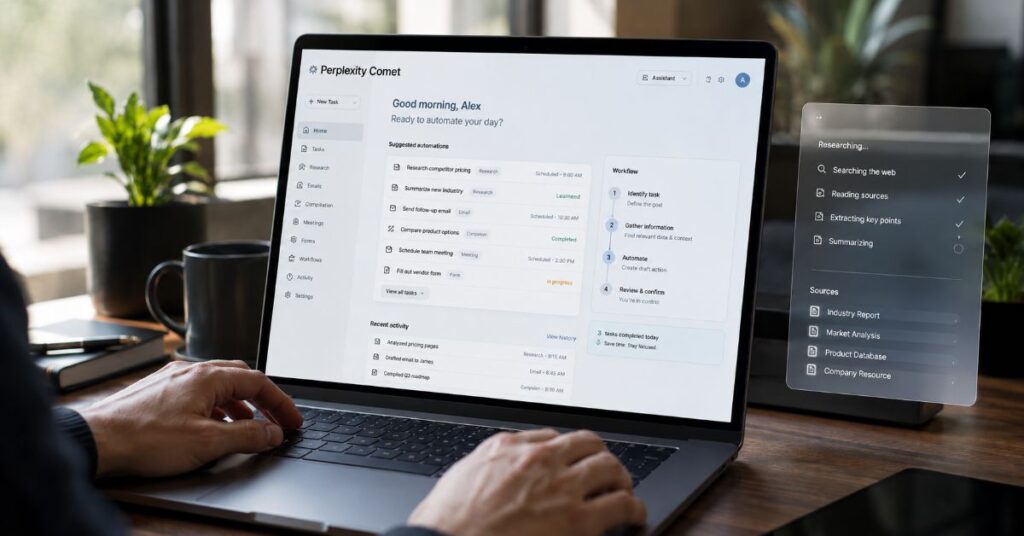
📋 Executive Summary
Boundary: Comet handles attended browser actions, while recurring cloud jobs now live in Perplexity Computer Scheduled Tasks.
Access: The Free plan lists no Comet Assistant queries; Enterprise Pro and Enterprise Max publish caps of 80 and 800 monthly queries.
Pricing: Consumer Pro receives no recurring Computer credit allocation, and its one-time 4,000-credit bonus expires after 30 days.
Control: Gmail and Google Calendar access can read, compose, send, and edit, so automation should begin with narrow permissions and review gates.
Security: Page context used by Comet may be retained for up to 30 days, while prompt injection remains a structural risk for every agentic browser.
Decision: Use Comet for variable, supervised web work; use APIs or scripted automation when exact repeatability and machine-readable outputs matter most.
I would use Comet to automate online work only when the task benefits from seeing and acting on live webpages, because the same browser context that makes the agent useful also makes mistakes and malicious page instructions consequential. That is the central answer to how to automate online tasks with Perplexity Comet in 2026: give the browser a bounded outcome, the minimum context it needs, and a mandatory review point before it sends, submits, buys, books, deletes, or publishes anything.
The sharpest finding is not a feature claim. It is a product boundary. Comet Assistant can read tabs, compare pages, draft messages, fill forms, and carry out supervised multi-step actions in the browser. Recurring jobs that continue while the laptop is closed now sit in Perplexity Computer Scheduled Tasks, where every run can consume credits. Treating those two systems as one unlimited automation layer leads to poor prompts, unexpected spend, and weak accountability.
This guide maps the complete workflow from installation and permissions to prompt design, email and calendar operations, research, shopping, forms, scheduled monitoring, recovery, and enterprise rollout. It also separates documented facts from unresolved details. Perplexity publishes explicit enterprise browser-agent caps, yet consumer limits are described only as average or advanced monthly use. Its help centre also publishes conflicting mobile availability pages. Those gaps matter when a team is deciding whether Comet can support a dependable operating process rather than an impressive demonstration.
The practical standard throughout is simple: delegate discovery and routine interaction, retain human control over irreversible consequences, and move deterministic work into APIs or scripts when a browser agent cannot guarantee the same result twice.
What Comet Actually Automates
Comet is a Chromium-based browser with an assistant in the browsing layer, not merely a chatbot displayed beside a webpage. Perplexity documents that it can click, type, submit forms, summarise open pages, compare products, draft and send email, manage subscriptions, organise information, and execute multi-step flows under supervision. That distinction matters because the agent can observe page state and use the authenticated sessions already open in the browser.
The product is easiest to understand as three capabilities. Comet Assistant is the reading and reasoning layer, useful for summarising an article, comparing tabs, or answering a question about the current page. Comet Agent is the execution layer, able to navigate, fill fields, and perform a workflow. Perplexity Computer is the longer-horizon orchestration layer, able to combine web access, files, connectors, subagents, and scheduled execution. Our earlier guide to Comet workflows provides broader context on that architecture.
This separation prevents an important category error. A request such as ‘summarise these five suppliers and rank the contractual risks’ is primarily analysis. ‘Open each supplier form, insert our company details, and stop before submission’ is attended browser automation. ‘Check every weekday for a changed price and notify finance’ is a scheduled monitoring task that belongs in Computer. The interface may feel continuous, but the reliability, cost, and oversight model changes across each layer.
Aravind Srinivas offered a useful counterweight to claims that one AI layer should replace every search behaviour. In March 2026, he wrote that Google ‘does a much better job here than anyone else in the world, including Perplexity’ for quick navigational mobile searches. The admission supports a practical rule: use Comet when synthesis or action adds value, not when a direct bookmark or ordinary search is faster.
| Task Type | Best Perplexity Layer | Human Review | Typical Output |
| Summarise or compare open tabs | Comet Assistant | Check sources and omissions | Brief, comparison, extracted facts |
| Fill a form or navigate a site | Comet Agent | Review before final submission | Completed draft state in browser |
| Run recurring monitoring | Computer Scheduled Tasks | Review notifications and exceptions | Alert, report, saved session |
| Produce deterministic system output | API or scripted workflow | Validate schema and logs | JSON, database record, repeatable action |
Set Up the Browser and Permission Boundary
A reliable automation begins before the first prompt. Perplexity’s current desktop requirements list Windows 10 or 11 on x64 or ARM64, and macOS 13 or later on Intel or Apple Silicon. The minimum is 4 GB RAM, with 8 GB recommended, at least 2 GB free disk space, a 1280 by 800 display, and an internet connection. Linux and ChromeOS are not officially supported in the desktop documentation. Separate help pages advertise Android features while another mobile page still says no public mobile app, so mobile availability should be verified in the relevant app store and region rather than assumed.
After installation, import only what the workflow needs. Comet supports most Chrome extensions, but Perplexity says extensions must be installed fresh and their settings or data do not transfer automatically. This is operationally useful because it forces a clean review of extensions that can read page content, inject scripts, or observe browsing activity. The Comet versus Chrome analysis is helpful when deciding whether to replace a daily browser or run Comet as a specialised work environment.
The permission boundary should be designed as a ladder. Start with page summarisation and tab comparison. Add browser control only after confirming the agent stops at the requested checkpoint. Add connectors last, and grant them from a dedicated work account where possible. Perplexity says Comet does not upload browsing history, all open tabs, cookies, passwords, local files, or typed website input by default. It sends the minimum context required when a request needs page content, selected text, another tab, email, or calendar information.
The first time an advanced automation launches, the user can allow it once, always allow it, or deny it. Always allow is convenient but should be reserved for low-consequence tasks on trusted domains. For finance, HR, customer data, or publishing, one-time permission preserves a deliberate interruption before the browser gains execution authority.
How to Automate Online Tasks With Perplexity Comet
The safest implementation pattern is outcome, scope, evidence, action, stop. State the result you want, define which tabs or websites are permitted, specify the evidence the agent must collect, describe the actions it may take, and name the exact point where it must pause for review. This converts a conversational request into an operating procedure without pretending the web is deterministic.
A strong example is: ‘Using only the three supplier tabs open in this window, extract delivery lead time, warranty, return policy, and total price into a table. Flag missing information. Do not sign in, add items to a basket, or contact a seller. Stop after the comparison.’ The prompt constrains sources, fields, prohibited actions, and stopping conditions. It also creates an output that a human can audit before any commercial step.
For an action workflow, add a preview phase: ‘Open the council permit form, fill the company details from the attached profile, and list every field you could not verify. Do not submit. Take no action on payment or declarations.’ This keeps the browser agent useful while preserving legal and financial accountability. Our related workflow automation guide explains when to move from an interactive assistant to API-led orchestration.
Jeremy Yang, a Harvard Business School assistant professor and Perplexity researcher, and his co-authors reported that ‘Computer performs 26 minutes of autonomous work per user session, versus 33 seconds for Search.’ That result measures a different Perplexity layer, but it illustrates the economic reason to structure delegation carefully: agent systems do more machine work, which increases both potential time savings and the verification burden.
How to Automate Online Tasks With Perplexity Comet Safely
Use a five-line task contract before every consequential run: permitted sites, permitted data, permitted actions, forbidden actions, and review checkpoint. Keep the first run narrow, observe where the agent hesitates or overreaches, then revise the contract rather than merely adding more prose.
For repetitive work, save the prompt as a reusable template with variables such as date range, supplier list, destination folder, and notification condition. A reusable prompt is not a guarantee of identical execution, but it reduces ambiguity and makes deviations easier to detect.
Build Reliable Prompts as Operating Procedures
Browser agents fail less often when prompts resemble a checklist rather than a wish. Natural language remains the control interface, but the instruction should define observable states. ‘Find good options’ is subjective. ‘Find five options under £500, available for delivery to London within seven days, with at least a two-year warranty, then show the evidence beside each result’ gives the agent measurable filters and an audit trail.
Use explicit source rules. Tell Comet whether it may search the web, use only current tabs, open linked pages, access history, or consult connected email and files. Then define freshness. For prices, stock, travel, policy, and software limits, require the agent to capture the page date or current timestamp and note any conflict between sources. This is especially important because a browser can encounter cached pages, personalised offers, geographic variants, and content loaded after scripts run.
Add exception handling before action. A robust prompt says what to do when a field is missing, a login expires, a CAPTCHA appears, a website changes layout, or two sources disagree. The correct default is usually to stop, report the obstruction, and preserve the partially completed state. Telling an agent to ‘try whatever works’ is an invitation to widen scope without a documented decision.
The following prompt pattern works across research, forms, email, and procurement. It also creates a standard that managers can review before staff delegate tasks.
| Prompt Element | Instruction Example | Why It Matters |
| Outcome | Produce a five-row supplier comparison | Defines completion |
| Scope | Use only named tabs and official product pages | Limits untrusted context |
| Evidence | Quote the field label and show the source page | Supports verification |
| Action | Fill the form but do not submit | Separates preparation from consequence |
| Exceptions | Stop on CAPTCHA, login failure, or missing legal field | Prevents improvisation |
| Stop Condition | Pause at the final review screen | Creates human approval |
Email and Calendar Workflows
Email and calendar automation delivers immediate value because the information is fragmented, repetitive, and time-sensitive. Perplexity’s Gmail and Google Calendar connector can query messages, inspect calendar events, create or update events, and, when used with Comet, send email or create recurring focus time. The permissions are broad: the connector can read, compose, and send mail, view contacts, access availability, and view or edit events. That capability should be treated as delegated account authority, not a convenience toggle.
Begin with read-only style tasks even when the connector technically supports writing. Ask Comet to summarise yesterday’s messages, identify requests that require a reply, and draft responses in a table containing sender, request, deadline, risk, and proposed response. Review the classification before allowing any draft to enter an email composer. Next, permit drafting but forbid sending. Only after the workflow proves stable should low-risk messages be eligible for direct sending, and even then the prompt should define approved recipients, topics, and maximum consequences.
Calendar workflows need similar controls. A useful prompt can find double bookings, calculate travel time, suggest alternatives, and prepare a rescheduling note. It should not cancel a client meeting, accept a contract-related invitation, or expose private attendees without confirmation. Perplexity currently states that the Gmail and Calendar connector can query only one primary calendar, not multiple or secondary calendars. Teams that depend on shared calendars must account for that limitation.
Connector data can also appear in shared sessions, where anyone with session access may see the response. Keep personal inbox analysis out of shared threads. For organisations, admins can disable connectors centrally. This governance layer matters more than clever prompting because it can prevent a misconfigured user from granting broad access in the first place.
Research, Comparison, Shopping, and Forms
Comet is strongest when a task crosses several webpages but still benefits from human judgement. Research and comparison fit that pattern. The agent can open sources, summarise tabs, extract structured attributes, and identify disagreements while the user remains in the browser. For analysts, the best workflow is not ‘research this topic’. It is a staged brief: collect candidate sources, rank them by authority and date, extract specified fields, flag contradictions, and stop before writing the final recommendation.
Shopping and travel add dynamic data. Prices can change between search and checkout, delivery terms depend on postcode, and availability may be personalised. Ask Comet to capture the retrieval time, exclude sponsored results if that matters, and present the final total rather than the headline price. For baskets, reservations, and bookings, stop before the last irreversible click. Perplexity’s own examples include adding ingredients to a basket for review, which is a sensible boundary.
Forms are more difficult than they appear. A browser agent may map the wrong company field, infer an answer from nearby text, or miss a declaration hidden below a collapsed section. Use a source-of-truth file with exact company details and require the agent to label every value as copied, calculated, or unresolved. Never allow it to invent legal, tax, medical, compliance, or identity information. The Perplexity Computer field review shows how longer-horizon agents expand beyond simple browser clicking, but that added autonomy should not remove the review checkpoint.
For users comparing agentic browsers, our Atlas and Comet comparison highlights an important trade-off. Comet keeps cited research close to the browser experience, while alternative agents may offer different automation depth or platform integration. The right choice depends on whether the primary risk is missing evidence, failing execution, or exposing a logged-in environment.
Scheduled Automation: Where Comet Ends and Computer Begins
Recurring automation is now a Computer feature, even when the job eventually drives a browser. Perplexity’s Scheduled Tasks run in the cloud, so the laptop does not need to remain open. A user describes the task and cadence in natural language, Computer proposes a schedule, and the user confirms it. Supported cadences include hourly, daily, weekdays, weekly, monthly, and custom recurring schedules. Sub-hourly schedules are not supported.
This is the most important product distinction in the article. Comet is the attended browser where a user can watch and intervene. Computer Scheduled Tasks create a fresh agent for most background runs, often without previous conversation context. That is appropriate for monitoring prices, mentions, inboxes, news, and recurring reports. Tasks that need to generate files, drive a logged-in browser, publish a site, or use richer conversation context may run in an attended mode instead.
Design scheduled prompts for stateless execution. Include every critical rule inside the task itself: data sources, date range, alert threshold, output format, recipient, and what counts as no change. A prompt such as ‘check competitors and tell me what changed’ is fragile. A better task names the competitors, official pages, fields to compare, materiality threshold, and condition for silence. Perplexity states that tasks can stay quiet when nothing noteworthy happens, which reduces notification fatigue.
Connectors can extend scheduled jobs across Gmail, Google Calendar, Slack, Notion, GitHub, Salesforce, Drive, and other services. Each connection creates another failure point and another authority boundary. When a token expires, Computer may pause or stop after repeated failures to avoid wasting credits. Build a monthly connector review into the process, and require a human to reauthorise rather than embedding broad credentials in a workaround.
Pricing, Query Caps, and Credit Economics
Comet automation is not an unlimited feature bundled identically across every plan. Perplexity’s plan matrix, updated on 22 July 2026, lists no Browser Agent queries for Free. Pro and Education Pro receive monthly limits described only as average use, while Max is described as advanced use. Enterprise Pro lists 80 Comet Assistant queries per month and Enterprise Max lists 800. The absence of precise consumer caps means a team cannot model high-volume usage from public documentation alone.
Published prices are clearer. Pro costs $20 per month or $200 per year. Education Pro is $10 per month after verification. Max costs $200 per month or $2,000 per year. Enterprise Pro starts at $40 per seat monthly or $400 yearly. Perplexity’s connector documentation lists Enterprise Max at $325 per seat monthly or $3,250 yearly. Regional taxes, promotions, procurement terms, and account-specific limits may differ.
The hidden trap appears when users move from Comet to Computer. Perplexity says 100 Computer credits equal $1. Light tasks typically use 100 to 350 credits, complex tasks 350 to 950, heavy tasks 875 to 2,275, and mega tasks 2,400 to 9,800. Consumer Pro receives no recurring monthly allocation, only a one-time 4,000-credit bonus that expires after 30 days. Max starts with 10,000 monthly credits. Unused monthly credits do not roll over.
That structure changes the automation decision. A weekly monitoring job may be cheap, but a large recurring research task can consume several dollars each run. Estimate cost from a pilot, record the actual usage dropdown, set spending limits, and reserve Computer for work whose saved labour exceeds the variable cost.
| Plan | Published Price | Comet Assistant Limit | Computer Credits |
| Free | $0 | No browser-agent queries | No premium allocation stated |
| Pro | $20 monthly or $200 yearly | Monthly average-use limit, exact cap unpublished | No monthly allocation; 4,000 one-time bonus |
| Education Pro | $10 monthly with verification | Monthly average-use limit, exact cap unpublished | Plan-specific details should be checked in account |
| Max | $200 monthly or $2,000 yearly | Monthly advanced-use limit, exact cap unpublished | 10,000 monthly; 35,000 one-time bonus |
| Enterprise Pro | From $40 monthly or $400 yearly per seat | 80 monthly | 500 monthly; 8,000 one-time bonus |
| Enterprise Max | $325 monthly or $3,250 yearly per seat | 800 monthly | 15,000 monthly; 45,000 one-time bonus |
Security, Privacy, and Prompt Injection
Agentic browsers collapse the boundary between reading and acting. A malicious page does not need to exploit browser code if it can persuade the model that hidden text is an instruction. Ninghui Li, Purdue’s Samuel D. Conte Professor of Computer Science and a 2026 Perplexity security paper co-author, wrote that ‘agent architectures change core assumptions around code-data separation, authority boundaries, and execution predictability.’ That is the correct security frame for Comet automation.
Perplexity’s privacy documentation says browsing history, the full tab list, cookies, passwords, local files, and typed website input stay on the device by default unless a request explicitly needs context. When page content, history items, or tab context are used, that material may be stored securely for up to 30 days to support Library and query history, then deleted automatically. Users can disable Comet Assistant or block it on specific sites. Enterprise accounts add no-training commitments, policy controls, DNS enforcement, and audit options.
Prompt injection remains the unresolved structural risk. Corban Villa, a UC Berkeley security researcher and lead author of the July 2026 Prismata paper, wrote that ‘agents resurface this risk by interpreting natural language as instructions.’ The practical defence is layered: restrict domains, minimise connector access, use one-time permissions, separate research from action, block sensitive sites, and require confirmation for consequential operations.
Extension hygiene also matters. Our browser permission risk guide explains why a helpful extension can become another observer or command surface. Install only essential extensions, review their site access, and avoid mixing personal password-manager sessions with experimental automation. For enterprise deployment, Perplexity supports more than 500 Chromium policies, agent restrictions, silent installation, central management, and audit logs for qualifying organisations.
| Risk | How It Appears | Primary Control | Residual Limitation |
| Indirect prompt injection | Hidden page text redirects the agent | Restrict sites and require action approval | Model may still misclassify content |
| Excess connector authority | Agent can read or write across accounts | Least privilege and admin disable controls | OAuth scopes may remain broad |
| Sensitive context retention | Page or tab context stored for history | Temporary threads and deletion controls | Up to 30-day retention may be unsuitable |
| Extension interference | Extension reads or modifies pages | Fresh install and allowlist | Compatibility does not equal safety |
| Wrong irreversible action | Agent sends, submits, buys, or deletes | Stop before final action | Human review can still miss errors |
Performance Bottlenecks and Failure Recovery
Browser automation is constrained by the web interface, not only by model intelligence. Pages load asynchronously, buttons move, consent banners cover fields, logins expire, CAPTCHAs interrupt flows, and websites vary by location or account state. Comet may also lose context across too many tabs or confuse similarly named pages. The most reliable response is not a longer prompt. It is a smaller task with a visible checkpoint.
Break workflows into units that can be verified in under two minutes. First collect or open sources. Then extract data. Then prepare the action. Finally review and execute. If a run fails, restart from the last verified state rather than asking the agent to reconstruct the entire journey from memory. Keep a short run log containing prompt version, sites used, start time, result, error, and human correction. That record reveals whether the weakness is prompt ambiguity, page instability, permissions, or model execution.
Common technical failures include launch problems, blank Chromium windows, graphics issues, extension conflicts, VPN or proxy interference, and stale profile data. The Comet troubleshooting checklist covers launch, rendering, and network failures. Avoid deleting a browser profile as a first response because it can remove sessions, bookmarks, and evidence needed for diagnosis.
Performance claims also need context. Yang and co-authors found a 55 per cent lower per-query dissatisfaction rate for Computer than Search and an 87 per cent reduction in completion time on matched tasks. Those are production-data findings for Computer, not a universal guarantee for every Comet browser task. High autonomy can reduce manual execution while increasing fixed costs for delegation, verification, and recovery. Measure the full cycle, including the time spent checking output and repairing exceptions.
Team Rollout, Governance, and Auditability
A company should deploy Comet as a controlled work environment, not as an unrestricted replacement for every browser. Start with a small cohort and three task classes: read-only research, draft-only communication, and supervised form completion. Exclude payments, payroll, employee records, regulated data, production admin consoles, and destructive account actions during the pilot. Success criteria should include accuracy, saved time, correction rate, security exceptions, and cost per completed workflow.
Perplexity Enterprise supports MDM deployment on macOS and Windows, more than 500 Chromium policies, URL and extension allowlists, managed bookmarks, privacy controls, agent action restrictions, silent or offline installation, and central management. Organisations with 50 or more Enterprise Pro seats, or at least one Enterprise Max seat, can enable audit logs. Telemetry can help identify adoption and performance, although logging does not remove the need for process-level records of approvals and corrections.
Build a responsibility matrix. The user owns prompt scope and final review. The team owner approves task templates. IT controls installation, extensions, and allowed domains. Security defines sensitive systems and response procedures. Legal or compliance approves data categories and retention. Finance monitors plan and credit spend. This makes automation governance an ordinary operating discipline rather than an abstract AI policy.
Training should explain what an AI agent actually does, including the difference between reasoning, tool use, and authority. Users need to recognise when a page is trying to influence the agent, when connector data may be exposed in a shared session, and when the browser should stop. The goal is not maximum autonomous completion. It is dependable completion with a traceable human decision at the point of consequence.
When Comet Is the Wrong Tool
Comet is not the best choice for every automation. Use an API or scripted browser framework when the same inputs must produce a stable machine-readable output, when thousands of records must be processed, when every action needs an immutable log, or when a website explicitly prohibits automated access. Deterministic systems are less flexible, but they are easier to test, version, monitor, and roll back.
Do not use Comet for high-frequency trading, unattended financial transfers, legal declarations, medical decisions, identity verification, credential management, or bulk changes in production systems. The combination of probabilistic reasoning and live webpage content creates too much uncertainty for those consequences. Even enterprise controls cannot turn a general-purpose browser agent into a formally verified transaction engine.
A traditional browser remains better for quick navigation, developer tools, specialised extensions, and workflows that depend on a stable keyboard-driven interface. Srinivas’s own 2026 comment about Google’s advantage in quick navigational search reinforces that point. The product’s value appears when a person would otherwise read, compare, copy, paste, and coordinate across several sites. It is less compelling when the correct destination is already known.
Finally, choose a human-led process when judgement is the work. Negotiating a supplier exception, interpreting a sensitive employee message, approving a compliance representation, or deciding which source is ethically appropriate cannot be reduced to efficient clicking. Comet can gather evidence and prepare options, but the accountable professional should make and record the decision. That balance keeps the tool useful without forcing a predetermined recommendation that Perplexity is always the best answer.
Our Content Testing Methodology
This guide uses a documentation-led evaluation rather than claiming a live Comet test that was not performed in our publishing environment. I cross-referenced Perplexity’s plan matrix updated 22 July 2026, Computer credit documentation updated 16 July, Scheduled Tasks guidance, Comet privacy documentation, enterprise deployment controls, Gmail and Calendar connector permissions, desktop operating requirements, and official Comet use cases. Where official pages conflict, particularly on mobile availability, the article reports the conflict rather than selecting a convenient answer.
Pricing was checked against official Perplexity pages. The matrix distinguishes Free, Pro, Education Pro, Max, Enterprise Pro, and Enterprise Max. Browser-agent query caps were recorded exactly where Perplexity publishes numbers and labelled unpublished where it uses qualitative terms. Computer cost ranges, monthly allocations, one-time bonuses, expiry, and non-rollover rules were separated from Comet Assistant limits because they apply to a different execution layer.
Performance evidence comes from the June 2026 paper by Jeremy Yang, Kate Zyskowski, Noah Yonack, and Jerry Ma, which analyses production data from Perplexity Search and Computer. Security framing was cross-checked against the March 2026 agent security paper led by Ninghui Li and the July 2026 Prismata paper by Corban Villa and colleagues. These sources inform risk analysis but do not prove that every Comet workflow will reproduce the same performance or security result.
This article was researched and drafted with AI assistance and reviewed by the Sami Ullah Khan editorial desk at Perplexity AI Magazine. All data, citations, pricing figures, and named quotes have been independently verified against primary sources before publication.
Conclusion
Comet can automate meaningful online work when the task is variable, browser-based, and supervised. Its strongest use cases involve research across several pages, structured comparisons, draft preparation, email and calendar assistance, form completion, and shopping or booking workflows that pause before commitment. The browser removes copy-and-paste labour because the assistant can reason over page context and act inside authenticated sessions.
The practical limits are equally important. Free users do not receive browser-agent queries in the current plan matrix. Consumer Comet caps are not publicly quantified. Recurring tasks belong to Computer and can create a separate credit bill. Connector permissions are broad, page context may be retained for up to 30 days, mobile documentation conflicts, and prompt injection remains an open security problem for the agentic-browser category.
The best operating model is therefore bounded delegation. Define the sites, data, actions, exceptions, and stopping point. Use Comet for supervised variability, Computer for scheduled long-horizon work, and APIs or scripts for deterministic scale. Keep a human at the final point of financial, legal, reputational, or data consequence. As models improve, the browser will likely complete longer tasks with fewer interventions, but the unresolved question is not whether it can click more accurately. It is how organisations will preserve accountable authority when reading and acting become the same automated operation.
Frequently Asked Questions
Can Perplexity Comet Automate Websites?
Yes. Perplexity documents that Comet can click, type, submit forms, compare pages, draft or send email, organise information, and execute multi-step browser workflows. Use explicit site limits and stop before irreversible actions such as payment, submission, deletion, or publication.
Is Comet Automation Available on the Free Plan?
The browser may be downloadable, but Perplexity’s plan matrix updated 22 July 2026 lists no Browser Agent, or Comet Assistant, queries for Free. Paid consumer plans have qualitative monthly limits, while Enterprise Pro and Enterprise Max publish 80 and 800 monthly queries.
Can Comet Send Emails and Create Calendar Events?
Yes, when the Gmail and Google Calendar connector is enabled. The connector can read, compose, and send email and view or edit calendar events. Perplexity currently says it can query only one primary calendar, not multiple or secondary calendars.
Can Comet Run Tasks While My Computer Is Off?
Recurring background work now runs through Perplexity Computer Scheduled Tasks, not the attended Comet browser alone. Computer runs in the cloud and supports hourly, daily, weekday, weekly, monthly, and custom recurring schedules, with no sub-hourly cadence.
How Much Does Comet Automation Cost?
Pro costs $20 monthly, Max $200 monthly, Enterprise Pro starts at $40 per seat monthly, and Enterprise Max is listed at $325 per seat monthly. Comet query limits vary by plan. Computer scheduled work uses separate credits, with 100 credits currently equal to $1.
Does Comet Store My Browsing Data?
Perplexity says browsing history, all tabs, cookies, passwords, local files, and typed website input remain local by default. Context explicitly used for page, history, or tab requests may be stored for up to 30 days to support Library and query history.
What Is the Biggest Risk of Comet Automation?
Indirect prompt injection is the defining risk. A malicious page can contain instructions that an agent may confuse with the user’s request. Reduce exposure through domain restrictions, minimal connector permissions, one-time approvals, separate research and action stages, and human confirmation.
When Should I Use an API Instead of Comet?
Use an API or scripted workflow when output must be deterministic, structured, high-volume, fully logged, and repeatable. Comet is better for supervised tasks that require navigating changing webpages, interpreting context, and adapting to irregular interfaces.
References
- Perplexity Support. (2026, July 22). Which Perplexity subscription plan is right for you?
- Perplexity Support. (2026, July 16). How credits work on Perplexity.
- Perplexity Support. (2026, July 16). Scheduled Tasks in Computer.
- Perplexity. (2026, March 4). Comet Assistant privacy and data use.
- Perplexity Support. (2026, July 16). Comet for Enterprise.
- Perplexity Support. (2026, July 16). Connecting Perplexity with Gmail and Google Calendar.
- Yang, J., Zyskowski, K., Yonack, N., & Ma, J. (2026). How AI agents reshape knowledge work: Autonomy, efficiency, and scope.
- Li, N., Zhang, K., Polley, K., & Ma, J. (2026). Security considerations for artificial intelligence agents.
- Villa, C., Ozdarendeli, A. E., Tan, S., & Popa, R. A. (2026). Prismata: Confining cross-site prompt injection in web agents.
