
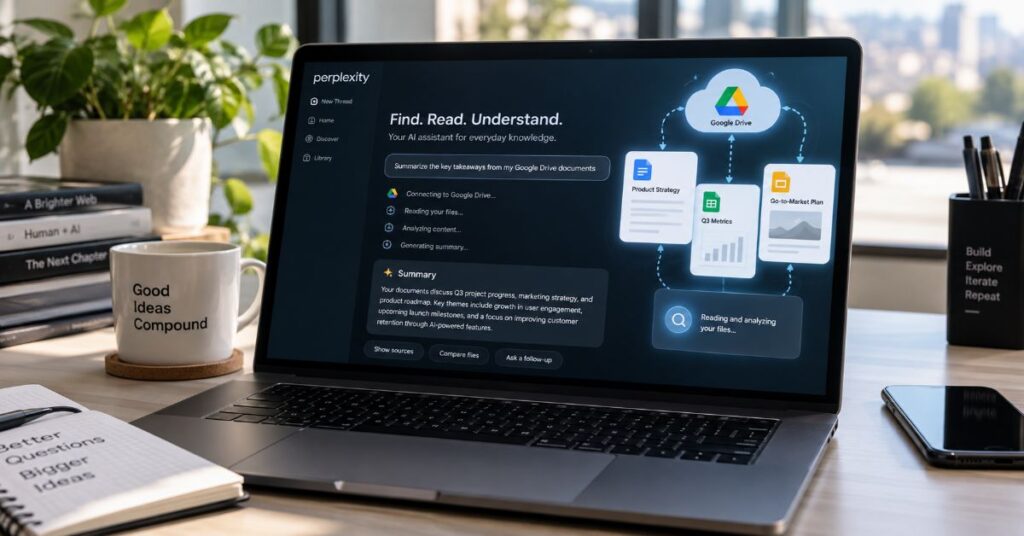
Yes – Perplexity can read files from Google Drive through its Google Drive Connector on Pro, Max, Enterprise Pro, and Enterprise Max plans. The important 2026 wrinkle is that “reading Drive” can mean two technically different things: a live, API-based search of your current Drive, or a deeper indexed copy of selected files for high-precision retrieval. Those modes have different plan requirements, freshness behaviour, storage implications, and practical limits.
As of 19 September 2026, Perplexity’s dedicated Google Drive documentation says Pro and Max users can search their entire Drive with Standard Search and sync Drive material into Projects, while Enterprise customers additionally receive High-Precision Search and My Files support. The same documentation says Standard Search queries Google Drive in real time through Google’s API rather than indexing the entire Drive. By contrast, high-precision Enterprise search downloads and parses selected documents, stores them in dedicated infrastructure, creates embeddings, and indexes metadata for deeper semantic retrieval.
That distinction matters more than the simple yes/no answer. If you need the latest figures from a frequently edited Google Sheet, direct Drive search is the safer freshness path. If a team needs deep, repeated analysis across a curated contract set or research library, high-precision indexing is the more capable Enterprise workflow. This guide separates those cases, maps current pricing and file formats, explains privacy and permissions, and highlights a September documentation inconsistency that can otherwise make current plan access unusually confusing.
Can Perplexity Read Files From Google Drive? The 2026 Answer
The shortest accurate answer is that Perplexity can search and analyse Google Drive content without forcing you to download every document first. Its current connector supports Google Docs, Sheets and Slides; Microsoft Office files; PDFs; CSV; Markdown; JSON; and TXT. Once the connector is enabled, a user can select Google Drive as a search source, mention @Google Drive in a new session, or attach Drive files to a query. Perplexity then grounds its answer in files the user is authorised to access.
That is different from the older, simpler workflow of downloading a document and uploading it manually. Manual attachment still works, and our file upload guide covers that route, but the connector adds retrieval across Drive itself. For Standard Search, the dedicated September 18 help page says Perplexity queries Google Drive through Google’s API at query time and only accesses the files returned for the search. It explicitly says the entire Drive is not indexed in this default mode.
The practical boundary is also worth stating clearly: the Drive connector is not a general-purpose remote desktop for editing Drive content. Perplexity requests permissions that include seeing and downloading Drive files and limited create/edit/delete scope for files used with the app, but the company says it uses those permissions to read and maintain connector metadata rather than modifying the content of your Drive files. The core experience is search, retrieval, summarisation, comparison and question-answering.
A useful mental model is therefore “searchable private source”, not “a copy of Google Drive living inside Perplexity”. That model is precise for Standard Search, and it helps explain why permission changes can be reflected immediately while content imported into a Project can still become stale until it is imported again.
Which Plans Can Access Google Drive?
Plan names are the first place older guides go wrong. Perplexity’s dedicated Google Drive Connector page, last modified 18 September 2026, says the connector is available to Perplexity Pro, Perplexity Max, Enterprise Pro and Enterprise Max. Pro and Max receive Standard Search across the whole Drive and can sync Drive files to Projects. Enterprise Pro and Enterprise Max add My Files support and High-Precision Search over selected files.
Pricing is equally important because Google Drive access no longer maps cleanly to an “Enterprise-only” rule. Perplexity lists Pro at $20 per month or $200 per year. Max is $200 per month or $2,000 per year. Enterprise Pro is $40 per seat per month or $400 per seat per year, while Enterprise Max is $325 per seat per month or $3,250 per seat per year. Those are vendor prices current in September 2026; taxes, promotions and volume discounts can change the effective bill. Our broader Perplexity pricing guide explains how the wider plan stack fits together.
The table below focuses only on Drive-relevant differences. It does not invent a consumer connector quota because Perplexity does not publish a fixed weekly number for Pro or Max file uploads. Instead, its File Uploads page says those plans use a rolling weekly allowance, with Max receiving a higher allowance than Pro, and that remaining capacity is not currently displayed in account settings.
| Plan | Current Price | Drive Capability | High-Precision Search | High-Precision Project Limit |
| Free | $0 | No documented Drive Connector entitlement | No | No |
| Pro | $20/month or $200/year | Standard Search across Drive; Project sync per 18 Sep Drive page | No | No |
| Max | $200/month or $2,000/year | Standard Search across Drive; Project sync per 18 Sep Drive page | No | No |
| Enterprise Pro | $40/seat/month or $400/year | Standard Search, Project sync, My Files | Yes | 500 files per high-precision Project |
| Enterprise Max | $325/seat/month or $3,250/year | Standard Search, Project sync, My Files | Yes | 5,000 files per high-precision Project |
How Standard Drive Search Works
Standard Search is the mode most individual users will encounter, and its architecture is simpler than the word “sync” suggests. The current help page says Perplexity sends a search to Google Drive through Google’s API in real time. The service does not index the entire Drive; it receives the files that Google’s API returns for the query, subject to the user’s existing Drive permissions. This makes Standard Search suitable when freshness matters or when a Drive contains too many files to curate manually.
The same page says Standard Search can search the whole Drive without a file-count limit. Enterprise security documentation adds an important privacy detail: in API-based search, Perplexity says no file copies are stored in its infrastructure except query results, which can be governed by retention settings. It also says only citation snippets included in answers are retained. The specific retention treatment depends on product and organisation settings, so “no full Drive index” should not be misread as “no processing or retention of any query result”.
In day-to-day use, the workflow is straightforward: enable Google Drive in Settings, authenticate with Google, select Drive as a source, and ask a question that contains enough discriminating detail for retrieval. The wider 2026 Perplexity usage guide is useful if you are combining Drive with web search, Pro Search or other source controls.
Standard Search is also the correct answer to a common freshness problem. If a spreadsheet changes hourly, querying Drive directly is preferable to relying on a previously imported Project copy. Perplexity’s September documentation explicitly says that content imported into a Project is copied at import time, whereas selecting Google Drive as the source in a session searches current Drive files without import. That one distinction explains many apparent “Perplexity used an old version” failures.
| Dimension | Standard Search | High-Precision Search |
| Primary path | Google Drive API at query time | Selected files/folders downloaded and indexed |
| Freshness | Queries current Drive state | Imported content stays as of import until refreshed |
| Storage | No entire-Drive index; only query-returned material handled | Raw files in dedicated S3 namespaces; embeddings in Vespa |
| Scale | Whole Drive search; no file-count limit documented | 500 files/Project Enterprise Pro; 5,000 Enterprise Max |
| Best fit | Fresh, broad or infrequently accessed content | Stable, curated corpora needing deep semantic retrieval |
| Plan | Pro, Max, Enterprise Pro, Enterprise Max | Enterprise Pro and Enterprise Max only |
What Enterprise High-Precision Search Adds
Enterprise customers can go further with High-Precision Search. In this mode, users select particular Drive files or folders for deeper indexing. Perplexity’s security documentation describes a pipeline in which files are downloaded through the Drive API, raw files are stored in organisation-specific AWS S3 namespaces, supported formats are parsed for text, content is converted into embeddings stored in Vespa, and file metadata such as name, path and permissions is indexed for retrieval.
This architecture trades a larger data footprint for stronger semantic search over a controlled corpus. Perplexity documents 500 high-precision files per Project for Enterprise Pro and 5,000 per Project for Enterprise Max, plus total user limits of 15,000 and 50,000 respectively for this high-precision surface. These limits should not be confused with ordinary session-upload allowances or the separate My Files capacities described elsewhere in Perplexity’s plan documentation.
The strongest use cases are repetitive, evidence-heavy tasks: policy libraries, diligence data rooms, contract sets, technical documentation, research repositories and shared operating manuals. A curated Project also changes collaboration. Files imported to a shared Project become searchable by Project members, although Perplexity says access to the underlying Drive file still requires the appropriate Google Drive permission. Our Perplexity Spaces guide explains the broader workspace concept for teams that want persistent context around files and threads.
High precision does not mean live synchronisation of document edits. Perplexity says imported copies stay as they were at import time and must be imported again to bring in content changes. That creates a subtle two-clock system: permission changes can be reflected immediately, while document text can remain stale until re-imported. For regulated or fast-changing material, teams should therefore define an explicit refresh process rather than assuming “connected” means continuously updated content.
Supported File Types and Parsing Limits
The connector’s supported-format list is narrower than Perplexity’s general local-upload capability, and this is one of the most useful details missing from many generic guides. The Google Drive Connector supports Google Docs, Sheets and Slides; DOCX, XLSX and PPTX; PDF; CSV; Markdown; JSON; and TXT. The dedicated Drive page says images, audio and video are not currently supported through this connector.
That limitation can be surprising because Perplexity’s general File Uploads page does accept images, audio and video. Local audio and video attachments can be transcribed into searchable text, while images can be attached for analysis. In other words, “Perplexity supports video” does not mean “Perplexity can read a video sitting in Google Drive through the Drive connector”. The ingestion surface determines the feature set.
Long documents bring a second limitation. Perplexity’s general upload documentation says short files can be analysed in full, but for long files the system extracts the parts it considers most important for the query. The Drive pages do not publish a universal token or page threshold for when this extraction behaviour begins. For research work, that makes question design important: narrow prompts that name the relevant period, section, entity or metric are less likely to depend on an arbitrary slice of a large document. This is also why our academic research trust test recommends verifying cited passages rather than treating any AI summary as an exhaustive reading.
The 2025 EMNLP Industry benchmark on deep search reinforces that caution. Choubey and colleagues evaluated systems over 39,190 enterprise artefacts and reported that even the best tested agentic RAG approach achieved an average score of 32.96, with retrieval identified as the main bottleneck. The lesson is not that connected-file search is useless; it is that retrieval quality remains a measurable failure point even when the source documents are available.
| File Type | Drive Connector | Notes |
| Google Docs / Sheets / Slides | Yes | Native connector formats |
| DOCX / XLSX / PPTX | Yes | Microsoft Office files supported |
| Yes | Text extraction supported | |
| CSV / Markdown / JSON / TXT | Yes | Structured and text formats supported |
| Images | No via Drive connector | Can be attached through other upload surfaces |
| Audio | No via Drive connector | Local/general uploads can be transcribed |
| Video | No via Drive connector | General uploads can transcribe audio, but video visuals are not indexed |
Step-by-Step: Connect, Search and Verify
The cleanest setup starts in Perplexity Settings rather than in Google Drive. Open Connectors, locate Google Drive, choose Enable and Add Connector, then authenticate with Google and approve the requested scopes. Once the connection is active, you have two principal ways to use it: choose Google Drive as a source for a new session, or add Drive files or folders to a Project.
For current information, start with source search. A prompt such as “Find the latest Q3 forecast in my Drive and compare revenue assumptions with the previous forecast” gives the retriever an object, a time constraint and a comparison target. If the answer cites a file, open the citation and confirm that the version and date are the ones you expected. If the result is too broad, add the likely folder, team name, document owner or exact phrase.
For a stable corpus, use a Project. Add files from cloud, select the relevant Drive files or folders, then keep subsequent questions inside that Project. Perplexity says subfolders are included when a folder is imported. Because Project imports are point-in-time copies, schedule a manual refresh after source documents change. If the workspace contains sensitive material, pair that refresh process with clear membership and Drive permission reviews.
A final operational detail is retention. Whether a file remains available after a session or in a persistent workspace depends on where it was attached or imported. Our guide to file access after sessions separates session uploads, persistent repositories and connector-backed files; do not assume a connector attachment follows the same lifecycle as a locally uploaded one-off file.
For consumer users, remember that Drive attachments can still consume upload allowance. Perplexity’s File Uploads page says files attached to a session from connected apps such as Google Drive count toward the same rolling weekly file allowance as local attachments.
Privacy, Permissions and Data Retention
Google Drive access introduces two separate permission systems: Google decides what the user can see in Drive, while Perplexity decides which connector and workspace features the account or organisation can use. The dedicated connector page says Perplexity respects Drive permissions and serves only content the user is authorised to access. If Drive access is revoked or a file is deleted, Perplexity says the file is immediately removed from its searchable surface.
Standard Search is designed to minimise copying. Perplexity’s Enterprise security page says the API-based path queries Drive at request time, does not store full file copies except material returned in query results, and applies real-time permission checks. High-Precision Search is deliberately different: selected files are downloaded, parsed and indexed in dedicated storage so the system can perform deeper semantic retrieval. Both modes are described as excluding synced files from model training for Enterprise customers.
For consumer Pro and Max, Perplexity’s connector page also states that connector data is not used to train models. Users should still distinguish that promise from broader account-level data controls and from third-party provider policies. The safest reading is surface-specific: verify the privacy statement for the exact plan and feature being used, then use organisation controls where available.
Those privacy promises are useful boundaries, not substitutes for governance. Administrators still need to map connector behaviour to their own retention schedules, legal-hold duties, data residency requirements and Google Workspace policies. In practice, that means documenting which retrieval mode is approved for which corpus, who can import material into Projects, and how quickly access revocation and content refresh are expected to propagate.
If your main concern is where answers get evidence from, our analysis of how Perplexity selects sources explains why connected files, web results and other source classes can produce different evidence pools even for the same question.
The Hidden Constraints: Freshness, Quotas and Documentation Drift
The most consequential 2026 limitation is not file size; it is staleness. Perplexity’s September 18 Drive page says Standard Search queries current Drive files through Google’s API, but content imported into a Project is copied at import time. The Enterprise security page likewise says indexed imports remain as they were when imported and must be imported again to pick up edits. A file can therefore remain searchable but contain yesterday’s numbers.
That behaviour creates an unusual combination: permissions can update immediately while content does not. If a user’s access is revoked, Perplexity says the file is removed from search. If the same authorised user edits the text, an indexed Project copy can still need refresh. Teams should label high-churn documents, keep live-source search enabled for them, and reserve high-precision indexing for relatively stable corpora or for workflows with a defined re-import cadence.
The second hidden constraint is rolling allowance. Perplexity no longer describes Pro and Max file attachments as unlimited. Its File Uploads page says Free, Pro and Max all have weekly allowances; Max is higher than Pro; attached images count; connected-app attachments count; and capacity returns gradually as uploads age out of the one-week window. The product does not currently show the remaining upload allowance in account settings. That makes “upgrade” prompts easy to misread as a removed feature when they may simply indicate the rolling allowance is exhausted.
The third constraint is documentation drift. A general Pro connector article modified September 3 says file connectors can only be used directly in sessions and that Project connectors are an Enterprise feature. Fifteen days later, the dedicated Google Drive page says Pro and Max can sync Drive files to Projects. Because the Drive-specific article is both newer and more specific, this guide uses the September 18 behaviour as current while flagging the inconsistency. Users who cannot see the capability should check account rollout, app version and support rather than assuming either page alone describes every account state.
For readers starting from an unsigned session, note that Drive connectors are authenticated features; our guide on using Perplexity without an account explains which capabilities require sign-in.
How Reliable Is Retrieval Across a Large Drive?
Connected-file answers are retrieval systems, not magical full-library reading. The system must first find the right document or passages, then pass enough relevant context to a model, then generate an answer that stays faithful to that evidence. Each stage can fail independently. A polished answer can therefore be wrong because retrieval found the wrong spreadsheet, because only part of a long document was extracted, or because the generator over-interpreted incomplete evidence.
The strongest independent evidence comes from enterprise retrieval benchmarks rather than vendor claims. Choubey et al.’s 2025 EMNLP Industry paper built a deep-search benchmark from 39,190 heterogeneous enterprise artefacts – including documents, meetings, Slack messages, GitHub content and URLs – and found retrieval to be the central bottleneck. That is directly relevant to Drive: adding a connector expands the searchable corpus, but larger corpora also increase the importance of filtering, naming, metadata and reranking.
For high-stakes work, use a verification loop. Ask the question; inspect the cited Drive file; confirm the file date, owner and relevant passage; then ask a second question that tests for conflicts or missing evidence. If Perplexity cannot find a known document, search by exact filename or a distinctive phrase before concluding the file is inaccessible. If a summary omits a critical clause, ask for that clause directly rather than assuming the document was read exhaustively.
Customer comments on Perplexity’s current 2026 Enterprise pages reflect the same verification-first theme. Juan Sanchez, Chief Information Officer at Inteleos, points to “verified citations provided in the answers” and the “balance between recall and precision.” Joe Green, Chief Innovation Officer at Gunderson Dettmer, describes the value as “rapid, cited context that we can validate quickly.” Ben Levick, Head of AI and Operations at Ramp, emphasises confidence in “zero training on data” and the controls protecting company information. These are customer testimonials rather than independent benchmarks, but together they clarify the enterprise design goal: fast retrieval that remains inspectable by a human.
“verified citations provided in the answers”
— Juan Sanchez, Chief Information Officer, Inteleos – Perplexity Enterprise customer page (2026)
“balance between recall and precision”
— Juan Sanchez, Chief Information Officer, Inteleos – Perplexity Enterprise customer page (2026)
“rapid, cited context that we can validate quickly.”
— Joe Green, Chief Innovation Officer, Gunderson Dettmer – Perplexity Enterprise customer page (2026)
“zero training on data”
— Ben Levick, Head of AI and Operations, Ramp – Perplexity Enterprise customer page (2026)
Troubleshooting Google Drive Connector Problems
When the connector does not work, separate authentication, authorisation, retrieval and quota problems. If Google OAuth fails or the connector immediately disconnects, retry after removing and re-authorising the connection. In managed Google Workspace environments, Perplexity says admins may need to allow the relevant OAuth scopes and ensure users can access Google Drive through the Drive SDK API. Enterprise administrators can also disable connectors organisation-wide, which produces a different failure from a user-level Google permission problem.
If the connector shows as connected but a known file does not appear, verify the user’s Reader-or-higher permission in Drive, search by exact title, and check whether the file type is supported. Images, audio and video stored in Drive are not currently supported by the Drive connector even though similar files can be attached locally. For a recently edited Project file, re-import it before diagnosing retrieval quality because the Project copy may be stale.
If attachments suddenly stop working and Perplexity displays an upgrade prompt, consider the rolling weekly upload allowance. The official File Uploads page says consumer file and image uploads are metered over a rolling week and that remaining capacity is not shown in settings. Waiting for older uploads to roll out of the window can restore capacity without changing plans.
Community reports in June-August 2026 also document cases where the Google OAuth window closed unexpectedly or Drive files failed to display. Those reports prove that connector bugs have occurred, but they do not establish a single universal cause. Treat them as diagnostic context, not as a substitute for official support status. The fastest troubleshooting path is to identify which layer failed, capture the error message and browser state, then test the same file through direct Drive source search versus Project import.
| Symptom | Likely Cause | Best Next Check |
| OAuth completes but connector fails | Google Workspace policy, browser/client bug, stale authorisation | Remove and reconnect; test another browser; ask Workspace admin to review OAuth settings |
| File cannot be found | Unsupported type, insufficient Drive permission, weak query | Confirm Reader-or-higher access; search exact filename or distinctive phrase |
| Project answer uses old content | Point-in-time import is stale | Re-import the file/folder or query Google Drive directly as a source |
| Upgrade prompt on attachment | Rolling weekly consumer upload allowance exhausted | Wait for older uploads to roll out or use a higher-limit plan if needed |
| Enterprise user cannot enable Drive | Organisation admin disabled connector | Ask the Perplexity organisation admin to enable it |
| Image/audio/video in Drive is ignored | Drive connector does not support those formats | Upload through a supported local attachment surface where appropriate |
Our Content Testing Methodology
We verified this guide against Perplexity documentation current to 19 September 2026, prioritising the dedicated Google Drive Connector page modified 18 September, the Google Drive security architecture page modified 18 September, the general File Uploads page modified 7 September, the subscription comparison modified 2 September, and the Enterprise pricing FAQ updated 22 July. Where Perplexity’s own pages conflict, we state the conflict and prefer the newer, feature-specific document rather than silently harmonising it.
We also reviewed current search results for the target query and adjacent queries, including Perplexity Help Center pages, Enterprise videos, connector tutorials, third-party automation pages and 2026 community bug reports. The dominant structures were short setup guides, feature lists, or enterprise-only security explanations. The largest gaps were the distinction between live API search and indexed high-precision search, the point-in-time nature of Project imports, rolling upload allowances, and the narrower file-type support of the Drive connector versus local uploads. Those gaps determined this article’s structure rather than the order used by any source.
For external validation of retrieval limits, we used the 2025 EMNLP Industry paper by Choubey and colleagues, which reports a 39,190-artifact enterprise benchmark and identifies retrieval as the principal bottleneck. Pricing and plan claims were checked against Perplexity primary sources; where the company does not publish a fixed consumer weekly attachment cap, we explicitly leave the number unconfirmed.
This article was researched and drafted with AI assistance and reviewed by the Sami Ullah Khan editorial desk at Perplexity AI Magazine. All data, citations, pricing figures, and named quotes have been independently verified against primary sources before publication.
Conclusion
Perplexity can now treat Google Drive as a first-class private search source, but the useful answer is more precise than a simple yes. Pro and Max users can use Standard Search to query current Drive content through Google’s API, while Enterprise tiers add deeper indexing and high-precision retrieval over selected files. The latter can produce stronger repeated analysis, but it also creates imported copies whose content must be refreshed when the source changes.
For most individuals, the deciding question is freshness versus depth. Live Drive source search is the better default for frequently edited documents. Curated Project imports are better for stable research sets that will be queried repeatedly. Enterprise teams should add explicit controls for refresh cadence, Project membership and retention, because permission revocation and content synchronisation do not operate on the same clock.
The open questions are mostly operational rather than conceptual. Perplexity does not publish exact Pro and Max weekly attachment allowances, and its September documentation still contains a Project-access inconsistency between the general connector page and the newer Google Drive page. Those details may continue to change as connectors mature, so the durable practice is to verify the live help page and product interface before relying on a fixed limit or workflow.
Frequently Asked Questions
Can Perplexity read files from Google Drive?
Yes. Perplexity can query Google Drive through its connector on Pro, Max, Enterprise Pro and Enterprise Max. Pro and Max receive Standard Search across Drive; Enterprise adds high-precision indexing and My Files capabilities. Perplexity’s dedicated Google Drive Help Center page is the best current confirmation.
Does Perplexity automatically stay synced with every Google Drive edit?
Not in every workflow. Standard Search queries current Drive files through Google’s API, but files imported into a Project are point-in-time copies. Perplexity says those imported files must be brought in again to reflect content edits.
Can Perplexity read Google Sheets and Google Docs?
Yes. The Google Drive Connector supports Google Docs, Sheets and Slides, plus common Office, PDF, CSV, Markdown, JSON and TXT files. The connector does not currently support Drive-hosted images, audio or video.
Do I need Perplexity Enterprise to connect Google Drive?
No. Perplexity’s Google Drive page says Pro and Max can use the connector and Standard Search. Enterprise Pro and Enterprise Max add high-precision search and additional repository features.
Does Perplexity index my entire Google Drive?
Not in Standard Search. Perplexity says the default mode queries Google Drive through Google’s API at query time and does not index the entire Drive. Enterprise high-precision search indexes only selected files or folders.
Are Google Drive files used to train Perplexity models?
Perplexity says connected-file data is not used to train models, and Enterprise documentation explicitly states that synced files are never used for model training. Organisations should still review the current privacy and retention controls that apply to their plan.
Why is Perplexity showing an upgrade prompt when I attach a Drive file?
Connected Drive attachments count toward the same rolling weekly file allowance as other session uploads. Perplexity does not currently display the remaining Pro or Max allowance, so an upgrade prompt can simply mean the weekly window is full.
Can I use the Perplexity API to search my Google Drive directly?
Perplexity documents Google Drive primarily as a product connector in the web/app and Computer experiences. Its API Platform is billed separately, and current public API documentation does not provide a simple Sonar API parameter that mirrors the private Google Drive source selector. Treat connector access and API access as separate product surfaces.
References
Perplexity Support. (2026, September 18). Connecting Perplexity with Google Drive.
Perplexity Support. (2026, September 18). Google Drive Connector: File Upload Security.
Perplexity Support. (2026, September 7). File Uploads.
Perplexity Support. (2026, September 2). Which Perplexity Subscription Plan Is Right for You?
Perplexity Support. (2026, July 22). Enterprise Pricing and Billing: Frequently Asked Questions.
Perplexity. (2026). Perplexity for Product.
Perplexity. (2026). Perplexity for IT.
Perplexity. (2026). Perplexity for Legal.
Choubey, P. K., Peng, X., Bhagavath, S., Huang, K.-H., Xiong, C., & Wu, C.-S. (2025). Benchmarking Deep Search over Heterogeneous Enterprise Data.
Published
Spotted an error? Read our corrections policy or email editorial@perplexityaimagazine.com.
