
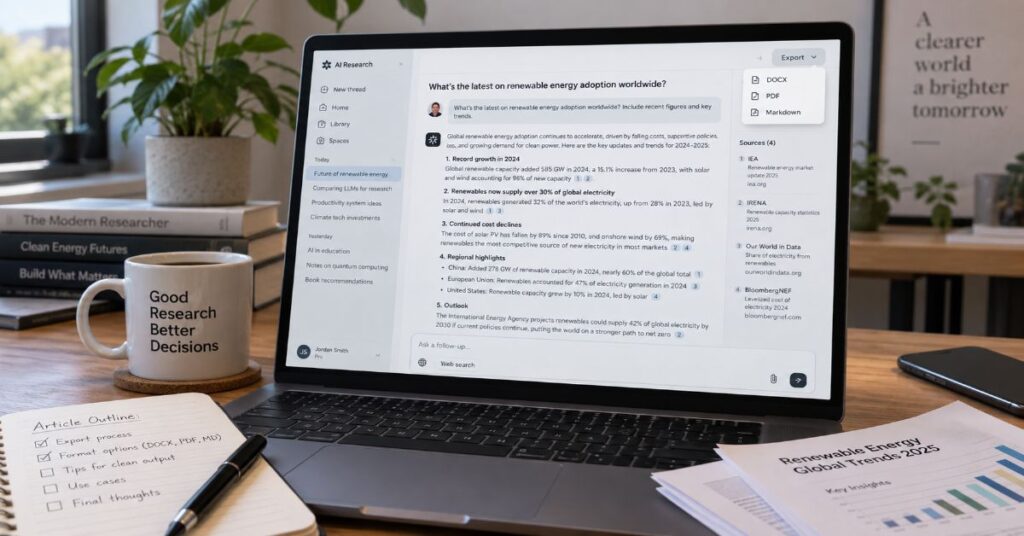
How to export Perplexity threads to a document is now straightforward: open a thread on the web, use the three-dot menu, and choose DOCX, PDF, or Markdown—but the real risk is exporting a polished file that has lost the citation trail that made the thread valuable. That distinction matters because search results in August and September 2026 still contain guides claiming there is no native single-thread export, while Perplexity’s own current enterprise tutorial explicitly documents PDF, Markdown and DOCX export. The native route is therefore the default starting point, not a workaround.
The harder question is which export method fits the job. A DOCX is best when the research needs editing, tracked changes, comments or hand-off to a client. PDF is better when visual stability matters more than revision. Markdown is the most portable choice for Obsidian, GitHub, knowledge bases and text-processing workflows. A public share link is useful for live access to the original thread, but it is not a durable document archive. And the account-level “Export my data” function is a different tool altogether: it is designed for portability and backup across account data rather than producing a clean publication-ready file from one thread.
This guide tests those routes against the practical details that usually go wrong: citation preservation, long-thread structure, tables, follow-up order, privacy, collaboration, batch archiving and the difference between exporting a conversation and asking Perplexity to generate a new document artifact. The goal is not merely to get text out of Perplexity. It is to preserve enough context that the exported file still works as research evidence after it leaves the interface.
What Perplexity Can Export Natively in 2026
Perplexity now exposes several distinct ways to move research out of the interface, and conflating them is the source of much of the outdated advice online. The current Perplexity Enterprise tutorial says a thread can be exported as PDF, Markdown or DOCX. It also describes thread sharing, copying, bookmarking, adding an answer to a workspace, and converting a thread into a public web page. Texas A&M University’s September 2026 support article independently documents the same three per-thread export choices and shows the path through the three-dot menu beside Share.
That makes the per-thread export the most direct answer for ordinary users. It preserves the conversation as a file rather than requiring copy-and-paste. The important caveat is that “export” is not one feature with one purpose. Perplexity also offers full-account data export through account settings, Deep Research report export, and newer Computer workflows that can generate files as artifacts. Those routes may all produce documents, but they solve different problems.
The platform’s evolution explains why older pages can now be misleading. Deep Research originally emphasised exporting the final research report to a PDF or document. By March 2026, Perplexity’s Computer changelog said Markdown-first outputs could be downloaded as PDF or DOCX on demand. Later 2026 product materials increasingly frame files as artifacts that can be created, revised and passed into ongoing Projects. The practical lesson is to start with the object you actually have: a thread should normally use thread export; a generated artifact should use its download controls; an account archive should use data export.
The Fastest Way to Export One Thread as DOCX
For a single conversation that needs to become an editable Word file, the native DOCX path is the cleanest workflow. On the web interface, open the exact thread you want to preserve. In the upper-right controls, open the three-dot menu beside the sharing controls, choose Export, and select DOCX. The browser downloads a Word document that can then be renamed, moved into a document management system, or opened in Microsoft Word or a compatible editor.
Before exporting, do one cleanup pass inside the thread. Collapse any side investigation that does not belong in the final research record by creating a fresh summarising response at the end of the thread. Ask Perplexity to list the major claims, disputed points and primary sources used. That creates a human-readable checkpoint even if the exported file renders the conversation differently from the live interface. It also makes it easier to audit the file later.
For users who are still learning the interface, our complete Perplexity AI guide explains how threads, follow-ups and the Library fit together; that context helps you locate the correct conversation before exporting it.
Step-by-Step Export Workflow
- Open the exact Perplexity thread on the web and confirm the title, date and final answer you intend to preserve.
- Use the thread’s three-dot menu in the upper-right area beside the sharing controls.
- Choose the export option, then select DOCX for an editable Word document.
- Open the downloaded file and test several citations, especially any source that supports a decision-critical claim.
- Rename the file with a stable convention such as YYYY-MM-DD_topic_thread-export.docx and store the original separately from any edited version.
Choosing DOCX, PDF, Markdown or a Share Link
The best format depends on what happens after export. A Word document is not automatically the most faithful archive, and a PDF is not automatically the most useful research file. The trade-off is between editability, rendering stability, machine readability and access to the live source context.
| Method | Best For | Strengths | Main Constraint |
| DOCX | Editing, review, client hand-off | Editable, comments, tracked changes, templates | Layout can change across Word-compatible apps |
| Final reading copy, compliance snapshot | Stable appearance, easy sharing | Poor for substantive editing | |
| Markdown | Knowledge bases, Git, text pipelines | Portable plain text, easy to transform | Visual layout and complex tables may simplify |
| Share Link | Live collaboration and source browsing | Keeps readers close to original thread | Depends on continued access and sharing settings |
| Account Export | Backup, migration, portability | Captures broad account data | Not a polished per-thread deliverable |
Which Format Should You Pick?
Use DOCX when another person will edit the research. Use PDF when you want a stable snapshot. Use Markdown when the exported content is moving into a knowledge system or automation pipeline. Keep a share link only as a convenience layer, not as the sole archive, because permissions and product behaviour can change over time.
Preserving Citations, Sources and Follow-Up Context
Perplexity’s defining value is not the prose alone; it is the claim-to-source relationship. Any export workflow should therefore be judged on whether a reader can still identify what evidence supports a statement. Native exports can carry citations and source references, but users should still open a sample of the links after export because citation rendering can differ by format and because a source page may later move, change or become inaccessible.
A reliable pre-export habit is to create an evidence ledger at the bottom of a long thread: ask for a numbered list of the most decision-relevant claims, the source title supporting each claim, publication date where available, and a one-sentence note on why the source is credible. This is not a substitute for the native citations. It is a second layer that survives if the document’s inline markers are reformatted during later editing.
If citations are already missing or inconsistent before export, fix the research record first. The Perplexity citation troubleshooting guide walks through retrieval and interface problems that can break the claim-to-source chain.
| Element to Preserve | Why It Matters | Verification Step |
| Inline citations | Connect individual claims to evidence | Open a sample of links after export |
| Source titles | Help readers recognise evidence when URLs change | Keep titles in an evidence ledger |
| Follow-up sequence | Shows how assumptions and corrections developed | Retain question-and-answer order in archive copy |
| Tables and code | Often contain the decision-ready output | Check wrapping, rows, formulas and monospaced text |
| Export date | Volatile web evidence can change | Add date to filename or document header |
How Long Threads Break When They Become Documents
A long Perplexity thread is structurally different from a conventional report. It can contain repeated questions, branching follow-ups, corrections, rewritten answers, tables and source lists. When that sequence is flattened into a document, the chronological record may be preserved while the argument becomes harder to scan. This is why a technically successful export can still be a poor deliverable.
The best remedy is to decide whether you need a transcript or a report. A transcript preserves the research journey. A report preserves the conclusion. If the thread is going to an auditor, legal team, researcher or collaborator who needs provenance, keep the chronological export. If it is going to an executive or client who needs the outcome, use the exported thread as source material and create a separate edited document with a clear structure, while retaining the original export as an appendix or evidence file.
The same principle appears in our Perplexity research workflow guide: sustained threads are useful because they accumulate context, but the deeper the conversation becomes, the more deliberate the final structure needs to be.
Full Account Export Is for Portability, Not Polished Documents
Perplexity’s account-level data export is a separate self-service process. Its GDPR Help Center guidance says users can sign in, visit account details and choose “Export my data”, after which a download link is sent by email. The current API forum discussion confirms why power users care about this route: it is the only first-party mechanism publicly described for obtaining a full copy of history, but it is manual and not exposed as a documented account-export API.
That distinction matters for backup strategy. If you want one client-ready thread, use per-thread export. If you want to preserve hundreds of conversations before closing an account, migrating research systems or building a personal archive, request the full account export. Do not treat an account ZIP as if it were a ready-made Word archive; it is data portability first and publishing second.
If a thread appears missing before you begin an archive project, resolve that first; our guide to recovering missing Perplexity history separates account, navigation and retention problems from true data loss.
Exporting Research for Word, Google Docs and Team Workflows
Once a DOCX leaves Perplexity, the next challenge is collaboration. Word is strongest when the exported research needs comments, tracked changes, corporate templates, numbered headings or formal review. Google Docs is stronger when many people need to edit simultaneously in a browser. Markdown is strongest when the destination is a knowledge base, code repository or publishing pipeline.
The emerging pattern across AI products is that chat is becoming the front end to document creation rather than the final destination. Satya Nadella described a typical Microsoft 365 Copilot trajectory in April 2026 as a session that starts in chat, produces insights and then generates an artifact that opens in Word, Excel or PowerPoint. His phrasing is revealing because it treats the conversation as a staging area and the file as the work product.
For teams that are bringing external evidence into the same workflow, the file upload guide for Perplexity covers how source documents become part of a thread before the final output is exported.
Plan Limits, Pricing and What Actually Affects Export
Perplexity’s consumer and enterprise plans change access to research, file creation and advanced workflows, but a user should not assume that paying for a higher tier automatically makes an exported thread more accurate. The export file contains the result of the research process that produced the thread. Model access, research depth, file limits and premium data sources can affect that upstream process; the file format itself does not improve the evidence.
As of September 2026, Perplexity’s Help Center lists Standard, Pro, Education Pro, Max, Enterprise Pro and Enterprise Max. Pro is $20 per month or $200 per year, Education Pro is $10 per month with verification, and Max is $200 per month or $2,000 per year. Enterprise documentation lists Enterprise Pro at $40 per month or $400 per year per seat and Enterprise Max at $325 per month or $3,250 per year per seat. Consumer usage limits are often described with flexible language such as average use or advanced use, so the defensible approach is to preserve Perplexity’s wording rather than invent a hidden cap.
Academic users should also distinguish the export format from research quality. Our Perplexity academic research test focuses on source discovery, verification and research-mode constraints rather than treating a polished file as proof of accuracy.
| Plan | Current Public Price | Research / File Context Relevant to Export |
| Standard (Free) | $0 | Basic search and limited file features; no need to upgrade solely to make a thread export editable |
| Pro | $20/month or $200/year | Advanced models, more research capacity, file analysis and Create files/apps access |
| Education Pro | $10/month with verification | Pro features with education positioning and higher study/research access |
| Max | $200/month or $2,000/year | Highest consumer access to advanced models, research and creation workflows |
| Enterprise Pro | $40/month or $400/year per seat | Extended limits, team controls, governed files/connectors and enterprise privacy |
| Enterprise Max | $325/month or $3,250/year per seat | Highest enterprise research/file limits plus broader security and administration |
Pricing checked against Perplexity Help Center and enterprise billing pages current in July–September 2026. Perplexity can use flexible usage language for consumer limits, so this table does not invent fixed caps where the company does not publish them.
When Native Export Is Not Enough
Native export should be the default, but there are legitimate cases where a second step is needed. A research team may need every citation converted into formal footnotes. A newsroom may need links normalized, metadata added and the document placed into a content-management template. A developer may need structured JSON rather than a Word file. A compliance team may need a tamper-evident PDF plus the underlying transcript. Those are transformation problems, not reasons to pretend native export does not exist.
Third-party browser extensions and unofficial command-line tools can add formats, batch workflows or knowledge-base integration. They also create a security boundary: an extension that can read a Perplexity thread may be able to read sensitive research visible in the browser. For confidential work, prefer first-party export, review browser-extension permissions, and avoid tools that depend on private endpoints unless you accept the maintenance and privacy risk. The August 2026 Perplexity forum request for a documented export API is useful evidence here: power users are explicitly asking for a supported alternative to reverse-engineered automation.
If your main concern is why a particular citation appeared in the first place, read our analysis of how Perplexity selects sources; source eligibility and retrieval happen upstream of document export.
Troubleshooting Export Failures and API Constraints
Most export problems fall into four buckets: interface state, rendering, source-link integrity and automation expectations. Start with interface state. If the export choices do not appear, confirm that you are viewing a saved thread rather than a transient result, refresh the web app, and test the same thread in a current desktop browser. Product controls move over time, so a missing button in an old screenshot does not prove the capability has been removed. Texas A&M’s September 2026 guide places the export choices in the three-dot menu near Share, while Perplexity’s own Enterprise tutorial describes the same formats without tying the workflow to a permanent pixel location.
Rendering problems are different. A DOCX can open successfully yet wrap tables poorly, convert code blocks into proportional text, or move long source lists across pages. PDF can preserve the visual shape better but may turn long URLs or source labels into awkward line breaks. Markdown avoids most layout problems but deliberately gives up Word-style page composition. If the exported file will be published or submitted, treat the native file as a source artifact and perform a production check in the destination application before approval.
Citation failures require a separate test because a visually correct document can still have a broken evidence trail. Open several links from different parts of the thread, including at least one early answer and one late follow-up. Check that the citation points to the intended source rather than merely to a domain home page. For volatile topics, record the publication date and title in your evidence ledger. This creates redundancy when a publisher changes URLs after the export was created.
Automation is the area where expectations most often outrun documented capability. As of September 2026, Perplexity publicly documents account-level “Export my data” through settings, but the August 2026 API forum request for programmatic history export was still a feature request rather than a published endpoint. The safe inference is that teams should not design a production archive around an undocumented private thread-export API. If automated retention is mandatory, use an approved records workflow around the files that users export, or evaluate newer Computer and Project automations separately from the consumer thread-history interface.
Perplexity’s newer Computer workflows also blur the word “export”. Computer can create Word, Excel and PowerPoint files as work products, and Perplexity’s March 2026 changelog says Markdown-first reports can be downloaded as PDF or DOCX. That is generation, not necessarily transcript export. If you ask Computer to turn a research session into a polished memo, compare the generated memo with the original thread before archiving it: synthesis can omit exploratory turns, caveats or sources that remain visible in the conversation.
Desktop and mobile workflows also deserve separate expectations. The strongest current evidence for native thread export describes the web or desktop-style interface, where the overflow menu has enough space to expose document actions. Mobile apps can prioritise sharing, copying and reading controls differently, and feature placement can change faster than help articles are updated. If a phone or tablet does not show DOCX, PDF or Markdown for a thread, do not conclude that the account lacks export. Open the same saved thread in the web app before resorting to copy-and-paste. This two-interface check prevents a temporary mobile UI difference from turning into an unnecessary third-party-export workflow.
For teams, standardise the export environment as part of the procedure. A simple policy such as “final research exports are created from the desktop web app, verified in Word, and stored with the original share link in metadata” eliminates ambiguity across devices. It also makes support easier: when a colleague reports a missing menu or malformed file, the team can reproduce the issue in the same browser and destination application instead of comparing screenshots from different app versions. That operational discipline is more valuable than memorising where a button sits in any one release.
A Better Archive Workflow for Researchers and Teams
Export becomes much more reliable when it is treated as a records workflow rather than a download button. The archive should preserve the file, the date, the research question, enough source context to reproduce the conclusion, and a stable naming convention. Teams should also decide whether the authoritative copy is the live Perplexity thread, the exported document, or a later edited report. Without that decision, users can end up with three near-identical versions and no way to tell which one was approved.
Aravind Srinivas told Forbes India in May 2026, “People are building their workflows around it.” That observation is more important than any particular export menu. Once AI research becomes part of a recurring workflow, the file has to fit the same governance rules as every other work product: versioning, permissions, retention, review and traceability.
Document-management research points in the same direction. Nitro’s 2026 survey of more than 1,300 professionals found 62% of employees still lose at least six hours a week to manual document work. Cormac Whelan, Nitro’s CEO, summarised the implementation gap this way: “Deploying AI may seem like the easy part in 2026.” The practical implication for Perplexity users is that exporting is only useful if the resulting file lands in a process that people can actually retrieve, review and reuse.
A Practical Archive Standard
| Archive Layer | Recommended Record | Purpose |
| Original | Native DOCX, PDF or Markdown export | Preserves the thread as captured |
| Evidence | Source ledger or verified citation list | Maintains claim-to-source traceability |
| Edited deliverable | Reviewed Word or Google document | Provides a readable final work product |
| Metadata | Export date, owner, topic, version | Makes retrieval and governance reliable |
| Live reference | Perplexity share link where appropriate | Lets collaborators revisit the interactive source context |
Where Export Fits in the New AI Document Stack
Perplexity is moving beyond search threads toward an environment where conversations, files, connectors, generated assets and Projects can all become part of ongoing work. That does not make thread export obsolete; it makes the boundary clearer. Export is the hand-off point where a conversational research object becomes a document that can live outside the product.
Neil Araujo, CEO of iManage, described the broader knowledge-management shift in 2026 as: “We are not storing and forgetting anymore. We are storing, contextualizing, and understanding.” That is a useful standard for evaluating any AI export. A good archive is not merely text at rest. It preserves enough context that another person can understand where the information came from, what changed, and how it should be used.
The same artifact-first shift is visible in presentation work. Our guide to building presentation outlines with Perplexity shows how research, structure and export become separate stages instead of one monolithic prompt.
For Perplexity specifically, this means maintaining two layers when stakes are high: the exported artifact for portability and the source-verification trail for trust. Perplexity can accelerate the research and package the result, but the user still decides which version becomes the official record.
What 2026 Industry Leaders Say About the Artifact Shift
The export question sits inside a broader change in knowledge work: AI conversations are increasingly expected to end in durable artifacts rather than remain trapped in chat history. Four 2026 comments from technology and document-workflow leaders point to the same operating model.
“People are building their workflows around it.” — Aravind Srinivas, Perplexity CEO, Forbes India, May 2026
“You ask some questions. You get some insights.” — Satya Nadella, Microsoft Chairman and CEO, FY2026 Q3 earnings call
“Deploying AI may seem like the easy part in 2026.” — Cormac Whelan, Nitro CEO, July 2026
“We are not storing and forgetting anymore. We are storing, contextualizing, and understanding.” — Neil Araujo, iManage CEO, ConnectLive 2026
None of these comments is specifically an instruction for Perplexity export. Together, however, they explain why export quality matters: AI-generated research becomes operational only when it can move into the systems where people edit, approve, archive and reuse work.
Our Content Testing Methodology
This guide was verified as a feature-and-workflow article rather than inferred from old screenshots. The primary Perplexity evidence set included the current Enterprise “An introduction to Queries” tutorial for thread export formats, the Deep Research product announcement for report export, the March 27, 2026 Computer changelog for Markdown-first drafting with PDF/DOCX download, the September 2026 subscription guide for plan features and limits, Enterprise billing guidance for seat pricing, and Perplexity’s GDPR Help Center workflow for full-account “Export my data”. Texas A&M University’s September 2026 knowledge-base article was used as an independent interface check because it documents the three-dot menu and the same PDF, Markdown and DOCX choices.
The live sitemap endpoints specified in the editorial brief did not return parseable XML through the available browsing layer. I therefore did not fabricate a sitemap inventory. The eight internal links were selected from live indexed Perplexity AI Magazine pages with direct semantic relevance to threads, research, files, citations, history and export-adjacent workflows. I also reviewed ten materially relevant search results for the exact or near-exact keyword before drafting. The main structural patterns were short click-path tutorials, extension-led export pages, account-backup explainers and Deep Research export guides. The most important gap was factual drift: at least one August 2026 exporter guide still stated that Perplexity had no native per-thread export, while Perplexity’s own current tutorial documents it. Other gaps included weak separation between per-thread export and account data portability, little discussion of citation integrity after export, and almost no treatment of document governance once the file leaves Perplexity. This article is organised around those gaps rather than mirroring a ranking page.
For external context, document-workflow statistics were checked against Nitro’s June 2026 survey of more than 1,300 professionals, and knowledge-management claims against iManage’s 2026 platform and benchmark material. Direct quotes were limited to short, attributable excerpts from 2026 sources. Pricing figures were checked against official Perplexity pages; where Perplexity describes consumer limits with flexible terms rather than a fixed number, the article preserves that uncertainty.
This article was researched and drafted with AI assistance and reviewed by the Sami Ullah Khan editorial desk at Perplexity AI Magazine. All data, citations, pricing figures, and named quotes have been independently verified against primary sources before publication.
Conclusion
Exporting a Perplexity thread is no longer a workaround-heavy task. In the current 2026 web experience, the native route is to open the thread and export it as DOCX, PDF or Markdown. The format choice should follow the downstream job: Word for editing and review, PDF for stable distribution, Markdown for portable knowledge workflows. A share link can complement those files, but it should not be the only record when the research matters.
The more consequential distinction is between a document and an archive. A document is readable. An archive is reproducible. For high-stakes research, preserve the native export, test citations, record the date, and keep an evidence ledger or verified source list alongside any polished rewrite. Use full-account data export for migration and backup rather than expecting it to behave like a finished report.
Perplexity’s product direction is moving toward generated artifacts, Projects and connected workspaces, so export may become only one stage in a larger AI workflow. The open question is not whether files will remain necessary, but which layer becomes authoritative: the live conversation, the generated artifact, or the reviewed document inside an organisation’s own system of record.
Frequently Asked Questions
How do I export Perplexity threads to a document?
Open the thread on the Perplexity web interface, use the three-dot menu near the sharing controls, choose Export, and select DOCX, PDF or Markdown. DOCX is the best choice when you need an editable Word file. After downloading, open several citations to confirm the evidence trail survived the export.
Can Perplexity export a thread directly to Word?
Yes. Perplexity’s current 2026 enterprise tutorial documents DOCX as a native thread export format alongside PDF and Markdown. The exact placement of controls can change, so use the thread’s current overflow or three-dot menu rather than relying on an old screenshot.
Does a Perplexity DOCX keep citations?
Native exports are designed to carry the thread’s content and references, but you should still test important links after export. If the document will support academic, legal, financial or executive decisions, keep a separate source ledger for the highest-stakes claims.
What is the difference between exporting a thread and Export my data?
Thread export creates a file from one conversation. “Export my data” is an account-level portability process that Perplexity says is requested from account details and delivered through an emailed download link. Use the first for a readable document and the second for broad backup or migration.
Should I export Perplexity as PDF or DOCX?
Choose DOCX when the file will be edited, commented on, templated or reviewed. Choose PDF when the goal is a visually stable snapshot. For technical knowledge bases or automation, Markdown is usually easier to process than either Word or PDF.
Can I export all Perplexity threads at once?
Perplexity provides full-account data export for portability, but a documented public API for automated thread-by-thread history export was still being requested in the Perplexity API forum in August 2026. For polished documents, individual thread export remains the cleaner first-party workflow.
Can I move an exported Perplexity thread into Google Docs?
Yes. Export the thread as DOCX and upload or open that file in Google Docs, or use Markdown if your workflow has a converter. Check headings, tables and citation links after conversion because formatting can change between document engines.
Is a Perplexity share link enough for long-term archiving?
Usually not. A share link is useful for live collaboration and source browsing, but access depends on product permissions and the continued availability of the thread. For durable records, keep a local DOCX, PDF or Markdown export as well.
References
Perplexity. (2026). An introduction to Queries. Perplexity Enterprise.
Perplexity. (2026). Introducing Perplexity Deep Research. Perplexity Hub.
Perplexity Support. (2026, September 2). Which Perplexity subscription plan is right for you?
Perplexity Support. (2026, July 22). Enterprise pricing and billing: Frequently asked questions.
Perplexity Support. (2026, July 28). GDPR compliance at Perplexity.
Texas A&M University. (2026, September). Perplexity – Exporting Work from Perplexity.
Nitro. (2026, June). The State of AI in Document Workflows.
Microsoft. (2026). Fiscal Year 2026 Third Quarter Earnings Conference Call.
Published
Spotted an error? Read our corrections policy or email editorial@perplexityaimagazine.com.
