
Executive Summary
AI agentic browsing explained in practical terms is a browser or cloud-browser workflow in which an AI system can interpret a goal, inspect live web context, choose next steps, and carry out navigation, clicks, typing, and other permitted actions on a user’s behalf. I find the sharpest 2026 reality is that the hard problem is no longer making an AI click a button; it is deciding how much of the browser’s authority the agent should inherit when research has already shown prompt-injection attack generators exceeding 80% success across multiple web agents.
That tension separates agentic browsing from ordinary AI search. A search assistant retrieves or synthesises information, then returns control to the user. A browser agent can keep operating after the first answer: open another tab, apply a filter, compare alternatives, fill a field, revisit a failed step, or pause for approval before a consequential action. The result can save significant time on repetitive web work, but it also introduces new reliability, security, pricing, and governance questions.
This guide maps the current 2026 landscape across Perplexity Comet, Gemini in Chrome with auto browse, Browse with Copilot in Microsoft Edge, and OpenAI’s cloud browser in ChatGPT Work. It explains the agent loop, published features and integrations, current subscription limits, real productivity use cases, the failure modes that product demos understate, and a safer implementation model for individuals and teams. Where vendors do not publish an exact quota or price in the source checked, I state that uncertainty rather than fill the gap with an estimate.
AI Agentic Browsing Explained: The Core Architecture
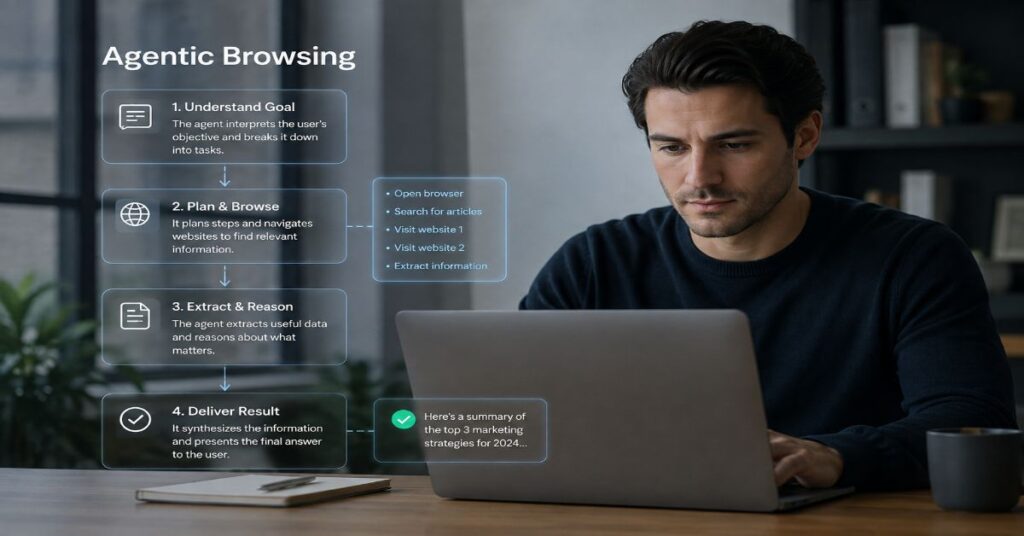
The simplest way to understand agentic browsing is to separate it from the AI features browsers have carried for several years. A normal AI sidebar can read a page and answer a question. An agentic browser can also decide what page to open next, interact with controls, enter data, compare intermediate results, and continue until it reaches a stopping condition. That changes the browser from a document viewer with an assistant attached into a tool-using environment where the model is part planner, part operator, and part verifier.
A useful architecture has six layers. First comes intent: the user states an outcome rather than a sequence of clicks. Second is context: the agent reads the current page, open tabs, selected files, connected apps, or other permitted data. Third is planning: it decomposes the outcome into steps. Fourth is execution: it invokes browser actions such as navigation, scrolling, selecting, typing, or opening a new tab. Fifth is observation: it checks what changed after each action. Sixth is governance: it asks for confirmation, stops at unsupported boundaries, or records what it did. The loop repeats until the task is complete or a policy boundary is reached.
This is why the label matters. An agentic browser is not merely search with a different interface. Its defining property is closed-loop action on changing web state. Perplexity’s own product direction makes that distinction especially visible, and our Comet agentic workflow overview shows how browsing, reasoning, and action are combined inside a browser session rather than treated as separate tools.
The architecture also explains why the category is difficult to benchmark. A model can be excellent at reasoning yet fail because a site changed its layout, an element is hidden behind a consent banner, a CAPTCHA appears, or the browser permission layer blocks a step. Conversely, a modest model can feel highly capable on a narrow, well-structured workflow because the browser exposes reliable state and the task is reversible. In 2026, agentic browsing quality is therefore a property of the whole system, not just the underlying language model.
AI Agentic Browsing Explained in One Workflow
Suppose the goal is to find three suitable meeting venues near King’s Cross for 12 people, compare cancellation terms, and prepare a shortlist. A conventional assistant can search and summarise. An agentic browser can open venue pages, inspect availability forms, collect terms, move between tabs, return to a failed branch, and stop before any reservation is submitted. That final stop is important: action capability does not imply permission to make every decision. The best systems treat approvals as part of the architecture rather than an interruption added later.
From Prompt to Click: The Agent Loop
In practice, the agent loop is less like one long command and more like a sequence of micro-decisions. A user says, for example, ‘Find a morning train from London to Manchester next Tuesday under £100 and put the two best options in a comparison.’ The agent must resolve the date, choose relevant sites, decide which filters matter, inspect results, recognise when a page has updated, record fares and restrictions, and determine whether it has enough evidence to stop. Each observation can change the next action.
This loop can be implemented through visual perception, page structure, browser APIs, accessibility trees, or combinations of them. The user usually does not see that implementation detail, but it affects reliability. Visual interaction is flexible across unfamiliar pages but can be slower and more error-prone. Structured page access can be faster and more precise but may break when sites use unusual components or deliberately restrict automation. Mature products increasingly blend methods and add deterministic checks around consequential actions.
| Approach | Primary Input | Can Act on Pages? | State Handling | Best Fit |
| Conventional browser | Human clicks and typing | Human only | Full browser state | Direct manual work |
| AI sidebar/search | Question or selected page | Usually limited | Page or conversation context | Answers, summaries, comparison |
| Agentic browser | Goal plus constraints | Yes, within permissions | Page, tab, session and task state | Multi-step web workflows |
| Remote cloud browser | Goal plus connected context | Yes, on supported sites | Remote task session | Delegated public-web tasks |
| RPA/browser script | Predefined workflow | Yes, deterministic | Explicit variables and selectors | Stable repeated processes |
Perplexity’s user-facing examples show the same pattern across errands, research, forms, and multi-step tasks. The practical lesson in our guide on how to automate online tasks with Comet is that a strong prompt describes the outcome, constraints, and stopping point. It should not force the agent to imitate a brittle click-by-click macro unless the workflow really requires that level of control.
The loop also gives users a diagnostic framework. Failure before the right site opens points to planning or retrieval; failure on a control points to execution; repetition after a page changes points to weak state tracking. Reaching a checkout or send button without an approval gate is a governance failure even when the clicks are technically correct.
The 2026 Browser-Agent Landscape
The market has converged on the same broad idea through different product shapes. Perplexity Comet is a Chromium-based browser with a built-in assistant and agent capabilities. Google is adding Gemini and auto browse directly to Chrome. Microsoft has Browse with Copilot in Edge, including a managed Edge for Business preview. OpenAI has shifted supported browser workflows into ChatGPT Work through a remote cloud browser rather than requiring the assistant to live entirely inside a conventional local browser.
The distinctions are more than branding. Comet emphasises persistent browser context, tab awareness, natural-language browsing, and a native assistant. Google can connect an agent to Chrome’s enormous installed base and its own services, while requiring confirmation for sensitive actions. Microsoft leans heavily on browser visibility, local execution for the consumer feature, enterprise data protection, allow and block controls, and managed deployment. OpenAI’s current cloud browser is deliberately more constrained at launch: it works on supported public pages, cannot accept credentials, sign in, use password managers, or complete payments, and stops when those steps are required.
Lindsay Kubasik, Partner Product Manager for Microsoft Edge, captured the category shift in May 2026: “AI is moving from answering questions to completing work.” The rest of Microsoft’s sentence places the browser at the centre of that shift. Perplexity co-founder and CEO Aravind Srinivas made a similar product distinction in a 2025 interview, saying, “Comet is natively agentic.” Those statements come from competitors, but they point to the same design objective: the browser is becoming a controlled action surface rather than merely the place where an answer is displayed.
For readers testing that difference directly, the Comet power-user browsing guide focuses on contextual tab work, page-level assistance, and delegation patterns rather than treating every AI browser feature as equivalent.
There is also a strategic signal in OpenAI’s current product shape. ChatGPT agent mode is no longer the supported path, while ChatGPT Work and cloud browser now carry longer multi-step work and browser execution. That suggests agentic browsing may become a capability shared across assistants and workspaces, not necessarily a standalone browser war in which every vendor must replace Chrome or Edge.
Features, Technical Boundaries, and Integrations
A feature checklist only becomes useful when it distinguishes what the product can read, what it can change, and what data plane it can connect to. Perplexity documents a Chromium base for Comet, natural-language browser commands, page and tab context, Ask and Summarize controls, an inline assistant, Gmail connectivity, and enterprise deployment through mobile-device-management tooling with more than 500 Chromium policies. Enterprise administrators can also control agent permissions and restrict where the assistant operates.
Google’s 2026 Chrome direction combines Gemini in a side panel with cross-tab work and Google service integrations. Auto browse is explicitly designed for multi-step errands such as updating an order or booking parking, with confirmations before sensitive actions. Microsoft’s Browse with Copilot can select, type, scroll, and navigate inside a tab. Its support documentation says the consumer feature acts locally in Edge, can use session cookies in the current window, and cannot access saved passwords, autofill, or wallet information. For enterprise tenants, admins can constrain sites with allow and block lists and rely on existing Microsoft 365 data-protection controls.
OpenAI’s cloud browser uses a different trust boundary. The browser session runs remotely and is invoked when a connected app cannot complete the task. It can work on supported public pages and enter data in supported fields, but its current launch boundary excludes authenticated browsing and payments. This makes it less convenient for some end-to-end consumer transactions, yet the restriction materially reduces exposure to credentials and irreversible commerce steps.
| System | Browser/Execution Model | Documented Agentic Features | Integrations and Controls |
| Perplexity Comet | Chromium-based local browser | Natural-language commands; Assistant; contextual tabs; inline help; multi-step agent work | Gmail connector; extensions; enterprise MDM; 500+ Chromium policies; agent permission controls |
| Gemini in Chrome | Chrome-native assistant and auto browse | Multi-tab reasoning; page assistance; multi-step errands; sensitive-action confirmation | Google services including Calendar, Maps, Gmail and YouTube in supported experiences; rollout varies by plan and region |
| Browse with Copilot | Local actions in Edge for consumer; managed Edge for Business preview | Select; type; navigate; scroll; multi-step tasks; user takeover; confirmations | Microsoft 365 context; cookies in current window; no saved-password, autofill or wallet access; allow/block controls for work |
| OpenAI cloud browser | Remote browser inside ChatGPT Work | Public-page navigation; supported form entry; source review; confirmation before consequential actions | Connected apps can provide context; no credentials, sign-in, password manager use, or payments at launch |
Perplexity also separates the browser experience from its developer platform. Its plan documentation points developers to an Agent API for custom integrations, while the web and Comet entitlements remain subscription features. The complete Perplexity AI guide is useful context for that distinction because search, Computer, browser assistance, connectors, and API access are related but not interchangeable product surfaces.
No vendor currently documents a universal browser-agent API with identical semantics across consumer browsing actions. That matters for technical teams: a browser assistant is not the same product surface as an automation API. Browser agents generally operate inside user context and browser permissions, while APIs have separate authentication, billing, quotas, and data handling.
Pricing, Plans, and the Limits Behind the Headline
Agentic browsing pricing in 2026 is difficult to compare because vendors bundle it into broader subscriptions, roll it out by region, and meter different agent capabilities in different ways. A monthly subscription price therefore does not tell you how many browser tasks an organisation can complete. The more useful comparison is access plus quota model plus action boundary.
Perplexity is unusually explicit at the enterprise tier. Its July 2026 plan comparison lists no Browser Agent queries for Free, variable monthly average-use limits for Pro and Education Pro, variable advanced-use limits for Max, 80 Comet Assistant browser-agent queries per month for Enterprise Pro, and 800 per month for Enterprise Max. Computer is metered separately through credits: 100 credits equals $1, Max starts with 10,000 monthly credits, Enterprise Pro with 500, and Enterprise Max with 15,000. Unused monthly credits do not roll over. This is the main pricing trap for readers who assume one subscription meter covers every agentic feature.
| Plan or Access Path | Published Price | Agentic Browser Access | Published Limit / Important Caveat |
| Perplexity Free | $0 | No Browser Agent queries in plan table | 3 Pro Searches/day; 1 Research query/month |
| Perplexity Pro | $20/month or $200/year | Comet Assistant | Monthly average-use browser-agent limit; no fixed consumer number published |
| Perplexity Max | $200/month or $2,000/year | Higher Comet/agent access | Monthly advanced-use browser-agent limit; Computer starts with 10,000 credits/month |
| Perplexity Enterprise Pro | $40/month or $400/year per seat | Comet Assistant | 80 browser-agent queries/month; 50 Research/month; 400 Pro Searches/week; Computer 500 credits/month |
| Perplexity Enterprise Max | $325/month or $3,250/year per seat | Highest enterprise Comet access | 800 browser-agent queries/month; 500 Research/month; 4,000 Pro Searches/week; Computer 15,000 credits/month |
| Google AI Pro | $19.99/month on official US plan page | Gemini in Chrome; auto browse eligibility varies | Agent-specific fixed task cap was not exposed in the source checked; rollout varies |
| Microsoft 365 Premium | $19.99/month regular price | Browse with Copilot rolling out in US | Additional markets to follow; promotions may change first-period price |
| ChatGPT Plus | $20/month | Cloud browser in supported regions | Public pages only at launch; no sign-in or payments; no fixed browser-task cap published in help page |
| ChatGPT Pro | $100 or $200/month tiers in 2026 | Cloud browser in supported regions | Cloud browser available to paid plans except Free and Go; overall plan limits vary by tier |
The broader workflow implications are covered in our Perplexity workflow automation guide, where the practical constraint is not simply whether an agent can perform a task, but whether the chosen plan has enough browser, research, file, and Computer capacity for the full workflow.
Microsoft’s consumer Browse with Copilot is rolling out to Microsoft 365 Premium subscribers in the United States, with additional markets to follow. Microsoft lists the regular Premium price at $19.99 per month, although promotions may reduce the first billing period. Google’s official AI plan page lists Google AI Pro at $19.99 per month and includes Gemini in Chrome for eligible US access; availability and agent-specific limits can differ by rollout. OpenAI’s current cloud browser is available to paid ChatGPT plans except Free and Go in supported regions. OpenAI publicly lists Plus at $20 per month, and its 2026 pricing materials also include Pro tiers, but the cloud-browser help page does not publish a single fixed browser-task quota.
For procurement, the safe reading is straightforward: budget from the official plan page, then validate the agent-specific quota and regional availability inside the account before assuming production capacity. If a vendor publishes a variable ‘average use’ limit rather than a fixed number, that uncertainty belongs in the operating model.
Where Agentic Browsing Delivers Real Productivity
The most defensible productivity gains appear in tasks that are repetitive, multi-page, information-heavy, and easy to verify. Consider vendor research. An agent can open several pricing and documentation pages, extract the same fields, normalise them into a table, and flag missing details. The human still evaluates the commercial judgement, but the agent removes the mechanical work of tab switching and transcription. That is a better fit than asking the system to choose a strategic supplier with no review.
The same pattern applies to travel comparison, appointment discovery, public-form preparation, order-status checks, subscription management, document collection, and scheduling. Google has publicly demonstrated auto browse around errands such as booking parking and updating orders. Microsoft gives examples such as finding SaaS pricing and structuring information from several competitor sites. OpenAI lists public-page tasks such as checking restaurant availability, finding local stock, comparing flights, contacting businesses through public forms, and tracking a package with connected-email context.
Parisa Tabriz, Vice President of Chrome, described internal usage as producing “a ton of time saved” after listing appointment booking, forms, bills, expense reports, subscriptions, and licence renewals. The phrase is useful because it points to cumulative friction rather than one spectacular demo. Browser work often consists of dozens of small state changes, each too trivial to automate with a bespoke system but collectively expensive in attention.
The best productivity measurement is therefore not ‘did the agent finish?’ but ‘how much supervised human time did the workflow remove without increasing correction cost?’ A task that saves twelve minutes but requires ten minutes of review is marginal. A task that saves forty minutes and produces a clean evidence trail is valuable. That is why read-heavy comparison and extraction workflows are often the first place agentic browsing earns trust.
For London-based teams, regional rollout is a practical constraint. Features announced first in the United States may reach the United Kingdom later or under different licence terms, so workflows should be designed around access the whole target team actually has.
Reliability Bottlenecks That Demos Hide
Agentic browsing fails in ordinary, unglamorous ways. Dynamic pages may re-render between observation and click. Consent banners can cover controls. A product card may look visually identical while representing a different variant. Search filters can reset after navigation. Sites can block automated access, require a CAPTCHA, or move a task behind authentication. An agent may also interpret a vague instruction differently from the user, especially when multiple plausible stopping points exist.
The core bottleneck is state. Browsers are full of hidden state: cookies, logged-in identity, selected filters, cart contents, modal dialogs, page history, and background tabs. The agent must know not only what it sees now, but what prior action produced the state and whether the state is trustworthy. Multi-step reliability drops quickly when each action has a small probability of error. A ten-step workflow with 98% success at each independent step has only about an 82% chance of completing every step without error. Real failures are not perfectly independent, but the calculation illustrates why long chains deserve checkpoints.
Delegation across multiple agents can amplify both capability and coordination risk. Our multi-agent systems explainer examines the broader pattern: specialised agents can divide research, execution, and verification, but hand-offs introduce their own context, permission, and accountability problems.
A second bottleneck is observability. Users need to see which site the agent opened, what it read, what it entered, and where it stopped. Microsoft’s real-time cursor and take-control model, OpenAI’s source and screenshot review, and vendor confirmation gates are all responses to the same requirement. Without observability, users cannot distinguish a slow but correct agent from an agent that is confidently drifting.
The final bottleneck is economic. A workflow can succeed technically yet waste scarce agent queries, credits, or expensive model calls on low-value navigation. Reserve higher-cost autonomous runs for work that removes meaningful labour or produces reusable output.
Security Is the Deciding Constraint
A normal webpage can contain untrusted text. An agentic browser has the extra problem that the model may interpret that text as an instruction. This indirect prompt injection risk is fundamental because browsing requires the agent to consume content from parties the user does not control. Google reported in April 2026 that it had observed prompt-injection attempts on the public web ranging from pranks and SEO manipulation to data-exfiltration and destructive instructions. Its scan also found a 32% relative increase in the malicious category between November 2025 and February 2026, although Google described the observed sophistication as generally limited.
Academic results are more severe under controlled attack conditions. The peer-reviewed Mind the Web study evaluated five popular web agents and reported an injection generator with more than 80% attack success, including attacks against systems with built-in safety mechanisms. BrowseSafe, a benchmark developed by Perplexity researchers, contains 14,719 samples across multiple attack types, injection strategies, distractors, domains, and writing styles. The point of that dataset is not that every browser session is unsafe; it is that prompt injection must be treated as a repeated security evaluation problem, not a one-time filter.
| Task Class | Example | Recommended Autonomy | Required Guardrail |
| Read-only | Compare public product pages | High | Source review and site scope |
| Reversible | Fill a draft form or add to cart | Moderate | Preview before submission |
| Communicative | Prepare or send an email | Low to moderate | Recipient and content confirmation |
| Transactional | Book or purchase | Low | Price, date, item and payment confirmation |
| High consequence | Banking, legal filing, admin change | Very low or none | Prefer deterministic systems or direct human control |
University of Washington researchers added a browser-architecture dimension in 2026. Across seven agentic browsers, they found markedly different choices about what an embedded agent could access. In the least restrictive designs, a successful prompt injection could create conditions for bypassing same-origin protections, including cross-origin data theft or forged actions. Their work does not mean every tested product is equally exposed today, and products continue to change, but it shows why model-level refusal alone is not a sufficient security boundary.
Zeki Turedi, CrowdStrike Field CTO for Europe, framed the enterprise concern plainly: “They will have the full privilege of the human user.” That is why identity, least privilege, session separation, site restrictions, and auditability matter as much as model intelligence.
The deeper enterprise threat model is covered in our AI agent security risks guide, including the expansion from data exposure to action-surface risk when an agent can modify systems rather than merely read them.
The practical conclusion is conservative: never give a browsing agent more authority than the task needs. A system that can read three public product pages does not need access to email, payments, or an authenticated admin console. Capability should be granted per workflow, not because the browser happens to contain a logged-in session.
A Safer Implementation Workflow for Teams
Teams can adopt agentic browsing without treating it as an all-or-nothing autonomy decision. Start by classifying the workflow. Read-only tasks include collecting specifications, monitoring public pages, and summarising documents. Reversible tasks include filling a draft form, adding an item to a cart, or preparing an email without sending it. Irreversible or high-consequence tasks include purchases, financial transactions, legal submissions, account changes, and communications that create commitments. The higher the consequence, the stronger the approval boundary should be.
Next, define a site boundary. If the task only requires three approved vendor websites, do not permit open-ended browsing. Enterprise products increasingly expose allow and block controls for exactly this reason. For consumer use, a separate browser profile or isolated session can reduce the amount of unrelated authenticated data exposed to the agent. Even when a vendor prevents access to saved passwords, an existing cookie can still represent an authenticated identity, so session context matters.
Then separate evidence from action. Ask the agent to collect and present the evidence first: price, availability, terms, target recipient, form values, or proposed changes. Only after review should it proceed to an action step. OpenAI’s current cloud-browser confirmation model and Microsoft’s supervision prompts reflect this pattern. The user should be able to stop or take over at any point.
Finally, record outcomes. Keep the final source list, screenshots or action history where available, the exact user request, and any approvals. For recurring business workflows, sample completed runs for error rate and policy exceptions. Do not measure only completion speed. A useful scorecard includes task success, human correction time, number of approval interruptions, security exceptions, and cost per successful workflow.
This creates a controlled ladder of autonomy: begin with research and comparison, move into form preparation, then permit selected state-changing actions only after the workflow proves stable. The staged approach also makes errors easier to diagnose.
When a Conventional Browser or Script Is Better
Agentic browsing is not the right tool for every web task. If the task is deterministic, repeated at high volume, and supported by a stable API, conventional software integration is usually more reliable and easier to audit. If a site exposes a documented endpoint for inventory, booking, CRM updates, or analytics, calling that endpoint avoids the visual ambiguity and layout drift of browser interaction. Agentic browsing is most valuable where there is no clean API, the workflow changes, and human-readable web interfaces are the only practical surface.
A conventional browser is also better when the task is faster to do than to explain. Opening one known page and clicking a familiar control may take seconds. Delegating the task can add prompt writing, supervision, and verification overhead. The agent earns its keep when it absorbs a chain of tedious actions, not when it turns a single click into a conversation.
Sensitive workflows deserve an even higher bar. Banking, securities trading, medical records, identity documents, privileged administration, and legally binding submissions should not be handed to a general browser agent merely because the feature exists. Microsoft explicitly cautions users against sensitive financial and personal information in its consumer browsing feature. OpenAI’s current cloud browser avoids sign-in and payment entirely at launch. Those product boundaries are signals about risk, not inconveniences to route around.
There is also a case for specialist automation. Robotic process automation, browser testing frameworks, and workflow engines can be superior when selectors, validations, and exception paths are known. They are less flexible, but deterministic code is easier to test than a model deciding the next action from natural language. The strongest enterprise architecture may therefore be hybrid: use an agent for interpretation and variable research, then hand stable high-consequence steps to explicit APIs or deterministic systems.
The balanced view is that agentic browsing expands the automation frontier; it does not erase the value of browsers, scripts, APIs, or human judgement. A good implementation chooses the least autonomous tool that can complete the job reliably.
What Comes Next for Agentic Browsing
The next phase is likely to be less about browsers that advertise themselves as ‘AI browsers’ and more about browser execution becoming an expected capability inside broader assistants. OpenAI’s move toward ChatGPT Work and a cloud browser is one example. Google is placing auto browse inside Chrome across desktop and Android. Microsoft is building both consumer and managed enterprise browsing into Edge. Perplexity continues to combine browser, search, Computer, connectors, and an API platform around a broader agentic workflow stack.
That convergence will make permission architecture more important. Users will want context across tabs and services, while security teams will demand separation between what an agent can read, transmit, and change. The strongest systems will pair rich context with narrow, observable, revocable action rights.
Benchmarks will also need to evolve. Traditional model tests do not capture browser state, page mutations, network delays, user confirmations, hostile content, or cross-origin permissions. Better evaluation will pair task-completion metrics with security metrics such as prompt-injection resistance, privilege boundaries, audit completeness, and recovery after a failed step. BrowseSafe and the 2026 same-origin work are early signs of this shift toward system-level evaluation.
For publishers and website operators, agentic traffic adds a second audience to web design: software that must interpret the page without being tricked by it. Clear forms, accessible labels, predictable states, and explicit confirmation steps can improve both human usability and agent reliability. At the same time, attempts to plant instructions specifically to manipulate agents create a new abuse surface, as Google’s 2026 web study illustrates.
The category is therefore moving toward a familiar technology pattern. Early enthusiasm focuses on what the system can do; durable adoption depends on what it can do safely, repeatedly, and under governance. Agentic browsing will matter most when the action layer becomes boring enough to trust.
Our Editorial Verification Process
For this explainer, I cross-checked current vendor documentation available in August 2026 for Perplexity Comet and subscription limits, Google’s Chrome auto browse rollout, Microsoft’s Browse with Copilot and Edge for Business controls, and OpenAI’s cloud browser in ChatGPT Work. Pricing claims were taken from current vendor plan or support pages where the amount was explicitly published. When a vendor exposed a variable limit rather than a fixed consumer quota, the article preserves that wording instead of converting it into an invented number.
Security claims were checked against the peer-reviewed Mind the Web paper published in the AsiaCCS 2026 proceedings, the BrowseSafe research and benchmark, the University of Washington’s 2026 same-origin study, and Google’s April 2026 survey of prompt injections observed on the public web. The article distinguishes controlled research demonstrations from evidence of attacks observed in the wild, because the two answer different questions about risk.
For internal linking, the requested sitemap endpoints did not return parseable XML through the browsing layer during this editorial pass. I therefore used seven live, indexed Perplexity AI Magazine articles that are directly relevant to Comet, browser automation, agent security, workflow automation, Perplexity usage, and multi-agent systems. Each appears once in a different body section, with no internal links in the introduction, executive summary, FAQs, methodology, or conclusion.
This article was researched and drafted with AI assistance and reviewed by the Awais Khalid editorial desk at Perplexity AI Magazine. All data, citations, pricing figures, and named quotes have been independently verified against primary sources before publication.
The post-publish technical checks required by the editorial brief cannot be executed against a Word file. After WordPress publication, the back button should be tested from a real referring page, and the rendered page should be inspected for hidden text or scripts that interfere with browser history. Those checks belong to the live site deployment, not to the manuscript.
Conclusion
Agentic browsing has crossed the line from experimental browser chat to real delegated web work. In 2026, the leading systems can reason across pages, navigate, enter information, use connected context, and complete meaningful portions of multi-step workflows. The important distinction is not whether one browser can click more buttons than another. It is how each system manages state, permissions, confirmation, observability, and failure.
The strongest current use cases are research-heavy and reversible: comparison, collection, form preparation, public-page errands, and structured hand-offs to a human decision. The weakest are high-consequence tasks where a mistaken action, compromised session, or prompt injection could create financial, legal, privacy, or security damage. Current vendor restrictions around payments, credentials, site allowlists, and sensitive actions reflect that reality.
Open questions remain. Browser-agent security architecture is still evolving, consumer usage limits are not always transparent, regional rollouts complicate deployment, and benchmark success does not guarantee reliability on a changing website. The direction, however, is clear: browsers are becoming action surfaces for AI. The durable version of agentic browsing will be the one that makes delegation useful without making authority invisible.
Frequently Asked Questions
What Is Agentic Browsing?
Agentic browsing is web use in which an AI system can pursue a goal through multiple browser steps rather than only answer a question. It can inspect page state, choose actions, navigate, click, type, compare results, and continue until it reaches an outcome or a confirmation boundary.
How Is Agentic Browsing Different From AI Search?
AI search primarily retrieves and synthesises information. Agentic browsing adds an execution loop. After finding information, the agent can take permitted browser actions, observe what changed, and decide the next step. The difference is action on live web state, not simply a more conversational search interface.
Which Browsers Support Agentic Features in 2026?
Major examples include Perplexity Comet, Gemini in Chrome with auto browse, Browse with Copilot in Microsoft Edge, and OpenAI’s cloud browser inside ChatGPT Work. Availability, supported sites, regions, licences, and action limits differ, so current vendor documentation should be checked before deployment.
Can an AI Browser Log In and Make Purchases?
It depends on the product. Microsoft’s browsing feature can operate in an existing signed-in browser context but places controls around sensitive actions. OpenAI’s current cloud browser explicitly does not accept credentials, sign in, use password managers, or complete payments at launch. Other products use their own confirmation and permission models.
What Is the Biggest Security Risk?
Indirect prompt injection is a central risk. Malicious or manipulated web content can contain instructions intended for the agent rather than the human reader. If the agent has broad permissions, a successful injection can potentially influence actions or expose data. Least privilege, site restrictions, confirmation gates, and isolated sessions reduce the impact.
Are Agentic Browsers Reliable Enough for Business Work?
They can be useful for bounded, verifiable workflows, especially research, comparison, extraction, and preparation. Reliability falls on long or stateful workflows with authentication, CAPTCHAs, dynamic interfaces, and consequential actions. Businesses should pilot narrow tasks, measure correction time, and keep humans in the loop for commitments.
How Much Does Agentic Browsing Cost?
There is no universal price. Features are bundled into broader AI subscriptions. Perplexity publishes both subscription tiers and browser-agent limits, Microsoft ties consumer Browse with Copilot to Microsoft 365 Premium, Google ties eligible Chrome AI features to AI plans, and OpenAI makes cloud browser available on eligible paid ChatGPT plans. Quotas and regional access vary.
When Should I Use a Script Instead of a Browser Agent?
Use a script or API when the workflow is stable, high-volume, deterministic, and supported by a documented programmatic interface. Use an agentic browser when the task requires interpreting changing human-facing pages, handling variable layouts, or combining research and action across sites. Hybrid workflows often provide the best balance.
References
OpenAI. (2026). Using cloud browser in ChatGPT.
Perplexity Support. (2026, July 22). Which Perplexity Subscription Plan is right for you?.
Perplexity Support. (2026, July 16). How Credits Work on Perplexity.
Dsilva, C. (2026, May 12). Bringing the best of Gemini in Chrome to Android.
Kubasik, L. (2026, May 20). New in Edge for Business: AI for work, safe from day one.
Zhang, K., Tenenholtz, M., Polley, K., Ma, J., Yarats, D., & Li, N. (2025). BrowseSafe: Understanding and Preventing Prompt Injection Within AI Browser Agents.
Shapira, A., Gandhi, P. A., Habler, E., Brodt, O., & Shabtai, A. (2026). Mind the Web: The Security of Web Use Agents.
Roesner, F., & Kohlbrenner, D. (2026). Agentic Browsers and the Same-Origin Policy.
Brunner, T., Liu, Y.-H., & Pande, M. (2026, April 23). AI threats in the wild: The current state of prompt injections on the web.
