
Executive Summary
The question “how does an ai browser work” has a deceptively simple 2026 answer: it places a reasoning and action loop on top of a conventional web browser, even as one of the category’s biggest experiments, OpenAI Atlas, was scheduled to stop working on 9 August 2026. I think that contrast is the sharpest clue to the market: Google has described Chrome as an AI-first, agentic browser while Perplexity continues to develop Comet around a context-aware assistant. The durable story is therefore the architecture, not any single product. Underneath the AI, the browser still has to resolve domains, negotiate secure connections, render HTML and CSS, run JavaScript, isolate sites, store cookies and enforce permissions. The new layer watches selected parts of that environment and converts them into model-readable context. A large language model then interprets the user goal, retrieval systems bring in current evidence, a planner chooses a next step, and an executor may click a control, fill a field, open another tab, call a connected service or ask the user to approve a sensitive action. That extra agency changes the risk model. A normal malicious webpage tries to fool a person or exploit browser code. An agentic webpage can also try to steer the model that is acting for the person. This guide follows the complete stack from Chromium-style process isolation to retrieval, planning, tool execution, permissions, prompt injection, multi-tab memory, pricing and performance bottlenecks. It also separates what vendors document today from what remains opaque, because an AI browser should not be judged by how fluent its sidebar sounds. It should be judged by what context it can see, what actions it can take, what boundaries it cannot cross, and what happens when its reasoning is wrong.
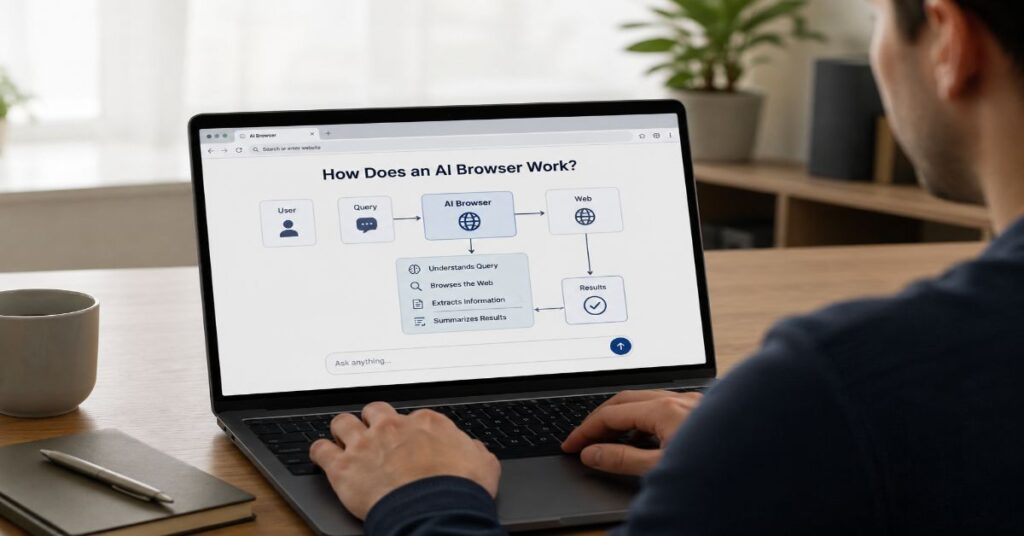
How Does an AI Browser Work?
The most useful mental model is a six-stage control loop: observe the web state, assemble relevant context, retrieve missing evidence, plan a sequence, execute one bounded action, then verify whether the page changed as expected. The browser repeats that loop until it finishes, reaches a safety boundary or needs human input. The language model is important, but it is only one component. A reliable system also needs a browser engine, a context adapter, search or retrieval tools, memory, an action interface, permission checks and state tracking.
How Does an AI Browser Work in Seven Steps?
- Interpret the Goal: Convert a natural-language request into an objective, constraints and completion condition.
- Observe the Current State: Read permitted page text, metadata, controls, selected tabs or screenshots.
- Retrieve Evidence: Search the web, query a knowledge source or inspect another authorised tab when local context is insufficient.
- Build a Plan: Choose a sequence such as search, compare, open, extract, draft and submit.
- Request Permission: Pause before a sensitive capability if policy or user settings require confirmation.
- Execute and Re-observe: Click, type, scroll, navigate or call a connector, then inspect the result rather than assuming success.
- Verify and Finish: Check the completion condition, cite evidence where appropriate, or explain what blocked the task.
This architecture explains why the same underlying model can behave differently in a browser, a chatbot and an API. Perplexity explicitly notes that third-party models inside its product are combined with its own search, citations, tools, prompts, safety systems and usage limits. For a concrete product example, our earlier guide to how Comet’s browser layer works shows the distinction between answer generation and browser-native execution. The wrapper around the model determines which evidence is visible and which actions are possible, so architecture can matter as much as raw model intelligence.
One operational consequence follows: the model should never become the browser’s source of truth for state. The live page, selected account, network result and visible confirmation remain authoritative. The model proposes interpretations and next steps; the browser should verify them against observable state before moving on.
| Layer | Primary Job | Typical Inputs | Main Failure Mode |
| Browser engine | Render and isolate the web | HTML, CSS, JavaScript, network responses | Site or renderer bugs |
| Context adapter | Turn page state into model-readable context | Visible text, metadata, selected tabs, controls | Missing or stale context |
| Retrieval layer | Find current external evidence | Search queries, knowledge bases, APIs | Poor recall or weak sources |
| Reasoning and planner | Choose next steps | Goal, context, tool descriptions, memory | Wrong plan or hallucinated state |
| Executor | Perform browser or connector actions | Click, type, navigate, tool calls | Unintended side effects |
| Policy and permissions | Constrain sensitive capabilities | User settings, site rules, admin policy | Over-broad authority |
| Verifier | Check progress and completion | New page state, confirmations, extracted values | False success |
The Browser Engine Still Does the Web Work
AI does not replace the browser engine. A modern browser still needs a privileged browser process to manage windows, tabs, input, networking and persistent data, plus less-privileged renderer processes that parse and display untrusted sites. Chromium’s multi-process architecture was built around the principle that web applications should be separated from one another and that renderers should run with restricted access. Site isolation later strengthened this idea by keeping cross-site content in more carefully separated processes. These boundaries matter even more when an AI layer can operate across tabs because the agent should not become a shortcut around protections the engine already enforces.
Most current AI browsers therefore look evolutionary below the interface and revolutionary above it. Perplexity describes Comet as Chromium-based for enterprise deployment, which preserves compatibility with ordinary web applications and lets administrators reuse hundreds of Chromium policies. Google is doing the inverse from the incumbent side: it is retaining Chrome’s mature browser core while layering Gemini and agentic features into the product. That shared foundation explains why an AI browser can still use familiar logins, extension ecosystems, developer tools and web standards even when its user interaction shifts from manual clicking to natural-language intent.
For buyers comparing the two design philosophies, Comet versus Chrome trade-offs are more revealing than a simple feature checklist. One starts with an AI-first workspace on Chromium; the other starts with a general-purpose browser and progressively adds AI. In both cases, the renderer remains responsible for rendering. The model is an orchestrator above the page, not a substitute for Blink, JavaScript execution, TLS, cookies or the browser sandbox.
This separation is a useful information-gain test. When a vendor says its browser “understands” a page, ask what the AI actually receives. It may get extracted text and metadata rather than raw pixels. Another system may also inspect accessibility trees, screenshots or structured control descriptions. A product can feel identical at the chat box while exposing a very different representation to the model, which directly affects speed, privacy, accessibility and resilience to hostile content.
The Context Layer Builds the Model’s Working View
The context layer is where browsing becomes model-readable. A webpage contains far more data than an agent should send to a model, so the system has to select a working view. Perplexity’s current Comet documentation says the Assistant can extract visible text, headlines and website metadata from the open page when a request is submitted, and can reference another tab when the user explicitly invokes it. Its privacy documentation also says browsing history, the full tab list, cookies, passwords, autofill, local files and typed website input stay local by default unless a request explicitly needs relevant context.
That distinction between browser capability and assistant permission is central to browser extension permission risks. A browser may technically hold sensitive session data, but the AI layer should not automatically inherit all of it. Perplexity says request-related context from pages, history items or explicitly referenced tabs can be retained for up to 30 days to support Library and query history. Organisations should therefore map three separate questions: what the browser stores locally, what the assistant can read, and what leaves the device for model processing.
Context selection is also a performance problem. Sending an entire long page, every open tab and a full conversation history would inflate token usage, slow inference and bury the relevant signal. Better systems compress or rank context, preserve stable identifiers for controls and refresh the page state after actions. The challenge is that compression can discard the one sentence or button that matters. This creates a retrieval-like failure inside the browser itself: the right fact can exist on screen while never reaching the model.
A second hidden issue is freshness. Web pages mutate after scripts load, prices change, single-page applications update without a full navigation, and forms reveal fields only after earlier choices. An agent that plans from a stale snapshot can click the wrong control or report a result that no longer exists. Strong designs therefore treat observation as continuous state acquisition, not a one-time scrape. They re-observe after meaningful actions and bind decisions to current page state wherever possible.
Retrieval Grounds Answers in Live Evidence
An AI browser gains much of its value from retrieval. If the user asks what is on the current page, local context may be enough. If the user asks for the cheapest current plan, a cross-source comparison or evidence behind a claim, the agent needs fresh external information. Retrieval turns the browser from a page summariser into a research system by letting it search, open sources, extract facts and feed only the relevant evidence back into generation.
The underlying idea is closely related to retrieval-augmented generation architecture: separate evidence discovery from language production. In an open-web browser, the “retriever” may be a search engine plus navigation policy rather than a vector database, but the reliability principle is the same. A model cannot faithfully cite evidence it never retrieved, and a larger model cannot compensate for a source that was missed, stale or misread.
The 2026 browser-summarisation audit by Xia and colleagues is useful because it measures a real browser function rather than a synthetic chatbot prompt. The researchers evaluated 41,331 summaries of 13,777 articles from 15 US news outlets across Chrome with Gemini, Edge with Copilot and Perplexity Comet. They found the summaries broadly accurate while also finding systematic editorial transformation, including reductions in ideological bias, negativity, anger and fear and increases in clarity. The lesson is double-edged: retrieval and page grounding can improve factual contact with source material, yet the model still mediates how that material is framed.
Citations also need to be interpreted carefully. A browser can attach a source link without proving that every sentence is entailed by that source. For professional research, a stronger workflow is claim-level: identify the factual assertion, open the cited source, confirm that the passage supports the assertion, check publication date and authority, and keep uncertainty when sources disagree. This is why browsing reduces some hallucination risks without eliminating them. Grounded generation changes the error distribution; it does not turn probabilistic text generation into a database transaction.
The Planner Turns Intent Into a Sequence of Actions
The planner is the component that converts “book a table near the theatre after my meeting” into a sequence the browser can actually execute. It decomposes the goal into smaller steps, decides which tools are relevant, maintains intermediate state and determines when the task is complete. Some architectures expose the plan explicitly; others let the model choose one tool call at a time. Either way, the model must reason about both information and state changes.
A simple research task might become: search for three sources, open the most authoritative results, extract dates and prices, compare them, then draft a synthesis with citations. A transactional task adds more dangerous steps: authenticate, choose an item, enter details, review totals and submit. The closer the workflow gets to irreversible action, the more the planner should hand control back to deterministic code and explicit user confirmation.
“No one wants AI agents, because AI agents aren’t a thing.” Josh Miller, CEO of The Browser Company, speaking to WIRED in August 2026.
Miller’s provocation is useful precisely because it separates the implementation concept from the product experience. Users do not wake up wanting a planner-executor loop. They want a useful outcome with less friction. A good AI browser therefore hides orchestration without hiding consequence. It may automatically open comparison tabs, but it should surface the final price before purchase. It may draft an email, but it should make clear whether the next step saves a draft or sends a message.
The practical examples in automating a Perplexity workflow illustrate this sequence-based view. The important technical point is that “automation” is not one capability. It is repeated perception, decision and execution under a policy. Reliability depends on how well the system handles intermediate failures, not just whether the initial plan sounds sensible.
A robust planner also needs explicit stopping rules. It should know when evidence is insufficient, when a page has entered an unexpected state and when repeated attempts are making the task riskier rather than more likely to succeed. Escalating cleanly to the user is a feature, not a planning failure.
Execution Is Where an Assistant Becomes an Agent
A sidebar that only answers questions is an assistant. The moment it can click, type, submit, move data between services or invoke a connector, it becomes an execution system. Browser agents normally expose a constrained tool vocabulary: navigate to a URL, click an element, type into a field, select an option, scroll, read a page, open a tab or call an external integration. The language model chooses among those tools, while the browser automation layer translates the choice into a real event.
Perplexity’s Assistant panel describes actions that can run alongside normal browsing, including summarising pages and drafting responses from tab context. Its broader connected-service documentation shows why tool boundaries matter: connectors can carry user-authorised data into a query and, in some cases, perform actions back in the connected service. In Slack, for example, Perplexity documents permissions that include reading accessible messages and sending messages on the user’s behalf. That is not simply “more context”; it is a change in authority.
This is also why agentic workflows inside Comet should be assessed as software orchestration rather than a smarter search box. The executor needs error handling for missing elements, authentication gates, CAPTCHAs, slow network responses, dynamic layout changes and unexpected modals. A robust system must distinguish “the click was issued” from “the intended state change happened”.
Google’s 2026 agent strategy makes the same architectural separation visible at a different scale. Sundar Pichai said the company was “super focused on bringing the power of agents, safely and securely, to consumers”. Google’s Gemini Spark announcement describes a personal agent running on dedicated cloud virtual machines, using tools and long-horizon orchestration, with Chrome integration as part of the broader agentic direction. This shows that the future “AI browser” may not always run every step inside the local browser process. Some agents will use cloud execution and then surface results or controls in the browser interface.
Permissions and Identity Define the Real Trust Boundary
The most consequential AI-browser design choice is not which model answers fastest. It is what the agent is authorised to do under the user’s identity. Browsers already hold powerful ambient authority through authenticated sessions. If an agent can see a signed-in page and act within it, the effective permission may be much broader than a conventional API scope. That makes least privilege and explicit confirmation essential architectural controls.
Perplexity documents first-run permission prompts for advanced Comet agents with choices to allow once, always allow or deny. It also lets users disable the Assistant or block it on specific websites. These are useful controls, but organisations should go further by classifying actions. Reading a public article, reading a private CRM record, drafting a message, sending a message, changing an account setting and initiating a payment are not equivalent. The policy layer should assign different confirmation, logging and data-retention requirements to each.
“every user has different expectations of their browser” Ajit Varma, Head of Firefox at Mozilla, in a TechRadar interview published 4 August 2026.
Varma’s point captures a governance problem that product teams can miss: permission is also a user-experience contract. Some people want aggressive automation; others want AI completely off. Mozilla’s 2026 emphasis on AI controls and opt-in behaviour demonstrates an alternative to treating the model as an unavoidable browser layer. In enterprise settings, this choice should be enforceable by policy, not left only to individual habit.
Identity separation is equally important. A browser agent operating inside a personal profile should not silently inherit access to every corporate session, and an enterprise profile should not expose personal accounts merely because both are open on the same device. Profile boundaries, scoped connectors and audit trails give administrators a way to trace which identity authorised each consequential action. This also makes offboarding safer because revoking one work identity does not require dismantling the user’s whole browsing profile.
| Action Class | Example | Recommended Control | Why It Matters |
| Read-only public | Summarise an article | Low-friction permission | No account state changes |
| Read-only private | Inspect CRM or email | Scoped access and audit log | Sensitive data exposure |
| Reversible write | Create a draft or cart | Preview and undo path | Model can make mistakes |
| External communication | Send email or post message | Explicit confirmation | Acts under user identity |
| Financial or legal | Purchase, transfer, accept terms | Strong confirmation and limits | High consequence |
| Destructive admin | Delete, revoke, publish broadly | Block by default or dual approval | Potentially irreversible |
Prompt Injection Is the Structural Security Problem
Traditional browser security assumes that page content is untrusted data. Agentic browsing complicates that rule because the model reads the same page as both information and potential instruction. A malicious page can hide or disguise text that tells the agent to ignore the user’s goal, reveal private context or perform an action elsewhere. This is indirect prompt injection, and 2026 research shows the attack surface extends beyond obvious “ignore previous instructions” strings.
“Agentic browsers dismantle the security boundary that browsers have relied on for decades.” Michael Bargury, co-founder and CTO of Zenity, quoted during Black Hat USA coverage in August 2026.
The WAAA! study by Datta and colleagues broadens the threat model. The researchers derived a taxonomy of 20 attacks, implemented 18 and found that 10 traditional web threats can re-emerge, often in amplified form, once an agent can be influenced by hostile page content. Their generalisability study reproduced 14 attacks across four major LLMs. A separate July 2026 paper on agent data injection showed that attackers can manipulate trusted-looking metadata or context rather than injecting an explicit instruction, including arbitrary click attacks against web agents. The security conclusion is important: filtering for instruction-like language alone is not enough.
This threat overlaps with why AI hallucinations still happen but it is not the same problem. Hallucination is an internal output error; prompt or data injection is adversarial steering from external content. Both can cause a wrong action, but the controls differ. Hallucination needs better grounding, uncertainty and verification. Injection needs isolation between trusted instructions and untrusted data, constrained capabilities, origin-aware policies and deterministic checks around side effects.
The timing is especially instructive. OpenAI’s Atlas was scheduled to stop working on 9 August 2026 as the company moved browser-based agentic work into other ChatGPT and Codex experiences. Days before that date, Black Hat reporting highlighted cross-vendor browser-agent vulnerabilities. Atlas should therefore be treated as an architecture case study, not a current purchasing option. The wider security issue remains active across products because it follows from the power to combine untrusted web content with user-authorised action.
Multi-Tab Memory Creates Power and New Failure Modes
Cross-tab context is one of the clearest differences between ordinary browsing and AI-assisted browsing. A person may open ten sources, remember which claim came from which page and manually reconcile contradictions. An AI browser can compress that process by reading selected tabs, carrying conclusions forward and answering questions about the set. Perplexity documents explicit tab references and multi-tab summarisation in Comet, while Google has been expanding Chrome’s AI features around summaries, remembered pages and broader context.
For a practical user-facing view, browsing with AI in Comet shows why this feels qualitatively different from opening a chatbot in a second window. The browser already knows which page the user is looking at, and the user can selectively add more context without copying and pasting. That reduces interaction cost, but it also creates a provenance problem: once facts from several tabs are compressed into one conversation, the system must preserve where each fact came from.
Memory introduces another failure mode: stale state can survive after the page changes. A product price may be updated, a tab may navigate to a different URL or the user may log out, while the model still carries an earlier summary in working memory. Good agent designs should distinguish durable notes from live observations and re-check values that affect actions. This is especially important for prices, availability, account status and forms whose fields depend on prior choices.
The field evidence suggests that users already value these workflow-oriented capabilities. A large-scale study of hundreds of millions of anonymised Comet interactions found Productivity and Workflow plus Learning and Research accounted for 57% of agentic queries. Personal use was 55%, professional use 30% and educational use 16%. The study does not prove that agentic browsing is universally superior, but it shows where demand is concentrating: tasks that involve collecting context, combining information and moving through multi-step digital work.
Latency, Accuracy and Reliability Bottlenecks
Every extra layer in an AI browser adds potential latency. The browser may need to extract page state, call a model, run a web search, open one or more sources, call the model again, execute an action and wait for the page to update. A task that feels instant when performed manually can become slower if the agent over-plans. Conversely, a 90-second agent run can be valuable if it replaces fifteen minutes of repetitive comparison. The right performance metric is therefore not only response time. It is user time saved at an acceptable error rate.
Reliability drops sharply when the task depends on brittle interface details. Buttons move, sites A/B test labels, accessibility metadata is incomplete, anti-bot systems intervene and CAPTCHAs intentionally distinguish humans from automation. Authentication can expire mid-task. Pop-ups can hide controls. A model may infer that a submission succeeded because the button disappeared even though the request failed. These are state-tracking problems that require verification after every consequential step.
Accuracy also depends on the operation. The 2026 study of browser-generated news summaries found broad factual accuracy across tens of thousands of summaries, which is encouraging for read-only synthesis. That result should not be extrapolated to autonomous transactions. Summarising an article is forgiving because a reviewer can compare output with the source. Sending a message, changing a booking or purchasing an item has side effects and often fewer opportunities for correction.
For engineering teams, a useful benchmark therefore combines task-completion rate with human-intervention rate, side-effect error rate and latency percentiles rather than reporting one accuracy score. Read-only research and write actions should be measured separately. A system that completes 95 per cent of summaries but misfires on one in twenty submissions has a very different risk profile from the headline completion number. Teams should also record cost per completed task, since repeated model calls can turn reliability problems into budget problems.
| Bottleneck | What the User Sees | Root Cause | Engineering Response |
| Context loss | Agent misses a visible fact | Extraction or ranking dropped it | Re-observe and expose provenance |
| Long latency | Agent appears to think too long | Multiple model and retrieval calls | Parallelise safe reads, cap planning depth |
| Wrong click | Unexpected navigation | Ambiguous or stale element mapping | Stable element IDs and post-action checks |
| False completion | Agent claims success too early | No explicit success condition | Verify server or page state |
| Hallucinated claim | Confident unsupported answer | Weak evidence or generation drift | Claim-level citation verification |
| Blocked automation | Task stalls at login or CAPTCHA | Security or anti-bot boundary | Hand back to user cleanly |
AI Browser Products, Pricing and Limits in 2026
The commercial market is difficult to compare because vendors bundle browser features into broader AI plans and do not publish equivalent limits. The cleanest current matrix is Perplexity’s because its July 2026 plan documentation explicitly lists Browser Agent access. Free does not include the Comet Assistant browser agent in that comparison. Pro and Education Pro are described with monthly limits for average use, while Max is described with monthly limits for advanced use. Perplexity does not publish numeric consumer Comet caps on that page, so any exact consumer-agent quota would be speculative. Enterprise Pro lists 80 browser-agent requests per month and Enterprise Max lists 800.
Perplexity’s current base subscription prices are also documented: Pro is $20 per month or $200 per year; Max is $200 per month or $2,000 per year; Enterprise Pro starts at $40 per month or $400 per year per seat; Enterprise Max starts at $325 per month or $3,250 per year per seat. Education Pro is advertised at $10 per month for verified users in the plan comparison. API billing is separate from subscriptions. Perplexity Computer uses a separate credit system, so Computer credits should not be mistaken for Comet browser-agent quotas.
| Perplexity Plan | Published Price | Comet Browser Agent | Published Numeric Cap |
| Free | $0 | No in plan comparison | Not applicable |
| Pro | $20/month or $200/year | Monthly limits, average use | Not publicly stated |
| Education Pro | $10/month with verification | Monthly limits, average use | Not publicly stated |
| Max | $200/month or $2,000/year | Monthly limits, advanced use | Not publicly stated |
| Enterprise Pro | $40/month or $400/year per seat | Included | 80/month |
| Enterprise Max | $325/month or $3,250/year per seat | Included | 800/month |
Google’s position is structurally different because AI features are being built into Chrome and Gemini subscriptions rather than sold as a standalone AI browser. In February 2026, Sundar Pichai said Google had “reimagined Chrome as an AI-first, agentic browser through features like Chrome Auto Browse”. At I/O in May, Google described Gemini Spark as a personal agent that could work in the background and said Chrome integration would extend that agentic model. The exact feature gates can vary by region and subscription, so a buyer should verify the current account UI rather than assume all Chrome users receive the same agent capabilities.
OpenAI Atlas should not appear in a current “best AI browsers” pricing table as an active option. OpenAI’s support documentation scheduled Atlas to stop working on 9 August 2026. That recent shutdown is a useful warning about vendor risk: when the AI layer is central to the browser experience, product discontinuation can force a workflow migration even if the underlying web still works elsewhere.
How to Evaluate an AI Browser for Real Work
A sensible evaluation starts with the task, not the marketing claim. For low-risk research, ask whether the browser can show source provenance, compare several tabs, preserve citations and let the user open the evidence quickly. For work inside authenticated systems, add permission scope, retention, audit logs and administrator controls. For actions that communicate, publish, purchase or delete, insist on explicit confirmation and a clear record of what the agent intends to do before it does it.
The first technical test is context minimisation. Open a page containing both relevant and sensitive information and determine what the assistant says it can access, what must be explicitly referenced and what the vendor documents as leaving the device. The second is state verification: give the agent a task with a page that changes after each step and see whether it re-observes or keeps acting on an old assumption. The third is adversarial resilience: place untrusted instructions in a benign-looking document or webpage in a controlled test environment and confirm whether the system treats them as data rather than authority.
The fourth test is graceful failure. Disconnect a network request, expire a session or introduce a CAPTCHA. A strong product should stop, explain the block and preserve enough state for the user to continue. It should not improvise credentials, fabricate a completion or repeatedly click through an unknown state. The fifth test is commercial transparency: compare published plan limits with actual account controls and note where the vendor uses qualitative language rather than numeric quotas.
Finally, separate assistant value from agent value. Summarisation, translation and cross-tab synthesis can be useful even if the organisation blocks autonomous actions. That modular approach aligns with the broader 2026 industry debate. An AI browser does not have to be maximally agentic to be worthwhile. It needs to match the user’s risk tolerance and workflow. In many organisations, the best deployment will be asymmetric: broad read-only assistance, tightly scoped connectors and very narrow write authority.
Our Editorial Verification Process
I treated this as an explainer rather than a hands-on product review. I cross-referenced current Perplexity Help Center documentation for Comet context extraction, privacy, model availability, enterprise controls, plan pricing and browser-agent limits; Chromium documentation for the underlying multi-process browser model; Google’s 2026 product and executive statements for Chrome and Gemini agent direction; and OpenAI’s current support notice for the Atlas shutdown date. Security claims were checked against 2026 research on agentic browser attacks and recent Black Hat reporting. Usage and summarisation statistics were drawn from the cited research papers and are presented with their study scope rather than generalised to all browsing tasks.
The live sitemap endpoints requested in the editorial brief did not return parseable XML through the browsing layer used for this research. I therefore did not fabricate a sitemap extraction. Instead, I verified eight contextually relevant Perplexity AI Magazine pages through live indexed search and used each exactly once in a different body section. Pricing was only included where a primary vendor page supported the figure; consumer Comet caps are explicitly marked as unpublished when Perplexity provides only qualitative limit labels.
This article was researched and drafted with AI assistance and reviewed by the Awais Khalid editorial desk at Perplexity AI Magazine. All data, citations, pricing figures, and named quotes have been independently verified against primary sources before publication.
Conclusion
AI browsers are easiest to understand when the hype is stripped away. They are conventional browsers plus a new control plane: context extraction lets a model observe selected parts of the web, retrieval adds current evidence, planning turns intent into steps, execution changes state, and permissions decide how much authority the system receives. That stack can compress research and repetitive workflows, but it also moves model errors and adversarial web content closer to real consequences.
The 2026 market reinforces that architecture matters more than labels. Google is pushing Chrome towards agentic behaviour, Perplexity continues to develop Comet around integrated browsing and assistance, and OpenAI has wound down Atlas as a standalone browser. At the same time, recent research shows both strong read-only summarisation results and serious security weaknesses when agents act across the web. The open question is not whether browsers will contain more AI. They already do. The harder question is how much context and authority those systems should receive, and whether vendors can make observation, permission, provenance and verification strong enough that convenience does not outrun control.
Frequently Asked Questions
What Is an AI Browser?
An AI browser is a web browser with an integrated model layer that can understand page context, retrieve information, summarise content and, in agentic versions, perform browser or connected-service actions. The underlying engine still handles ordinary web rendering, networking, storage and security boundaries.
How Is an AI Browser Different From Chrome With a Chatbot Extension?
The difference is integration depth. A simple extension may read the current page and display a chat panel. A deeper AI browser can manage selected multi-tab context, use built-in retrieval, maintain task state and expose controlled browser actions. The exact boundary varies by product.
Can an AI Browser Click and Fill Forms for Me?
Some can. Agentic browsers expose automation tools that let a model navigate, click, type and sometimes use connected services. Sensitive actions should be governed by permissions and confirmation because a model can misunderstand state or be influenced by hostile page content.
Does an AI Browser Send My Browsing History to the Model?
Not necessarily. Data handling is product-specific. Perplexity says Comet does not upload the full browsing history, tab list, cookies, passwords, local files or typed website input by default. A request can still send the minimum page or tab context needed for the task.
Why Are AI Browsers Vulnerable to Prompt Injection?
The model consumes untrusted webpage content while also deciding what actions to take. Malicious content can therefore try to steer the agent. Stronger designs separate trusted instructions from untrusted data, restrict capabilities, preserve origin information and require deterministic checks before side effects.
Are AI Browsers More Accurate Than Normal Search?
They solve a different problem. Browser AI can synthesise page content and multiple sources, while normal search primarily retrieves links and snippets. A 2026 study found browser-generated news summaries broadly accurate, but that does not prove equal reliability for every research or transactional task.
Which AI Browser Is Best in 2026?
There is no universal winner. Comet is built around AI-assisted browsing, Chrome is integrating Gemini and agentic features into a mature browser, and Firefox is emphasising user choice around AI. OpenAI Atlas was scheduled to stop working on 9 August 2026, so it is not a current standalone option.
Should Businesses Allow Autonomous Browser Actions?
Only after classifying risk. Read-only research can usually receive broader access than sending messages, changing records, purchasing or deleting. Enterprises should use least privilege, confirmations, audit logs, retention controls and policy-enforced blocks for high-consequence actions.
References
Chromium Blog. (2008). Multi-process architecture. Chromium.
Datta, S., Nahapetyan, A., Enck, W., & Kapravelos, A. (2026). WAAA! Web Adversaries Against Agentic Browsers. arXiv.
Google. (2026a). Alphabet earnings, Q4 2025: CEO’s remarks. Google.
Google. (2026b). I/O 2026: Welcome to the agentic Gemini era. Google.
OpenAI. (2026). Evolving Atlas into ChatGPT for browser-based agentic work. OpenAI Help Center.
Perplexity Support. (2026a). Comet Assistant Privacy & Data Use. Perplexity Help Center.
Perplexity Support. (2026b). Which Perplexity Subscription Plan is right for you?. Perplexity Help Center.
Xia, Y., Batorski, D., Wertz, E., Mamakos, M., Li, L., & Wojcieszak, M. (2026). AI-Powered Browsers Are Broadly Accurate News Summarizers That Reduce Political Bias and Negative Affect. arXiv.
Yang, J., Yonack, N., Zyskowski, K., Yarats, D., Ho, J., & Ma, J. (2025). The Adoption and Usage of AI Agents: Early Evidence from Perplexity. arXiv.
