
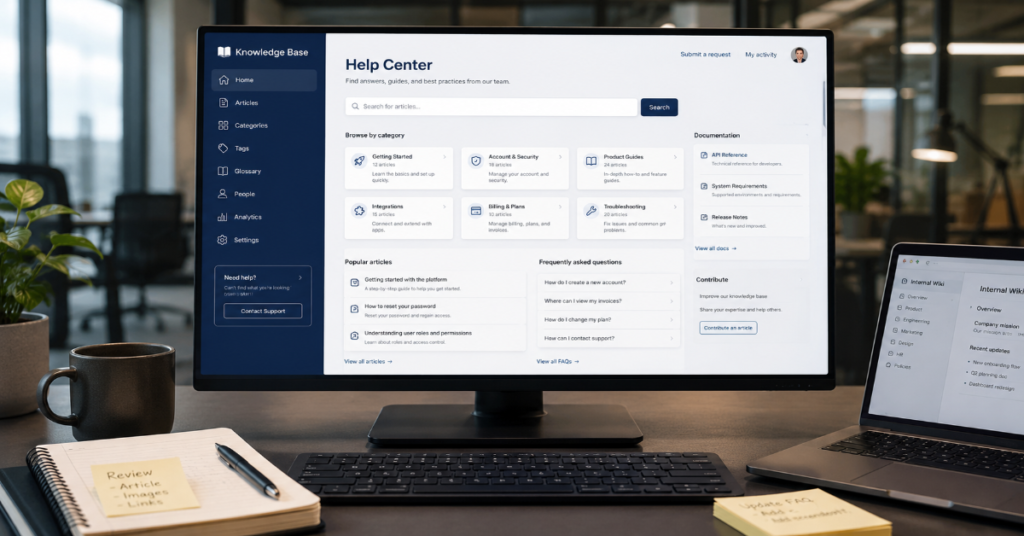
Knowledge base software is a centralized digital system used to create, organize and share information for customers, employees or both. In practice, it powers help centers, FAQs, internal wikis, SOP libraries, onboarding portals, support macros and increasingly, AI agents that answer questions using approved company content.
The search intent behind this topic is practical. Buyers want to know what the software does, which features matter, how it compares with document tools and whether AI search changes the buying decision. The short answer: a good knowledge base reduces repetitive support work, gives teams one trusted source of information and improves consistency across customer-facing answers.
The market has moved quickly since 2024. Zendesk’s CX Trends 2026 material frames AI and contextual intelligence as central themes in customer experience, while ServiceNow’s 2026 Knowledge event pushed enterprise AI agents deeper into IT, HR, finance and service operations. Atlassian’s Confluence positioning also shows how knowledge systems are being rebuilt around AI-powered drafting, summarization and search across work tools.
That shift matters. A knowledge base used to be a library. In 2026, it is becoming infrastructure. If the content is accurate, governed and searchable, it can lower support volume and speed up internal work. If it is messy, duplicated or stale, AI only amplifies the weakness.
What Knowledge Base Software Actually Does
At its core, knowledge base software manages reusable answers. It gives teams a structured way to publish information once and reuse it many times across customer support, internal operations, onboarding and training.
A typical platform includes article creation, categories, tagging, search, permissions, version history, analytics and integrations with help desks or collaboration tools. More advanced systems add AI search, automated article suggestions, content gap detection, translation workflows and chatbot or agent handoff.
There are two main use cases:
External knowledge bases: These face customers. They usually include FAQs, troubleshooting guides, billing explanations, product documentation and policy pages.
Internal knowledge bases: These face employees. They usually include SOPs, HR policies, onboarding checklists, IT guides, sales playbooks, compliance notes and engineering runbooks.
The difference is not just audience. External content must be concise, findable and brand-safe. Internal content must be permission-aware, operationally detailed and connected to the systems employees already use.
Knowledge Base Software Compared With Wikis, Help Desks and Document Tools
| Tool type | Best use | Main limitation | When it fits |
| Knowledge base software | Structured self-service and reusable support content | Requires content governance | Customer help centers, internal SOPs, AI support sources |
| Wiki software | Collaborative internal documentation | Can become messy without ownership | Engineering notes, project documentation, team knowledge |
| Help desk software | Ticket handling and customer conversations | Knowledge may be secondary | Support teams managing inbound requests |
| Document storage | File saving and retrieval | Weak article-level search and workflow | Static files, contracts, policies, PDFs |
| Enterprise search | Finding information across systems | Does not always manage content quality | Large companies with many disconnected tools |
The mistake many companies make is treating a shared drive as a knowledge base. A folder full of PDFs may store information, but it does not guarantee fast retrieval, article ownership, feedback loops or consistent answers.
The Features That Matter Most in 2026
The best knowledge base software is not defined by the longest feature list. It is defined by how well it supports the full knowledge lifecycle: creation, review, discovery, feedback and retirement.
1. Strong Search
Search is the product experience. If users cannot find answers quickly, they will open tickets, message coworkers or abandon self-service. Modern tools now use semantic search and AI-assisted retrieval instead of relying only on exact keywords.
ServiceNow’s Zurich documentation, updated in May 2026, describes knowledge portal search as returning articles, pinned articles and social Q&A, with filtering available for results. That kind of structured search layer is essential when content volume grows.
2. Clear Content Ownership
Every important article needs an owner, a review date and a workflow for updates. Without ownership, knowledge bases decay quietly. The most dangerous content is not missing content. It is outdated content that looks official.
3. Analytics and Gap Detection
Useful analytics include failed searches, article views, ticket deflection, thumbs-up or thumbs-down feedback, outdated article reports and escalation patterns. These signals show where customers or employees are stuck.
4. Permissions and Access Control
Internal knowledge often contains sensitive operational details. A good platform must separate public, internal, department-specific and restricted content. AI tools make this even more important because retrieval systems can expose information if permissions are not enforced correctly.
5. AI-Ready Content Structure
AI agents depend heavily on source quality. Intercom’s Fin documentation says its AI can learn from help center articles, internal support content, PDFs and webpages, while Help Scout’s AI Answers uses Docs knowledge base content to provide instant responses. This creates a simple rule: weak documentation produces weak automation.
Leading Knowledge Base Software Options
This is not a universal ranking because company size, support volume, compliance needs and existing tools change the right choice. The comparison below focuses on practical fit.
| Platform | Best fit | Notable strength | Trade-off |
| Zendesk Guide | Customer support teams already using Zendesk | Deep support workflow integration and AI service features | Can become expensive as needs expand |
| Help Scout Docs | Small and midsize support teams | Simple help center publishing and AI Answers | Less suited to complex enterprise governance |
| Intercom Help Center and Fin | AI-first customer service teams | AI agent connection to multiple knowledge sources | Requires careful content control for answer quality |
| Atlassian Confluence | Internal teams and technical documentation | Strong collaboration, Rovo search and Jira ecosystem fit | Can become cluttered without page ownership |
| ServiceNow Knowledge Management | Large enterprises | Workflow, ITSM and employee service integration | Implementation complexity is higher |
| Notion | Startups and lightweight internal documentation | Flexible workspace and fast content creation | Governance and support workflows may need add-ons |
Zendesk describes its knowledge base product as AI-powered and designed to improve self-service, content creation and support efficiency. Atlassian positions Confluence as an AI workspace for creating, summarizing and finding knowledge across teams. Those claims reflect the broader market direction: knowledge systems are being pulled closer to AI assistants, ticketing tools and workflow automation.
Structured Insight Table: What Actually Drives ROI
| ROI driver | How it creates value | What to measure | Common failure point |
| Ticket deflection | Customers solve basic issues without contacting support | Self-service resolution rate, contact rate reduction | Articles do not match real customer wording |
| Faster onboarding | New employees find processes without asking peers | Time to productivity, repeated HR or IT questions | Content is scattered across tools |
| Agent productivity | Support agents reuse approved answers | First response time, handle time, macro usage | Articles are outdated or too generic |
| Knowledge consistency | Teams give the same answer across channels | QA scores, policy error rate | No review workflow |
| AI automation | AI agents answer from approved sources | Resolution rate, escalation quality, hallucination reports | Knowledge gaps create wrong answers |
The hidden ROI issue is maintenance cost. A knowledge base can save hundreds of hours, but only if someone owns the content system. Companies often budget for software but not for editorial operations.
Practical Implementation Framework
A practical rollout should begin with the highest-friction questions, not a giant documentation project.
Start with ticket analysis. Pull the top 50 repeated customer or employee questions from the past 90 days. Group them by intent, then create articles for the highest-volume issues first. This avoids the common mistake of writing documentation nobody searches for.
Next, define article types. A troubleshooting article is different from a policy explanation. A billing FAQ is different from a technical runbook. Templates help writers keep structure consistent.
Then set governance rules:
Article owner: One person responsible for accuracy.
Review cycle: Every 90, 180 or 365 days depending on risk.
Approval path: Required for legal, billing, compliance and security content.
Feedback loop: Users can mark content helpful or unhelpful.
Retirement process: Old content is archived instead of left visible.
Knowledge-Centered Service, or KCS, is relevant here because it treats knowledge as part of daily support work rather than a separate documentation task. The Consortium for Service Innovation describes KCS as an operating system for both human and AI agents, focused on keeping content accurate and useful over time.
Strategic Implications for Customer Support
For support leaders, knowledge base software changes the economics of service. Every repeated question answered by self-service is time that agents can spend on complex cases, retention issues or high-value customers.
But there is a trade-off. Deflection should not become avoidance. A bad help center can frustrate customers if it hides contact options or pushes irrelevant AI answers. The best systems combine self-service with clear escalation.
Zendesk’s 2025 CX Trends report drew from more than 10,000 consumers and business leaders across 22 countries, showing how AI became a central customer experience issue rather than a back-office experiment. That matters because knowledge bases now influence customer loyalty directly. If the answer is clear, customers feel helped. If the system loops them through irrelevant articles, they feel blocked.
Strategic Implications for Internal Teams
Internal knowledge bases solve a different problem: operational drag. Employees waste time asking the same questions about benefits, approvals, procurement, IT access, sales rules or product details.
The real cost is not just the interruption. It is inconsistency. When one team uses an old policy and another uses the current one, errors spread.
ServiceNow’s Employee Center is positioned as a consolidated portal for AI search, targeted campaigns and an app launcher. This points to a larger enterprise trend: internal knowledge is moving from static pages into workflow portals where employees can search, act and request services in one place.
Risks and Trade-Offs
Knowledge base software creates value, but it also creates new risks.
Content decay: The system looks reliable while the information becomes stale.
AI overconfidence: AI agents may present answers with authority even when the source content is incomplete.
Permission leakage: Internal documents can surface to the wrong audience if access controls are weak.
Search blind spots: If content lives in Slack, Google Drive, Confluence and support tools, one knowledge base may not see the full picture.
Low adoption: Employees may ignore the system if it adds friction or lacks trusted content.
One practical workaround is to treat the knowledge base as a product. It needs a roadmap, owner, usage metrics and user feedback. It should not be treated as a one-time documentation cleanup.
Original Insights: What Most Buying Guides Miss
Insight 1: AI Raises the Cost of Bad Documentation
Before AI, a bad article usually harmed one reader at a time. With AI agents, the same bad article can power hundreds or thousands of wrong answers. That changes the risk model. Content quality is now an automation control, not just an editorial concern.
Insight 2: The Best Knowledge Base Is Often Not the Most Flexible One
Flexible tools are attractive, but too much flexibility can create inconsistent structures. For regulated teams or high-volume support teams, rigid templates, approval workflows and audit trails may be more valuable than open-ended page design.
Insight 3: Search Analytics Are More Useful Than Page Views
High page views can mean an article is useful, but they can also mean users are repeatedly confused. Failed searches, repeated searches and searches followed by ticket creation often reveal more valuable content gaps.
Insight 4: Internal and External Knowledge Should Share Governance, Not Necessarily the Same Interface
Customers and employees need different experiences. But the company should still use shared rules for ownership, review cycles, terminology and source-of-truth decisions.
Market and Real-World Impact
Market estimates vary because vendors define “knowledge base,” “knowledge management” and “customer service KM” differently. Grand View Research estimated the broader knowledge management software market at USD 20.15 billion in 2024 and projected USD 62.15 billion by 2033. A narrower 2026 knowledge base software market estimate from Market Reports World placed the category at USD 390.93 million in 2026, rising to USD 649.09 million by 2035.
The gap between those numbers is important. It shows that buyers should be careful when reading market claims. A “knowledge management” report may include enterprise collaboration, analytics and workflow tools, while a “knowledge base software” report may focus on help center platforms.
The real-world impact is still clear. AI support tools, employee service portals and enterprise search platforms all need governed content. ServiceNow’s 2025 Moveworks acquisition, reported at USD 2.85 billion, also shows how valuable employee support automation has become.
The Future of Knowledge Base Software in 2027
By 2027, knowledge base software will likely be judged less by article publishing and more by answer governance. The question will shift from “Can we publish help content?” to “Can our approved knowledge safely power AI agents, employee workflows and customer self-service?”
Three trends are already visible.
First, AI agents will demand cleaner knowledge architecture. Intercom’s 2026 documentation for knowledge sources shows how AI agents, copilots and self-service support depend on connected content sources.
Second, enterprises will require stronger audit trails. ServiceNow’s 2026 AI agent push emphasizes governed platforms, enterprise context and secure action. If AI can act on behalf of workers, then companies need to know what knowledge source drove the answer or action.
Third, knowledge work will become more operational. KCS-style practices will matter more because AI needs fresh, validated information. A static content library cannot support dynamic service automation for long.
The uncertainty is adoption quality. Many companies will buy AI-powered knowledge tools before fixing fragmented content ownership. Those companies may see limited returns until governance catches up.
Key Takeaways
- Knowledge base software works best when it is treated as an operating system for answers, not just a place to store articles.
- AI increases the value of structured knowledge but also increases the risk of outdated or incomplete content.
- Search quality, permissions, review workflows and analytics matter more than visual customization.
- Internal and external knowledge bases solve different problems but should follow shared governance standards.
- The right platform depends on support volume, existing tools, compliance needs and whether AI automation is part of the roadmap.
- Market data varies widely, so buyers should compare definitions before relying on category size claims.
- By 2027, knowledge base platforms will compete on answer accuracy, governance and workflow integration.
Conclusion
Knowledge base software has become a core system for modern support and operations. The best platforms help customers solve problems independently, help employees find trusted information and give AI systems a safer foundation for automated answers.
But software alone does not create knowledge discipline. The companies that benefit most are the ones that assign ownership, review content regularly, measure search behavior and remove outdated information before it causes confusion. AI does not remove that work. It makes it more important.
For small teams, the right choice may be a simple help center with strong search and easy publishing. For enterprises, the priority may be permissions, workflow integration, auditability and AI governance. In both cases, the principle is the same: trusted knowledge must be created, maintained and measured. Without that discipline, even the most advanced platform becomes another place where information gets lost.
FAQ
What is knowledge base software used for?
It is used to create, organize and share reusable information. Common uses include customer help centers, FAQs, internal SOPs, onboarding documentation, IT support guides, product documentation and AI support sources.
Is knowledge base software the same as a wiki?
No. A wiki is usually a flexible collaborative documentation space. A knowledge base is more structured and often includes search analytics, article feedback, permissions, review workflows and support integrations.
What features should I look for in knowledge base software?
Prioritize strong search, article templates, permissions, version history, ownership fields, review reminders, analytics, feedback tools and integrations with your help desk or collaboration platform.
Can AI replace a knowledge base?
No. AI depends on trusted source material. A knowledge base gives AI systems approved information to retrieve and summarize. Without accurate content, AI answers become less reliable.
How often should knowledge base articles be reviewed?
High-risk content such as billing, legal, security and compliance articles should be reviewed more frequently, often every 90 to 180 days. Low-risk evergreen content can usually follow a longer cycle.
What is the biggest mistake companies make with knowledge bases?
The biggest mistake is publishing content without ownership. If no one is responsible for updating articles, the system becomes stale and users stop trusting it.
Which teams need internal knowledge base software?
HR, IT, support, sales, customer success, operations, engineering and compliance teams all benefit when repeated answers, processes and policies are centralized in a searchable system.
Methodology
This article was drafted using the uploaded Perplexityaimagazine.com production prompt as the editorial specification. Public sources were reviewed from vendor documentation, market research pages and current industry reporting. The analysis avoids fabricated testing claims. No private product benchmark was conducted.
Sources were selected for relevance to knowledge base platforms, AI support, customer experience, enterprise search and knowledge governance. Market-size figures were treated cautiously because category definitions differ across publishers. Vendor claims were used only to describe product positioning or documented features, not as neutral proof of performance.
Known limitations: pricing, plan availability and AI feature packaging can change quickly. A human editor should verify all citations, product details, source dates and APA formatting before publication.
References
Atlassian. (2026). Confluence: AI workspace for knowledge and collaboration.
Atlassian. (2026). Rovo in Confluence: AI features.
Consortium for Service Innovation. (2026). Knowledge-Centered Success.
Grand View Research. (2025). Knowledge management software market size report, 2033.
Help Scout. (2026). Get started with AI Answers.
Intercom. (2026). Fin AI Agent explained.
Intercom. (2026). Knowledge sources to power AI, agents and self-serve support.
Market Reports World. (2026). Knowledge base software market size, trends.
ServiceNow. (2026). Search using the Knowledge Management Service Portal.
ServiceNow. (2026). Employee Center.
Zendesk. (2025). CX Trends 2026.
Zendesk. (2025). AI-powered knowledge base for faster self-service.
