
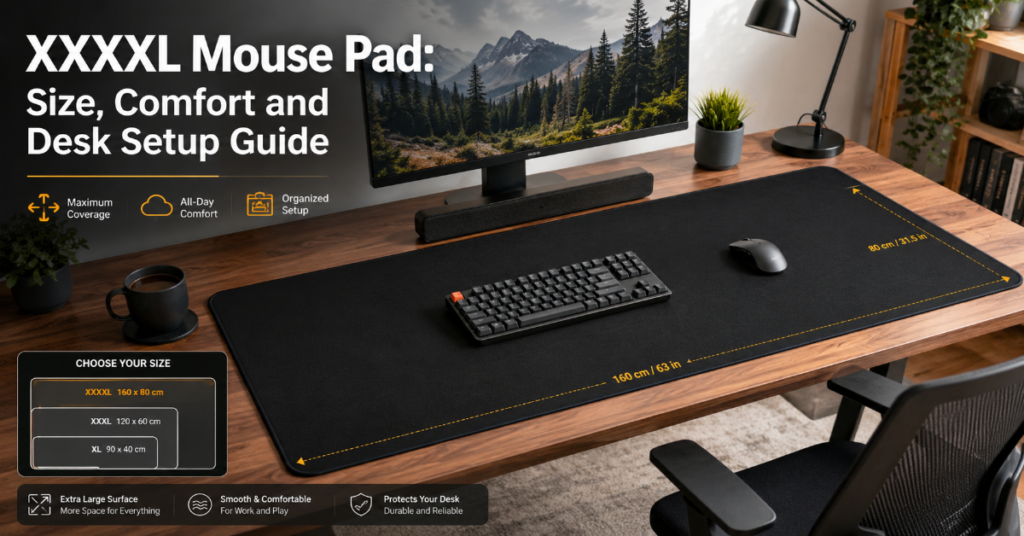
A XXXXL Mouse Pad is an extra-large gaming or desk mat that covers most of a desktop surface, usually giving enough room for both a keyboard and wide mouse movement. It is especially useful for low-sensitivity gamers, streamers, designers and anyone who wants a cleaner, quieter workspace.
The typical range sits around 900×400 mm to 1200×600 mm, although brands use different labels such as XXL, 3XL, extended, desk mat or full-desk mouse pad. For example, SteelSeries lists its QcK XXL at 900×400×2 mm, while Razer lists the Gigantus V2 3XL at 1200×550×4 mm. Corsair’s MM300 Pro Extended sits in the middle at 930×300×3 mm.
The appeal is simple. A standard mouse pad gives the mouse a surface. A large desk mat organizes the whole setup. It protects the desk, dampens keyboard sound, reduces wrist contact with hard wood or glass and makes wide mouse swipes feel predictable.
Still, bigger is not always better. A very large mat can be harder to clean, harder to dry and awkward on narrow desks. Thickness can improve comfort but may create a soft, slightly slower feel. Cloth gives control but absorbs sweat, dust and spills unless treated. Hard and glass pads feel faster but can be noisier and less comfortable for long sessions.
What Is a XXXXL Mouse Pad?
A xxxxl mouse pad is a full-width or near-full-width mat designed to hold a keyboard, mouse and sometimes accessories like a stream deck, controller or notebook. It is not just a stretched version of a regular mouse pad. Its main value is workspace consistency.
A larger surface helps because the mouse never leaves the pad during wide tracking movements. That matters for FPS players using low DPI settings, where turning or tracking often requires sweeping the arm rather than flicking only the wrist.
The naming is messy. One brand’s XXL can be another brand’s extended size. Razer’s 3XL Gigantus V2 is 1200 mm wide, while SteelSeries’ QcK XXL is 900 mm wide. Corsair’s MM300 Pro Extended is 930 mm wide but only 300 mm deep. This means shoppers should compare actual dimensions, not size labels.
Common Sizes and What They Fit
| Size class | Typical dimensions | Best for | Main limitation |
| Extended | 800–930 mm wide | Keyboard plus mouse | May feel shallow on deeper desks |
| XXL | Around 900×400 mm | Gaming and office setups | Not always full-desk coverage |
| 3XL / XXXL | Around 1200×550 mm | Large desks and low DPI play | Harder to wash and dry |
| XXXXL / full desk | Up to 1200×600 mm or larger | Maximum coverage | Can overwhelm small desks |
The first practical step is measuring the desk. Leave space for monitor stands, speakers, chargers and cable routes. A pad that technically fits can still feel cramped if the keyboard must sit too close to the edge.
Cloth Surface vs Hard Desk Mat
For most people, cloth is the safer choice. It gives a controlled glide, feels comfortable under the wrist and is quieter than hard plastic, aluminum or glass. PC Gamer’s 2026 mouse pad testing highlights fabric pads as a strong all-round category, while also noting that hard and glass pads can feel faster but more specialized.
Hard pads are better for users who want speed above all else. They are easier to wipe clean, resist liquid absorption and do not develop the same fabric staining. The trade-off is that they can feel slippery, amplify mouse feet noise and become uncomfortable during long work sessions.
| Surface type | Glide feel | Control | Cleaning | Comfort | Best use |
| Cloth | Balanced | High | Moderate | High | Gaming, work, general use |
| Hard plastic | Fast | Medium | Easy | Medium | Speed-focused gaming |
| Glass | Very fast | Low to medium | Easy | Low to medium | Specialist competitive setups |
| Hybrid | Fast but textured | Medium | Moderate | Medium | Users who want speed without full hard-pad feel |
Does Thickness Matter?
Most large desk mats are 2–4 mm thick. Thickness changes comfort more than sensor accuracy.
A 2 mm pad feels flatter and firmer. It is easier to roll, easier to carry and less likely to feel spongy. SteelSeries’ QcK XXL is listed at 2 mm, which makes it a low-profile option.
A 3 mm pad is the common middle ground. Corsair’s MM300 Pro Extended uses a 3 mm construction, giving more cushion while staying stable.
A 4 mm pad feels more cushioned and can smooth out minor desk imperfections. Razer’s Gigantus V2 XXL and 3XL sizes are listed at 4 mm.
For modern optical sensors, surface consistency matters more than thickness. A clean, even cloth surface usually tracks better than a dirty, glossy or uneven desk.
Practical Buying Checklist
| Feature | What to look for | Why it matters |
| Width | 900 mm or more | Fits keyboard and mouse together |
| Depth | 400–600 mm | Supports arm movement |
| Thickness | 2–4 mm | Balances comfort and firmness |
| Base | Non-slip rubber | Prevents pad movement |
| Edges | Stitched edges | Reduces fraying |
| Surface | Smooth cloth weave | Improves tracking consistency |
| Cleaning | Washable or spill-resistant | Extends useful life |
A xxxxl mouse pad should not slide, curl at the edges or smell strongly of rubber after airing out. These issues are more important than visual design because they affect daily use.
Gaming Setups vs Office Setups
Gamers usually care about glide, stopping power, low DPI movement and edge durability. A cloth surface with stitched edges is often the most balanced choice because it supports both wide arm movements and precise micro-corrections.
Office users care more about comfort, desk protection, keyboard sound and visual organization. For office work, a large desk mat can make a keyboard feel softer and reduce the scratchy feel of a mouse on a bare desk.
Streamers and content creators sit between both groups. They benefit from a cleaner visual surface, especially when the desk appears on camera. A full-width mat also hides minor desk wear and creates a consistent background for product shots or keyboard closeups.
Risks and Trade-Offs
The biggest downside is maintenance. Large cloth mats collect dust, skin oil, food particles and drink residue. A small pad can be replaced cheaply or cleaned in a sink. A huge desk mat may need a bathtub, drying rack or outdoor drying space.
Another risk is desk fit. A 1200 mm wide pad looks impressive but may cover cable holes, monitor bases or speaker stands. It can also make a small desk feel visually heavy.
There is also a speed trade-off. Cloth pads reward control but can feel slow to users coming from hard pads. Glass and hard pads feel fast but may require new muscle memory.
Finally, very cheap oversized mats can have inconsistent surfaces. Uneven printing, raised graphics, curling edges and weak rubber bases can hurt the experience even when the size looks right.
Cleaning and Maintenance
A large desk mat should be cleaned lightly every week and deeply every few months. For routine cleaning, use a microfiber cloth, warm water and a small amount of mild soap. Avoid harsh chemicals because they can damage coatings, fade prints or weaken adhesive layers.
For deeper cleaning, remove the keyboard and mouse, shake off debris, gently scrub the surface with diluted soap and rinse carefully. Let the mat air dry flat. Do not use high heat, a dryer or direct harsh sunlight for long periods.
Spill-resistant mats are easier to maintain. Corsair’s MM300 Pro, for example, is marketed with a spill-proof and stain-resistant cloth surface. That does not mean it never needs cleaning, but it gives more protection against accidents than untreated cloth.
Market and Real-World Impact
Large mouse pads became popular because desks changed. More users now run mechanical keyboards, dual monitors, microphones, stream decks and wireless peripherals. A desk mat turns those objects into one visual setup.
The gaming accessory market also pushed the trend. Brands now sell mouse pads not only as performance surfaces but as identity pieces, with artwork, RGB lighting, stitched borders and limited-edition designs. PC Gamer’s 2026 guide reflects this split by covering performance cloth pads, hard pads, glass pads and aesthetic desk pads as different categories rather than one generic product type.
The office market is another driver. Remote workers want desks that look cleaner on video calls and feel more comfortable through long sessions. A xxxxl mouse pad solves several small problems at once: surface protection, keyboard sound, mouse glide and visual order.
The Future of XXXXL Mouse Pads in 2027
By 2027, large desk mats will likely keep moving in three directions: better materials, cleaner aesthetics and more functional surfaces.
The first trend is surface specialization. Instead of one generic cloth texture, brands are already separating speed, balance and control surfaces. PC Gamer’s recent testing notes SteelSeries’ QcK Performance line with different surface options, which points toward more targeted cloth pads rather than one-size-fits-all mats.
The second trend is larger hybrid work setups. Desk mats will keep crossing from gaming into office furniture, especially as mechanical keyboards, compact workstations and creator desks become mainstream.
The third trend is selective smart functionality. Wireless charging mouse pads exist, but they remain niche because of cost and compatibility. Logitech’s Powerplay 2, announced with a $99 price and support for select Logitech mice, shows the category is still active but not universal.
The uncertainty is price. A plain cloth desk mat is inexpensive. A wireless charging or RGB mat can cost several times more without improving core tracking for most users.
Key Takeaways
• Actual dimensions matter more than size labels like XXL, 3XL or XXXXL.
• Cloth is the best default surface for most gaming and office setups.
• Hard and glass pads are faster but less forgiving.
• A 3 mm pad is the safest middle ground for comfort and control.
• Stitched edges and a non-slip rubber base are practical durability features.
• Large mats need more cleaning space and longer drying time.
• Wireless charging pads are useful only if the mouse ecosystem matches.
Conclusion
A xxxxl mouse pad is most useful when it solves a real desk problem: limited mouse space, inconsistent tracking, surface scratches, keyboard noise or visual clutter. It is not automatically better because it is bigger. The right mat depends on desk size, mouse sensitivity, cleaning habits and whether the setup is mainly for gaming, work or content creation.
For most users, the best choice is a large cloth mat with stitched edges, a rubber base and enough depth for comfortable arm movement. Gamers using low DPI should prioritize surface consistency and width. Office users should prioritize comfort, easy cleaning and a design that does not dominate the desk.
The simplest buying rule is this: measure first, choose surface second, then compare thickness and edge quality. A well-sized mat can make a desk feel calmer, more comfortable and more controlled every day.
FAQ
What is a xxxxl mouse pad?
A xxxxl mouse pad is an extra-large desk mat designed to cover much of a desk surface. It usually fits both keyboard and mouse, giving more space for wide mouse movement while protecting the desk.
Is a cloth mouse pad better than a hard mouse pad?
For most users, yes. Cloth gives better control, more comfort and less noise. Hard pads are faster and easier to wipe clean, but they can feel slippery and less comfortable during long sessions.
Does a thicker mouse pad affect mouse sensor performance?
Usually not directly. Modern optical sensors care more about surface consistency than pad thickness. Thickness mainly affects comfort, firmness and how much the pad absorbs desk imperfections.
What size mouse pad is best for low DPI gaming?
Low DPI gamers should usually choose at least 900×400 mm. Players with very wide arm movements may prefer 1200×550 mm or larger, provided the desk has enough space.
How do you clean a large desk mat?
Use warm water, mild soap and a soft cloth or sponge. Rinse carefully, press out excess water without twisting and let it air dry flat. Avoid dryers, harsh chemicals and high heat.
Are stitched edges important?
Yes, especially on large cloth mats. Stitched edges help prevent fraying and surface separation over time. They matter most for users who rest their wrists near the edge or move equipment often.
Methodology
This article was prepared from the uploaded production brief, then checked against current manufacturer pages and recent hands-on mouse pad guides. Product dimensions were validated using SteelSeries, Razer and Corsair product pages. Broader performance context came from recent PC Gamer and Tom’s Hardware coverage, with older hands-on testing from TechGearLab used only as supporting context. No private lab testing was conducted for this draft, so any performance judgments are based on named sources, published specifications and practical comparison logic.
References
Corsair. (2026). MM300 PRO Premium Spill-Proof Cloth Gaming Mouse Pad.
PC Gamer. (2026). Best mouse pads for gaming in 2026: The fabric and hard-top mats I prefer to game on.
Polygon. (2025). Logitech announces a sequel to its Powerplay mouse pad.
Razer. (2026). Razer Gigantus V2: Big mouse pad.
SteelSeries. (2026). QcK XXL.
