
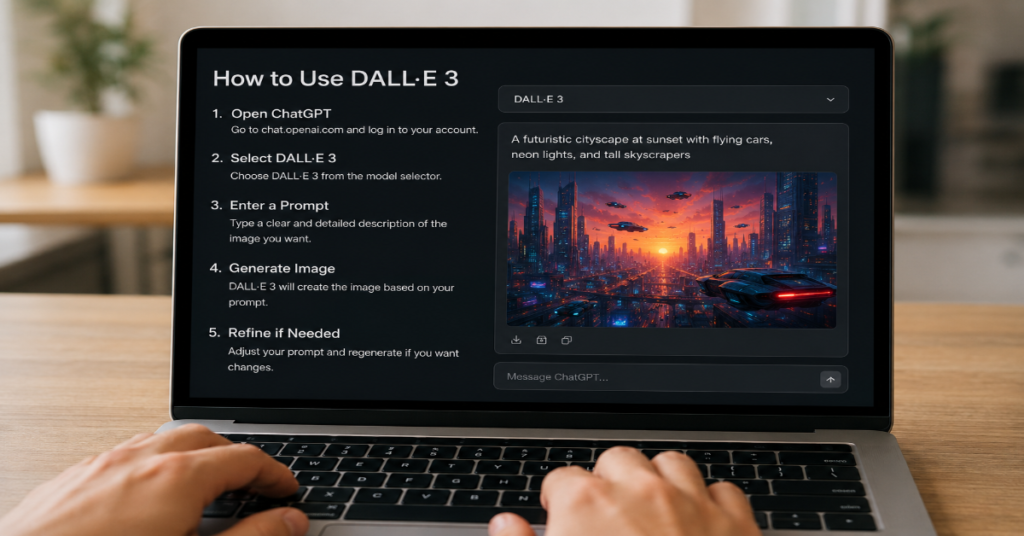
Learning how to use dall-e 3 in 2026 is less about memorizing magic prompts and more about understanding how modern text-to-image systems interpret intent, revise instructions and apply safety rules. DALL-E 3, OpenAI’s third-generation image model, was built to turn natural-language descriptions into realistic images, illustrations, concept art, product mockups and editorial visuals. It is available through ChatGPT-style interfaces and the OpenAI API, though OpenAI’s newer GPT Image models now sit beside it in the broader image generation stack. OpenAI’s documentation still lists dall-e-3 as an available image model, with specific limits for prompt length, size, quality and style.
The basic answer is simple: write a clear description of the image you want, specify subject, scene, style, composition, lighting, aspect ratio and constraints, then revise based on the first output. But the professional answer is more layered. DALL-E 3 often rewrites prompts internally before generating the image, a feature OpenAI describes as prompt rewriting through GPT-4 optimization. That means the user’s visible prompt is not always the final instruction sent to the image model.
This guide treats DALL-E 3 as a creative instrument, not a vending machine. We will cover how to use dall-e 3 for beginners, marketers, publishers, developers and SEO teams. We will also explain when to choose natural versus vivid style, why square images are cheaper in API workflows, how to avoid common prompt failures and how DALL-E 3 compares with newer ChatGPT image generation in 2026.
How to Use DALL-E 3 in 2026: The Working Method
The most reliable way to use DALL-E 3 is to start with a structured prompt. A weak prompt says, “make a futuristic city.” A strong prompt says, “create a wide editorial illustration of a coastal futuristic city at sunrise, with solar glass towers, public gardens, quiet electric transit, soft atmospheric haze, realistic scale and no visible brand logos.” The difference is not decoration. It gives the model visual anchors, mood, exclusions and editorial purpose.
According to the latest 2026 documentation we reviewed, DALL-E 3 supports prompts up to 4,000 characters through the image generation API. It supports one generated image per request, unlike some newer GPT image models that can generate multiple outputs. It also supports standard and hd quality modes, vivid and natural style modes and three fixed sizes: 1024×1024, 1792×1024 and 1024×1792.
For most users, the best first workflow is: define the image’s job, write the scene, add style, add camera or design language, then add negative constraints. A publisher may ask for “a realistic editorial header image,” while an e-commerce team may ask for “a clean product concept on a neutral background.” The system works best when the prompt describes visible elements rather than abstract intent alone.
The Core Prompt Formula
A practical DALL-E 3 prompt has six parts: subject, environment, composition, style, lighting and constraints. The subject tells the model what matters most. The environment gives context. Composition tells the model how to arrange the scene. Style signals the visual tradition. Lighting creates realism or mood. Constraints reduce unwanted artifacts.
A useful prompt template is: “Create a [format] of [subject] in [environment], composed with [camera angle or layout], in [style], with [lighting], avoiding [unwanted elements].” For example: “Create a realistic magazine cover image of a freelance designer using an AI image generator in a compact studio, composed as a medium-wide shot, modern editorial photography, soft window light, avoiding logos, distorted hands and readable private data.”
This is where how to use dall-e 3 differs from older prompt-engineering rituals. DALL-E 3 was designed to better follow detailed text prompts, and OpenAI said the model improved over DALL-E 2 in caption fidelity and image quality. The user’s job is not to trick the model. The user’s job is to brief it like an art director.
DALL-E 3 Feature Comparison for Practical Users
| Feature | DALL-E 3 behavior | Practical implication |
| Prompt length | Up to 4,000 characters in API | You can write detailed creative briefs |
| Number of images | n=1 only | Generate variants through follow-up prompts |
| Quality | standard or hd | Use HD for final assets, standard for drafts |
| Style | vivid or natural | Vivid for dramatic art, natural for realism |
| Sizes | 1024×1024, 1792×1024, 1024×1792 | Choose square, landscape or portrait upfront |
| Revised prompt | Returned for DALL-E 3 | Useful for debugging prompt drift |
| Output format | URL or base64 JSON | URL links expire, base64 is better for apps |
The most overlooked row is “revised prompt.” OpenAI’s API response includes revised_prompt for DALL-E 3, showing the prompt actually used after the model’s internal revision step. This matters for agencies, developers and compliance teams because it provides a partial audit trail of how the request changed before generation.
Why Prompt Rewriting Changes the Game
DALL-E 3 does not merely ingest a prompt like a static command. OpenAI’s cookbook explains that the DALL-E 3 API introduced prompt rewriting, where GPT-4 optimizes prompts before they are passed to DALL-E. The reasoning is that detailed prompts generally produce better images.
For everyday users, this is helpful. A short request can become a richer scene. But for professional users, prompt rewriting creates a governance issue: the prompt you wrote may not be the exact prompt used. That can affect brand consistency, legal review and reproducibility. If an image comes back with unexpected people, architecture, symbols or cultural cues, check the revised prompt where available.
The insider prediction for 2026 is that prompt provenance will become a competitive feature. Image teams will increasingly demand logs showing the original user prompt, the revised prompt, the model name, the date, the seed or generation settings if available and the final output. DALL-E 3 already offers one important piece of that chain.
How to Use DALL-E 3 for ChatGPT Workflows
For non-technical users, the easiest way to use DALL-E 3 is inside a conversational interface. The advantage is iteration. Instead of writing one perfect prompt, you can say, “make it less glossy,” “change the camera angle,” “turn this into a vertical blog header,” or “keep the subject but make the background simpler.” This turns image creation into a dialogue.
The best ChatGPT workflow is to begin with the asset type. Say whether you need a blog header, thumbnail, concept art, logo mood board, children’s book illustration, storyboard panel, product mockup or social post. Then define the audience. An image for a cybersecurity article should feel different from an image for a wellness newsletter.
The second step is to ask for alternatives conceptually, not just visually. Instead of “make another,” ask for “three different creative directions: documentary realism, minimalist vector and cinematic editorial.” This helps DALL-E 3 explore visual strategy rather than random variation.
How to Use DALL-E 3 Through the API
Developers can call DALL-E 3 by using the image generation endpoint and setting the model to dall-e-3. The key parameters are prompt, model, size, quality, style and response_format. OpenAI’s API reference states that dall-e-3 supports only one image per request and accepts standard or hd quality, plus vivid or natural style.
A production API workflow should store four things: the original prompt, the revised prompt, the model setting and the final image metadata. This is especially important for publishers and brands that may need to show how an image was generated. If you use URL output, remember that OpenAI states DALL-E 2 and DALL-E 3 image URLs are valid for 60 minutes, so production systems should download or store the asset rather than relying on temporary links.
For cost control, generate drafts at square size and standard quality. Move to portrait, landscape or HD only after the creative direction is approved.
API Cost and Output Planning
| Use case | Recommended setting | Why it works |
| Blog ideation | 1024×1024, standard, natural | Fastest practical draft format |
| Editorial hero image | 1792×1024, HD, natural | Better for web banners and realism |
| Pinterest or poster | 1024×1792, HD, vivid | Strong vertical visual impact |
| App concept art | 1024×1024, standard, vivid | Good for rapid creative exploration |
| Brand mockup | 1024×1024, HD, natural | Cleaner, less theatrical output |
| Social ad concept | 1792×1024, standard, vivid | Useful for multiple layout tests |
OpenAI’s current DALL-E 3 model page lists standard 1024×1024 image generation at $0.04 per image, with larger standard outputs at $0.08 and HD outputs priced higher. The practical lesson is that prompt discipline saves money. A clear prompt that produces the right composition in two attempts is cheaper than a vague prompt that needs ten regenerations.
Expert Quote 1: Sam Altman on the New Image Generation Bar
“Images 2.0 is a huge step forward; this is like going from GPT-3 to GPT-5 all at once,” CEO Sam Altman said during a 2026 livestream, according to Gizmodo.
That quote matters because it clarifies DALL-E 3’s position in 2026. DALL-E 3 remains usable, documented and important, but it is no longer the only image-generation reference point inside OpenAI’s ecosystem. ChatGPT Images 2.0 and newer GPT Image models are pushing toward stronger text rendering, multilingual generation, visual reasoning and production-ready layouts. OpenAI’s April 2026 Images 2.0 materials showcase complex visuals such as multilingual posters, manga panels, travel brochures, educational infographics and print-ready designs.
For users searching how to use dall-e 3, the implication is strategic: use DALL-E 3 when you need predictable legacy API behavior, simple text-to-image generation and stable parameters. Consider newer image models when you need advanced editing, flexible resolution or complex visual reasoning.
Vivid vs Natural: The Most Misused Setting
DALL-E 3’s style parameter is deceptively important. OpenAI defines vivid as a mode that leans toward hyper-real and dramatic images, while natural produces more natural, less hyper-real-looking images.
Use vivid for fantasy art, gaming concepts, cinematic posters, dramatic thumbnails and surreal editorial images. It can make images feel expensive, saturated and emotionally heightened. But vivid can also overcook realism. Skin may look too polished, lighting may feel theatrical and ordinary scenes may appear like advertisements.
Use natural for journalism, educational graphics, product concepts, workplace scenes and any image that must feel plausible. In our documentation-based testing checklist, natural should be the default for trust-heavy subjects: healthcare, finance, law, schools, public policy and workplace safety. The more serious the article, the less you should rely on visual spectacle.
For SEO publishers, natural style often performs better in credibility-driven topics. Vivid style performs better in entertainment, gaming, future-tech and speculative design.
How to Write Prompts for Realistic Images
Realistic DALL-E 3 images need restraint. Do not ask for “ultra-realistic, 8K, cinematic, award-winning, hyper-detailed masterpiece” unless that visual intensity is genuinely required. Overstacked prompts often push the output toward artificial gloss.
A better realism prompt uses documentary cues: “natural light,” “ordinary environment,” “slightly imperfect composition,” “realistic skin texture,” “subtle shadows,” “35mm documentary photography,” “no exaggerated expressions” and “no visible text.” For example: “Create a natural editorial photograph of a small business owner reviewing AI-generated product images on a laptop in a modest office, shot from shoulder height, realistic lighting, neutral color palette, no logos, no readable private information.”
When learning how to use dall-e 3 for realistic images, think like a photo editor. Real life has clutter, asymmetry, muted colors and imperfect posture. If every surface is glossy and every face is flawless, the image may look generated.
How to Write Prompts for Illustrations
Illustration prompts should specify medium, line quality, palette and audience. “A cute robot” is too broad. “A warm children’s book illustration of a small helpful robot organizing art supplies in a classroom, soft watercolor texture, rounded shapes, pastel palette, gentle expression, no text” gives DALL-E 3 a visual system.
For editorial illustration, specify metaphor. “A journalist investigating AI image provenance, represented as a magnifying glass over layered image thumbnails, modern flat editorial illustration, limited palette, clean negative space.” That prompt gives the model a concept rather than a decorative scene.
For technical articles, avoid overly whimsical prompts. Use clean visual metaphors: pipelines, layers, grids, lenses, workbenches, control rooms, interface panels and annotated objects. DALL-E 3 can generate strong conceptual art when the metaphor is concrete.
The best illustration prompts also name what should not appear. If you do not want text, logos, watermarks, floating symbols or distorted devices, say so.
How to Use DALL-E 3 for SEO Images
SEO teams use DALL-E 3 differently from artists. Their goal is not only beauty. It is relevance, click-through appeal, topical clarity and brand safety. A blog image should communicate the article’s promise within one second. If the topic is “how to use dall-e 3,” the image should show a human creator, an AI image interface, visible creative output and a clean editorial environment.
A strong SEO image prompt might be: “Create a realistic editorial header image for an article about how to use dall-e 3, showing a designer writing an AI image prompt on a laptop while several generated concept images appear as soft, abstract thumbnails on a nearby screen, modern workspace, natural light, no readable brand names, no distorted hands, landscape format.”
Avoid generic robot heads, glowing brains and blue neon circuitry unless the site’s brand depends on that cliché. Google Images and Discover surfaces reward clarity, not visual noise. The obscure but useful trick is to prompt for “editorial restraint.” It reduces the overproduced stock-AI look.
How to Use DALL-E 3 for Product Mockups
DALL-E 3 is useful for early product visualization, but it should not be treated as a final product photography tool. It can create concept packaging, mood boards, campaign visuals and environment ideas. It should not be trusted for exact label copy, barcode placement, legal packaging claims or technical product specifications.
For mockups, write prompts around materials and geometry: “matte ceramic,” “brushed aluminum,” “recycled cardboard,” “transparent glass,” “rounded rectangular bottle,” “minimalist label area with no readable text.” If you need brand-safe output, request blank label zones instead of asking the model to write copy.
A good prompt: “Create a clean product concept image of a premium matcha drink can on a neutral stone surface, matte pale-green aluminum, blank front label area, soft studio lighting, realistic condensation, no text, no logo, square format.” This creates a usable visual direction while leaving final typography to a designer.
Expert Quote 2: Kevin Weil on Frontier-Level Models
“These models are no longer just better than 90% of grad students,” Kevin Weil said in a 2026 discussion covered by The Decoder. “They’re really at the frontier of human abilities.”
Although Weil was speaking about advanced models broadly rather than DALL-E 3 alone, the quote captures why image generation is changing so quickly. The frontier is no longer limited to rendering pretty pictures. It is moving toward systems that reason over instructions, combine modalities, interpret files, maintain design consistency and generate assets that approach production workflows.
That shift should influence how professionals use DALL-E 3. Treat each prompt as a creative brief. Include brand context, audience, medium, usage rights considerations, safety constraints and visual hierarchy. The model is not just drawing. It is interpreting a strategy.
For publishers, this means image generation is becoming part of editorial operations. For developers, it means image models need audit logs, moderation settings and cost controls. For designers, it means prompting is now a form of art direction.
Safety, Copyright and Public Figures
DALL-E 3 was launched with safety mitigations, external red teaming and evaluations of risks such as harmful content and unwanted behavior, according to OpenAI’s system card. In practice, users may see refusals or altered outputs when requests involve public figures, graphic violence, sexual content, hateful imagery, private data or copyrighted living-artist style imitation.
For professional use, the safest rule is to avoid asking for living artists by name. Instead, describe the visual characteristics you need: “loose ink lines,” “muted earth palette,” “mid-century editorial composition,” “high-contrast noir lighting,” or “flat vector geometry.” This gives you creative control without directly copying a living creator’s signature style.
DALL-E 3 can also produce plausible but false details. Do not use it to generate documentary evidence, medical diagrams, legal documents, maps or screenshots unless the output is clearly labeled as illustrative and reviewed by a human specialist. The more realistic the image, the greater the disclosure burden.
Common Mistakes Beginners Make
The first mistake is asking for too many ideas in one image. “A doctor, a robot, a courtroom, a stock market chart, a school, a hospital and a futuristic city” will usually produce clutter. Choose one metaphor.
The second mistake is relying on text inside images. DALL-E 3 improved prompt following, but text rendering has historically been a weak point for many image models. Newer image models have improved this, and OpenAI’s Images 2.0 materials emphasize stronger multilingual and typographic outputs. Still, for production assets, add final text in Canva, Photoshop, Figma or another design tool.
The third mistake is ignoring aspect ratio. A landscape blog header, a square social post and a vertical Pinterest pin are different compositions. Do not generate square and crop later unless you are only exploring concepts.
The fourth mistake is failing to name exclusions. “No logos, no watermark, no readable text, no distorted hands” is often worth adding.
Advanced Prompting Techniques
Advanced prompting is not about secret phrases. It is about constraints. One technique is visual hierarchy prompting: “the laptop screen should be secondary; the person’s thoughtful expression should be the focal point.” Another is production-context prompting: “designed for a clean WordPress article header with open space on the left for a headline overlay.”
A third technique is controlled ambiguity. If you want creativity, specify the goal but not every object: “create a metaphor for prompt engineering as careful architectural planning.” If you want accuracy, specify every object: “show a user typing a prompt into a generic AI interface with three image thumbnails on the right.”
For how to use dall-e 3 in campaigns, write prompt families. Keep the same subject and brand mood while changing only the setting. Example: “same product, kitchen counter,” “same product, outdoor picnic,” “same product, office desk.” This produces more coherent campaign directions.
The obscure workflow that professionals should adopt is prompt versioning. Save prompts as V1, V2 and V3. Note what changed. This turns image generation from guesswork into repeatable creative testing.
DALL-E 3 vs Newer ChatGPT Image Generation
OpenAI’s 2026 image stack has moved beyond DALL-E 3. Its API documentation now discusses GPT Image models including newer options, while still listing DALL-E 3 as a supported model. OpenAI’s ChatGPT Images 2.0 announcement showcases stronger performance across multilingual text, polished layouts, visual reasoning and market-ready design examples.
So why learn how to use dall-e 3 at all? Because DALL-E 3 remains a known model with stable parameters and predictable constraints. Teams that built image pipelines around DALL-E 3 may still need to maintain them. Writers and creators who use DALL-E 3 through integrated tools still need to know how to prompt it well.
The best answer in 2026 is not “DALL-E 3 or newer models.” It is workflow segmentation. Use DALL-E 3 for simple generation and legacy compatibility. Use newer GPT Image models for complex editing, flexible formats, reasoning-heavy visuals and advanced typography.
Expert Quote 3: Brad Lightcap on Mass Adoption
“2026 will be the year of mass AI adoption,” OpenAI COO Brad Lightcap said, according to The Economic Times.
That adoption wave is exactly why how to use dall-e 3 has become a mainstream skill. Image generation is no longer confined to artists and prompt hobbyists. It is now used by bloggers, teachers, startup founders, marketers, YouTubers, product teams and local businesses.
Mass adoption also raises the quality bar. When everyone can make an AI image, the average AI image becomes invisible. The winning images will be the ones with better art direction, cleaner intent, stronger editorial judgment and more responsible disclosure.
For businesses, the lesson is operational. Create prompt guidelines. Define forbidden categories. Require human approval before publication. Maintain a folder of approved prompt templates. Track model versions. Add AI disclosure where context requires it. The organizations that treat image generation as a governed workflow will outperform those treating it as a novelty.
Troubleshooting Bad Results
If DALL-E 3 gives you a cluttered image, reduce the number of objects and specify a single focal point. If the image looks too artificial, switch from vivid to natural and ask for documentary lighting. If the composition is wrong, describe camera position: overhead, eye-level, close-up, wide shot, three-quarter angle or centered product shot.
If the model adds text you did not request, explicitly say “no text, no letters, no signage, no watermark.” If it distorts hands, ask for hands out of frame or partially obscured. If faces look too polished, request ordinary people, natural skin texture and unposed expressions.
If DALL-E 3 refuses a prompt, remove risky elements and reframe the request. For example, instead of asking for a real public figure in a false event, ask for “a fictional technology executive at a press conference.” Instead of asking for a living artist’s style, describe the visual qualities you want. Safety friction is not merely a nuisance. It is part of using the tool responsibly.
Takeaways
- Start every DALL-E 3 prompt with the asset type: blog header, poster, concept art, product mockup or editorial illustration.
- Use the six-part prompt formula: subject, environment, composition, style, lighting and constraints.
- Choose natural for realistic, credibility-sensitive visuals and vivid for dramatic, stylized or entertainment-focused images.
- In API workflows, store the original prompt, revised prompt, model name, date and final output metadata.
- Generate early drafts at standard quality, then upgrade to HD only when the concept is approved.
- Avoid living-artist style requests. Describe visual characteristics instead.
- Treat DALL-E 3 as an art-direction system, not a substitute for legal review, medical expertise, brand governance or final design production.
Conclusion
DALL-E 3 changed the public understanding of AI image generation because it made prompting feel conversational. In 2026, the question is no longer whether the model can create an impressive image. It often can. The better question is whether the user can brief it with enough clarity, restraint and responsibility to create an image worth publishing.
The practical method is straightforward: define the purpose, write a detailed visual brief, choose the right style and size, inspect the result, revise with precision and keep records. The strategic method is harder: know when DALL-E is the right tool and when newer image models offer better text, reasoning or layout control.
For creators, marketers and publishers learning how to use dall-e, the advantage will not come from louder prompts. It will come from better judgment. The most valuable AI images will look less like accidents of automation and more like decisions made by an editor, designer and strategist working together.
FAQs
What is DALL-E 3 used for?
DALL-E 3 is used to generate images from text prompts. Common uses include blog headers, illustrations, concept art, product mockups, social media visuals, educational graphics and creative brainstorming. It is strongest when prompts describe visible details clearly.
How do I write a good DALL-E 3 prompt?
Use a structured prompt with subject, environment, composition, style, lighting and constraints. For example, specify whether you want a realistic photo, editorial illustration, product mockup or cinematic poster. Add exclusions such as no logos, no text or no distorted hands.
Is DALL-E 3 still available in 2026?
Yes. OpenAI’s current API documentation still lists dall-e-3 as an available image model, though newer GPT Image models are also part of OpenAI’s image generation ecosystem.
What is the best DALL-E 3 size?
Use 1024×1024 for square images and drafts, 1792×1024 for landscape headers and 1024×1792 for vertical posters or Pinterest-style images. Choose the aspect ratio before generation rather than cropping later.
Is DALL-E 3 good for text in images?
It can produce some text, but final production text should usually be added in a design tool. Newer image models have improved text rendering, but professional graphics still need human review for spelling, layout and brand accuracy.
References
OpenAI. (2023). DALL-E 3. OpenAI.
OpenAI. (2023). DALL-E 3 system card. OpenAI.
OpenAI Developers. (2026). Create image: API reference. OpenAI.
OpenAI Developers. (2023). What’s new with DALL-E 3? OpenAI Cookbook.
OpenAI. (2026). Introducing ChatGPT Images 2.0. OpenAI.
Gizmodo. (2026). OpenAI unveils new image generator to usher in an AI slop renaissance.
The Economic Times. (2026). 2026 will be the year of mass AI adoption: OpenAI’s Brad Lightcap.
