
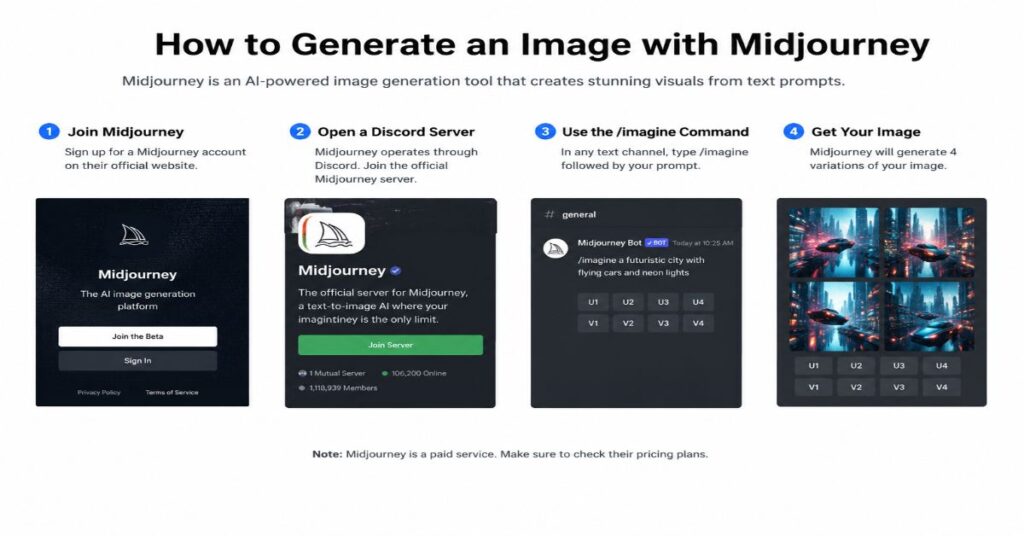
📋 Executive Summary
🖼️ Model: V8.1 is Midjourney’s default model, combining faster generation with separate Standard Definition and High Definition workflows.
⚡ Workflow: Draft Mode can produce 24 low-resolution concepts for approximately 0.4 GPU minutes, making exploration cheaper than repeated full-quality generations.
💳 Pricing: Midjourney plans range from $10 to $120 monthly, but Fast GPU hours, Relax Mode access, Stealth Mode and concurrency limits differ substantially.
✍️ Prompt: Reliable prompts define the subject, environment, composition, lighting, visual medium and technical controls instead of relying on adjective-heavy prose.
🔒 Limits: Midjourney has no public API, and unauthorised automation remains prohibited, limiting unattended production and enterprise integration workflows.
🎯 Decision: Choose a plan and workflow based on generation volume, privacy requirements, revision depth and the need for external editing tools.
I can answer how to generate an image with Midjourney in one line: sign in, open the Create page, write a specific visual brief, submit it, and refine the strongest result. The sharper 2026 hook is that Midjourney V8.1 can now produce a 24-image Draft batch for 0.4 GPU minutes, yet the fastest workflow still depends less on clever adjectives than on making clear visual decisions. A good first prompt identifies what is visible, how it is framed, what medium it resembles, where the light comes from, and what shape the final asset must fit.
This guide explains that process from account choice to export. It covers the current V8.1 web workflow, the Discord route, subscription economics, prompt structure, parameters, image and style references, editing, resolution, commercial rights, and the limits that matter in production. It also separates documented facts from judgement. Midjourney’s own documentation confirms model costs, feature compatibility, plan caps, resolution, and automation rules; where exact visual performance cannot be independently measured without paid generation access, I say so rather than turning a plausible impression into a benchmark.
The central idea is simple. Midjourney works best as an art-direction system, not as a one-shot stock-photo vending machine. The first grid is a conversation starter. Your real work is choosing a direction, changing one variable at a time, preserving what already works, and moving the image into a finishing tool when the job requires precise text, regulated claims, brand-safe layouts, or pixel-level control.
How to Generate an Image with Midjourney
The web workflow is the clearest route for a first image, and it now deserves priority over old Discord-only tutorials. For a slower, interface-by-interface introduction, the site’s Midjourney tutorial for beginners provides useful background. The essential current sequence is shorter:
- Create or sign in to a Midjourney account and select a paid subscription. Midjourney does not currently offer a free trial on its website or through Discord.
- Open the Create page on midjourney.com. The Imagine bar is the main prompt field and the settings control sits beside it.
- Choose the current model and output mode. V8.1 became the default on 10 June 2026, with standard-definition and high-definition output options.
- Write a visual prompt that names the subject, setting, medium, composition, lighting, mood, and any delivery constraint such as aspect ratio.
- Submit the prompt. A normal generation returns a set of candidates, while V8.1 Draft Mode returns 24 lower-resolution square concepts.
- Open the most promising image and use Vary, Remix, Edit, Pan, Zoom Out, or an upscaler depending on what is wrong.
- Download the final image, then add typography, logos, legal copy, or exact brand elements in software designed for layout and compliance.
Discord remains useful for people who prefer slash commands, shared channels, private direct messages, or repeatable parameter syntax. The /imagine command performs the same core task, and settings can be changed with commands or prompt parameters. The practical difference in 2026 is feature availability. V8.1 Draft Mode is currently web-only, while some editing actions in Discord depend on whether an image is standard definition and which model generated it. Beginners should therefore learn the web interface first, then use Discord when command history, community iteration, or server workflows genuinely improve the job.
Choose the Right Interface and Subscription
Subscription choice is not merely a question of how many images you expect to make. It determines whether you have Relax Mode, privacy through Stealth Mode, video resolution, concurrent job capacity, and enough Fast GPU time for deadline work. The current plan structure is best read as four operating profiles: Basic for evaluation, Standard for regular image creation, Pro for private or client-sensitive production, and Mega for heavy teams or individual producers. The magazine’s separate guide to Midjourney pricing and rights expands on the cost model, but the complete official matrix relevant to image generation is below.
| Plan | Monthly | Annual | Fast GPU Time | Relax Image Mode | Video Resolution | Stealth |
| Basic | $10 | $96 ($8/month) | 3.3 hours (200 minutes) | No | SD | No |
| Standard | $30 | $288 ($24/month) | 15 hours | Unlimited images | SD and HD | No |
| Pro | $60 | $576 ($48/month) | 30 hours | Unlimited images | SD and HD | Yes |
| Mega | $120 | $1,152 ($96/month) | 60 hours | Unlimited images | SD and HD | Yes |
| Plan | Concurrent Image Jobs | Concurrent Video Jobs | Repeat/Permutation | Queued Jobs | Extra GPU | Commercial Rule |
| Basic | 3 Fast | 1 Fast | 4 jobs | 10 | $4/hour | General commercial terms |
| Standard | 3 Fast or Relax | 3 Fast | 10 jobs | 10 | $4/hour | General commercial terms |
| Pro | 12 Fast or 3 Relax | 6 Fast or 3 Relax | 40 jobs | 10, with Relax video allowance | $4/hour | Required above $1m company revenue |
| Mega | 12 Fast or 3 Relax | 12 Fast or 3 Relax | 40 jobs | 10, with Relax video allowance | $4/hour | Required above $1m company revenue |
Two hidden economics deserve emphasis. First, annual billing gives a 20 per cent discount, but the full year is paid upfront. Second, unused subscription Fast time does not become a long-term asset, while extra GPU time costs $4 per hour. Standard is usually the rational starting point for a creator who will iterate often because unlimited Relax image generation changes the cost of learning. Pro is not simply “more minutes”; it is the first tier with Stealth Mode and the tier a company above $1 million in annual gross revenue must purchase under Midjourney’s stated commercial terms. Even Stealth should not be confused with a private enterprise deployment. The service is cloud-based, and its community rules still apply to private generations.
Build a Prompt That Gives the Model a Clear Brief
Midjourney prompt engineering is most dependable when it resembles a compact creative brief. Readers comparing the wider market can use the magazine’s best AI image generators guide to see why different systems respond differently to the same level of instruction. For Midjourney, begin with visible facts and delay abstract language until the scene is anchored.
A useful prompt order is subject, action or pose, environment, medium, camera or composition, lighting, colour direction, mood, and parameters. The order is not a formal grammar, but it prevents a common failure: a long sentence that contains ten adjectives and no stable picture. “Premium, innovative, beautiful, futuristic campaign visual” sounds polished but gives the model little spatial information. “Close editorial portrait of a ceramic artist in a north London studio, hands covered in clay, soft window light, 85mm photography, muted terracotta and slate palette, shallow depth of field” creates an inspectable scene.
| Prompt Layer | Question to Answer | Example Language | Typical Failure When Missing |
| Subject | What must appear? | A ceramic artist shaping a bowl | Generic or substituted subject |
| Setting | Where is it? | North London studio with shelves of tools | Empty or incoherent background |
| Medium | What should it resemble? | Editorial photography or gouache illustration | Uncontrolled mixed aesthetic |
| Composition | How is it framed? | Waist-up, eye level, negative space on left | Poor crop or unusable layout |
| Lighting | Where does light come from? | Soft side light from a tall window | Flat or theatrical lighting |
| Mood and Palette | What emotional and colour direction? | Quiet, tactile, terracotta and slate | Default cinematic styling |
| Delivery Constraint | Where will it be used? | Wide web hero, 16:9, no text | Wrong ratio or cluttered subject placement |
Negative instructions belong at the end through the –no parameter, and they work best when they remove categories rather than demand impossible perfection. “–no text, watermark, frame” is clear. A long blacklist of anatomy errors can consume attention without guaranteeing flawless hands. For literal work, Raw mode can reduce Midjourney’s default styling, while a lower Stylize value can make the result follow the brief more closely. For expressive concept art, a higher Stylize value gives the model more interpretive freedom. The goal is not to discover one universal prompt formula. It is to make each phrase responsible for a visible decision.
Run the First Generation in V8.1
V8.1 is the default model as of June 2026 and is the sensible starting point for most new work. Midjourney documents standard jobs as roughly four to five times faster than earlier versions, with improved prompt reading and better retention of small details. Standard-definition V8.1 output costs 0.8 GPU minutes, while native HD output costs 1.3 minutes. A square standard image starts at 1024 by 1024 pixels; a square HD image generates at 2048 by 2048 pixels.
The most important 2026 workflow change is Draft Mode. One V8.1 Draft prompt generates 24 square concepts at 512 by 512 pixels and costs 0.4 GPU minutes. This turns the first generation into a contact sheet rather than a final-image contest. Use it to test viewpoint, composition, subject placement, wardrobe, environment, and broad style. Once a concept works, use Vary or Remix to regenerate it at standard or high definition. Draft Mode is currently available only on the Midjourney website, not in Discord.
That creates a practical three-pass workflow. Pass one explores widely in Draft Mode. Pass two locks the composition and regenerates at standard definition. Pass three uses HD only when the direction is approved and the image needs native 2K detail. This order protects GPU time because high resolution cannot rescue a weak composition. It also prevents the opposite mistake, spending an hour polishing a draft whose subject placement will never fit the final layout.
“AI has made it possible to prototype your ideas in record time without technical knowledge and detail.”
Noah Levin, Vice President of Product Design at Figma, speaking to Business Insider in July 2026.
Levin was discussing product prototypes, but the same discipline applies to image generation. Faster prototypes raise the standard for selection. A 24-image batch is valuable only when the brief contains a clear rejection rule: wrong angle, weak silhouette, no space for copy, inaccurate object, unsuitable mood, or a visual risk the brand cannot accept.
Read the Grid and Iterate Deliberately
A Midjourney grid should be evaluated as evidence, not as a beauty contest. Choose the candidate that solves the communication problem, even when another image looks more spectacular. For editorial work, the strongest image may be the one with a legible silhouette and usable negative space. For product previsualisation, it may be the image that preserves the object’s geometry. For a campaign mood board, atmosphere can matter more than exact detail.
Change one variable at a time. If the pose is correct but the light is wrong, keep the subject and composition language, then alter only the lighting phrase. If the visual style is right but the crop is unusable, change the aspect ratio or camera distance. Remix is designed for this stage because it allows prompt and parameter changes while preserving a relationship to the selected image. Subtle variations protect the overall direction; Strong variations open wider alternatives.
Seeds can support controlled experiments, but they should not be mistaken for permanent reproducibility across model updates, feature combinations, or editing actions. Use a seed when comparing two prompt phrases under similar conditions, not as a contractual guarantee that a future generation will remain identical. Quality settings also require context. In V7, –q 2 and –q 4 spend two or four times the default GPU time, yet the parameter affects the initial image set rather than later upscales or edits. V8.1’s standard and HD modes are a more direct resolution decision for most current work.
“The first prompt is the creative starting point rather than the final destination.”
Dylan Field, Co-founder and Chief Executive Officer of Figma, in Figma’s October 2025 Weave announcement.
That sentence captures the difference between prompting and directing. Keep a simple iteration log with the original brief, the selected image, the exact change, and the result. After five or six rounds, this record becomes more useful than a collection of “magic words” because it shows which decisions actually changed the visual outcome.
Control Composition, Style, and Cost with Parameters
Parameters are compact controls placed at the end of the prompt. They are especially useful when an image must fit a publication slot or a repeatable design system. The magazine’s guide to AI tools for graphic designers provides broader production context, while the table below focuses on Midjourney’s documented controls.
| Control | Syntax | Documented Range or Behaviour | Use It For | Important Constraint |
| Aspect Ratio | –ar W:H | Default 1:1; V8.1 SD up to 14:1; HD up to 4:1 | Editorial, social, banner, portrait formats | Ratio is not the same as exact pixels |
| Stylize | –s value | Changes strength of Midjourney aesthetic | Literal versus expressive interpretation | Higher values may drift from details |
| Raw | –raw | Reduces default styling | Realism and tighter prompt adherence | Still not a precision layout engine |
| Chaos / Variety | –c 0-100 | 0 is default; higher values diversify a batch | Exploration and unexpected compositions | Higher values can weaken prompt consistency |
| No | –no item | Removes named concepts | Text, frames, unwanted objects | Not a guaranteed defect remover |
| Image Weight | –iw | Controls influence of image prompts | Balancing text and visual input | Version behaviour can differ |
| Style Weight | –sw 0-1000 | Default 100 | Strength of Style Reference | Not compatible with Moodboards |
| Personalisation | –p or –p code | Applies a learned profile | Consistent taste across work | Requires an unlocked profile |
| Model Version | –v # | Selects available model version | V8.1 default or V7 compatibility needs | Some features force another model |
| Speed | –fast / –relax / –turbo | Uses plan-specific GPU modes | Deadline versus cost control | Turbo is not currently supported in V8.1 |
| Resolution | –sd / –hd | V8.1 1024px or 2048px square baseline | Approved final generation | HD editing actions can downscale to SD |
Use only parameters that answer a production question. A typical web hero prompt may need –ar 16:9, –raw, and a modest Stylize setting. Adding Chaos, Weird, a Style Reference, Personalisation, a Moodboard, and high Quality at once makes diagnosis difficult. Parameter combinations also create cost and compatibility traps. V8.0 Alpha, for example, multiplied GPU use for certain Style Reference and HD combinations; V8.1 has a different cost model. Treat old prompt recipes as version-specific, and check the current documentation before applying a parameter bundle copied from a 2024 tutorial.
Use Image Prompts, Style References, and Personalisation
Text is only one way to direct Midjourney. Image Prompts can influence content, composition, style, and colour. Style References are narrower: they aim to carry the visual feel of an image, including palette, texture, medium, and lighting, without copying the subject. Moodboards express a broader aesthetic across a curated collection, while Personalisation profiles learn from images you select and apply that taste through –p.
The choice depends on what must remain consistent. Use an Image Prompt when the scene structure or colour balance matters. Use a Style Reference when the subject may change but the treatment should stay related. Use a Moodboard when a campaign needs a family resemblance across varied assets. Use Personalisation when you want a recurring personal or organisational preference applied across prompts. Style Weight runs from 0 to 1000 with a default of 100, but it is not compatible with Moodboards. Moodboards also cannot be used with Style Reference Version or Style Weight controls.
A competitor comparison matters here because reference systems solve different problems. The magazine’s Midjourney and DALL-E comparison highlights the trade-off between art direction and literal instruction following. Midjourney is often selected for visual atmosphere, but it should not be assumed to preserve logos, exact packaging, or counted objects reliably enough for final regulated artwork.
Omni Reference requires special caution. It is designed to carry a person, object, vehicle, or creature into a new image, but it currently runs through V7 rather than V8.1. It costs twice the GPU time of a regular V7 image and is not compatible with Fast Mode, Draft Mode, Conversational Mode, –q 4, or several inpainting and outpainting actions. Only one Omni Reference image can be used. This is a useful character-consistency tool, not a general “lock everything” switch.
“AI should accelerate your vision and creativity, not override it.”
Melanie Perkins, Founder and Chief Executive Officer of Canva, speaking on The Verge’s Decoder podcast in April 2026.
References are therefore best treated as constraints inside a human-led art direction process. A reference can narrow the space of possible outputs, but it does not remove the need to inspect likeness, pose, cultural cues, consent, and brand ownership.
Repair, Extend, and Retexture in the Editor
Once a composition is close, generation should give way to editing. This transition is also central to the magazine’s practical AI stack for content creators because image creation rarely ends at the model output.
Midjourney’s web Editor combines Remix, inpainting through Vary Region or Erase, Pan, and Zoom Out. The full Edit tab adds smart selection, custom aspect ratios, layers, prompt suggestions through Describe, Retexture, and export controls. Pan extends the canvas in a chosen direction. Zoom Out adds context around all sides. Vary Region regenerates a selected area. Retexture changes the surface style while retaining the underlying structure and composition.
Edit in small areas and describe only the change. “Meadow stream” is more useful for an erased trail than a polite paragraph asking the model to transform the whole scene. Large selections provide more context but risk replacing content that already works. Small selections preserve more of the original, although they may not give the model enough room to reconstruct complex geometry. When several parts are wrong, repair them sequentially so each result can be evaluated.
The most consequential bottleneck is model mismatch. V8.1 images can enter the Editor, but current Editor functionality uses V6.1. Editing a native HD image through Pan, Zoom Out, or Vary Region can downscale the result to standard definition, after which an upscale is needed to return to HD. Omni Reference images require additional handling because the reference and –ow parameter must be removed before certain edits. These are not edge cases for professionals; they affect cost, fidelity, and whether a supposedly final 2K asset remains 2K after revision.
For exact typography, logos, pack shots, data visualisation, or accessibility-safe layout, move the image to Photoshop, Affinity, Figma, Illustrator, Canva, or another controlled editor. Midjourney can supply the visual foundation. It should not be asked to perform every downstream design task merely because it produced the first image.
Export at the Right Resolution
Resolution decisions should follow the publication channel. V8.1 standard images begin at a 1024-pixel square baseline, while native HD begins at 2048 pixels. Subtle and Creative upscalers can double standard output dimensions. Subtle aims to preserve the image, while Creative adds new detail and can change features. HD images cannot currently be upscaled further inside Midjourney. Upscaling consumes GPU minutes and can cost twice as much as the initial generation.
| Aspect Ratio | V8.1 Standard | Upscaled or Native HD | Typical Use | Production Note |
| 1:1 | 1024 x 1024 | 2048 x 2048 | Profile, square social, catalogue | Good baseline for general assets |
| 4:3 | 1232 x 928 | 2464 x 1856 | Editorial landscape, presentation | Useful for print-adjacent layouts |
| 2:3 | 896 x 1344 | 1792 x 2688 | Poster, book cover, portrait | Leave room for separate typography |
| 16:9 | 1456 x 816 | 2912 x 1632 | Web hero, video thumbnail, slide | Check safe crop on responsive screens |
| V8.1 Draft | 512 x 512 only | Regenerate selected concept | Exploration | Do not treat as final delivery |
Pixel dimensions are not print quality by themselves. A 2048-pixel square placed at 300 pixels per inch is roughly 6.8 inches wide before any crop. Large-format print, detailed packaging, or close-view exhibition work may require external upscaling and manual retouching. For web, file size, compression, responsive crops, and the location of the focal point can matter more than chasing the largest possible output.
Use the lowest-cost resolution that can answer the next decision. Draft is for composition. Standard definition is for selection and most online work. Native HD is for approved directions that need more detail. An external editor remains the final authority for colour profile, sharpening, text, logo placement, file format, metadata, and platform-specific compression.
Build a Repeatable Production Workflow
Professional Midjourney use is less about writing one perfect prompt and more about creating a controlled chain of decisions. The magazine’s Midjourney versus Stable Diffusion guide is relevant because cloud convenience and pipeline control lead to different operating models.
For an editorial hero, begin with a one-sentence story angle and a layout specification. Generate wide draft concepts, reject anything that merely decorates the topic, then select an image whose visual argument adds information. For a marketing campaign, create a shared moodboard, lock palette and lighting, generate a small number of approved archetypes, and document the prompt, model, references, and exclusions. For a product concept, treat Midjourney as previsualisation unless the product geometry is fictional. Exact pack shapes, safety labels, claims, and trademarks must be rebuilt from controlled source assets.
A robust team handoff includes the brief, final prompt, model version, aspect ratio, parameter string, reference provenance, selected image identifier, edit history, usage context, and reviewer decision. This protects the team from “prompt folklore”, where a colleague can reproduce the words but not the conditions. It also creates an audit trail for consent, disclosure, and commercial review.
“AI isn’t just the future, it’s already delivering real creative value today.”
Shantanu Narayen, then Chair and Chief Executive Officer of Adobe, in a 2025 Bloomberg interview shared by Adobe.
Creative value is not the same as final suitability. A generated concept can reduce the time needed to explore visual directions, but human review still decides whether the image is accurate, original enough for the context, respectful, legally usable, and technically fit for publication. Scientific Reports research published in 2026 surveyed 380 designers and found that receptivity to generative AI tools related to self-perceived creativity through reduced cognitive load and increased cognitive engagement. That result supports structured adoption, not blind delegation.
The highest-leverage practice is to define acceptance criteria before generation. A campaign team can agree that every image must preserve a product silhouette, leave 35 per cent negative space, avoid identifiable public figures, use a documented palette, and survive a mobile crop. Midjourney then becomes one tool in a reviewable system rather than an opaque source of attractive surprises.
Know the Constraints, Rights, and Better Alternatives
Midjourney is strong when the task rewards atmosphere, art direction, rapid visual exploration, and a low-setup cloud workflow. It is a weaker fit when the job requires programmatic generation, confidential local deployment, deterministic geometry, perfect text, exact object counts, traceable model customisation, or a fully private enterprise pipeline. The company’s community guidelines state that it does not provide a public API, does not authorise third-party apps or scripts except rare explicit exceptions, and prohibits automated interaction. Accounts that ignore those rules may be blocked.
Cost is another constraint. Basic has no Relax image generation, Standard and above add unlimited Relax images, and Stealth is limited to Pro and Mega. A reader who needs to learn the general mechanics before paying can review free AI image generator alternatives, but free tiers usually trade away privacy, speed, model access, commercial clarity, or output quality.
Midjourney states that subscribers generally own the images and videos they create, including after cancellation, subject to its terms and limited exceptions. Companies with more than $1 million in annual gross revenue must use Pro or Mega. Ownership language does not eliminate third-party risk. A generated image can still contain a recognisable person, protected character, brand element, misleading scene, or culturally sensitive representation. Commercial teams should review high-risk outputs before publication and maintain the source brief and generation record.
Alternatives should be selected by workflow, not by a universal ranking. Stable Diffusion and related open ecosystems are better when local deployment, model tuning, ControlNet-style structure, and automation matter more than ease. DALL-E inside ChatGPT can be useful for conversational editing and literal instructions. Adobe Firefly may suit teams already governed through Creative Cloud and enterprise brand processes. Dedicated design applications are better for text, grids, charts, packaging, and accessibility. A photography or illustration commission remains the right choice when the work depends on real people, documentary truth, physical products, consent, or a distinctive human authorship that the organisation wants to foreground.
“We’re now in an era where good enough is not enough, it’s merely mediocre.”
Dylan Field, Co-founder and Chief Executive Officer of Figma, in the 2025 Figma Weave announcement.
That is the balanced conclusion for tool choice. Midjourney can raise the floor of visual ideation, but it also makes generic polish abundant. The competitive advantage moves to the brief, the selection standard, the edit, the provenance, and the human point of view.
Our Content Testing Methodology
This guide was verified against Midjourney’s live documentation for Getting Started, V8.1 model behaviour, Draft and Conversational Modes, plans, parameters, upscalers, the Editor, Personalisation, references, community rules, commercial use, and free-trial availability. Pricing and caps were cross-checked against the current plan comparison, including monthly and annual prices, Fast GPU allocations, Relax access, Stealth availability, concurrent jobs, repeat and permutation limits, queues, extra GPU pricing, and the revenue threshold for Pro or Mega.
Technical bottlenecks were treated as compatibility tests on paper rather than inferred from old tutorials. The review traced what happens when a V8.1 HD image enters editing, when V8.1 Draft Mode is attempted through Discord, when Omni Reference is combined with Fast or Draft Mode, when Moodboards are combined with Style Weight, and when a team proposes automated generation. The official documentation identifies each of those constraints. No paid Midjourney image jobs were executed for this article, so visual-quality comparisons are not presented as measured benchmarks and no claim is framed as direct hands-on performance evidence.
Industry context was checked against 2025 and 2026 statements from Melanie Perkins, Noah Levin, Dylan Field, and Shantanu Narayen, plus current research on human-AI creative practice. The cited research included a 2026 Scientific Reports survey of 380 designers and recent peer-reviewed or conference research on generative image interaction and visual marketing. Internal links were selected from indexed Perplexity AI Magazine pages after the sitemap endpoints failed to expose usable XML through the research browser; each selected URL was verified as live and used once in a different body section.
This article was researched and drafted with AI assistance and reviewed by the Sami Ullah Khan editorial desk at Perplexity AI Magazine. All data, citations, pricing figures, and named quotes have been independently verified against primary sources before publication.
Conclusion
Learning how to generate an image with Midjourney is now less about memorising Discord syntax and more about managing a modern visual workflow. V8.1 makes exploration faster, Draft Mode makes broad ideation cheaper, native HD reduces one upscaling step, and the web Editor brings more revision tools into the same environment. Those improvements do not remove the central difficulty: deciding what the image must communicate and recognising when a polished output is still wrong for the job.
The most reliable process begins with a concrete brief, tests composition at low cost, changes one variable at a time, and reserves high resolution for an approved direction. References and Personalisation can improve consistency, but compatibility limits remain. Editing can downscale HD output, Omni Reference still routes through V7, Stealth is plan-limited, and there is no public API for automated production.
Midjourney’s future will probably bring tighter model integration, richer editing, and fewer gaps between generation modes. Open questions remain around provenance, licensing norms, privacy expectations, and how much creative sameness emerges when polished defaults become universal. For now, the system is best understood as a powerful visual collaborator whose output becomes valuable only after human direction, selection, verification, and finishing.
Frequently Asked Questions
How Do I Generate My First Image in Midjourney?
Subscribe, sign in at midjourney.com, open Create, type a visual description into the Imagine bar, and submit it. Start with the subject, setting, medium, composition, lighting, mood, and aspect ratio. Select the best candidate, then use Vary, Remix, Edit, or Upscale.
Can I Use Midjourney for Free in 2026?
Midjourney does not currently offer a free trial on its website or through Discord. A limited trial is available through the niji journey mobile app. The main Midjourney service requires a subscription, with Basic starting at $10 per month.
Is Midjourney Better on the Website or Discord?
The website is easier for beginners and currently has V8.1 Draft Mode, which is not available in Discord. Discord remains useful for slash commands, shared channels, direct messages, and command-based workflows. Many users benefit from learning the web interface first.
What Is the Best Midjourney Prompt Format?
Use a compact visual brief: subject, action, setting, medium, composition, lighting, palette, mood, and delivery ratio. Put parameters at the end. Avoid contradictory adjectives and change one variable per iteration so you can see which instruction affected the result.
What Resolution Does Midjourney V8.1 Produce?
A square V8.1 standard image starts at 1024 by 1024 pixels. Native HD starts at 2048 by 2048 pixels. Other aspect ratios change the exact dimensions. Standard images can use Subtle or Creative upscalers, while native HD images cannot currently be upscaled further inside Midjourney.
Does Midjourney Have an API?
No public API is currently provided. Midjourney’s community guidelines also prohibit unauthorised automation and third-party apps or scripts except rare explicit exceptions. Teams that require programmatic generation should use a service with a documented API and suitable commercial terms.
Can I Use Midjourney Images Commercially?
Midjourney states that subscribers generally own the images and videos they create, subject to its terms. Companies above $1 million in annual gross revenue must use Pro or Mega. Commercial use still requires review for third-party rights, likenesses, trademarks, misleading content, and contractual obligations.
Why Does My Midjourney Image Change During Editing?
Current Editor functionality uses V6.1 even when the source image was generated in V8.1. Pan, Zoom Out, and Vary Region can downscale an HD image to standard definition, and generative editing can reinterpret nearby details. Work in small selections and preserve a copy of the approved source.
References
Midjourney. (2026a). Comparing Midjourney plans.
Midjourney. (2026b). Version.
Midjourney. (2026c). Draft and conversational modes.
Midjourney. (2026d). Parameter list.
Midjourney. (2026e). Community guidelines.
Midjourney. (2026f). Upscalers.
Sheng, Y., et al. (2026). Generative AI tools receptivity promotes designer self-perceived creativity through cognitive resource mechanisms.
Hartmann, J., et al. (2025). Can generative AI create superhuman visual marketing content?
Patel, N. (2026, April 20). Canva’s CEO on its big pivot to AI enterprise software.
