
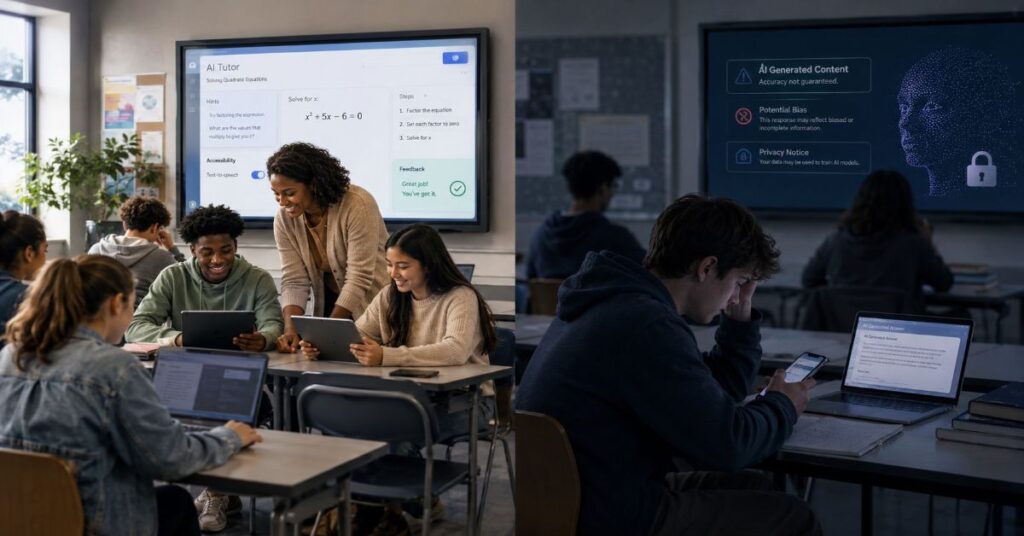
- 1 AI in education pros and cons depend more on pedagogy than model capability.
- 2 Personalised support works best when AI guides reasoning instead of supplying final answers.
- 3 Teacher time savings are real, but every output still needs professional review.
- 4 Current evidence shows better assisted performance, yet mixed learning transfer without AI.
- 5 Privacy, age suitability, access, and assessment rules must be designed before deployment.
- 6 The strongest 2026 strategy uses AI as scaffolding, with human judgement retaining authority.
AI can raise the quality of a student’s assignment while lowering the amount of learning behind it. I examine the AI in education pros and cons through that tension, because polished output is not the same as durable understanding. This article explains where artificial intelligence genuinely improves teaching and learning, where it creates hidden costs, how current education products are priced, and which classroom controls protect critical thinking, accuracy, privacy, and academic integrity. The practical conclusion is direct: AI should expand a learner’s capacity to reason, not become a substitute for reasoning.
The adoption curve is already steep. HEPI’s 2026 survey of 1,054 UK undergraduates found that 95 per cent used AI in at least one way and 94 per cent used generative AI for assessed work. RAND reported that US student use of AI for homework rose from 48 per cent to 62 per cent between May and December 2025. Yet the same RAND study found that 67 per cent believed AI use for schoolwork harmed critical thinking. These figures describe neither a triumph nor a failure. They describe a technology that students have normalised before many institutions have built coherent rules around it.
The most useful way to judge the AI in education pros and cons is therefore not by asking whether a chatbot can produce a correct answer. The better questions are whether the student can explain the answer, challenge it, reproduce the skill without assistance, and recognise when the system is wrong. For teachers and leaders, the test is equally practical: does AI return enough time and instructional value to justify review work, data exposure, licensing cost, and governance risk? The sections that follow answer those questions with current evidence, product documentation, and an implementation model designed for real classrooms rather than demonstrations.
AI in Education Pros and Cons at a Glance
AI in education spans general assistants, curriculum-linked tutors, learning-platform features, accessibility systems, and administrative automation. Readers comparing platforms can use the site’s student AI tool landscape as a market map, but schools should classify each use as tutor, partner, assistant, or authority. Risk rises sharply when AI moves from supporting a task to making a consequential judgement.
The central benefits are personalisation, speed, scale, accessibility, and teacher efficiency. The central risks are cognitive outsourcing, inaccurate information, privacy exposure, unequal access, academic misconduct, and the gradual erosion of human interaction. None of these outcomes is automatic. The same system can strengthen or weaken learning depending on when it enters the task and what the student must still do.
The evidence increasingly separates assisted performance from independent transfer. The OECD Digital Education Outlook 2026 found that general-purpose generative AI can improve the quality of work while access is available, yet those gains may disappear or reverse when students are assessed without the tool. Stanford SCALE’s 2026 review reached a similar conclusion after screening 818 papers and identifying only 20 with sufficiently strong causal evidence for its core findings. Education-specific tools with pedagogical guardrails showed more promise than unconstrained chatbots.
That is why a simple list of AI in education pros and cons can mislead. Personalised learning is a benefit only when adaptation targets a genuine misconception rather than making the task easier. Instant information is useful only when students verify it. Automated feedback saves time only when criteria are correct and the teacher samples outputs. Engagement is valuable only when it produces attention to the subject rather than attention to the interface.
The table below converts the broad debate into operational tests. A school can use it before approving a classroom use case, and a teacher can use it when deciding whether an activity belongs before, during, or after independent thinking.
| Potential benefit | How it helps | Matching risk | Control that preserves learning |
| Personalised learning | Adjusts explanation, pace, examples, and practice | Learner follows an easier path without mastering the concept | Require an unaided checkpoint after AI support |
| Instant information | Reduces search friction and offers rapid orientation | Confident errors or fabricated citations | Verify claims against two suitable sources |
| Teacher efficiency | Drafts plans, rubrics, feedback, and communications | Automation bias and hidden review workload | Use templates, sampling, and final teacher approval |
| Engagement | Creates interactive dialogue, simulations, and games | Novelty replaces sustained attention | Tie interaction to a measurable learning objective |
| Accessibility | Supports translation, reading levels, captions, and formats | Over-simplification or sensitive data exposure | Preserve meaning and use approved accounts |
| Scalable tutoring | Offers help outside class time | Dependence and reduced productive struggle | Use hints first, answers last, and record reasoning |
Personalised Learning Is the Strongest Case for AI
Personalised learning is the most persuasive benefit in the AI in education pros and cons debate because a teacher cannot provide continuous one-to-one support to every learner. A well-designed tutor can vary examples, restate a concept, diagnose an error pattern, translate terminology, and generate additional practice at the moment a student needs it. This responsiveness is especially valuable outside lesson hours and for learners who hesitate to ask questions publicly.
The design detail is crucial. A tutor that asks, ‘What have you tried?’ preserves agency. A tutor that displays the complete solution can remove the very struggle through which understanding develops. Anthropic’s Learning mode, for example, is designed to guide rather than answer, using Socratic questions and prompts about evidence. Khanmigo similarly positions itself as a tutor that helps students discover the answer. In 2026, Khan Academy reported a six-percentage-point improvement during a six-month product testing programme and tracked next-item correctness, response latency, and cognitive engagement rather than conversational satisfaction alone.
That measurement choice offers an important insight not usually captured in product comparisons. The best personalisation metric is not whether the AI answer was helpful. It is whether the learner performs the next comparable task correctly without help. Schools should therefore measure three layers: assisted completion, immediate unaided transfer, and delayed retention. A product may score well on the first and poorly on the other two.
Students can apply the same principle in everyday ChatGPT study workflows. Ask for a hint, analogy, counterexample, or diagnostic question before requesting a solution. Then close the tool and reconstruct the explanation from memory. This sequence turns generative AI into scaffolding. It also makes over-reliance visible, because a learner who cannot reproduce the method has received performance support, not learning.
Personalisation also has limits. Models may misdiagnose a misconception, adapt to a student’s expressed preference rather than the method the subject demands, or simplify difficult material until essential nuance disappears. The teacher remains responsible for deciding what should be easier, what should remain difficult, and when support should be withdrawn.
Teacher Efficiency: Real Savings, New Review Work
Teacher efficiency is the clearest institutional benefit. AI can produce a first draft of a lesson sequence, differentiate reading passages, generate low-stakes quizzes, convert notes into a rubric, summarise meeting records, draft routine correspondence, and suggest examples for mixed-attainment classes. The OECD reported that 57 per cent of lower-secondary teachers agreed AI helped write or improve lesson plans. OpenAI’s May 2026 education update also reported that surveyed educators in Slovakia saved around five hours per week, although this vendor-reported result should not be generalised to every school or workflow.
The saving is never equal to the generation time. A thirty-second draft may require ten minutes of checking for curriculum alignment, factual accuracy, tone, safeguarding, accessibility, and unintended bias. The relevant measure is net time saved after review. Schools should record that figure during pilots rather than relying on demonstrations. An AI tool that produces attractive but unreliable materials can shift work from creation to correction without reducing total workload.
A reproducible workflow starts with a locked template. The teacher defines age group, learning objective, prior knowledge, required standard, prohibited content, source material, and output format. The AI generates a draft. The teacher then checks every factual claim, samples answer keys, verifies reading level, reviews accommodations, and edits the final version. High-stakes feedback should be compared against anonymised exemplars before classroom use.
Google’s education ecosystem illustrates how these functions are moving into familiar software. Gemini for Education and NotebookLM are available at no cost to eligible institutions, while paid Workspace editions add deeper integration across Gmail, Docs, Drive, Sheets, Slides, Meet, Forms, Vids, and other applications. The site’s Google Gemini workflow guide explains the general interface, but school leaders should focus on admin controls, retention, and data boundaries as much as generation quality.
The bottleneck is often not model speed but organisational readiness. Inconsistent prompts, scattered accounts, unclear approval rules, and weak document versioning create more friction than the AI removes. Teacher efficiency improves when institutions standardise safe templates and review routines, not when they merely buy licences.
Engagement, Accessibility, and the Human Relationship
AI can make learning more interactive by turning a static explanation into dialogue. Students can ask follow-up questions, request examples connected to their interests, practise a language without embarrassment, simulate a debate, or receive immediate feedback. For reserved learners, an always-available assistant can lower the social cost of asking for clarification. For students with accessibility needs, AI can adjust reading level, generate captions, describe images, translate text, and convert material into alternative formats.
Interactive design also supports retrieval practice. A model can quiz a student, vary difficulty, revisit missed concepts, and explain why an answer is wrong. Classroom systems such as the Gimkit classroom guide show how game mechanics, live questions, and rapid feedback can increase participation. The educational value comes from the quality of the questions and discussion that follow, not from points, animations, or screen time by themselves.
The risk is that engagement becomes a proxy for learning. A student may spend twenty energetic minutes interacting with a chatbot while avoiding the slower work of reading, writing, calculating, or discussing with peers. Interfaces are optimised to continue interaction, while education sometimes requires silence, uncertainty, and delayed feedback. Schools should therefore distinguish behavioural engagement, which means visible activity, from cognitive engagement, which means explaining, connecting, testing, and revising ideas.
Human relationships remain a non-transferable part of education. Teachers notice frustration, confidence, humour, avoidance, and social dynamics that a model may misread or never see. They also make value judgements about when to challenge a learner and when to support them. AI can offer patience at scale, but it cannot assume pastoral responsibility or professional duty of care.
A balanced classroom pattern uses AI in short, purposeful intervals. Students might work independently, consult an AI tutor for one hint, compare responses with a peer, and then explain the final reasoning to the teacher. This keeps the technology inside a social learning process. The aim is not maximum interaction with AI. It is better interaction among the student, the subject, the teacher, and other learners.
Accuracy Problems and How Students Should Fact-Check AI
Generative AI predicts plausible outputs. It does not possess a built-in obligation to tell the truth, and fluent language can conceal factual error. In education, the most dangerous mistakes are often not absurd hallucinations but small distortions: a quotation with the wrong wording, a real paper with an invented finding, a correct formula applied to the wrong condition, or a historical explanation that removes disagreement. Students may not recognise these errors because they are still learning the domain.
Fact-checking should therefore be taught as a workflow, not a warning. First, separate the response into claims that can be tested. Second, identify which claims require primary evidence. Third, open the cited source and confirm that it exists, supports the statement, and is current enough for the task. Fourth, compare the claim with an independent authoritative source. Fifth, record uncertainty instead of forcing a confident conclusion. A citation is not proof unless the student has inspected it.
A useful classroom rule is source before synthesis. Students collect and read suitable material first, then use AI to compare, organise, question, or explain it. This reduces the chance that the model defines the evidence base. For writing support, the site’s AI paraphrasing tool guide is best treated as an editing aid after the student has established meaning and ownership. Paraphrasing software can change surface language while preserving an error, weakening a qualification, or obscuring who made the original claim.
Teachers can make verification assessable. Require a claim ledger with four columns: AI claim, checked source, result, and correction. Ask students to submit one example where the AI was wrong or incomplete. In science and mathematics, ask them to test boundary conditions. In humanities, require a competing interpretation. In every subject, distinguish direct quotation, paraphrase, and inference.
The information-gain insight is that verification has a cost that should be budgeted. We call this a traceability budget: the minutes available to check each generated claim. If a task creates more claims than the learner or teacher can responsibly verify, the workflow is too broad. Reducing the AI’s scope often improves reliability more than adding another prompt.
Critical Thinking, Over-Reliance, and Productive Struggle
The most serious disadvantage in the AI in education pros and cons debate is cognitive outsourcing. Students can delegate searching, outlining, explanation, drafting, calculation, and evaluation to the same interface. Each individual shortcut seems minor, but the combined effect can remove the chain of decisions through which expertise develops. A learner may submit competent work without building a mental model of how it was produced.
The 2026 evidence is cautionary. RAND found that 67 per cent of surveyed students believed AI for schoolwork harmed critical thinking. OECD analysis described a risk of metacognitive laziness when general-purpose systems improve task performance without producing learning gains. Stanford SCALE found that independent transfer was mixed once AI access was removed. These findings do not prove that AI always weakens thought. They show that the mode of use matters more than the presence of the tool.
Andreas Schleicher, OECD Director for Education and Skills, argued that students must have ‘learned to think before they prompt’. Heather Schwartz of RAND framed the institutional challenge as helping students use AI in ways that ‘deepen, rather than erode, their critical thinking’. Both statements point towards sequencing. Independent effort should normally precede AI assistance, and reflection should follow it.
A practical method is Attempt, Ask, Audit, Articulate. The student first attempts the problem and marks uncertainty. The student then asks AI for a hint, critique, or alternative. Next, the student audits the response against evidence and the original work. Finally, the student articulates the conclusion without the tool. Teachers can assess the attempt and audit trail, not only the final answer.
AI in Education Pros and Cons by Learning Task
AI is most supportive when it adds friction in the right place. Ask it to challenge an argument, generate a plausible misconception, or withhold the next step until the learner explains the previous one. Avoid using it to produce the first complete answer to a task designed to teach planning, reasoning, or expression. Productive struggle is not inefficiency. It is often the mechanism of learning.
Academic Integrity and Assessment Must Change Together
AI has made authorship harder to infer from a final document. Detection tools remain probabilistic, model outputs can be edited, and human writing can be falsely flagged. A percentage score should never be treated as proof of misconduct. The more defensible response is assessment design that captures process, oral explanation, source use, drafts, and decision-making.
HEPI’s 2026 survey found that 94 per cent of UK undergraduates used generative AI for assessed work, while 12 per cent directly included AI-generated text, up from 8 per cent in 2025 and 3 per cent in 2024. It also found that 65 per cent believed assessment had changed substantially. These results suggest that blanket prohibition is increasingly difficult to enforce and may obscure legitimate uses such as brainstorming, feedback, translation, or accessibility support.
Institutions need assessment-specific rules. An assignment should state which uses are permitted, which must be disclosed, and which are prohibited. A useful taxonomy is green for support, amber for transformation, and red for substitution. Green might include spelling feedback or practice questions. Amber might include structural suggestions or code debugging, with disclosure. Red includes generating the submitted answer, fabricating sources, or using AI during a closed assessment.
Students looking for ethical AI essay tools should be taught that ‘ethical’ describes the workflow, not the product. An essay tool is safer when it helps analyse a question, challenge a thesis, or identify gaps after the student has read the sources. It becomes academically corrosive when it supplies prose that the student presents as personal intellectual work.
Assessment can also use AI as an object of critique. Give students a model response containing subtle errors and ask them to annotate it. Require an oral defence of the final submission. Compare an AI-generated outline with a student-generated one. Ask for a revision memo explaining which suggestions were accepted and rejected. These formats make judgement visible and reduce the value of hidden automation without pretending the technology is absent.
AI Detection Is Evidence, Not a Verdict
AI detection occupies an uncomfortable place in the AI in education pros and cons discussion. Schools want a scalable response to undisclosed machine-generated work, but detectors infer statistical patterns rather than observe authorship. A score can be affected by editing, language proficiency, formulaic academic style, short samples, and the detector’s training data. False positives can damage trust and place a disproportionate burden on multilingual students or those who write in highly structured forms.
The safer position is to treat detection as one weak signal inside a broader review. The site’s AI detector comparison guide explains feature differences among current products, but procurement should focus on due process. Can a teacher see the passages that contributed to the score? Does the vendor publish threshold guidance and known limitations? Can the student challenge the result? Is the original text retained, and for how long? Is the tool approved to process student work?
A defensible academic integrity review combines version history, notes, citations, the student’s prior work, an oral conversation, and the assignment’s AI rules. Teachers should ask the student to explain an argument, locate a source, or reconstruct a paragraph’s development. The goal is not to force a confession. It is to determine whether the submitted work represents the student’s knowledge and authorised assistance.
Detection can be more useful at aggregate level. A department may use anonymised trends to identify assignments that invite substitution, modules where rules are unclear, or cohorts needing AI literacy support. It is less reliable as an automatic individual sanction. High-stakes decisions should never be triggered by a detector alone.
There is also a strategic risk: an arms race between generators and detectors can divert attention from better assessment. Process evidence, staged deadlines, personalised prompts, in-class components, and oral defence are harder to automate invisibly and usually improve learning even when no misconduct occurs. The strongest integrity system is not the one that catches the most students. It is the one that makes genuine authorship easier to demonstrate.
Student Privacy and K-12 Governance
Privacy risk increases when AI systems process detailed conversations, learning difficulties, behaviour, disability information, grades, identifiers, voice, images, or emotional disclosures. In K-12 settings, children may not understand what data they are revealing or how long it may persist. A teacher using a personal consumer account can unintentionally move student information outside the institution’s approved environment.
The governance baseline is data minimisation. Do not enter names, contact details, medical information, safeguarding records, individual education plans, unpublished assessment data, or identifiable student work unless the institution has explicitly approved that processing. Use education or enterprise accounts with contractual protections, role-based access, retention controls, and admin oversight. Schools should complete a data protection impact assessment when new technology is likely to create high risk, following applicable law and regulator guidance.
UNESCO’s updated guidance calls for privacy protection and age-appropriate use. Andreas Schleicher put the principle starkly in 2026: children’s data is ‘DNA to be protected’. For UK schools, the ICO’s UK GDPR guidance requires purpose limitation, fairness, transparency, security, and a lawful basis. In the United States, FERPA and other federal or state rules govern educational records, while COPPA may apply to services directed at children under 13.
Procurement questions should be specific. Does the vendor train models on prompts or outputs? Are education-workspace data and consumer data treated differently? Where is data stored? Which subprocessors receive it? Can administrators delete accounts and conversations? Are logs available? Does single sign-on disable personal accounts? What happens when a student leaves? Are model improvements, web search, plugins, or third-party connectors enabled by default?
The deeper insight is that the privacy boundary should follow the data type, not the product name. Even a reputable tool becomes unsafe when sensitive information is pasted into the wrong account. Conversely, a properly contracted system can support low-risk tasks when identifiers are removed. Governance should therefore classify data before classifying tools.
Equity, Future Jobs, and the New AI Literacy Divide
AI can widen access to explanations, language support, tutoring, and assistive formats. It can also widen inequality when better-resourced students receive paid models, faster devices, reliable connectivity, and expert guidance while others use limited free tiers without supervision. The new divide is not merely access to AI. It is access to high-quality AI, subject knowledge, verification skills, and adults who can teach responsible use.
HEPI found that 68 per cent of surveyed students considered AI skills essential, but only 48 per cent felt teaching staff were helping them develop those skills for future careers. Charlotte Armstrong, HEPI Policy Manager, concluded that ‘AI literacy and capability must be embedded across the curriculum’. That does not mean every lesson needs a chatbot. It means students should understand model limitations, data use, bias, verification, disclosure, intellectual property, and when human judgement must prevail.
Job-security anxiety is rational but often framed too simply. AI is likely to automate tasks within occupations faster than it eliminates whole professions. Education should therefore prepare students to decompose work, verify machine output, communicate with humans, and retain domain expertise. A computer science student who can generate code but cannot test, secure, explain, or maintain it is not job-ready. The same applies to law, design, finance, medicine, and teaching.
Cost transparency matters. Students may see offers such as the site’s Perplexity student access guide, but institutions should avoid building compulsory coursework around a paid tier that some learners cannot afford. Where a tool is necessary, the institution should provide access or an equivalent alternative. Course teams should also test whether free and paid accounts produce materially different results.
Laura Kalda, COO of Estonia’s AI Leap, said new tools could support personalised learning while ‘strengthening critical thinking, independent learning, and the role of teachers’. That balance should define employability education. Students need confidence with AI, but also the capacity to perform when it is unavailable, inappropriate, or wrong.
Education AI Features, Pricing, Limits, and Integrations
Education pricing bundles licences, security, support, storage, model access, and volume terms. The matrix reflects vendor information checked on 17 June 2026. Taxes, regions, promotions, and contracts vary. ChatGPT Edu and Claude for Education publish no universal seat price, so both are correctly shown as sales-quoted.
The relevant education features are broader than chat. ChatGPT Edu adds campus administration and advanced tools. Gemini combines NotebookLM, Classroom, and Workspace applications. Claude offers Learning mode, Projects, and education integrations. Khanmigo connects guided tutoring with Khan Academy content. Perplexity focuses on cited research and academic discovery.
Technical limits can change by model, demand, account, and administrator setting. Consumer subscriptions do not automatically include education-grade terms. APIs are normally billed separately. Long documents may need retrieval or chunking, scanned files can introduce OCR errors, and connectors inherit the linked user’s permissions.
Procurement teams should obtain written terms for model access, usage caps, context size, retention, hosting, support, accessibility, security, incident notification, subprocessors, export, deletion, and exit. Operational restrictions matter too: teacher plans may exclude students, learner plans may be country-limited, and low-cost school plans may use fixed terms or card-only payment.
| Platform or plan | Public price on 17 June 2026 | Education-facing features | Important limits and integrations |
| ChatGPT for Teachers / Edu | $0 for verified US K-12 teachers to June 2027; Edu quote. Consumer Go $8, Plus $20, Pro $200 monthly. | Files, analysis, research, custom assistants, administration. | Teacher plan excludes students; Edu caps contractual; API separate. |
| Gemini for Education / AI Pro | Core Gemini and NotebookLM: $0. AI Pro: $20 annual-commitment monthly rate or $24 monthly; page shows a $15 promotion. | Classroom, NotebookLM, premium models, Gmail, Docs, Drive, Sheets, Slides, Meet, Forms, Vids. | Region and promotion vary; security depends on edition; developer services separate. |
| Claude for Education / Pro | Education quote. Pro: $20 monthly or $17 monthly equivalent annually. | Learning mode, Projects, research, Canvas, planned Panopto and Wiley links. | Education caps unpublished; model usage varies; API separate unless contracted. |
| Khanmigo | $4 monthly learner or parent, US-only; teacher tools free; Enterprise Starter $10 per student yearly below 1,000 licences. | Guided tutoring, Khan content, writing coach, teacher tools, reporting, moderation, SSO. | Under-18 access needs parent or school; Starter uses fixed terms and card payment. |
| Perplexity Pro / Education | Pro: $17 monthly when billed annually; education enterprise quote. | Cited answers, deep research, academic discovery, Wiley integration. | Education price not standardised; API usage is separate. |
A Step-by-Step Implementation Workflow for Schools
Responsible adoption begins before anyone opens a chatbot. The first step is to define the learning or workload problem in measurable terms. ‘Use AI in Year 9 science’ is not a use case. ‘Reduce teacher time spent creating three reading-level versions of the same worksheet without increasing factual errors’ is. A narrow objective makes benefits and failures observable.
Second, classify the task by cognitive demand, data sensitivity, and consequence. Low-risk examples include generating anonymous practice questions. Medium-risk examples include feedback on drafts. High-risk examples include grading, placement, discipline, safeguarding, or special educational needs decisions. Higher risk requires stronger evidence, approval, monitoring, and human control.
Third, select the account and contract before selecting prompts. Confirm age eligibility, privacy terms, training use, retention, admin access, integrations, and exit procedures. Fourth, build a small pilot with representative teachers and students. Use real curriculum material but anonymise personal data. Establish a comparison group or baseline where possible.
Fifth, create a standard interaction pattern. Students attempt before asking. The AI gives hints before answers. Claims require sources. Final work includes an AI-use disclosure. Teachers review samples and record corrections. Sixth, redesign assessment so that process evidence, oral explanation, and unaided transfer matter.
Seventh, monitor a balanced scorecard. Track net teacher minutes saved, student completion, next-task correctness without AI, delayed retention, factual error rate, review time, accessibility outcomes, complaints, policy breaches, and unequal access. Latency should also be measured because slow responses interrupt attention, while instant complete answers may remove reflection. This makes response speed a pedagogical variable, not only a technical metric.
Finally, define stop conditions. Pause the pilot if sensitive data is exposed, errors exceed the review capacity, students cannot reproduce skills independently, or the vendor changes terms materially. A rollback path should preserve teaching continuity and export necessary records. Adoption is not a one-way door.
| Stage | Required action | Evidence to collect | Common bottleneck |
| 1. Define | State one learning or workload outcome | Baseline time, quality, and attainment | Vague goals framed around the tool |
| 2. Classify | Rate cognitive, privacy, and consequence risk | Approved use category and owner | High-risk use hidden inside a convenient feature |
| 3. Contract | Check terms, retention, access, and exit | DPIA, security review, data map | Consumer accounts used for institutional work |
| 4. Pilot | Test a narrow cohort and curriculum area | Error logs, user feedback, comparison data | Novelty effects and weak baseline |
| 5. Teach | Use attempt, hint, verification, and disclosure | Student reasoning trail | Prompts that request complete answers |
| 6. Assess | Capture process and unaided transfer | Oral defence, drafts, delayed quiz | Final-product grading only |
| 7. Monitor | Review benefits, harms, equity, and cost | Balanced scorecard | Counting usage instead of learning |
| 8. Exit | Set pause and rollback conditions | Export, deletion, continuity plan | Vendor lock-in and lost records |
The Balanced Verdict by Age and Use Case
The balanced verdict is not a universal yes or no. AI use should become more open as learners develop subject knowledge, self-regulation, and the ability to recognise uncertainty. Younger children need tighter guardrails, shorter interactions, stronger content filters, and direct adult oversight. Older students can use broader tools, but high-stakes work still requires disclosure, verification, and assessment design that protects authorship.
For primary learners, the strongest uses are teacher-mediated explanations, accessibility support, and carefully designed tutoring linked to trusted content. Open-ended emotional companionship, unrestricted web-connected chat, and collection of personal data are poor fits. For secondary students, guided practice, feedback, debate simulation, and research orientation can be useful when independent attempts come first. For university students, AI can support literature mapping, coding, analysis, and critique, but disciplinary methods and citation standards remain non-negotiable.
Teacher-facing use is generally easier to justify than student-facing automation because a professional can review output before it reaches a learner. Administrative use can also be valuable, but decisions that affect rights or opportunities should not be delegated. In every setting, the AI in education pros and cons depend on who controls the interaction, what data enters the system, and whether the human user can detect failure.
The most defensible institutional position in 2026 is strategic permission. Approve defined uses, provide approved accounts, teach AI literacy, require disclosure, preserve non-AI routes, and prohibit autonomous high-stakes decisions. This is more realistic than prohibition and more responsible than unrestricted adoption.
| Context | High-value uses | Uses requiring strong caution | Minimum safeguard |
| Primary school | Teacher-created materials, accessibility, guided tutoring | Open-ended chat, emotional support, personal data entry | Adult mediation and approved child-safe account |
| Secondary school | Hints, quizzes, debate, feedback, research orientation | Complete homework answers, hidden drafting, automated grading | Attempt first, source checking, disclosure |
| Higher education | Literature mapping, coding support, critique, data analysis | Fabricated citations, undisclosed prose, method substitution | Discipline-specific policy and oral defence |
| Teacher workflow | Planning, differentiation, routine communication, resource drafts | Unreviewed answer keys, sensitive records in consumer tools | Professional review and secure workspace |
| Institutional decisions | Trend analysis and low-risk administration | Discipline, admissions, SEN placement, safeguarding decisions | Named human authority and appeal process |
Takeaways
● Judge AI by unaided transfer and delayed retention, not the polish of AI-assisted work.
● Require students to attempt, verify, and explain before accepting an AI-supported answer.
● Measure net teacher time saved after review, correction, and curriculum alignment.
● Use education-grade accounts and classify data before approving any tool or connector.
● Treat AI detector scores as weak evidence and preserve a fair appeal process.
● Provide institution-funded access when a paid AI capability is required for coursework.
● Redesign assessment around drafts, reasoning trails, oral defence, and source inspection.
● Set pause conditions and a rollback plan before a pilot becomes routine practice.
Conclusion
The AI in education pros and cons are now visible enough to reject both hype and panic. Artificial intelligence can give learners immediate explanations, personalised practice, accessible formats, and new ways to test ideas. It can return valuable planning time to teachers and extend support beyond the school day. Those benefits are meaningful, particularly where human attention is scarce.
The risks are equally concrete. General-purpose systems can produce confident errors, invite cognitive outsourcing, blur authorship, collect sensitive data, and widen gaps between students who receive guidance and those who receive only access. Current evidence repeatedly shows that better performance with AI does not guarantee learning that survives without it.
The decisive design choice is therefore where the tool sits in the learning sequence. AI is strongest after an initial attempt, during guided feedback, and before independent articulation. It is weakest when it supplies the first and final answer to a task whose purpose is thought. Teachers should retain authority, students should retain ownership, and institutions should retain the ability to audit, pause, and exit.
Open questions remain about long-term cognitive development, emotional effects, bias, labour-market change, and which tutoring designs produce durable gains across different ages and subjects. A balanced approach does not wait for perfect evidence, but it treats every deployment as a testable educational intervention rather than an inevitable software upgrade.
Frequently Asked Questions
What are the main pros and cons of AI in education?
The main benefits are personalised support, rapid feedback, accessibility, scalable tutoring, and reduced teacher administration. The main risks are inaccurate information, over-reliance, weaker critical thinking, privacy exposure, academic misconduct, bias, unequal access, and reduced human interaction. Outcomes depend on the task, age group, account protections, and whether students still demonstrate independent learning.
Can AI improve student learning outcomes?
AI can improve performance while students use it, especially for practice, feedback, coding, and structured tutoring. Evidence for durable learning is more mixed. Education-specific systems that guide reasoning tend to show more promise than general chatbots that provide complete answers. Schools should test unaided transfer and delayed retention rather than relying on completion rates or student satisfaction.
Does AI reduce critical thinking in students?
It can when students outsource searching, planning, evaluation, or writing before attempting the task. It can also strengthen critical thinking when used to challenge arguments, generate counterexamples, expose misconceptions, and support verification. The safest sequence is independent attempt, limited AI assistance, source checking, and unaided explanation.
How should students fact-check AI-generated information?
Break the answer into testable claims, locate primary or authoritative sources, confirm that each citation exists, compare the claim with an independent source, and record uncertainty. Students should inspect the source itself rather than trust a linked title. Teachers can require a claim ledger showing what was checked and corrected.
What student data should never be entered into public AI tools?
Do not enter names, contact details, medical or disability information, safeguarding records, grades, individual education plans, identifiable work, or private family information into unapproved consumer tools. Use institution-approved accounts, minimise data, remove identifiers, and follow applicable privacy law and school policy.
Will AI replace teachers?
AI is more likely to automate parts of teaching than replace the profession. It can draft materials, generate practice, and assist with routine communication, but teachers provide judgement, motivation, safeguarding, relationships, curriculum decisions, and accountability. The strongest systems reinforce the teacher’s role rather than making autonomous high-stakes decisions.
How can teachers use AI without increasing workload?
Start with repetitive, low-risk tasks and fixed templates. Measure net time after review, not generation speed. Reuse approved prompts, limit the scope of outputs, sample-check answer keys, and store final materials in a controlled workflow. Stop using a feature when correction time exceeds the time it saves.
What is the best policy for AI use in schools?
Use strategic permission: define approved, conditional, and prohibited uses; provide secure accounts; teach AI literacy; require disclosure; protect non-AI alternatives; redesign assessment; and preserve human authority for consequential decisions. Policies should be specific to age, subject, assessment, and data type, then reviewed as evidence and products change.
References
Anthropic. (2025, April 2). Introducing Claude for Education. https://www.anthropic.com/news/introducing-claude-for-education
Fesler, L., Martinez, J., Agnew, C., & Loeb, S. (2026). The evidence base on AI in K-12: A 2026 review. Stanford University SCALE Initiative. https://scale.stanford.edu/sites/default/files/The%20Evidence%20Base%20on%20AI%20in%20K-12%20Report.pdf
Higher Education Policy Institute. (2026, March 12). Student generative artificial intelligence survey 2026. https://www.hepi.ac.uk/reports/student-generative-ai-survey-2026/
Khan Academy. (2026, May 1). How Khan Academy is building a better AI tutor: Our most recent learnings. https://blog.khanacademy.org/how-khan-academy-is-building-a-better-ai-tutor-our-most-recent-learnings/
OECD. (2026). OECD Digital Education Outlook 2026: Exploring effective uses of generative AI in education. OECD Publishing. https://doi.org/10.1787/062a7394-en
OpenAI. (2026, May 20). The next phase of OpenAI’s Education for Countries. https://openai.com/index/the-next-phase-of-education-for-countries/
RAND Corporation. (2026, March 17). Student use of AI for homework rises as concerns grow about critical thinking skills. https://www.rand.org/news/press/2026/03/student-use-of-ai-for-homework-rises-as-concerns-grow.html
UNESCO. (2026, January 16). Guidance for generative AI in education and research. https://www.unesco.org/en/articles/guidance-generative-ai-education-and-research
Google for Education. (2026). Compare Google Workspace for Education editions. https://edu.google.com/workspace-for-education/editions/compare-editions/
