
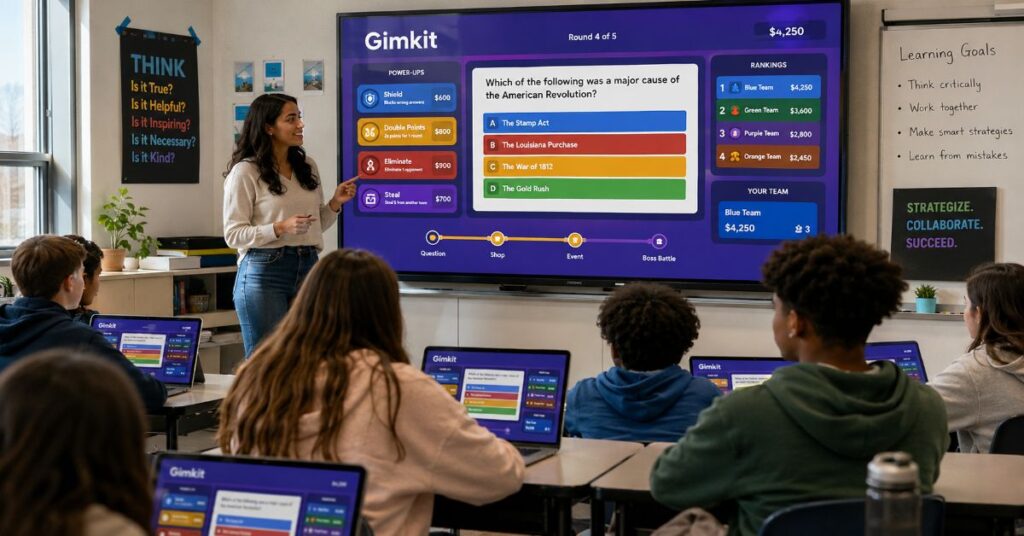
Gimkit is a web-based educational game platform that lets teachers run interactive quiz-style games for classroom review, homework practice and student engagement. Students join a game with a code, answer questions on their own devices and earn virtual money that can be spent on upgrades, power-ups or strategic advantages depending on the mode.
That sounds simple, but Gimkit’s classroom appeal comes from a deeper design choice: it does not treat quizzes as static tests. It turns recall into a loop. Students answer, earn, spend, adjust and compete. For teachers, the platform offers kits, live games, asynchronous assignments, reports and multiple game modes that can make review feel less like a worksheet and more like a structured classroom event.
Created in 2017 by Joshua Feinsilber while he was a high school student in Washington, Gimkit sits in the same broad category as Kahoot, Quizizz and Blooket. Its difference is economic gameplay. Correct answers do not merely move a score upward. They create in-game currency that students can invest, waste, save or use strategically.
That design is why teachers like it. It is also why teachers need to manage it carefully. Gimkit can raise energy, participation and recall. It can also reward speed over depth when a lesson is poorly structured. The best use is not “play a game because students are bored.” The best use is targeted review, immediate feedback and short formative checks where the teacher already knows the learning goal.
What Gimkit Is and How It Works
At its core, Gimkit is built around “kits.” A kit is a question set. Teachers can create a kit from scratch, import content from a spreadsheet, copy existing material or bring in flashcard-style terms and definitions. Once the kit exists, the teacher chooses how students will play it.
A live game follows a familiar classroom flow. The teacher selects a kit, chooses a game mode, configures game options, shares a code or join link and starts the session. Students join from their devices. The teacher can project the lobby, monitor names, manage the room and end the game when the time limit or chosen goal is reached.
The student experience is intentionally fast. A question appears. The student chooses an answer. Correct answers generate in-game money or progress. Incorrect answers slow the student down, reduce earnings or force another attempt. The game layer makes repetition feel less repetitive.
The teacher experience is more operational. Teachers decide the kit quality, the game length, whether students play individually or in teams, whether names need moderation and how the report will be used afterward. Gimkit is easy to start, but good classroom use still depends on teacher judgment.
The platform supports three major learning situations:
| Use case | How Gimkit is used | Best classroom fit |
| Live review | Whole class joins with a code and plays together | End of lesson, test review, warm-up activity |
| Independent practice | Students complete work outside live class | Homework, remote learning, make-up practice |
| Formative assessment | Teacher checks question-level and student-level performance | Identifying misconceptions before reteaching |
| Student-created review | Students help create questions through collaborative workflows | Peer review, vocabulary work, exam preparation |
| Practice without grades | Students use practice links for low-pressure repetition | Skill-building, vocabulary drilling, recall practice |
This makes the platform flexible, but it is still strongest in one area: retrieval practice. It helps students pull information from memory repeatedly. That is valuable when the material is well chosen.
Why Teachers Use Gimkit
Teachers use Gimkit because it solves a real classroom problem: review is necessary, but review often feels dull. A class may need twenty minutes of vocabulary practice, equation checks, historical date review or science term reinforcement. The teacher could use a worksheet. The students may comply, but energy can collapse.
Gimkit changes the social environment. A review set becomes a shared event. Students see progress. They make small decisions. They react to the leaderboard or game mechanics. Even students who normally dislike quizzes may engage because the quiz is wrapped inside a game.
The strongest educational benefit is not entertainment. It is repetition with feedback. A student who misses a question can see the correct answer, encounter the concept again and try to recover. That loop can help with memory when the kit is aligned to the lesson.
There is also a diagnostic benefit for teachers. Reports can show student overview data, general overview data and question breakdowns. That matters because a game with high energy is only instructionally useful if the teacher uses the result. If half the class misses the same question, that is not just a score. It is a reteaching signal.
The platform also lowers the setup barrier. Teachers do not need to code a game. They need a question set, a class and a clear purpose. This makes it practical for busy classrooms.
Gimkit Features Teachers Should Understand
Gimkit’s feature set is broad enough that new users can miss the difference between what is fun and what is instructionally important. The core features fall into six buckets.
| Feature area | What it does | Why it matters |
| Kits | Question sets created, copied or imported by teachers | The quality of the kit determines learning quality |
| Live games | Students play together with a game code or join link | Useful for synchronous classroom review |
| Game modes | Different rule systems and classroom formats | Adds variety, but can distract if poorly chosen |
| Assignments | Student-paced play from anywhere | Useful for homework and remote practice |
| Reports | Class, student and question-level data | Turns play into formative assessment |
| Classes | Rostering and cleaner classroom management | Helps teachers organize repeated use |
The feature that deserves the most attention is reports. A teacher can run an exciting session and still get little value if no one reviews the data afterward. Reports help answer practical questions:
Which question did most students miss?
Which students need another pass at the concept?
Did the class improve after reteaching?
Was the kit too easy, too hard or badly worded?
Were students guessing quickly instead of thinking?
Those questions are more important than the final winner. The winner tells the class who played well. The report tells the teacher what to do next.
Gimkit Game Modes Explained
Gimkit’s game modes are one of its main attractions. The platform has included modes such as Classic, Team Mode, The Floor is Lava, Humans vs. Zombies, Boss Battle, Infinity Mode, Trust No One and Draw That. Modes change how students compete, collaborate or move through the experience.
Classic mode is the easiest starting point. Students answer questions, earn currency and compete in a familiar format. Team-based modes can shift the emphasis toward collaboration. 2D modes make the game feel more like a small digital world, which can raise engagement but may require more classroom management.
The choice of mode should follow the learning goal. A vocabulary review may work well in a fast individual mode. A unit review before a major test may benefit from teams because students can discuss ideas. A younger class may enjoy visual modes, but a teacher may need stricter time limits to keep attention on the questions.
| Game mode type | Best for | Risk |
| Classic quiz competition | Fast review and low setup | Can over-reward speed |
| Team mode | Collaboration and peer support | Strong students may carry the group |
| 2D modes | High engagement and novelty | More classroom noise and distraction |
| Strategy modes | Longer review sessions | Students may focus on strategy over content |
| Drawing or creative modes | Visual recall and concept association | Less useful for factual precision |
The practical rule is simple: choose the quietest mode that still achieves the engagement goal. Not every lesson needs maximum excitement.
Gimkit Basic vs Gimkit Pro
Gimkit Basic is the free version. It allows teachers to use featured modes, set up classes and collect reports. This is enough for many teachers who only need occasional live classroom review.
Gimkit Pro is the paid version. It adds unrestricted access to all game modes, Pro Exclusive modes, assignments, image uploads and audio questions. The Pro tier is most useful for teachers who use the platform weekly, assign work outside class or want full control over mode selection.
| Plan | Price | Best for | Main limits or advantages |
| Gimkit Basic | Free | Teachers testing the platform or using occasional live review | Featured modes rotate, some Pro modes limited |
| Gimkit Pro monthly | $14.99 per month | Teachers who need short-term access | Higher cost if used for a full school year |
| Gimkit Pro annual | About $59.88 to $59.98 per year, based on official FAQ wording | Regular classroom users | Better value after roughly four months |
| Department group license | $650 per year for up to 20 teachers | Small departments | Requires school-level coordination |
| School group license | $1,000 per year for an entire school | Whole-school adoption | Best value only if enough teachers use it |
One pricing detail deserves editorial caution. Gimkit’s own Pro FAQ lists annual billing at $59.88 in one line, then uses $59.98 in a break-even comparison. The difference is small, but schools should verify the exact price at checkout or in a purchase order before budgeting.
For an individual teacher, Pro only makes sense if the added features are actually used. Paying for all modes is not valuable if a teacher always uses the same free mode. Paying for assignments is valuable if students regularly complete practice outside class.
How to Create a Gimkit Kit
A kit is the foundation of the platform. A weak kit produces weak learning, even if the game is exciting. Teachers should treat kit creation like lesson planning, not clerical work.
The basic process is straightforward:
- Create a new kit from the teacher dashboard.
- Add the kit name, subject and language.
- Choose or upload a cover image if needed.
- Add questions manually, import flashcard content or upload a spreadsheet.
- Review answer choices carefully.
- Save the kit and test it before using it with students.
Teachers can also import content through spreadsheet workflows. Gimkit supports creating a kit with a CSV file by using an import-from-spreadsheet option, selecting a template, filling the spreadsheet, downloading it as a CSV file and uploading it back into the platform. This is useful for teachers who already maintain vocabulary lists or question banks.
Flashcard imports can also save time. Teachers can copy term-definition pairs separated by tabs into the import box. This helps when a teacher has existing study material from another flashcard tool.
The hidden risk is quality control. Imported questions often need editing. Definitions may be too long. Answer choices may be obvious. Some imported items may test recognition rather than understanding. A teacher should review every kit before a live session.
Best Practices for Classroom Use
Gimkit works best when it has a tight instructional purpose. The teacher should know exactly why students are playing before the game begins.
Good use cases include:
• Reviewing vocabulary before a reading assignment
• Practicing math facts or formulas after direct instruction
• Checking science concept understanding before a lab
• Preparing for a unit test
• Re-engaging students during the final ten minutes of class
• Giving absent students an independent practice option
Poor use cases include:
• Filling time with no learning target
• Replacing explanation with a game
• Using the leaderboard as the main measure of mastery
• Running long sessions that reward stamina more than understanding
• Using noisy modes with a class that needs structure
A strong session often follows this pattern:
| Stage | Teacher action | Time |
| Before game | Choose 15 to 25 targeted questions | 10 to 20 minutes planning |
| Launch | Explain purpose, rules and expected behavior | 2 minutes |
| Live play | Run the game with a visible time limit | 8 to 15 minutes |
| Debrief | Review missed questions with the class | 5 to 10 minutes |
| Follow-up | Use report data to plan reteaching | After class |
The debrief is where learning deepens. Without it, students may remember who won but forget what they missed.
Gimkit for Remote and Hybrid Classrooms
Gimkit can support remote learning because students can join from anywhere with a link or game code. Assignments are especially relevant here because they let students play individually on their own time.
For remote use, teachers should keep sessions shorter than in-person games. Long video-call games can become chaotic because the teacher cannot read the room as easily. A better structure is a short live launch, independent play and a quick review of the most-missed questions.
Teachers should also consider device access. Gimkit assumes students have a suitable device and internet connection. In well-resourced classrooms, that may be normal. In mixed-access environments, it can create unequal participation. A teacher may need alternatives such as paired play, printed review for students without access or in-class completion windows.
Remote best practices:
| Need | Recommended setup |
| Homework review | Use assignments with a clear due date |
| Live online class | Use a short mode and review missed questions immediately |
| Independent study | Share practice links without grading pressure |
| Low bandwidth | Avoid long 2D sessions and keep question sets concise |
| Mixed devices | Test the session on student devices before assigning |
Gimkit is not a remote teaching strategy by itself. It is a practice layer. The lesson still needs explanation, discussion and feedback.
Gimkit vs Kahoot vs Quizizz
Teachers often compare Gimkit with Kahoot and Quizizz because all three platforms turn questions into interactive classroom activities. The difference is the gameplay model.
Kahoot is best known for fast whole-class competition. Quizizz is strong for self-paced quizzes, homework and teacher reports. Gimkit adds a stronger economy and strategy layer, where students use earnings inside the game.
| Platform | Core style | Strength | Weakness |
| Gimkit | Quiz plus in-game economy | High engagement and strategy | Can distract from content if overused |
| Kahoot | Fast live quiz competition | Simple, energetic classroom review | Speed can dominate accuracy |
| Quizizz | Self-paced quiz and reports | Homework, practice and assessment | Less game-like than Gimkit |
| Blooket | Game modes around question sets | Younger student engagement | Can feel more game-first than lesson-first |
Gimkit is the best fit when a teacher wants review to feel strategic. It may not be the best fit when the teacher wants a quiet assessment or a straightforward graded quiz. For that, a simpler quiz tool or LMS assessment may be better.
Risks and Trade-Offs
The main risk with Gimkit is not the platform itself. It is misuse. Game-based review can make learning more engaging, but it can also create the illusion of learning when students are only chasing points.
Five risks matter most.
First, speed can overshadow comprehension. Students may rush through questions, especially in competitive modes. Teachers can reduce this by using fewer questions, better distractors and a debrief.
Second, leaderboards can demotivate some students. A student who falls behind early may disengage. Team modes, practice links and non-graded sessions can help.
Third, game mechanics can become the lesson. If students spend more attention on upgrades than answers, the teacher should switch modes or shorten the session.
Fourth, device and internet access can create equity issues. A student with a slow device may appear less capable than they are.
Fifth, student data needs care. Reports are useful, but any platform that stores student performance information should be used within school policy. Teachers should follow district guidance, use approved accounts and avoid collecting unnecessary personal information.
The strongest safeguard is intentional design. The teacher should decide the learning outcome first, then choose the mode.
Real-World Classroom Impact
Gimkit’s real-world impact is cultural as much as technical. It reflects a broader shift in classrooms: students are used to interactive systems, instant feedback and game-like digital environments. Teachers are not simply competing with distraction. They are trying to make academic practice feel active enough to hold attention.
That does not mean every class should become a game. It means teachers need tools that make repetition more humane. A student may need to answer twenty review questions to build fluency. Gimkit can make that practice feel less punishing.
The platform also changes classroom roles. Students are not only answerers. In some workflows, they can help create questions, challenge peers and recognize patterns in what the class knows. Teachers become facilitators of a feedback cycle.
The strongest classroom impact appears when Gimkit is used after instruction, not before it. It is excellent for “show me what stuck.” It is weaker for “teach this brand-new concept from zero.” That distinction should guide adoption.
Original Insights for Editors and Teachers
First, Gimkit’s biggest advantage is also its biggest distraction: the in-game economy. Currency creates motivation, but it can shift attention away from reasoning. Teachers should use shorter rounds for concept-heavy lessons and longer rounds only for fluency practice.
Second, the Pro decision should be based on frequency, not excitement. If a teacher uses Gimkit fewer than four months per year, monthly access may make more sense. If a teacher uses it weekly across a school year, annual Pro is the more rational choice.
Third, reports are the hidden value layer. Many reviews focus on game modes, but reports are what connect the platform to instruction. A school buying group licenses should train teachers on report review, not just game hosting.
Fourth, imported kits create a quality-control problem. Fast imports save time, but they can introduce vague wording, duplicate answers or low-rigor recall questions. Every imported kit needs editing before classroom use.
Fifth, Gimkit is better for practice than proof. A report can inform instruction, but it should not be treated like a secure test result. Students may share answers, guess rapidly or benefit from game mechanics unrelated to mastery.
The Future of Gimkit in 2027
The future of Gimkit in 2027 will likely depend on three forces: classroom technology budgets, teacher demand for engagement tools and school scrutiny of student data.
Game-based learning is not disappearing. Teachers continue to need tools that make practice more active, especially as classrooms balance digital fatigue with the need for feedback. Platforms like Gimkit are likely to keep expanding creative modes, student-paced options and teacher reporting.
The bigger question is school adoption. Individual teachers can buy Pro, but whole-school use depends on budgets. Gimkit Groups pricing makes department and school licenses easier to understand than quote-based enterprise pricing, but administrators will still ask a practical question: how many teachers will actually use it well?
By 2027, the strongest edtech tools will not be the ones with the most modes. They will be the ones that prove instructional value. Gimkit will need to keep connecting play to measurable review, teacher workflow and safe classroom management.
There is also a likely privacy and procurement pressure. Schools are becoming more careful about student data, third-party tools and approved software lists. Gimkit’s future growth in districts will depend not only on student engagement, but also on clear compliance documentation, reliable rostering and administrator-friendly purchasing.
The likely outcome is not that Gimkit replaces traditional quizzes. It becomes part of a blended review stack: teacher instruction, LMS assessment, classroom discussion and game-based retrieval practice.
Practical Takeaways
• Gimkit is strongest when used for retrieval practice after instruction.
• The free Basic plan is enough for teachers who only need occasional live review.
• Gimkit Pro is most useful for assignments, full mode access, audio, images and regular use.
• Teachers should review reports after every serious session, especially question breakdowns.
• Imported kits save time but require editing before students use them.
• Short sessions usually produce better learning value than long game-heavy sessions.
• Schools should evaluate device access, privacy rules and teacher training before buying group licenses.
Conclusion
Gimkit succeeds because it understands a simple classroom truth: students often need repetition, but repetition does not have to feel lifeless. By turning review into a strategic game, it gives teachers a practical way to raise participation and gather useful performance data.
Its value, however, depends on how it is used. A strong kit, a clear goal, a short session and a thoughtful debrief can make Gimkit a serious instructional tool. A random game with no follow-up is only entertainment.
For teachers, the best approach is to start with Gimkit Basic, test it with one focused review set and study the report afterward. For schools, the better question is not whether students enjoy it. They usually do. The better question is whether teachers will use the data to improve instruction. That is where the platform becomes more than a game.
FAQ
What is Gimkit used for?
Gimkit is used for classroom review, quiz practice, formative assessment, homework assignments and student engagement. Teachers create question sets called kits, then students answer questions through live games or independent activities.
Is Gimkit free for teachers?
Yes. Gimkit Basic is free for teachers with an educator account. The free plan supports featured modes, classes and reports, but it does not include unrestricted access to every mode or all Pro features.
What does Gimkit Pro include?
Gimkit Pro includes full access to all game modes, Pro Exclusive modes, assignments, image uploads and audio questions. It is most useful for teachers who use the platform often or need student-paced homework.
Can teachers import questions into Gimkit?
Yes. Teachers can create kits manually, import flashcard-style content or create a kit with a CSV spreadsheet. Imported content should be checked for formatting, answer quality and grade-level fit before use.
Is Gimkit better than Kahoot?
Gimkit is better when teachers want strategy, in-game currency and longer engagement loops. Kahoot is often better for quick, simple live quizzes. The better choice depends on the classroom goal.
Does Gimkit show student performance data?
Yes. Gimkit reports can show student overview data, general overview data and question breakdowns. Teachers can use those reports to identify missed concepts and plan reteaching.
Is Gimkit good for remote learning?
Yes, especially through assignments and practice links. For remote classes, teachers should keep sessions short, provide clear instructions and consider student device or internet limitations.
Methodology
This article was prepared by reviewing Gimkit’s official help documentation, including pages on hosting live games, creating kits, assignments, Gimkit Pro, imports, player maximums and game reports. The analysis also used the provided production article brief for required structure, keyword placement, metadata, FAQ and editorial modules.
No private classroom test was conducted for this article. Practical recommendations are based on documented platform features, common classroom implementation patterns and editorial analysis of how game-based review tools are typically used. Pricing should be checked directly at checkout before purchase because official help copy may change and one annual-price line in Gimkit’s own FAQ uses slightly different cents-level figures.
References
Gimkit Help. (2026). Host a live game. Gimkit.
Gimkit Help. (2025). Create a kit from scratch. Gimkit.
Gimkit Help. (2022). Assignments explained. Gimkit.
Gimkit Help. (2026). Gimkit Pro FAQ. Gimkit.
Gimkit Help. (2025). Import flashcard sets. Gimkit.
Gimkit Help. (2022). Create a kit with a CSV file. Gimkit.
Gimkit Help. (2023). Player maximums. Gimkit.
Gimkit Help. (2026). Game reports. Gimkit.
Tech & Learning. (2025). What is Gimkit and how can I use it to teach?
