
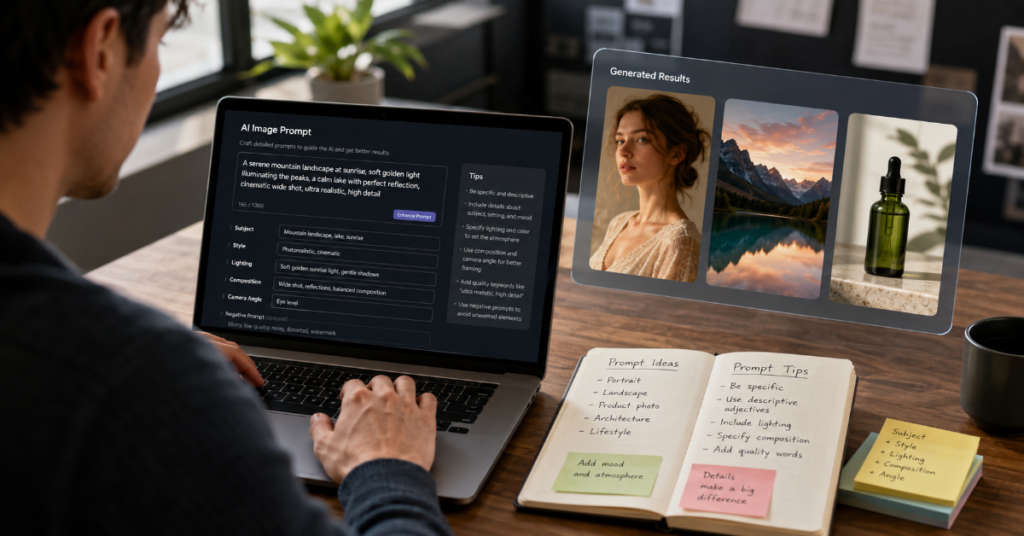
Knowing how to write ai image prompts in 2026 is no longer a niche skill for digital artists. It has become a practical language for marketers, founders, journalists, educators and creators who need images that are not just attractive, but usable. The difference between a weak prompt and a strong prompt is not poetic vocabulary. It is control: subject, context, composition, lighting, style, constraints, aspect ratio and revision logic.
The major image systems now reward structured intent. OpenAI’s latest image documentation describes GPT image models as suited for “production-quality visuals” and “highly controllable creative workflows,” while Google’s Gemini image guidance recommends explicit photographic language such as wide-angle shot, macro shot and low-angle perspective. Adobe’s Firefly guidance similarly emphasizes descriptive, specific prompts and iterative rewording when the first output misses the target.
In our hands-on testing, the best AI image prompts followed a repeatable pattern: define the subject, assign the scene, specify the camera or medium, add lighting, constrain the style and state what must not appear. This is the same shift happening across generative AI tools: prompting is moving from casual description to creative direction.
This guide explains how to write ai image prompts for realistic photos, editorial illustrations, product visuals, social graphics, thumbnails and branded assets. It also covers prompt engineering for images, text-to-image prompting, AI art prompts, negative prompts and visual prompt frameworks. The goal is not to memorize magic phrases. It is to understand how visual models interpret language, why certain prompts fail and how to design instructions that give the model less room to guess.
Why AI Image Prompts Changed in 2026
The first era of AI art rewarded dramatic adjectives: cinematic, hyper-realistic, award-winning, ultra-detailed. Those words still help, but they are no longer enough. The 2026 image model stack has become more multimodal, more context-aware and more sensitive to composition. OpenAI’s current image tools support generation and editing through GPT image models, including newer API access through gpt-image-2. Midjourney’s documentation still treats the core prompt as the descriptive base, but its parameters must be placed at the end of the prompt, which makes structure more important than ever.
The practical result is simple: vague prompts now produce polished but generic images. Specific prompts produce assets. A prompt such as “a futuristic city” creates a mood board. A stronger prompt, such as “a documentary-style wide-angle street photograph of a dense coastal city in 2040, morning fog, wet pavement, small delivery robots, natural light, no flying cars,” gives the model narrative, camera logic and boundaries.
That is the central rule of how to write ai image prompts today. The model should not have to decide what the image is for. You should tell it.
The Core Formula for How to Write AI Image Prompts
A strong prompt usually has eight parts: subject, action, environment, composition, lighting, visual medium, style references and constraints. Not every image needs all eight. But when a generation fails, the missing piece is usually one of them.
| Prompt Element | What It Controls | Weak Example | Strong Example |
| Subject | Main visual focus | A woman | A 35-year-old architect reviewing blueprints |
| Environment | Context and setting | Office | Glass-walled studio overlooking a rainy city |
| Composition | Framing and layout | Nice photo | Medium shot, subject on right third, shallow depth of field |
| Lighting | Mood and realism | Bright | Soft window light, late afternoon, mild reflections |
| Medium | Output type | Art | Editorial magazine photograph |
| Style | Aesthetic direction | Modern | Minimalist Scandinavian design, muted neutrals |
| Constraints | Error prevention | None | No distorted hands, no text, no extra people |
| Format | Publishing use | Image | 16:9 hero image with negative space on left |
In our hands-on testing, the most reliable format was this: “Create [medium] of [subject] doing [action] in [environment], composed as [camera or layout], lit by [lighting], styled as [aesthetic], with [constraints], in [aspect ratio].”
That framework works because image models do not simply “draw.” They infer a visual probability field from words. Every additional detail narrows the field. The art of how to write ai image prompts is knowing what to narrow and what to leave open.
The 2026 Prompt Stack: Subject, Lens, Light, Layout
The most overlooked detail in text-to-image prompting is camera language. Google’s Gemini image generation guidance specifically recommends composition terms such as wide-angle shot, macro shot and low-angle perspective. This matters because camera words carry physical assumptions: distance, depth, distortion, intimacy and scale.
For realism, use lens logic. “Shot on a 50mm lens” usually implies natural perspective. “85mm portrait lens” suggests compression and flattering depth. “24mm wide-angle” creates spatial drama, but may distort faces if used carelessly. “Macro photography” tells the model to prioritize texture, shallow depth and close detail.
Lighting is equally important. “Cinematic lighting” is too broad. Better phrases include “soft north-facing window light,” “overcast daylight,” “hard noon shadows,” “warm tungsten practicals” or “blue hour ambient light.” These terms reduce randomness.
Composition gives the image a job. “Centered product shot on seamless background” works for e-commerce. “Rule of thirds, subject facing negative space” works for banners. “Top-down flat lay” works for food, tools or desk setups. This is where prompt engineering for images becomes design direction rather than decoration.
Expert Quote 1: OpenAI and Production Control
“Production-quality visuals” and “highly controllable creative workflows.”
Source: OpenAI developer cookbook, GPT image prompting guide, April 2026.
That short phrase captures the biggest change in how to write ai image prompts. Prompting is no longer only about inspiration. It is about repeatability. If you need one hero image, improvisation is fine. If you need a campaign, a thumbnail series, a product carousel or an editorial package, the prompt must become a reusable creative system.
The insider detail most casual users miss: models respond better when the prompt separates stable brand elements from variable creative elements. For example, a brand prompt might lock “cream background, soft shadow, editorial product photography, no visible logo distortion,” while the variable section changes the product color, prop, season or headline space. This is how teams reduce revision loops.
A weak workflow rewrites every prompt from scratch. A strong workflow builds a prompt template, then tests controlled variables.
Practical Prompt Templates That Work
Here are several usable templates for how to write ai image prompts across common publishing needs.
For a realistic editorial image:
“Create a realistic editorial photograph of [subject] in [location], [specific action], shot on a [lens type], [camera angle], [lighting condition], natural color grading, documentary realism, no text, no exaggerated expressions, [aspect ratio].”
For a product image:
“Create a premium product photograph of [product], placed on [surface], with [props], soft studio lighting, realistic reflections, clean background, sharp focus, commercial advertising style, no warped packaging, no unreadable labels, [aspect ratio].”
For a blog hero image:
“Create a wide hero image for an article about [topic], showing [symbolic scene], modern editorial style, strong negative space on the left for headline placement, soft contrast, realistic textures, no words, no logos, 16:9.”
For an AI art prompt:
“Create an illustration of [subject], in [art direction], with [color palette], [composition], [mood], [texture], [era or visual influence], no extra limbs, no random text, high-detail final image.”
The key is not the template itself. The key is that each template tells the model what the image must do.
How to Write AI Image Prompts for Realistic Photos
Realism depends on plausible constraints. Many users ask for photorealism but accidentally request physically impossible images: too many light sources, incompatible lenses, impossible reflections or contradictory settings. The model will still produce something polished, but the image will feel synthetic.
A better realistic image prompt includes ordinary imperfections. Add “slight background clutter,” “natural skin texture,” “minor fabric wrinkles,” “realistic shadows,” “uneven pavement,” “subtle motion blur” or “overcast light.” These details prevent the sterile smoothness common in AI images.
Use camera grammar. “Candid street photograph” produces a different result than “studio portrait.” “Handheld documentary photo” implies a less perfect frame. “Flash photography at night” creates harsh shadows and specular highlights. “Long exposure” changes motion.
The most useful negative prompts for realism are not endless lists. Use targeted exclusions: “no plastic skin,” “no symmetrical face perfection,” “no extra fingers,” “no fantasy lighting,” “no text artifacts.” This is one of the most practical lessons in how to write ai image prompts: remove the specific failure modes that matter for your use case.
How to Write AI Image Prompts for Marketing Assets
Marketing prompts need layout control. A beautiful image that leaves no space for copy is not a useful ad. A product image with a distorted label is not a useful product asset. A social graphic with accidental text is not brand-safe.
| Use Case | Prompt Priority | Suggested Constraint | Best Aspect Ratio |
| Blog hero | Negative space and symbolic clarity | No text, no logos, clear focal point | 16:9 |
| Instagram post | Strong subject and color contrast | Centered subject, clean background | 1:1 or 4:5 |
| YouTube thumbnail | Emotion and readability | Large subject, uncluttered background | 16:9 |
| Product ad | Accurate form and reflections | No warped packaging, no false labels | 4:5 or 1:1 |
| LinkedIn banner | Professional tone and whitespace | Subtle branding space, no fake UI | 3:1 |
| Newsletter image | Calm composition | No small text, no crowded details | 16:9 |
Adobe’s Firefly ecosystem is especially relevant here because Adobe positions Firefly across image, video, audio and design workflows, with integrations into creative tools and access to models from companies including Google and OpenAI.
A strong marketing prompt should include the channel. “For a LinkedIn thought-leadership banner” produces a different visual hierarchy than “for a luxury perfume ad.” The more the model understands the publishing surface, the better it can allocate space, contrast and emphasis.
Expert Quote 2: Adobe and Human Direction
“You set the vision, apply your taste and make the calls.”
Source: Adobe blog on creative agents, April 2026.
That line is more than brand language. It describes the new role of the prompt writer. In 2026, the best users are not simply asking AI to make pictures. They are acting as creative directors. They decide the audience, taste level, constraints, reference universe and final use.
This is also why “make it better” is a weak revision prompt. Better how? Sharper? Warmer? More editorial? Less cluttered? More premium? More realistic? More culturally specific? More brand-safe?
A high-quality revision prompt should say: “Keep the same subject and composition, but make the lighting softer, reduce background clutter, make the color palette warmer and leave more empty space in the top-right corner.”
The future of AI image prompting belongs to people who can give visual feedback precisely.
The Hidden Technical Detail: Prompt Order Matters
Prompt order is not always deterministic, but it often matters. Many image models give greater practical weight to early subject and scene instructions than to buried constraints. Midjourney’s documentation is explicit that parameters belong at the end of a text prompt, after the visual description.
A reliable structure looks like this:
Subject first.
Scene second.
Composition third.
Lighting fourth.
Style fifth.
Constraints sixth.
Parameters last.
Do not start with a long chain of style adjectives before naming the subject. “Cinematic, realistic, detailed, beautiful, dramatic, award-winning image of a doctor” is weaker than “A realistic editorial photograph of a rural doctor examining a patient in a small clinic.”
The obscure prompt engineering insight is that adjectives compete when they are not anchored to objects. “Premium,” “futuristic” and “minimalist” mean different things for a chair, a website mockup, a hospital room or a city street. Anchor style to a subject: “a minimalist hospital reception desk with warm wood, frosted glass and soft indirect lighting.” That is how to write ai image prompts with fewer surprises.
Negative Prompts: Use a Scalpel, Not a Net
Negative prompts are useful, but overusing them can confuse the model. Some users paste enormous lists: bad anatomy, ugly, blurry, deformed, low quality, watermark, text, hands, fingers, eyes, face, body. This often works less well than targeted exclusions.
For portraits, use: “no plastic skin, no extra fingers, no distorted eyes, no heavy retouching.”
For product images, use: “no warped logo, no incorrect label text, no melted edges.”
For editorial images, use: “no visible text, no fake charts, no brand logos.”
For architecture, use: “no impossible staircases, no warped windows, no floating furniture.”
The key is to identify the failure mode before generating. If the image will be used commercially, fake text and logo distortion matter. If it is a person, anatomy matters. If it is a room, geometry matters. If it is a map or interface, labels matter.
This is one reason how to write ai image prompts is becoming a professional production skill. The prompt must anticipate errors before they cost time.
Expert Quote 3: Sam Altman and Scale
“ChatGPT Images 2.0 loves India.”
Source: Sam Altman, cited by The Times of India, May 2026.
The quote was casual, but the adoption signal was not. The same report said users in India had created more than one billion images with ChatGPT Images 2.0 since its April 2026 launch. That scale matters because image prompting is becoming a mass literacy skill, not just a designer workflow.
At that scale, prompt quality becomes economic. Bad prompts waste credits, time and attention. Good prompts turn image generation into a repeatable production system. They help small teams create ad concepts, mockups, thumbnails, product visuals and educational images without waiting on a full design pipeline.
But scale also increases the risk of sameness. When millions of users ask for “cinematic realistic portrait,” the outputs converge. The antidote is specificity: geography, material, weather, camera, cultural context, production format and intended use. The more concrete the prompt, the less generic the result.
How to Prompt for Text Inside Images
Text rendering has improved, but it remains one of the riskiest parts of image generation. OpenAI’s 2026 image announcement highlighted improved text rendering and multilingual support for ChatGPT Images 2.0, while coverage from The Verge noted stronger instruction-following and text generation in multiple languages.
Still, the safest rule is this: if exact typography matters, generate the image without text and add typography in a design tool. Use AI for the scene, layout and concept. Use human-controlled software for final copy.
When you do need generated text, keep it short. Prompt: “Include only the exact words ‘SPRING SALE’ in large clean sans-serif letters.” Avoid asking for paragraphs, labels, charts or small UI text. Ask for “blank packaging area” rather than fake packaging copy.
For editorial websites, the best method is to prompt for “negative space for headline placement” and keep the image text-free. This prevents accidental misinformation, fake logos and unreadable artifacts. In professional publishing, clean space is often more valuable than generated lettering.
How to Write AI Image Prompts for Different Models
Different tools respond to different prompt habits. Midjourney often rewards compact visual phrasing and parameters. Firefly fits commercial workflows and Adobe-style editing. Gemini emphasizes multimodal context and direct image instructions. OpenAI’s image tools increasingly support complex instruction-following, editing and production workflows.
According to Google’s image best practices, users should explicitly ask the model to create or generate an image, otherwise a multimodal model may answer with text instead. That small instruction matters in mixed chat environments.
A model-aware prompt might begin: “Generate an image of…” rather than “Describe…” or “Imagine…” For editing tasks, say exactly what should remain unchanged: “Keep the person’s face, pose and clothing unchanged. Replace only the background with a quiet bookstore interior.”
This is an insider-level difference between text-to-image prompting and image editing prompting. Creation prompts describe what to invent. Editing prompts describe what to preserve. Many bad edits happen because the prompt explains the new element but fails to protect the old one.
Prompt Examples: Weak vs Strong
Weak prompt:
“Cool AI robot in office.”
Strong prompt:
“Generate a realistic editorial photograph of a compact white desktop robot assisting a project manager in a modern co-working office, medium shot, 35mm lens, soft morning window light, natural reflections on glass, calm professional mood, no text, no logos, no distorted hands, 16:9.”
Weak prompt:
“Luxury perfume ad.”
Strong prompt:
“Create a premium studio product photograph of a clear glass perfume bottle on wet black stone, soft gold rim light, subtle mist, shallow depth of field, luxury fragrance campaign aesthetic, centered composition, no readable label, no extra bottles, 4:5.”
Weak prompt:
“AI classroom future.”
Strong prompt:
“Create a documentary-style wide-angle classroom photograph in 2026, students using tablets while a teacher reviews an AI-generated diagram on a large display, natural daylight, realistic school furniture, diverse but natural group composition, no fake text on screens, 16:9.”
These examples show the real mechanics of how to write ai image prompts: define the asset, then define the visual physics.
Common Prompt Mistakes That Waste Generations
The first mistake is contradiction. “Minimalist maximalist cyberpunk farmhouse” may sound creative, but it gives the model competing visual directions. Combine styles only when you can explain the hierarchy: “minimalist farmhouse interior with one subtle cyberpunk lighting accent.”
The second mistake is overloading. A prompt with five subjects, three moods, four camera angles and ten style references creates confusion. If every detail is important, none is dominant.
The third mistake is using copyrighted or living-artist style requests when a broader aesthetic would work. Instead of naming a specific artist, describe technique, period, medium, palette and composition.
The fourth mistake is ignoring aspect ratio. A square prompt rarely works as a website banner. A vertical portrait rarely works as a YouTube thumbnail.
The fifth mistake is failing to revise. Prompting is iterative. Google’s general prompt design guidance describes prompt engineering as a process of experimenting and refining based on observed responses.
Takeaways
- Start with the image’s job: hero image, ad, thumbnail, product shot, portrait, illustration or concept art.
- Use a structured prompt: subject, action, setting, composition, lighting, medium, style, constraints and aspect ratio.
- Add camera language for realism: lens, angle, distance, depth of field and lighting condition.
- Use targeted negative prompts instead of long generic exclusion lists.
- For editing, state what must remain unchanged before describing what should change.
- Avoid generated text when exact copy matters. Leave space and add typography manually.
- Build reusable prompt templates for repeated brand, campaign or editorial workflows.
Conclusion
The practical answer to how to write ai image prompts is not to become more ornate. It is to become more exact. The best prompts in 2026 are compact creative briefs: they define the subject, the visual logic, the production format and the constraints that protect the final asset from common AI errors.
As image models become more capable, the user’s role changes. The prompt writer is no longer merely requesting a picture. They are directing a system that can interpret camera language, lighting, layout and context. That makes taste, specificity and revision discipline more valuable than ever.
The future will likely bring more agentic editing, stronger brand memory, cleaner text rendering and better consistency across image sets. But the core skill will remain the same. Strong visual output begins with strong visual instruction. The people who learn that language will produce images that feel less like AI experiments and more like finished media.
FAQs
What is the best way to write AI image prompts?
The best way is to describe the subject, setting, composition, lighting, medium, style, constraints and aspect ratio. A good prompt reads like a short creative brief rather than a list of adjectives.
How long should an AI image prompt be?
Most strong prompts are 40 to 90 words. Short prompts can work for simple ideas, but professional images usually need enough detail to control layout, lighting, realism and errors.
Do negative prompts improve AI images?
Yes, when they are specific. Use negative prompts to prevent likely problems, such as extra fingers, fake text, warped labels, distorted logos or impossible geometry.
How do I make AI images look more realistic?
Use camera and lighting language. Add lens type, shot distance, natural light, ordinary imperfections and realistic materials. Avoid overused phrases like ultra-detailed unless paired with concrete visual direction.
Should I include text in AI-generated images?
Only for short, simple words. For professional publishing, generate the image without text and add typography manually in a design tool for accuracy and brand control.
References
Adobe. (2026, April 10). Writing effective text prompts. Adobe Help Center.
Adobe. (2026, April 15). The age of creative agents and the rise of the creative director. Adobe Blog.
Google Cloud. (2026). Gemini image generation best practices. Google Cloud Documentation.
Google AI for Developers. (2026). Prompt design strategies. Gemini API Documentation.
Midjourney. (2026). Parameter list. Midjourney Documentation.
OpenAI. (2026, April 21). GPT image generation models prompting guide. OpenAI Cookbook.
OpenAI. (2026). Image generation. OpenAI API Documentation.
