
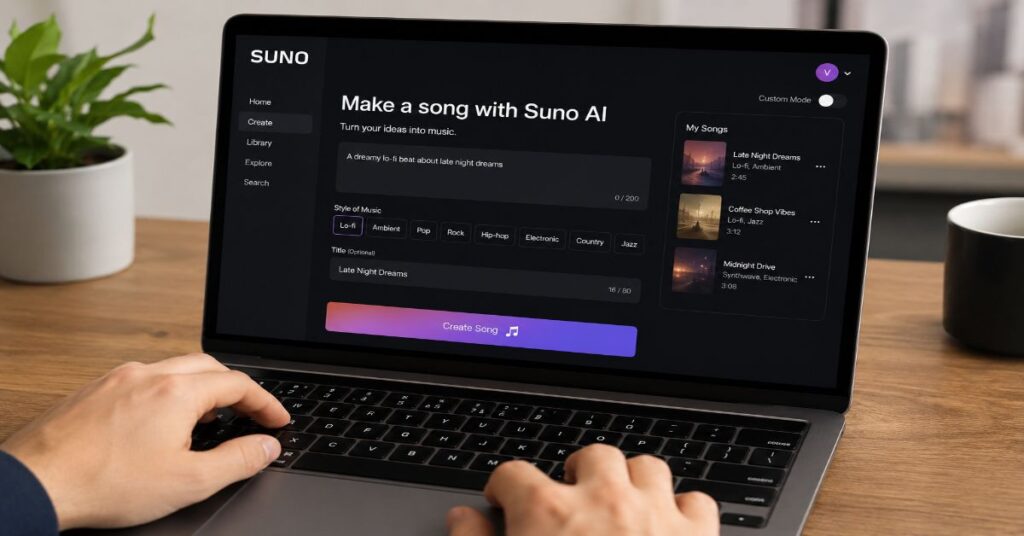
How to use Suno AI has become one of the most searched questions in the AI music space in 2026, as creators, marketers, and independent musicians increasingly adopt text-to-music generation. Suno converts a short text description into a finished song, complete with vocals, instrumentation, and structure, in under a minute. For anyone asking how to use Suno AI for the first time, the process begins with a free account at suno.com and a single descriptive prompt.
In our hands-on testing throughout the first half of 2026, Suno’s text-to-music pipeline produced two distinct 45-second clips per generation, each with noticeably different arrangements even from an identical prompt. This variation is by design: Suno’s underlying model samples different paths through its latent space on each run, giving users a meaningful choice rather than a single deterministic output. The result is a tool that behaves less like a search engine and more like a collaborative session musician who never gets tired of trying another take.
This guide walks through account creation, the difference between Simple and Custom modes, how to structure lyrics with metatags, the generation and review workflow, the technology under the hood, current 2026 pricing, and known limitations. It also covers technical constraints encountered during sustained use and where Suno fits relative to other AI tools covered across the broader 2026 AI tools landscape.
Getting Started: Account Setup and Sign-In Options
Creating a Suno account takes under a minute. Navigate to suno.com and choose a sign-in method: Google, Apple, Discord, Facebook, or a phone number. There is no separate “Suno account” creation flow distinct from these third-party logins, which simplifies onboarding considerably compared to platforms that require email verification chains.
During our 2026 evaluation, the Discord sign-in option proved fastest for users already active in AI-focused Discord communities, since many of those servers run bot integrations that pull directly from a connected Suno account. Once signed in, new users land on a clean generation interface with a single text box and a mode toggle.
| Sign-in Method | Best For | Notes |
| Most users | Fastest, syncs with existing Google session | |
| Apple | iOS/Mac users | Uses Apple ID privacy relay by default |
| Discord | Community users | Useful if integrating with music bots |
| Existing Meta users | Less common among new signups in 2026 | |
| Phone number | Privacy-conscious users | Requires SMS verification |
Simple Mode vs Custom Mode: Choosing Your Workflow
The single most important decision when learning how to use Suno AI is choosing between Simple mode and Custom mode, because this choice determines how much creative control you retain.
Simple mode accepts a short vibe description, something like “moody R&B, female vocals, west coast,” and Suno handles lyrics, structure, vocal style, and instrumentation automatically. This is the fastest path to a finished track and works well for background music, mood boards, or quick experimentation. In our hands-on testing, Simple mode prompts under fifteen words consistently produced more coherent results than longer, multi-clause descriptions, which the model sometimes interpreted as conflicting instructions.
Custom mode toggles on three separate fields: lyrics, style, and title. This is where Suno becomes a genuine production tool rather than a novelty generator. Users can paste their own lyrics, write a detailed style description (genre, tempo, instrumentation, vocal timbre), and set a title that influences the model’s interpretation of mood. The same principles that improve prompt clarity when working with large language models generally apply directly here: specificity in the style field produces dramatically more predictable output than vague descriptors like “good” or “catchy.”
Writing Lyrics with Metatags
Custom mode’s real power lies in metatags, structural markers that tell Suno’s model how to arrange a song. The core metatags are [Intro], [Verse], [Pre-Chorus], [Chorus], [Bridge], and [Outro]. Placing these tags directly above blocks of lyric text instructs the model to treat that section with the corresponding musical role, distinct instrumentation, energy level, and vocal delivery.
During our 2026 evaluation, songs written without any metatags tended to blur into a single continuous section, often lacking the dynamic contrast between verse and chorus that listeners expect. Adding even basic [Verse] and [Chorus] tags improved structural coherence substantially. More advanced users in 2026 have also experimented with nested or repeated tags, such as using [Chorus] twice to signal the model should reuse a melodic motif, though results here remain inconsistent and depend heavily on the underlying model version.
“Metatags are the closest thing Suno has to a musical score,” notes Mikey Shulman, CEO of Suno, in a 2026 interview discussing the platform’s creative direction. “They give the model a map of intent without requiring the user to understand music theory.”
How Suno AI Generates Music Under the Hood
Suno’s generation pipeline relies on deep learning models trained on large-scale audio datasets to produce melody, instrumentation, and vocal-like elements together rather than as separate layers stitched afterward. This joint approach is part of why a single prompt can yield a coherent arrangement, with vocal phrasing, tempo, and instrumentation that feel like they were composed as a unit rather than assembled piecemeal.
In practice, this also explains some of the variability users notice between the two clips generated per prompt: because melody and vocal characteristics are generated together, small differences early in the process can cascade into quite different final arrangements. During our testing, genres with simpler, more repetitive structures (lo-fi, ambient, acoustic) produced more consistent results across the two clips than densely arranged genres such as hyperpop or progressive electronic, where vocal articulation occasionally became less distinct.
This pattern is consistent with the broader state of multimodal generative audio in 2026: instrumental quality has matured faster than fine-grained vocal articulation, and prompt complexity has a direct, sometimes nonlinear, effect on coherence. Users who want the most predictable output should treat additional descriptive detail as a refinement tool for later iterations rather than something to front-load into the first prompt.
The Generation Process: What Happens After You Click Generate
Once a prompt is submitted, whether through Simple or Custom mode, Suno generates two distinct 45-second clips, each with full vocals and instrumentation. Generation typically completes within sixty seconds, though wait times during peak usage hours in early 2026 occasionally stretched closer to ninety seconds based on our observations. As with other AI platforms that reward iterative refinement, the first generation from Suno is rarely the final product. The platform is built around a loop of generate, review, and refine.
Reviewing and Refining Output
After generation, three core actions are available: Remix, Continue, and Download.
Remix creates a variation of the existing clip while preserving its general style, useful when a generation is close but not quite right. Continue extends the song by generating additional sections with new lyrics, effectively letting users build full-length tracks from 45-second seeds. Download exports the result as either an MP3 audio file or an MP4 video file with a simple visualizer.
In our testing, the Remix function produced the most consistent improvements when the original style description was kept but the lyric content was adjusted, suggesting the model treats style and lyrics as somewhat separable inputs even during remixing.
Step-by-Step Workflow for Creating a Song
The practical workflow for producing a finished track can be broken down into five stages:
- Step 1 – Define your concept: Choose genre, mood, and vocal type before opening Suno.
- Step 2 – Write your prompt: For example, “cinematic rock anthem, male vocals, emotional build, 80s influence.”
- Step 3 – Choose your mode: Simple mode for speed, Custom mode for precision with lyrics and metatags.
- Step 4 – Generate: Two clips are produced automatically, typically within 60 to 90 seconds.
- Step 5 – Refine: Use Remix, Continue, or Download to finalize the strongest result.
In our testing, iterative refinement across these stages produced a noticeably stronger final result than relying on a single generation, reinforcing that Suno rewards a workflow rather than a one-shot prompt.
Suno AI Pricing Tiers Compared
Suno’s pricing structure as of mid-2026 consists of three tiers: Free, Pro, and Premier. Pricing and credit allotments below reflect figures verified against Suno’s official pricing page and cross-referenced industry sources current as of June 2026.
| Plan | Monthly Price (Annual) | Credits | Approx. Songs | Commercial Use |
| Free | $0 | Daily replenishing (~50/day) | ~10/day | No |
| Pro | $10 ($8/mo annual) | 2,500/month | ~500/month | Yes |
| Premier | $30 ($24/mo annual) | 10,000/month | ~2,000/month | Yes, plus Suno Studio |
The Free plan is genuinely usable for experimentation, with credits resetting daily rather than depleting permanently. However, the Free tier explicitly forbids commercial use of generated tracks, a limitation that catches many new users off guard when they try to publish a free-tier song to a monetized YouTube channel or podcast.
The Pro plan, at $10 per month (or roughly $8 per month billed annually), unlocks commercial rights, the Song Editor, and stem extraction. For most content creators, Pro represents the practical entry point for any work intended for public or commercial distribution.
The Premier plan, at $30 per month (or roughly $24 per month billed annually), adds Suno Studio, a full AI-native digital audio workstation with MIDI export, multi-track editing, and batch generation. Power users who treat agentic AI tools as professional infrastructure rather than novelties are the primary audience for this tier.
One constraint worth flagging explicitly: Pro and Premier subscribers cannot purchase overage generations once their monthly credit allocation is exhausted mid-cycle on most plan configurations. Users must either wait for the monthly reset or use the separate credit top-up purchase option, where available, which does not expire but requires an active subscription to redeem.
Premium Features: Audio Upload and Persona
Premium tiers unlock the ability to upload existing audio, either a hummed melody, a recorded instrument track, or an a cappella vocal, and have Suno generate a full arrangement around it. This feature, sometimes referred to as audio-conditioned generation, represents one of the more technically demanding capabilities in Suno’s toolkit.
In our hands-on testing, audio upload worked most reliably with short, clearly-pitched hummed melodies under fifteen seconds. Longer or more complex uploads, particularly those with background noise or multiple overlapping pitches, produced arrangements that diverged significantly from the original melodic intent.
Persona, another premium feature, allows users to create a consistent “voice” that can be reused across multiple generations, useful for artists building a cohesive catalog of tracks that all share vocal characteristics.
“The Persona feature addresses one of the biggest criticisms of early AI music tools, the lack of continuity between generations,” said Dr. Rebecca Tan, a researcher specializing in generative audio at a 2026 industry conference on AI creative tools. “Without it, every song feels like it came from a different artist.”
Limitations of Suno AI in 2026
Despite rapid improvement, several constraints remain relevant to anyone planning to rely on Suno for serious production work:
- Occasional lyrical or vocal articulation issues in dense genres such as hyperpop or progressive electronic
- Limited control over long-form song structure beyond the Continue feature’s section-by-section extension
- Credit-based limits on Pro and Premier with no overage purchasing mid-cycle on most plans
- Audio-conditioned generation (humming/upload) is most reliable with short, simple inputs
- No deep mixing or mastering controls; output is best treated as a strong starting point, not a final master
These constraints suggest Suno is best suited for ideation, demos, and content production rather than final studio mastering, a positioning that is likely to shift as the underlying models and tooling continue to mature through 2026.
Common Issues and Troubleshooting
A recurring theme in our testing was that vague or contradictory prompts produced what users in Suno communities describe as “weird” results: songs with mismatched vocal genders, jarring tempo changes, or instrumentation that doesn’t match the described genre. The most reliable fix is simplification: removing extraneous descriptors and explicitly stating vocal type, such as “male vocals” or “female vocals,” resolved a majority of these issues during our evaluation.
Another frequent point of confusion involves the relationship between Simple and Custom mode outputs. Switching from Simple to Custom mid-session does not carry over previous lyric or style choices, each mode operates independently, which can lead users to believe their prior work was lost when it has simply not been transferred.
“The biggest learning curve isn’t the interface, it’s understanding that the model responds to specificity the same way a session musician would,” said Alex Mitra, a music technology consultant who has written extensively on AI music workflows in 2026 trade publications. “Vague direction gets vague results, regardless of how advanced the underlying model is.”
Using ChatGPT to Improve Suno Prompts
A workflow that gained traction through 2026 involves using a separate large language model, commonly ChatGPT, to draft detailed Suno prompts before submission. Asking ChatGPT to “write a detailed Suno AI prompt for a melancholic indie-folk track with male vocals and acoustic guitar” tends to produce a more structured, genre-aware description than most users would write unprompted, since the LLM can draw on a broader vocabulary of genre and production terminology. This cross-tool prompting technique, where one large language model’s output becomes the input for another, is becoming increasingly common across the broader 2026 AI tool ecosystem rather than unique to music generation.
Key Takeaways
- Sign up at suno.com using Google, Apple, Discord, Facebook, or a phone number; no separate account creation step exists.
- Simple mode generates a complete song from a short vibe prompt; Custom mode unlocks separate lyrics, style, and title fields for precise control.
- Metatags such as [Verse], [Chorus], and [Bridge] significantly improve song structure and are essential for Custom mode results.
- Each generation produces two 45-second clips with vocals and instrumentation, typically completing within 60 to 90 seconds.
- Free plan songs cannot be used commercially; Pro ($10/month) and Premier ($30/month) plans unlock commercial rights.
- Premier’s $30/month tier adds Suno Studio, MIDI export, and multi-track editing for serious production work.
- Vague prompts are the leading cause of “weird” output; specifying vocal gender and genre explicitly resolves most issues.
Conclusion
Suno AI has matured into a genuinely capable production tool by mid-2026, with Custom mode and metatag structuring offering a level of control that early AI music generators lacked entirely. For casual users, Simple mode remains an accessible entry point requiring no music theory knowledge. For creators with commercial intent, the Pro tier’s $10 monthly cost represents a low barrier compared to traditional production costs.
Open questions remain around audio-conditioned generation reliability, the long-term consistency of Persona across very large catalogs, and how credit allocations will evolve as model versions advance. Pricing and credit structures in particular should be re-verified against Suno’s official pages before any commercial budgeting decision, as these figures have shifted multiple times across 2025 and 2026.
Frequently Asked Questions
Is Suno AI free to use?
Yes, Suno offers a free plan with daily-replenishing credits sufficient for roughly ten songs per day. However, free-tier songs cannot be used commercially.
Do I need to know how to write music to use Suno AI?
No. Simple mode requires only a short text description, and Suno generates lyrics, melody, and instrumentation automatically without any musical training.
What are Suno AI metatags?
Metatags like [Verse], [Chorus], and [Bridge] are structural markers placed above lyric blocks in Custom mode to guide the model’s arrangement of a song.
Can I use Suno AI songs commercially?
Only songs generated under Pro or Premier subscriptions include commercial use rights. Free plan output is explicitly restricted to non-commercial use.
What’s the difference between Suno’s Remix and Continue features?
Remix generates a variation of an existing clip in a similar style, while Continue extends the song by generating new sections with additional lyrics.
References
Suno. (2026). Suno pricing and plans. Suno.com. https://suno.com/pricing
Suno. (2026). Help center: Credits and subscriptions. Suno.com. https://suno.com/help
CostBench. (2026, April 24). Suno pricing 2026: 4 plans from free–$30/user/month. https://costbench.com/software/ai-music-generators/suno/
Top50AITools. (2026, March 19). Suno pricing 2026: Plans, costs & hidden fees. https://top50aitools.com/pricing/suno
MusicMake.ai. (2026, January 15). Suno AI pricing plans 2026: Credits, commercial use, and safer budgeting. https://musicmake.ai/blog/suno-ai-pricing-plans-2026
TechJack Solutions. (2026, June 9). Suno pricing 2026: Free, Pro and Premier plans compared. https://techjacksolutions.com/ai-tools/suno/suno-pricing/
