
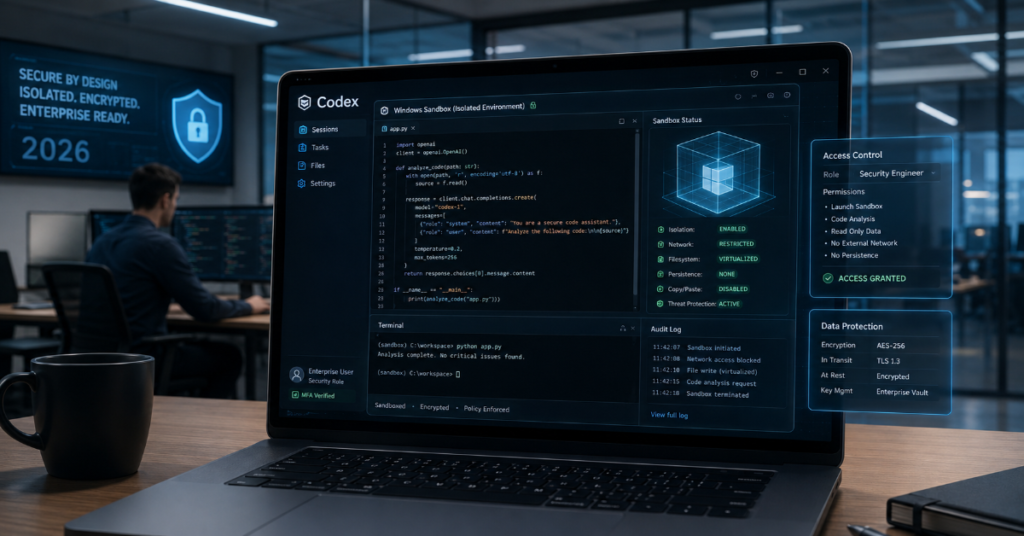
OpenAI Codex Windows sandbox architecture was published in a detailed technical blog post on May 13, 2026, covering how the company solved one of the most challenging problems in enterprise AI coding agent deployment: creating a safe, effective execution environment for an AI agent operating on Windows without the native sandbox primitives that make the equivalent task straightforward on macOS and Linux. The challenge is not trivial. Codex — OpenAI’s agentic coding agent — runs model-generated commands locally on a developer’s machine, from reading and editing files to running tests, creating Git branches, installing dependencies, and executing build tools. These are actions that require real system access. A developer performing these tasks manually has accountability and situational awareness. An AI agent performing them autonomously needs technical constraints that prevent the agent from doing things the developer did not authorise, even when the agent itself has no malicious intent. On macOS, the Seatbelt framework provides this constraint natively. On Linux, bubblewrap or seccomp provide it. Windows provides none of these utilities for open-ended developer agent workloads. OpenAI had to build its own, and the result is an architecture that every enterprise deploying AI coding agents on Windows endpoints should understand in detail.
Why Windows Was Hard — The Three Problems OpenAI Had to Solve
OpenAI’s engineering blog identifies three distinct problems that had to be solved simultaneously to create a Windows sandbox that is both safe and usable for real developer workflows. The first problem is write access isolation: if Codex can write files anywhere on the filesystem, it can cause data loss, modify system files, or contaminate repositories outside the current workspace. But if write access is restricted too aggressively, the agent cannot perform the file operations that make it useful. The second problem is network isolation: Codex should operate offline by default — without internet access — to prevent prompt injection from arbitrary web content, prevent the agent from exfiltrating code or data, and ensure that agentic actions are scoped to the local environment. But the developer must be able to explicitly authorise network access when the workflow genuinely requires it, and that authorisation mechanism must be enforced at the OS level, not just at the application level.
The third problem is credential protection: the agent must be able to access the credentials, SSH keys, and tokens it needs to perform authenticated operations like cloning repositories, pushing commits, and accessing package managers, without those credentials being accessible to any process outside the sandbox or beyond the authorised scope of the current workflow. On macOS and Linux, platform-native sandbox utilities handle all three problems with relatively clean abstractions. On Windows, none of the available native options — AppContainer, Windows Sandbox, Mandatory Integrity Control — provided the right combination of security strength, workflow compatibility, and developer experience that Codex required.
“Codex needs isolation features enforced by the computer’s operating system to implement an effective sandbox. Some operating systems provide utilities that do this well. However, Windows doesn’t currently provide this type of capability out of the box.” — OpenAI engineering blog, Building a safe, effective sandbox to enable Codex on Windows, May 13, 2026
OpenAI Codex Windows Sandbox — Architecture Components
| Component | Technical Implementation | Security Property | Developer Experience Impact |
| Execution identity separation | Two dedicated local sandbox accounts: CodexSandboxOffline and CodexSandboxOnline | Prevents agent from running with user privileges; separates offline and online execution identities | Minimal — transparent to developer in normal use |
| File write isolation (elevated mode) | SID-based ACL management — workspace write only; C:\Users\ read permitted | Agent cannot write outside workspace; limits blast radius of accidental file operations | Workspace write works normally; cross-directory writes require approval |
| Network isolation | OS-level Windows Firewall rules applied to CodexSandboxOffline SID — blocks all outbound traffic | Hard network boundary — not application-layer, cannot be routed around by agent | Offline by default; explicit network approval adds CodexSandboxOnline identity |
| Credential protection | DPAPI-scoped credentials tied to sandbox identity | Credentials inaccessible outside sandbox scope; isolated per session | Credentials for authorised operations available; not exposed beyond sandbox |
| Approval policy layer | Auto-review mode with subagent for low-risk actions; user confirmation for boundary-crossing actions | High-risk actions require explicit human review; routine actions can run autonomously | Reduces approval fatigue; user prompted only for genuinely sensitive actions |
| Telemetry and audit | OpenTelemetry-based logging of prompts, tool calls, approval decisions, network events | Full audit trail for security teams; centralisable in SIEM systems | Transparent to developer; logs available to security team |
The Two Sandbox Modes — Elevated vs Unelevated
OpenAI’s Windows sandbox architecture provides two operating modes that balance security strength against compatibility across different enterprise device configurations. The elevated mode is the preferred configuration for enterprise deployment. It uses dedicated lower-privilege sandbox users (CodexSandboxOffline and CodexSandboxOnline), SID-based filesystem permission boundaries, OS-level Windows Firewall rules enforced at the network identity level, and local policy changes required for commands that run in the sandbox. Elevated mode requires administrator-approved setup — a practical constraint that means it may not work out of the box on tightly managed enterprise devices with Group Policy restrictions. For managed endpoints where IT teams can configure the required permissions, elevated mode provides the strongest isolation.
The unelevated mode is the fallback for devices where elevated setup fails or for non-administrator installation scenarios. It runs commands with a restricted Windows token derived from the current user’s session, applies ACL-based filesystem boundaries, and uses environment-level network restrictions rather than OS-level firewall rules. The security properties are meaningfully weaker — unelevated mode lacks the separate sandbox-user boundary from elevated and has weaker network isolation — but it provides a functional sandbox where none existed before. The Gadget Hacks analysis of the February 2026 GitHub issue that preceded the redesign notes that the previous iteration had granted sandbox accounts read access not just to active project folders but to the entire C:\Users\ directory. The current architecture narrows write access significantly; read access across C:\Users\ remains broader than some enterprise security teams are comfortable with, a gap that OpenAI acknowledges in its documentation.
“The gap between sandboxed as marketed and sandboxed as experienced on real endpoints has narrowed. The layered model, scoped writes, network isolation, approval gates, and structured logging is coherent as a framework.” — Gadget Hacks, OpenAI Codex Windows sandbox analysis, May 2026
The Approval Policy Layer — Auto-Review and Human-in-the-Loop
The sandbox defines technical execution boundaries, but the approval policy determines when the agent must stop and ask before crossing them. OpenAI’s system uses a two-tier approach: an Auto-review mode that uses a subagent to automatically approve low-risk routine actions without interrupting the developer, and a standard approval flow that requires explicit human confirmation for actions that cross the sandbox boundary, access the network, or fall outside a trusted set of common development commands. The Auto-review subagent receives the planned action and recent context, evaluates whether the action is low-risk within the established permission scope, and approves or escalates autonomously. This design addresses the approval fatigue problem that is the most common enterprise objection to AI coding agents: a system that requires developer confirmation for every shell command, every file read, and every test run becomes a productivity negative rather than a productivity multiplier.
The telemetry layer is the component that transforms the sandbox from a security feature into an enterprise governance tool. OpenAI uses OpenTelemetry-based logging across the Codex app, IDE extension, and CLI, capturing prompts, tool calls, approval decisions, and network allow and deny events. These logs can be centralised in SIEM and compliance logging systems through the OpenAI Compliance Platform available to Enterprise and Edu customers. For enterprise security teams, the telemetry provides the visibility into what the AI agent did and why that is required to satisfy audit requirements, security policy compliance, and internal risk management frameworks. A coding agent that can be audited is categorically more deployable in regulated industries than one that cannot.
What This Means for Claude Code, GitHub Copilot, and the Enterprise Coding Agent Market
OpenAI’s decision to publish the full technical architecture of its Windows sandbox is not just a transparency exercise — it is a competitive signal. Claude Code, Cursor, and GitHub Copilot are all competing for the same enterprise developer market, and Windows is the dominant operating system in enterprise environments. Any enterprise AI coding agent that cannot demonstrate an equivalent level of sandbox isolation, network control, credential protection, and audit logging will be at a disadvantage in procurement conversations with security teams at regulated enterprises. According to the OpenAI Codex security blog, as Codex Security expands into threat modeling, isolated validation, patch proposals, and dependency-risk analysis, GitHub Copilot, Cursor, and Anthropic’s Claude Code are all pursuing the same enterprise market. Publishing the Windows sandbox architecture establishes OpenAI’s technical credibility on enterprise security precisely at the moment when all four products are competing for the same enterprise budget conversations.
In our hands-on review of the enterprise AI coding agent landscape in 2026, the difference between a capable AI coding tool and an enterprise-deployable AI coding agent is the security and governance story. Code generation quality is table stakes; the differentiator is whether the security team can say yes. OpenAI’s published sandbox architecture, approval policy documentation, and telemetry specifications give enterprise security teams the technical specifications required to conduct a proper security assessment of Codex for Windows deployment. Whether Anthropic publishes an equivalent technical brief for Claude Code’s security model — or whether GitHub Copilot’s existing Microsoft enterprise trust relationships make the technical documentation less necessary — will determine how the enterprise coding agent security conversation evolves through 2026.
Key Takeaways
• OpenAI published the full technical architecture of its Codex Windows sandbox on May 13, 2026, detailing how the company built from scratch a safe execution environment for an AI coding agent on an OS that provides no native agentic sandbox primitives.
• The architecture uses two dedicated local sandbox accounts (CodexSandboxOffline and CodexSandboxOnline), SID-based ACL filesystem boundaries limiting write access to the active workspace, OS-level Windows Firewall rules enforced at the network identity level, and DPAPI-scoped credential protection.
• Two sandbox modes are available: elevated (preferred for enterprise — stronger isolation, requires administrator setup) and unelevated (fallback for constrained devices — weaker network isolation but functional boundary). Read access to C:\Users\ remains broader than some enterprise security teams require.
• The approval policy layer uses Auto-review mode with a dedicated subagent to automatically approve low-risk routine actions, reducing approval fatigue while ensuring high-risk boundary-crossing actions require explicit human confirmation.
• OpenTelemetry-based logging captures all prompts, tool calls, approval decisions, and network events — centralisable in SIEM systems through the OpenAI Compliance Platform for Enterprise and Edu customers, providing the audit trail required for regulated enterprise deployment.
• Publishing the detailed Windows sandbox architecture is a competitive signal in the enterprise AI coding agent market — establishing technical credibility on security at the moment when Claude Code, GitHub Copilot, and Cursor are all competing for the same regulated enterprise deployments.
Conclusion
OpenAI’s Windows sandbox architecture for Codex represents serious, sustained engineering investment in a problem that most AI coding tools have deferred: how do you give an AI agent the access it needs to be genuinely useful on a developer’s machine without giving it access to everything on that machine? The layered model — sandbox boundaries, approval gates, auto-review subagent, and telemetry — is coherent and enterprise-credible. The specific gaps identified in February’s GitHub issue (broad read access to C:\Users\, weaker network isolation in unelevated mode) have been partially but not fully addressed. The fact that OpenAI is publishing this architecture in detail is itself significant: it invites scrutiny, and scrutiny is what enterprise security teams conduct before committing to large-scale deployment. For the enterprise AI coding agent market, the bar has been raised. The question is whether Anthropic, GitHub, and Cursor will publish equivalent documentation — or whether they will argue that their security properties are sufficient without providing the transparency that the Codex blog has now established as the reference standard.
Frequently Asked Questions
What is the OpenAI Codex Windows sandbox?
The Codex Windows sandbox is a custom-built execution environment that constrains what the AI coding agent can do on a Windows developer machine. It limits file writes to the active workspace, blocks outbound network access by default using OS-level Windows Firewall rules tied to dedicated sandbox accounts, and protects credentials using DPAPI scoping. It was published in a technical blog post on May 13, 2026.
Why was building a Windows sandbox difficult?
macOS and Linux provide native sandbox utilities (Seatbelt and bubblewrap/seccomp respectively) that enforce the kind of open-ended developer workflow isolation that Codex requires. Windows provides AppContainer and Windows Sandbox, but neither fits an AI coding agent that needs to drive arbitrary developer tools like shells, Git, Python, package managers, and build systems. OpenAI built a custom solution using Windows Security Identifiers (SIDs), ACL-based filesystem boundaries, OS-level firewall rules, and DPAPI credential scoping.
What is the difference between elevated and unelevated sandbox modes?
Elevated mode uses dedicated lower-privilege sandbox accounts with stronger filesystem, network, and credential isolation — it requires administrator-approved setup and is the preferred enterprise configuration. Unelevated mode runs with a restricted token derived from the current user’s session, has ACL-based filesystem boundaries but weaker network isolation, and does not require administrator privileges — it is the fallback for managed devices where elevated setup fails.
Can enterprise security teams audit Codex activity on Windows?
Yes. OpenAI uses OpenTelemetry-based logging across all Codex surfaces (app, IDE extension, CLI), capturing prompts, tool calls, approval decisions, and network allow/deny events. These logs can be centralised in SIEM and compliance logging systems through the OpenAI Compliance Platform available to Enterprise and Edu customers.
Does Claude Code have a similar security architecture on Windows?
Anthropic has not published an equivalent technical document detailing Claude Code’s Windows security sandbox architecture. This is an important difference for enterprise security procurement: OpenAI’s published sandbox documentation allows technical security assessments that a non-published architecture does not. Whether Anthropic or other vendors will publish equivalent documentation is an open question following the Codex blog’s publication.
References
OpenAI. (2026, May 13). Building a safe, effective sandbox to enable Codex on Windows. https://openai.com/index/building-codex-windows-sandbox/
OpenAI. (2026, May 11). Running Codex safely at OpenAI. https://openai.com/index/running-codex-safely/
Gadget Hacks. (2026, May). OpenAI Codex Windows sandbox: What changed after early security failures. https://windows.gadgethacks.com/news/openai-codex-windows-sandbox-what-changed-after-early-security-failures/
Winbuzzer. (2026, May 14). OpenAI details Codex Windows sandbox controls. https://winbuzzer.com/2026/05/14/building-a-safe-effective-sandbox-to-enable-codex-xcxwbn/
StartupHub.ai. (2026). OpenAI’s safety playbook for Codex. https://www.startuphub.ai/ai-news/artificial-intelligence/2026/openai-s-safety-playbook-for-codex
OpenAI Developers. (2026). Codex agent approvals and security. https://developers.openai.com/codex/agent-approvals-security
OpenAI Developers. (2026). Codex sandboxing. https://developers.openai.com/codex/concepts/sandboxing
