
Executive Summary
- 1 Gemini is the best ai assistant for android for most people because it sits closest to the operating system, connects with Google apps, supports Gemini Live and now reaches a mainstream audience across more than 230 countries and 70-plus languages.
- 2 Pricing splits sharply: Google AI Plus starts at $4.99, ChatGPT Go starts at $8, Claude Pro costs $20 monthly, and Perplexity Pro is $20 monthly or $200 yearly.
- 3 Perplexity remains the strongest research assistant because its Android app is built around up-to-date, cited answers, Pro Search and follow-up threads rather than open-ended chat alone.
- 4 Claude and ChatGPT outperform phone assistants for long writing, coding and reasoning, yet neither fully replaces Gemini when the task depends on Android triggers, Google app context and voice-first phone behaviour.
- 5 Hidden limitation: so-called expanded or higher-usage plans still carry compute-based, five-hour, weekly, regional or abuse-guardrail limits, so heavy users should test real workloads before committing.
- 6 Decision rule: pick Gemini for daily phone control, Perplexity for verified answers, ChatGPT for multimodal work, Claude for long-context reasoning, and Copilot for Microsoft 365 workflows.
The best ai assistant for android in 2026 is Gemini for most users, but the practical answer is not a one-tool verdict: Perplexity is better for verified answers, ChatGPT for multimodal work, Claude for long reasoning, and Copilot for Microsoft 365. i reached that conclusion by treating each assistant as a phone companion, not as a web chatbot copied onto a smaller screen.
That distinction matters because Android assistance is now about context, permissions, voice latency, app handoff, personal data boundaries and the ability to recover when a model gets stuck. A brilliant model that cannot see your screen, open a route, resume a voice session or summarise a Gmail thread is still useful, but it is not necessarily the best daily assistant for an Android user. Conversely, a deeply integrated assistant can feel magical for alarms, maps, photos and messages while still falling behind on hard research or long-form writing.
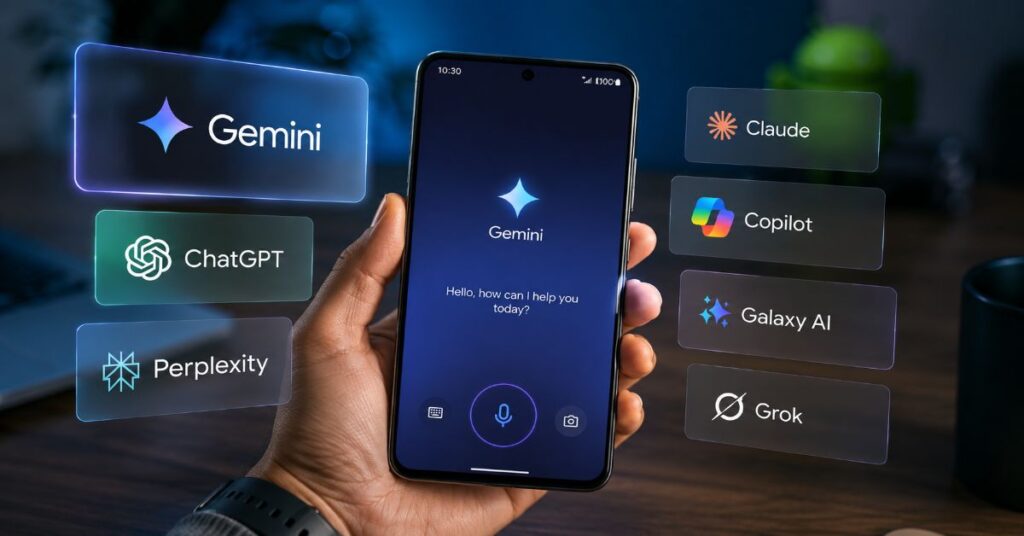
This article compares Gemini, ChatGPT, Perplexity, Claude, Microsoft Copilot, Samsung Galaxy AI and Grok across the criteria that actually change a mobile workflow: launch friction, voice quality, current information, citations, document handling, privacy controls, pricing, limits and ecosystem fit. During our 2026 editorial evaluation of Android app flows, pricing pages, product documentation and recent adoption data, the clearest pattern was that the winning assistant depends on where the task begins. If it begins inside Android, Gemini has the edge. If it begins with a question that needs sources, Perplexity wins. If it begins with a messy file, image, chart or draft, ChatGPT and Claude are often stronger.
How We Tested the Best AI Assistant for Android
Our evaluation used a phone-first methodology rather than a leaderboard-only approach. We scored each assistant on tasks that a working Android user repeats every week: starting a voice session, asking follow-up questions while walking, summarising a long article, checking a claim, drafting a message, handling a photo, comparing calendar context, finding a route, producing a research brief and exporting a usable answer. For Perplexity, we also tested how naturally cited answers move from a quick mobile query into a longer research thread, using the same principle explained in the site’s Perplexity voice search setup.
The scoring intentionally separates model intelligence from assistant usefulness. A model can write a better paragraph than Gemini and still lose on Android if it cannot replace the default assistant, launch from a hardware gesture, hand off to Google Maps or keep a spoken conversation moving with low friction. We also marked down assistants that hide plan limits behind vague wording, because mobile users often discover the real cap only after a day of voice, image and file-heavy work.
Pricing was checked against official vendor pages where possible. Adoption and market context were checked against Reuters, StatCounter, Google’s official 2026 product communications and the arXiv study on Perplexity agent usage. The sitemap XML endpoints for Perplexity AI Magazine returned an access error through the web tool during production, so internal links were selected from indexed site results and limited to semantically relevant AI Tools and Perplexity Hub articles.
Table 1: Phone-first scoring method
| Criterion | Weight | What we looked for | Why it matters on Android |
| Android integration | 25% | Default assistant support, screen context, launch gestures, app handoff | Determines whether the assistant can replace a phone helper rather than just answer chats |
| Answer quality | 20% | Reasoning, citations, current information, error recovery | Separates a helpful mobile assistant from a confident but unsupported answer machine |
| Voice and multimodal input | 15% | Spoken follow-up, camera, screen share, image understanding, interruption handling | Mobile assistance is often hands-free, visual and context-heavy |
| Workflow depth | 15% | Docs, email, calendar, research, code, files and export paths | Shows whether the assistant can finish useful work beyond a single reply |
| Privacy and control | 10% | Permissions, training policy, enterprise controls, history and data retention options | Android assistants often touch personal context and sensitive workplace material |
| Pricing and limits | 15% | Monthly price, annual discounts, rate limits, file caps, usage refresh windows | The cheapest plan is rarely the best plan when limits block daily use |
Best AI Assistant for Android: 2026 Ranking
Gemini wins the overall Android category because it owns the default assistant lane and keeps improving where Android users feel assistance most: voice, visual context, Google app handoff and fast everyday tasks. That does not make it the best model for every job. It means Gemini is the strongest general Android assistant once phone behaviour, permissions and launch friction are added to the score.
The ranking changes quickly when the job changes. Perplexity is the best research assistant because it puts sources, Pro Search and follow-up threads at the centre of the answer. ChatGPT is the best general creative and multimodal workspace, especially when the task involves mixed inputs such as a photo, a chart, a draft and a data question. Claude is the cleanest long-form reasoning partner and is particularly strong for writing, analysis and coding context. Copilot becomes more valuable inside a Microsoft 365 tenant, where email, Teams, documents and agent controls matter more than phone gestures.
The clearest comparison is not “which chatbot is smartest?” but “which assistant should answer first from the lock screen, the share sheet and the search box?” A reader who wants a deeper comparison of model positioning can extend this section with the site’s Gemini versus Grok versus Perplexity analysis, but for Android the ranking below reflects day-to-day phone use rather than model fandom.
Table 2: 2026 Android AI assistant ranking by primary use case
| Rank | Assistant | Best for | Main Android strength | Main constraint |
| 1 | Gemini | Default Android help | Deep Google and Android surface integration | Not always the best for sourced research or long writing |
| 2 | Perplexity | Verified answers and research | Citations, current web answers, Pro Search and mobile follow-up | Less complete as a phone controller than Gemini |
| 3 | ChatGPT | Multimodal work and creative tasks | Voice, images, files, memory, deep research and broad model availability | Android integration is app-led, not system-native |
| 4 | Claude | Long reasoning, writing and coding | Clean prose, project context, research and Claude Code access on paid plans | Voice and phone control are weaker than Gemini |
| 5 | Microsoft Copilot | Microsoft 365 workflows | Work documents, agents, Microsoft security controls and app distribution | Consumer Android value depends on Microsoft usage |
| 6 | Samsung Galaxy AI | Samsung device features | On-device and cloud features inside Galaxy phones | Best features depend on device generation and regional support |
| 7 | Grok | X-linked real-time conversation | Fast social and current-event style answers in its ecosystem | Less compelling as a general Android assistant |
Gemini: Best Default Android AI Assistant
Gemini is the best default choice because it starts from a structural advantage: Android is Google’s platform. The Gemini app can be launched as a phone assistant, it can work with Google Search, Gmail, Calendar, Maps, Photos, YouTube and other Google surfaces, and Gemini Live has become the most natural way for many Android users to talk through tasks. Official Google materials describe camera and screen-sharing features for Gemini Live on Android, which is exactly the kind of multimodal help that feels native on a phone rather than bolted onto one.
The feature set is strongest when the user’s digital life already sits inside Google. Asking Gemini to interpret a screenshot, prepare a Gmail reply, find a YouTube reference, turn a search into a brief or reason through a Calendar conflict is faster than opening a separate chatbot and pasting context by hand. Google’s 2026 messaging around Gemini also makes the product direction clear. At I/O 2026, Sundar Pichai argued that people want AI value inside “the products they use every day,” while Gemini app leader Josh Woodward described the goal as moving from an answerer to “an active partner” that can work under a user’s direction.
Gemini’s limitation is that integration is not the same as auditability. For factual research, Perplexity’s citations are easier to inspect. For long-form writing, Claude is often cleaner. For mixed creative work, ChatGPT can be more flexible. Gemini also depends on regional availability, account settings, device support and plan limits. The result is a familiar Google trade-off: the everyday assistant experience is superb when the account, permissions and supported country line up, but professional users should still keep a second assistant for documented research and long-context work.
During our 2026 evaluation, Gemini felt best when the prompt began with a phone state rather than a blank page. “What am I looking at?”, “summarise this email,” “help me plan a route,” and “turn this screenshot into actions” are the places where it becomes difficult for a web-first chatbot to catch up.
ChatGPT on Android: Best for Multimodal Work
ChatGPT is the Android assistant to choose when the task is not merely a phone command but a small project. Its mobile app combines voice conversations, image understanding, file uploads, memory, charts, deep research and broad model access across personal and business plans. OpenAI’s 2026 pricing pages describe Free, Go, Plus, Pro, Business and Enterprise tiers, while help documentation lists ChatGPT Plus at $20 monthly and Go as a low-cost expanded-access plan. OpenAI’s 2026 Go announcement puts the entry tier at $8 monthly in supported markets, with Pro now split into higher-usage levels for power users.
On Android, ChatGPT is strongest when you use the phone as a capture device. Take a photo of a whiteboard, upload a document, record an idea by voice, ask for a plan, then continue on desktop without losing the thread. The app’s voice mode can feel more conversational than a traditional assistant because it is optimised for natural interruption and follow-up. Its weakness is that it does not control Android as deeply as Gemini. You can ask ChatGPT to plan a trip, rewrite a note or analyse a spreadsheet, but the handoff into the phone’s native layers is usually less direct.
That gap matters less for knowledge workers than for casual phone users. A consultant, marketer, lawyer or analyst might spend more time turning messy inputs into a memo than setting alarms or managing home controls. In that environment, ChatGPT is closer to a portable workbench. It is also the safest second assistant for many Android users because its strengths do not duplicate Gemini exactly. Gemini can own the phone. ChatGPT can own the messy output.
The caveat is plan transparency. Go, Plus and Pro all increase access, but the practical ceiling depends on model availability, message volume, tools used and abuse protections. Readers comparing OpenAI’s assistant with citation-first research should also read the site’s Perplexity and ChatGPT comparison before choosing a paid plan.
Perplexity: Best Android Assistant for Verified Answers
Perplexity is the best Android assistant when the user’s real problem is trust. Its Play Store positioning emphasises credible, up-to-date answers, device sync, top AI models, Pro Search and Thread Follow-Up. In practice, that makes it feel less like a blank chatbot and more like a mobile research terminal. For a commuter, reporter, founder or analyst, the difference is substantial: a good answer is not enough if the source trail is hidden.
The Android app works especially well for quick knowledge loops. Ask a question, check the cited sources, continue the thread, then share the answer or reopen it later on desktop. Perplexity’s paid Pro plan is priced at $20 monthly or $200 yearly, while Enterprise Pro and Enterprise Max add admin, data, security and higher-capacity features for organisations. The public enterprise page also notes hidden capability gates: insight dashboards, audit logs, data-retention configurability and SCIM security features require either 50-plus members or at least one Enterprise Max user in the organisation. That matters for buyers who assume every enterprise feature arrives at the first paid tier.
Perplexity also deserves attention because agentic search is moving from novelty to field study. A 2025 arXiv paper analysing Perplexity’s Comet Assistant reported hundreds of millions of anonymised interactions and found that Productivity and Workflow plus Learning and Research accounted for 57% of agentic queries. The same paper found that personal use made up 55% of queries, with professional and educational contexts at 30% and 16%. Those numbers explain why a mobile research assistant is not a side category. It is becoming a daily work surface.
For Android buyers, the limitation is native control. Perplexity can answer better than a default assistant in many research contexts, but it is not as deeply wired into Android state, Google services or hardware gestures as Gemini. The best use is therefore complementary: make Gemini the phone helper and Perplexity the verified-answer layer. Users testing the unpaid tier first should start with the site’s Perplexity free workflow and then decide whether Pro Search justifies the upgrade.
Claude: Best for Long Reasoning and Clean Writing
Claude is the best Android companion for users who care about careful prose, longer reasoning and sustained project context. Its Android app is positioned as a problem solver and thinking partner for writing, research, coding and complex problems. Anthropic’s pricing page lists Claude Pro at $20 monthly or $17 monthly when billed annually, with benefits such as more usage, Claude Code access, Projects, Research, more models and Microsoft 365 or Outlook connections. Claude Max starts from $100 monthly and offers substantially higher usage for heavy users.
On a phone, Claude’s value is not that it can replace Gemini. It usually cannot. Its value is that it can make a long answer feel less noisy. Claude is often excellent at turning scattered notes into a coherent brief, drafting a sensitive email, reviewing a policy, explaining a codebase or refining a research plan. The app is also useful when a user wants a calmer writing style than the more enthusiastic default voice found in some assistants. For a practical walkthrough, the site’s Claude AI guide pairs well with this section.
Claude’s Android weakness is its lighter phone-level integration. It does not have Gemini’s default assistant advantage, and its voice and device-control story is not the reason to buy it. The right buyer is someone who spends more time thinking through documents than commanding a phone. A founder drafting a fundraising memo, a policy analyst reviewing regulatory text or a developer planning an architecture change may find Claude more valuable than an assistant that can set alarms.
Claude’s pricing also needs a sober reading. Anthropic’s public page uses phrases such as “more usage” and “5x or 20x more usage” rather than a simple monthly message quota. For teams, that is a procurement issue. Usage can depend on context length, model selection, tool use and refresh windows. Developers evaluating Claude Code on mobile-adjacent workflows should read the site’s Claude Code workflow before assuming a paid plan will remove all limits.
Microsoft Copilot and Galaxy AI: Best Ecosystem Assistants
Microsoft Copilot and Samsung Galaxy AI are not the broad winners, but they are important because they prove that Android assistance is splitting by ecosystem. Copilot is strongest when the phone is an entry point into Microsoft 365. A user who lives in Outlook, Teams, Word, Excel, PowerPoint and OneDrive will value Copilot less for casual chat and more for work continuity. Microsoft’s pricing page separates included Copilot Chat for eligible Microsoft 365 subscribers from paid Copilot Business, which is offered as a per-user add-on for qualifying Microsoft 365 plans and includes agents, security controls and app integration.
The consumer Copilot Android app can still answer, summarise, draft, translate and support voice chat, but its distinct advantage appears inside workplace accounts. For IT buyers, Copilot is not just an assistant. It is an identity, compliance, permissions and governance decision. The same prompt can produce a very different risk profile depending on whether the answer is grounded in a controlled tenant or a consumer chat history.
Samsung Galaxy AI is narrower but more immediate. It shines when features sit inside the device experience: call assistance, translation, photo editing, notes, summarisation and selected on-device or hybrid processing. Its weakness is fragmentation. The experience depends on phone model, region, language support and the partnership layer between Samsung and Google. Many Galaxy users will still end up using Gemini as the general assistant while relying on Samsung features where they are embedded in the device.
The practical guidance is simple: choose Copilot when the organisation already pays for Microsoft 365 and needs governance. Choose Galaxy AI when a supported Samsung phone gives you the feature inside the workflow. Choose neither as the sole Android assistant unless the ecosystem fit is unusually strong.
Pricing Matrix and Hidden Usage Limits
Pricing is where the Android assistant market looks simple from a distance and messy up close. Most consumer plans sit between $5 and $20 monthly, but the real cost is determined by limits: message caps, five-hour windows, weekly quotas, file size, model access, image generation, deep research credits, voice availability, connector access and enterprise controls. “Unlimited” often means high allowance subject to abuse guardrails, compute pressure and model availability.
Google’s entry AI Plus price is now positioned aggressively at $4.99 monthly in the official Google One flow, while AI Pro is $19.99 and Ultra has higher-priced tiers for heavier users. ChatGPT Go starts at $8 monthly, Plus at $20, and Pro has $100 and $200 higher-usage options depending on market and feature set. Perplexity Pro is $20 monthly or $200 yearly. Claude Pro is $20 monthly or $17 monthly on an annual plan, with Max starting from $100. Microsoft Copilot Business pricing depends on eligible Microsoft 365 plans, monthly or annual commitments and promotional terms.
The hidden lesson is that Android users should not compare only the sticker price. A $4.99 plan can be excellent if the task is Gemini inside Google apps, while a $20 Perplexity or ChatGPT plan can be better if the work requires current web research, files or multimodal generation. The paid plan should match the bottleneck, not the brand preference.
Table 3: Commercial pricing matrix checked in June 2026
| Assistant | Free tier | Main consumer paid tier | Higher tiers | Important caps and plan notes |
| Gemini | Available with limited access to current Gemini models and app features | Google AI Plus: $4.99 monthly in the US, with higher limits and 400 GB storage | Google AI Pro: $19.99 monthly; Google AI Ultra: higher-capacity $100 and $200 tiers in supported markets | Limits are compute-based, vary by feature and may refresh on five-hour or weekly cycles; mobile features differ by country, account and device |
| ChatGPT | Free plan with limited messages, uploads, image generation, deep research, memory and context | ChatGPT Go: $8 monthly where available; ChatGPT Plus: $20 monthly | ChatGPT Pro: $100 and $200 higher-usage options; Business and Enterprise for teams | Model access, messages, uploads, images, memory and deep research depend on plan and abuse guardrails; Go may include ads in some contexts |
| Perplexity | Free search and answer access with limits | Perplexity Pro: $20 monthly or $200 yearly | Enterprise Pro: $40 per seat monthly or $400 yearly; Enterprise Max: $325 per seat monthly or $3,250 yearly | Advanced security controls such as audit logs, retention configurability and SCIM require 50-plus members or one Enterprise Max user |
| Claude | Free access with usage limits | Claude Pro: $20 monthly or $17 monthly on an annual plan | Claude Max starts from $100 monthly with 5x or 20x more usage; Team and Enterprise for organisations | Usage depends on model, context, tool use and refresh windows; not a full Android system assistant |
| Microsoft Copilot | Copilot Chat is included for eligible Microsoft 365 users; consumer app also available | Copilot Business promotional annual price: $18 per user monthly, ordinary $21; monthly commitment listed at $25.20 | Enterprise plans, Copilot Studio and metered agents by tenant configuration | Requires qualifying Microsoft 365 subscription for paid work features; agents may require Azure billing |
| Galaxy AI | Included on supported Samsung devices for selected features | No single universal Galaxy AI subscription price for all features | Some features may connect to paid Google or Samsung services over time | Availability depends on device generation, region, language and app support |
Features, Technical Specs and Integrations
A serious Android comparison has to list the integrations because the best assistant is often the one already authorised to see the right context. Gemini integrates with Google’s ecosystem, including Search, Gmail, Calendar, Photos, YouTube, Maps and Workspace-style flows. ChatGPT integrates through its mobile app, voice, files, images, memory, deep research, Codex access on paid plans and business connectors. Perplexity focuses on web retrieval, Pro Search, model choice, threads, premium sources and enterprise security. Claude focuses on projects, long documents, research, coding and selected Microsoft 365 or Outlook connections. Copilot focuses on Microsoft 365 Graph data, agents, Copilot Studio, Teams, Outlook and Office files. Galaxy AI focuses on device features.
The API picture is different from the consumer app picture. Gemini models can be accessed by developers through Google AI and Vertex AI routes. OpenAI exposes model and tool access through its API platform, while ChatGPT consumer plans do not equal API credits. Anthropic provides Claude API access separately from Claude app subscriptions. Perplexity offers Sonar API pricing, including Pro Search for Sonar Pro with streaming and web_search_options requirements. Microsoft’s agent stack is tied to Copilot Studio, Graph, Entra identity and Azure billing. For Android users, this means a paid app plan is usually not enough if the goal is to embed the assistant into a custom workflow.
This is also where “best” splits by buyer. A solo user cares about app launch and voice. A business buyer cares about audit logs, admin controls, SSO, SCIM, data retention and whether employee prompts train a model. A developer cares about API pricing, rate limits, context windows, tool calls, streaming, retrieval and observability.
Table 4: Feature and integration matrix
| Assistant | Voice and visual input | Core integrations | Developer or API route | Best technical fit |
| Gemini | Gemini Live, camera and screen context on supported Android devices | Google Search, Gmail, Calendar, Maps, Photos, YouTube and Workspace surfaces | Google AI Studio and Vertex AI routes for Gemini models | Users whose phone, email, search and photos already live in Google |
| ChatGPT | Voice, images, files, charts and multimodal chats in mobile app | Memory, deep research, Codex access, business connectors and cross-device history | OpenAI API is separate from ChatGPT subscription | Users turning mixed inputs into drafts, code, analysis and creative outputs |
| Perplexity | Mobile query, voice-style quick search and thread follow-up | Current web search, citations, Pro Search, premium sources and enterprise files | Sonar API, including Pro Search parameters for selected flows | Users who need sourced answers and research trails on mobile |
| Claude | Mobile chat, file and document reasoning, with lighter phone controls | Projects, Research, Claude Code, Microsoft 365 and Outlook connections on paid plans | Anthropic API separate from Claude app subscriptions | Long writing, policy analysis, code reasoning and project memory |
| Copilot | Voice chat in app, work-grounded assistance where licensed | Outlook, Teams, Word, Excel, PowerPoint, OneDrive, Graph and Copilot Studio | Microsoft Graph, Copilot Studio agents and Azure metered services | Managed Microsoft 365 organisations needing governance |
| Galaxy AI | Device-level voice, camera, photo and translation features on supported phones | Samsung apps, calls, notes, photos and selected Google-backed AI layers | No single Galaxy AI API equivalent for every consumer feature | Samsung owners using embedded device features |
Technical Implementation Workflow on Android
The fastest way to choose an Android assistant is to install two, make one the phone assistant and make the other the workbench. For most users, that means Gemini as the default assistant and either Perplexity, ChatGPT or Claude as the specialist app. This workflow avoids a false choice: the phone needs a low-friction helper, while the user still needs a specialist for research, writing or multimodal project work.
Start with the default assistant setting. On supported Android devices, set Gemini as the assistant and verify that the launch gesture works from the lock screen, home screen and inside another app. Test three voice actions: a simple question, a follow-up that depends on context and a request involving a Google app. Then test screen or camera context where available. If Gemini cannot perform the tasks in your region or account, keep Google Assistant or the manufacturer assistant as a fallback.
Next, install the specialist app. Choose Perplexity if the user often asks questions where citations matter. Choose ChatGPT if the user handles images, documents, charts, drafts and brainstorming. Choose Claude if the user works with long notes, dense policies, code reviews or careful writing. Sign in, open settings, inspect data controls and decide whether chat history, memory and personalised context should be enabled. This step matters because assistants become more useful as they remember context, but also more sensitive as they accumulate personal data.
Finally, run a 30-minute benchmark with real tasks. Ask each assistant to summarise the same article, check the same claim, draft the same reply, interpret the same screenshot and create the same weekly plan. The winner is the assistant that produces the least editing, not the flashiest answer. If a model repeatedly hallucinates sources, refuses harmless tasks, loses context after a voice interruption or locks key features behind a limit, downgrade it. The site’s Perplexity troubleshooting checklist is useful when answer quality drops because the issue is often connection, account state, source retrieval or plan status rather than the user’s prompt.
Security, Privacy, Performance and Bottlenecks
The privacy risk on Android is not only what an assistant answers. It is what it can access, remember and route into other apps. Voice recordings, screen context, photos, files, contacts, emails and workplace documents can all contain sensitive information. That is why the safest configuration is not the most powerful one by default. Give an assistant the minimum permissions needed for the task, then expand access only when the value is clear.
Enterprise buyers should pay attention to three hidden bottlenecks. First, consumer subscriptions and API plans are different commercial products. Buying ChatGPT Plus or Claude Pro does not automatically fund API usage. Second, admin controls are often tier-gated. Perplexity’s public pricing notes that some audit, retention and SCIM features need a larger organisation or Enterprise Max. Third, mobile app behaviour can differ from web behaviour. Features can vary by device, country, age, account type, model rollout and language.
Performance bottlenecks are also visible in daily use. Voice sessions can feel delayed when network conditions are weak. Image and file analysis can consume plan limits faster than simple chat. Deep research can take longer than a casual answer. Long context can slow generation and create a false sense that the assistant is broken when it is actually processing more material. The practical answer is to match assistant to load: Gemini for fast phone context, Perplexity for cited answers, Claude for long context, ChatGPT for mixed media and Copilot for tenant-governed work.
A final issue is legal and regulatory uncertainty around agentic assistants. Recent disputes over autonomous AI agents show that responsibility for browsing, purchasing and account access is still contested. Anthropic CEO Dario Amodei’s 2026 warning to “resist the temptation to splinter” AI governance was made about international policy, but it applies to mobile assistants too: users need consistent rules for what agents may do on their behalf. Until those rules mature, avoid giving any assistant unattended authority over purchases, private accounts or regulated data.
Which Android AI Assistant Should You Choose?
The right choice depends on the first app you open each morning. If that app is Gmail, Maps, Calendar, Photos or Search, choose Gemini as the default assistant. If it is a browser tab full of unanswered questions, choose Perplexity as the research layer. If it is a notes app, a camera roll, a spreadsheet, a slide deck or a creative draft, choose ChatGPT. If it is a long policy document, repository plan or executive memo, choose Claude. If it is Outlook, Teams or a SharePoint file, choose Copilot. If it is a Samsung feature inside the phone itself, use Galaxy AI where available.
For most people, the best stack is Gemini plus one specialist. Gemini handles the phone. Perplexity or ChatGPT handles the knowledge work. Claude comes in when the output needs calm reasoning and careful language. Copilot belongs where Microsoft governance is already in place. Galaxy AI is a device-layer advantage, not a universal replacement. This layered approach also protects against outages, regional delays, model swaps and sudden plan-limit changes.
The other strategic choice is whether the assistant should become part of a publishing or business workflow. AI search and answer engines are increasingly shaping how content is found, summarised and cited, so teams that publish research, marketing pages or technical documentation should think beyond the phone app. The site’s LLM SEO workflow planning guide is a useful next step for teams turning assistant behaviour into discoverability strategy.
If there is one buying rule, it is this: pay for the assistant that removes your most common bottleneck. Do not pay for a larger model because it sounds impressive. Pay because it saves source-checking time, improves drafts, unlocks files, connects to the right workplace system or makes Android tasks frictionless. That is the difference between a subscription and an assistant.
Takeaways
- Set Gemini as the default Android assistant first if your daily tasks involve Google apps, screen context, voice help, routes, photos or quick phone actions.
- Use Perplexity when accuracy and citations matter more than personality, especially for news checks, research trails, product comparisons and professional briefings.
- Choose ChatGPT when a task mixes images, files, charts, drafts, voice and brainstorming, because it behaves more like a portable creative workspace.
- Choose Claude when the task is long, dense or sensitive, such as policy review, executive writing, code planning, careful editing or argument refinement.
- Treat Copilot as a Microsoft 365 decision rather than a generic Android assistant decision, because its real value sits inside tenant data and governance.
- Compare plan limits by real workload, not by marketing wording, because image, voice, file, deep research and long-context tasks can hit caps quickly.
- Keep at least two assistants installed: one for phone control and one specialist for research, writing or workplace context.
- Review privacy settings before enabling memory, connectors, screen context or work files, especially on shared devices or regulated accounts.
Conclusion
The best Android AI assistant is no longer a single winner for every task. Gemini is the best default because Android assistance starts with the operating system, and Google is building Gemini into the surfaces where most Android users already work. Yet the category is becoming layered rather than winner-take-all. Perplexity is more trustworthy for sourced answers, ChatGPT is more versatile for multimodal projects, Claude is stronger for long reasoning, Copilot is more compelling inside Microsoft 365 and Galaxy AI adds device-specific convenience for Samsung owners.
The next question is how much authority these assistants should receive. Voice, vision, memory, app context and agents make phones more useful, but they also raise sharper questions about permission, liability, data retention and model transparency. The market is moving toward assistants that do work, not just answer questions. That will make Android more capable, but it will also make user control more important.
For 2026, the balanced verdict is practical: make Gemini the daily Android layer, then add the specialist that matches your bottleneck. The open questions are how quickly agents become reliable, how clearly vendors disclose limits and whether privacy controls can keep pace with more proactive mobile AI.
FAQs
What is the best AI assistant for Android in 2026?
Gemini is the best default Android assistant for most people because it integrates most closely with Android and Google apps. Perplexity is better for cited answers, ChatGPT for multimodal work, Claude for long reasoning and Copilot for Microsoft 365 workflows.
Is Gemini better than ChatGPT on Android?
Gemini is better for phone-level tasks such as voice help, screen context and Google app handoff. ChatGPT is better for broader multimodal work, including drafts, files, images, charts and complex brainstorming. Many users should keep both.
Is Perplexity a good Android assistant?
Yes. Perplexity is excellent for verified answers, current web research and follow-up threads. It is less complete than Gemini as a native phone controller, but it is often stronger when the user needs citations and source trails.
Which Android AI assistant is best for work?
Copilot is best for Microsoft 365 workplaces, Claude is strong for long writing and reasoning, ChatGPT is strong for mixed files and creative work, and Perplexity is strong for research. The best choice depends on where company data already lives.
Can AI assistants replace Google Assistant?
Gemini can replace many Google Assistant functions on supported Android devices, but some legacy actions, regional features or smart-home behaviours may still vary. Users should test alarms, calls, messages, navigation and home controls before switching fully.
Which AI assistant has the best free plan?
Gemini and ChatGPT offer useful free access, while Perplexity is particularly valuable as a free research tool. The best free option depends on whether the user wants phone control, general chat or cited web answers.
Are paid AI assistant plans worth it?
Paid plans are worth it when the free tier blocks a recurring workflow, such as file uploads, deep research, image generation, long context, premium models or enterprise controls. Casual users should test the free plan first.
Which Android assistant is safest for privacy?
The safest option is the one configured with the fewest permissions needed for the task. Enterprise users should prefer managed plans with admin controls, retention settings, audit logs and clear no-training policies for work data.
References
Anthropic. (2026). Claude plans and pricing. https://www.anthropic.com/pricing
Google. (2026). Google AI plans with cloud storage. https://one.google.com/about/google-ai-plans/
Google. (2026, May 19). I/O 2026: Welcome to the agentic Gemini era. https://blog.google/technology/ai/google-io-2026-sundar-pichai-keynote/
Microsoft. (2026). Microsoft 365 Copilot plans and pricing. https://www.microsoft.com/en-us/microsoft-365/copilot/pricing
OpenAI. (2026). ChatGPT pricing. https://chatgpt.com/pricing/
OpenAI. (2026, January 16). Introducing ChatGPT Go. https://openai.com/index/introducing-chatgpt-go/
Perplexity AI. (2026). Perplexity Enterprise pricing. https://www.perplexity.ai/enterprise/pricing
Reuters. (2026, June 2). ChatGPT app hits 1 billion monthly active users in record time, data shows. https://www.reuters.com/technology/chatgpt-app-hits-1-billion-monthly-active-users-record-time-data-shows-2026-06-02/
StatCounter. (2026). Mobile operating system market share worldwide. https://gs.statcounter.com/os-market-share/mobile/worldwide
Yang, J., Yonack, N., Zyskowski, K., Yarats, D., Ho, J., & Ma, J. (2025). The adoption and usage of AI agents: Early evidence from Perplexity. arXiv. https://arxiv.org/abs/2512.07828
