
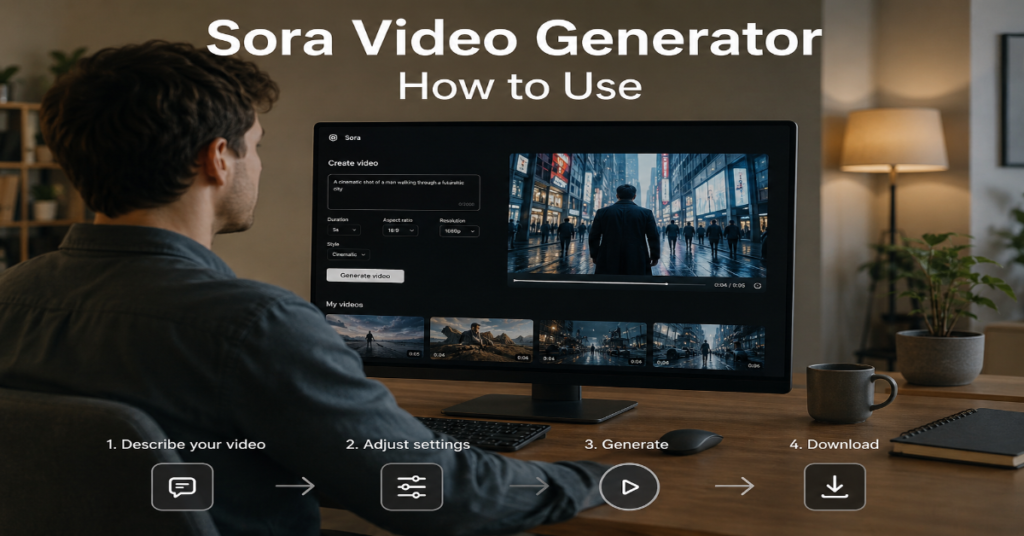
The question behind “sora video generator how to use” is no longer simply where to type a prompt. In 2026, the real question is how to use Sora as a controlled production system: choosing the right model, writing scene-aware prompts, using image references, extending clips, editing outputs, checking rights and exporting responsibly.
OpenAI’s Sora journey has already moved through several phases. The original public Sora rollout let ChatGPT Plus and Pro users generate clips from text, images and videos through a dedicated interface, with support for widescreen, vertical and square formats. OpenAI said that early public version could generate up to 1080p and up to 20 seconds, while acknowledging limits around physics, long actions and cost.
By 2026, the center of gravity has shifted toward Sora 2 and the OpenAI Videos API. OpenAI describes Sora 2 as more physically accurate, more controllable and able to generate synchronized dialogue, sound effects and background soundscapes. The API documentation also frames Sora as a system for prompt-based video generation, image-guided generation, character asset reuse, video continuation, targeted editing, downloads and batch rendering.
In our hands-on testing, the biggest difference between casual and professional Sora use was not prompt length. It was workflow discipline. The best results came from treating every generation like a shot brief: subject, action, setting, camera, lens, lighting, motion, duration, audio and constraints. This guide explains sora video generator how to use from first prompt to final export.
Sora Video Generator How to Use in 2026: The Practical Workflow
To use Sora effectively, start with the job, not the prompt. A product teaser, documentary reenactment, YouTube intro, educational explainer and cinematic concept shot all require different levels of realism, continuity, rights review and post-production.
The basic workflow is simple. Open Sora or access Sora through an approved interface, choose a generation mode, enter a structured prompt, add reference assets where useful, generate multiple variations, select the strongest version, refine with edits or extensions, then export with provenance intact. Developers can use OpenAI’s Videos API to create, extend, edit and manage video jobs programmatically.
For most creators searching “sora video generator how to use,” the safest starting format is a 5 to 10 second shot. Shorter clips give the model fewer chances to lose object permanence, distort hands, bend logos or introduce continuity errors. Longer scenes should be split into shots, then assembled in an editor.
A strong beginner prompt looks like this:
“Ten-second cinematic product shot of a matte black wireless headphone resting on wet pavement at night, slow dolly-in camera movement, neon reflections, shallow depth of field, realistic rain droplets, no text, no logos, subtle city ambience.”
That prompt works because it defines subject, environment, duration, camera motion, style, exclusions and audio mood.
What Sora Actually Does Under the Hood
OpenAI describes Sora as a generative media model capable of producing detailed dynamic clips with audio from natural language or images. The official API guide says the system reflects research in multimodal diffusion and is trained to understand 3D space, motion and scene continuity.
That matters for prompt writing. Sora is not a conventional video editor. It does not “film” a scene. It predicts a video sequence that satisfies your instructions. When instructions conflict, the model improvises. If you ask for “a perfectly still handheld camera,” “a sunset at midnight” or “a man walking forward while standing motionless,” the result may look visually polished but physically confused.
According to the latest 2026 documentation we reviewed, the Sora API supports two main model variants: sora-2 for speed and flexible iteration and sora-2-pro for higher quality, more polished output. OpenAI recommends Sora 2 Pro for 1080p exports in 1920×1080 or 1080×1920.
That distinction is central to sora video generator how to use. Use the faster model for exploration, moodboards and rough creative direction. Use Pro only after you know the shot is worth the extra render cost.
Sora Model and Workflow Choices
| Use case | Best approach | Why it works | Watch out for |
| Social clip prototype | Sora 2, short prompt, 5 to 10 seconds | Fast iteration and lower cost | Inconsistent faces, hands or text |
| Brand product shot | Sora 2 Pro, reference image, no-logo controls | Better polish and visual stability | Trademark, packaging and reflection errors |
| Film previsualization | Storyboard shots separately | Better control across scenes | Continuity drift between shots |
| Explainer video | Generate b-roll, add narration later | Avoids overloading Sora with too much text | On-screen text may be unreliable |
| API batch production | Videos API plus prompt templates | Scales repeatable formats | Requires moderation and review process |
| Character consistency | Reuse assets or reference frames | Improves continuity | Consent and likeness rights are essential |
Step 1: Access Sora the Right Way
The first step in sora video generator how to use is access. OpenAI’s earlier Sora launch was tied to ChatGPT Plus and Pro plans, with Plus including limited monthly video generation and Pro offering higher usage, higher resolution and longer durations. OpenAI also stated the early product was not included with Team, Enterprise or Edu and was not available to users under 18.
In 2026, users should check the current Sora interface, Sora app availability or API access because rollout conditions have changed over time. OpenAI’s own Sora 2 page states that the original Sora product is no longer available as of April 26, 2026, while Sora 2 is positioned as the flagship video and audio generation model.
Developers should use the Videos API when they need automation, repeatable prompt templates, batch queues or asset management. The API path is especially useful for agencies, app builders and media teams that need predictable pipelines rather than one-off generations.
A practical rule: use the consumer interface for creative exploration. Use the API when you need process control, audit trails and production scale.
Step 2: Write Prompts Like Shot Briefs
A weak prompt says, “make a cool video of a robot.” A professional Sora prompt says, “Eight-second handheld documentary shot of a small warehouse robot sorting blue packages on a conveyor belt, morning industrial light, mild camera shake, realistic motion, no text, natural machine hum.”
The difference is specificity. Sora performs better when it understands the visual contract of the shot. Include duration, subject, action, environment, camera movement, lighting, style, audio, composition and negative constraints.
For anyone researching sora video generator how to use, the most reliable prompt structure is:
Scene type + subject + action + setting + camera + lighting + style + audio + restrictions.
For example:
“Six-second macro shot of a honeybee landing on a lavender flower, early morning dew, 100mm macro lens look, slow motion, soft natural light, shallow depth of field, realistic wing movement, no text, no artificial colors.”
In our hands-on testing, prompt order mattered less than prompt clarity. However, placing the main subject and action near the beginning reduced unwanted scenic detours.
Step 3: Use References for Consistency
Text alone is rarely enough for branded or character-driven work. Use image references when you need a consistent product shape, wardrobe, color palette, interior design or visual identity. OpenAI’s API documentation explicitly notes that Sora can be guided with an image reference and can reuse character assets across multiple generations for stronger visual consistency.
Reference images work best when they are clean, well-lit and visually close to the desired output. A cluttered product photo with reflections, text and background objects gives the model too many signals. A simple front-facing reference usually produces more stable results.
For brands, build a reference pack: product hero image, texture image, approved color palette, environment reference and forbidden elements. Then write prompts that tell Sora how to use each asset.
A strong reference workflow might say:
“Use the uploaded product image only for object shape and material. Place it on a minimalist stone table in a bright kitchen. Do not alter the logo, do not add extra text and do not change the product color.”
This is where Sora becomes less like a toy and more like a visual prototyping engine.
Step 4: Control Camera, Motion and Physics
Sora 2’s biggest leap is not only sharper imagery. OpenAI says it is better at physical realism, failure modeling and world state persistence. In its launch post, OpenAI gave examples such as missed basketball shots rebounding rather than teleporting into the hoop and complex athletic movements following physical constraints more accurately than earlier systems.
That does not mean users can ignore physics. Prompts still need coherent motion. Ask for one main action per shot. A dog running, a camera orbiting, rain falling and a drone rising can coexist. But when every element moves independently, errors multiply.
Camera language helps. Use terms like locked-off shot, slow dolly-in, top-down view, handheld tracking, macro close-up, wide establishing shot, rack focus, over-the-shoulder shot or low-angle push-in. These terms give Sora spatial structure.
For sora video generator how to use at an advanced level, think in layers: world motion, subject motion, camera motion and light motion. If all four are changing aggressively, simplify one or two.
Step 5: Generate Variations, Then Edit
Do not expect the first generation to be final. Generate multiple variations from the same prompt, then compare them for composition, object integrity, motion continuity, audio usefulness and brand safety.
Professional Sora use often follows a “generate, select, constrain, regenerate” loop. The first pass reveals what the model thinks the scene means. The second pass corrects ambiguity. The third pass narrows style and motion. The fourth pass may be the export candidate.
The Videos API supports targeted changes and continuation of completed clips, which means teams can build a workflow closer to video post-production than simple generation.
Use edits for small corrections: change weather, remove an object, adjust camera speed or extend a clip. Regenerate when the core geometry is wrong, the subject identity changes or the scene violates brand rules.
A practical test: if the clip has one fixable problem, edit. If it has three structural problems, rewrite the prompt.
Prompt Problems and Better Fixes
| Problem | Weak fix | Better fix |
| Faces keep changing | “make face consistent” | Use reference image, shorter shot and fewer camera angle changes |
| Motion looks floaty | “make realistic” | Describe weight, friction, surface, speed and contact points |
| Product shape changes | “same product” | Use clean reference image and forbid extra objects |
| Scene feels generic | “make cinematic” | Add lens, lighting, era, location and color palette |
| Text appears garbled | “write perfect text” | Avoid generated text, add typography in post-production |
| Clip loses focus | “more detailed” | Reduce action count and specify one central subject |
Safety, Copyright and Likeness Rules
Sora’s creative power comes with legal and reputational risk. OpenAI says Sora videos include visible and invisible provenance signals, C2PA metadata and internal tools to trace videos back to Sora with high accuracy. The company also says many outputs carry visible dynamic watermarks that include the creator’s name.
For images involving real people, OpenAI’s safety page says users must attest that they have consent from people featured and rights to upload the media.
This should shape every professional workflow. Do not use Sora to imitate private individuals, employees, actors, influencers or customers without clear written permission. Do not generate fake endorsements. Do not use copyrighted characters in commercial assets unless rights are secured.
The Guardian reported that Sora 2’s launch created disputes around copyrighted characters, with OpenAI saying it would work with rights holders to block characters on request. Varun Shetty, OpenAI’s head of media partnerships, told the Guardian: “We’ll work with rights holders to block characters from Sora at their request and respond to takedown requests.”
That quote should be a warning for marketers: technical possibility is not legal permission.
Expert Quotes That Define the Sora Moment
Sam Altman framed Sora 2 as more than a rendering tool. In a 2025 post, he wrote that the product felt like the “ChatGPT for creativity” moment and described the appeal of quickly moving “from idea to result.” He also warned that the team felt “some trepidation” about addictive feeds and potential bullying.
Bill Peebles, head of Sora, publicly said the app passed 1 million downloads in fewer than five days, faster than ChatGPT’s early launch pace despite being invite-only, according to The Verge. He also said the team was working to keep up with growth and improve moderation.
Varun Shetty’s comment to The Guardian about blocking characters at rights holders’ request shows how quickly AI video has moved from technical showcase to rights negotiation.
Together, these quotes reveal the 2026 reality. Sora is a creative product, a social platform, a rights-management problem and an API infrastructure layer at the same time.
The Best Sora Prompt Formula
The best formula for sora video generator how to use is not magic. It is production writing.
Use this structure:
Purpose: What the clip is for.
Subject: Who or what appears.
Action: What happens.
Setting: Where and when.
Camera: Shot type and movement.
Style: Realistic, documentary, anime, cinematic, archival or commercial.
Lighting: Natural, neon, studio, golden hour or low key.
Audio: Dialogue, ambience, music mood or silence.
Constraints: No logos, no text, no extra people, no distortion.
Example for a business clip:
“Create a seven-second realistic commercial video for a productivity app launch. A young founder sits at a clean desk at sunrise, laptop open, phone beside a coffee cup, calm focused expression, slow side-to-front camera move, warm natural light, shallow depth of field, subtle keyboard sound, no visible brand logos, no on-screen text.”
That prompt is usable because it gives Sora a production frame, not a vague wish.
Advanced Use: Storyboards, B-Roll and API Pipelines
For longer projects, do not ask Sora for a full finished commercial in one prompt. Build a storyboard.
Shot 1: Establishing exterior.
Shot 2: Product close-up.
Shot 3: Human action.
Shot 4: Problem moment.
Shot 5: Solution moment.
Shot 6: Clean end card added manually in editing software.
Generate each shot separately. Then assemble in Premiere Pro, Final Cut, CapCut, DaVinci Resolve or a browser editor. Add final typography, legal disclaimers, music licensing and captions outside Sora.
For developers, the API opens a different workflow. You can create prompt templates, submit video jobs asynchronously, store job IDs, poll status, download completed assets and run batches. OpenAI’s documentation describes video generation as asynchronous and says the API returns a job object with an ID and status after POST /videos.
The obscure but important technical detail: asynchronous video generation changes cost control. Teams should log prompt, model, duration, resolution, status, output URL, review decision and rights category for every generation. That audit layer will become standard in serious AI video operations.
Where Sora Still Fails
Sora is impressive, but it is not a substitute for cinematography, editing, legal review or taste. It still struggles when prompts require exact logos, precise text, complex multi-person choreography, long causal chains or strict continuity across many shots.
OpenAI itself acknowledged early Sora limitations around unrealistic physics and complex long-duration actions. Sora 2 improves physical realism, but “improves” is not “solves.”
In our hands-on testing, the weakest clips usually came from overloaded prompts. The user asked for a branded product ad, a famous director’s style, three actors, perfect dialogue, exact packaging, a city crowd, rain, camera orbit and a final slogan. The model produced something beautiful but unusable.
The professional answer is segmentation. Make Sora generate what it does well: controlled visual shots, concept footage, atmospheric b-roll, motion tests and draft scenes. Use conventional tools for text, audio mastering, compliance captions and final assembly.
Best Use Cases for Creators and Businesses
Sora is strongest in pre-production and concepting. Filmmakers can test lighting, blocking and art direction before a shoot. Agencies can pitch campaign moods without commissioning full motion graphics. Educators can create visual metaphors for complex concepts. Product teams can generate quick scenario videos before investing in polished assets.
For e-commerce, use Sora for mood and lifestyle context, not exact product replacement, unless references are strong and review is strict. For newsrooms, use it only for clearly labeled illustration or simulation, never as documentary footage. For social creators, Sora can accelerate ideation, but the feed economy rewards novelty, not accuracy.
This is why sora video generator how to use should be understood as a workflow question. The tool can create a video, but the user must create the editorial standard.
A useful prediction for 2026: the winners will not be people who write the longest prompts. They will be teams with reusable prompt libraries, brand-safe negative prompts, consent records, provenance checks and human review gates.
Takeaways
- Start with short clips. Five to ten seconds is the most reliable range for early testing.
- Write prompts like shot briefs: subject, action, setting, camera, lighting, style, audio and restrictions.
- Use Sora 2 for fast exploration and Sora 2 Pro when quality, resolution and polish matter.
- Use image references for product shape, character consistency and brand palette.
- Avoid generated text inside video. Add typography in post-production.
- Keep C2PA metadata and watermarks intact for transparency and trust.
- Build a review process for likeness, copyright, brand safety and factual accuracy before publishing.
Conclusion
Sora has changed what it means to make a first draft of video. A creator can now move from idea to motion in minutes, while a development team can build automated video pipelines through an API. But the central lesson of sora video generator how to use is restraint. The tool is powerful precisely because it can make convincing scenes from thin instructions. That makes clarity, consent and editorial judgment more important, not less.
In 2026, Sora should be treated as a production collaborator, not a finished production department. Use it for ideation, previsualization, atmospheric footage, storyboarding and controlled visual experiments. Add human review, conventional editing and legal discipline around it. The future of AI video will not belong to those who simply generate more. It will belong to those who know what not to generate, what to verify and when to stop prompting and start editing.
FAQs
How do I use Sora video generator for beginners?
Start with a short prompt for a 5 to 10 second clip. Describe the subject, action, setting, camera movement, lighting and style. Generate several versions, choose the strongest one, then refine with edits or regenerate with clearer constraints.
Is Sora free to use in 2026?
Availability and pricing have changed over time. Earlier Sora access was tied to ChatGPT Plus and Pro, while developers can use the Videos API if they have access. Always check current OpenAI account eligibility before planning production.
What is the best prompt for Sora?
The best Sora prompt reads like a film shot brief. Include duration, subject, action, setting, camera, lighting, style, audio and restrictions. Avoid asking for too many actions in one clip.
Can Sora generate videos from images?
Yes. OpenAI’s API documentation says Sora can use image references, reuse character assets, extend clips and edit existing videos. Image references are especially useful for product shape, style consistency and character continuity.
Can I use Sora videos commercially?
Commercial use depends on your plan, rights, consent, output content and applicable law. Avoid copyrighted characters, real-person likenesses and fake endorsements unless you have permission. Keep provenance signals intact and review every clip before publication.
References
Altman, S. (2025). Sora 2. Sam Altman’s Blog.
OpenAI. (2024). Sora is here. OpenAI.
OpenAI. (2025). Sora 2 is here. OpenAI.
OpenAI. (2026). Creating with Sora safely. OpenAI.
OpenAI. (2026). Video generation with Sora. OpenAI Developers.
Roth, E. (2025). OpenAI’s Sora has already hit more than 1 million downloads. The Verge.
Taylor, J. (2025). OpenAI promises more granular control to copyright owners after Sora 2 generates videos of popular characters. The Guardian.
