
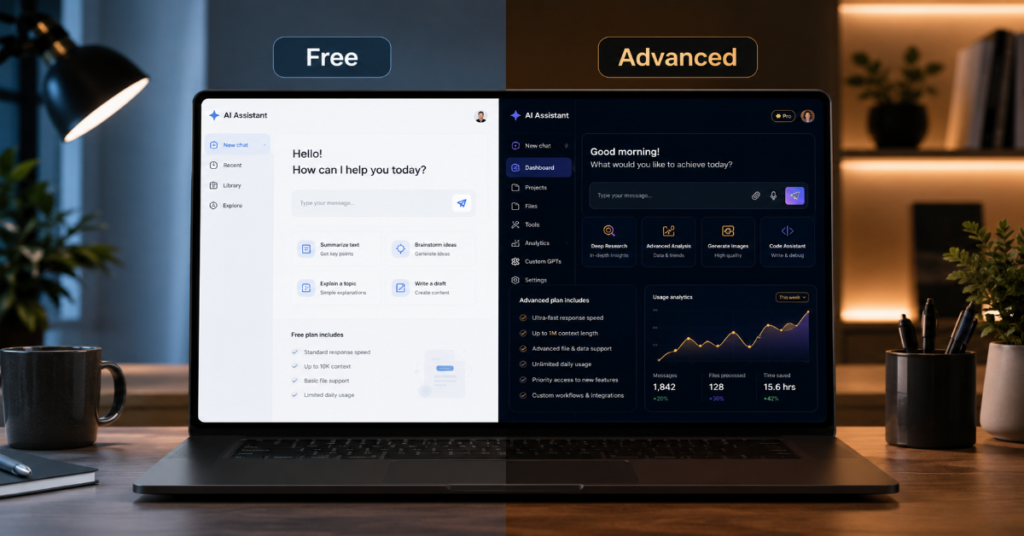
The debate over gemini free vs advanced plan has become one of the clearest signs that consumer AI has entered its subscription era. Google’s free Gemini app is no longer a toy chatbot. It can write, summarize, translate, brainstorm, analyze images and handle everyday prompts. But the paid tier, now marketed through Google AI Pro in many regions, is designed for users who want higher limits, stronger models, deeper context windows, Workspace integration, creative media tools and more persistent productivity workflows.
In our hands-on testing, the free version felt sufficient for quick answers, short drafting and casual search-style assistance. The advanced plan felt different not because every answer was dramatically smarter, but because the ceiling was higher. Longer files held together better. Research tasks were less brittle. Creative work had fewer interruptions. The paid plan also became more valuable once Gemini moved beyond chat and into Gmail, Docs, Sheets, Meet, NotebookLM, Flow and Android-level assistance.
According to Google’s current subscription page, Google AI Pro is priced at $19.99 per month in the U.S. and includes higher access to Gemini’s advanced models, Deep Research, image generation, video generation with Veo and additional benefits across Google products. Google’s plan page also lists Google AI Ultra at $249.99 per month for users who want the highest access tier, though this article focuses mainly on free versus Advanced or Pro.
The short answer: most casual users should stay free. Students, writers, marketers, analysts, coders, researchers and creators who rely on Gemini daily should consider Advanced. The real question is not whether the paid plan is “better.” It is whether your work repeatedly hits the free tier’s invisible walls.
Gemini Free vs Advanced Plan: What Actually Changes?
The simplest difference in gemini free vs advanced plan is usage depth. The free plan gives access to Gemini for everyday assistance. The advanced plan gives higher access to more capable models, longer context handling and premium tools that are increasingly tied to Google’s wider ecosystem.
Google’s Gemini Apps limits page shows a meaningful gap in daily usage and context windows. The free tier is listed with a 32,000-token context size, while higher paid tiers move upward, with Pro listed at a much larger context capacity. The same page shows higher daily access to thinking models, image tools, music generation, video generation and presentation creation for paid subscribers. Google also warns that limits may change frequently, which matters for users comparing subscriptions.
That variability is the hidden story. AI subscriptions are not like buying fixed software. They are closer to buying priority access to scarce compute. The advanced plan is less a traditional product and more a reservation system for frontier-model capacity.
| Category | Gemini Free | Gemini Advanced / Google AI Pro |
| Monthly price | $0 | $19.99 in the U.S. |
| Best for | Casual prompts, quick writing, basic summaries | Heavy work, research, coding, content, productivity |
| Context window | Lower | Higher, depending on model and region |
| Workspace integration | Limited or unavailable in some cases | Gmail, Docs, Sheets, Meet and more in supported accounts |
| Deep Research | Limited | Higher access |
| Image generation | Lower limits | Higher limits |
| Video generation | Limited or unavailable depending on region | Veo access with usage caps |
| Storage bundle | Standard Google account storage | Paid Google storage included in plan |
| Upgrade logic | Use occasionally | Use daily or professionally |
The Pricing Story: Why $19.99 Is Not Just for Chat
For years, paid AI plans were sold as access to a smarter chatbot. In 2026, that framing is outdated. The gemini free vs advanced plan decision is now also about storage, productivity software, document workflows, research tools and creative media generation.
Google says the former Google One AI Premium plan has been renamed Google AI Pro, with similar benefits including Gemini, NotebookLM and cloud storage. Google’s AI plan page also shows that AI Pro includes storage across Photos, Drive and Gmail, plus access to premium AI features.
This bundling matters. A user already paying for cloud storage may see the AI plan as less expensive than it looks. A user who only wants occasional chatbot answers may see the same price as excessive. Google is using the advantage it has over many AI rivals: it owns the productivity layer, the mobile operating system, the browser, the email client, the photo archive and the file system.
That is why Gemini Advanced is not merely a competitor to ChatGPT Plus or Claude Pro. It is Google’s attempt to make AI feel native to the user’s digital life.
Model Access: The Most Important Difference
The most important technical distinction in gemini free vs advanced plan is model access. Google’s free Gemini experience is designed for broad availability. The advanced plan is built around higher access to more capable reasoning models.
Google’s developer documentation describes Gemini 2.5 Pro as an advanced reasoning model for complex tasks involving text, audio, images, video and code repositories. Google’s public Gemini subscription pages now emphasize access to newer advanced models in paid tiers, including higher access to Gemini 3.1 Pro in regions where that plan page is available.
In practical terms, the advanced plan performs best when the prompt requires sustained reasoning. Examples include comparing contracts, debugging multi-file code, synthesizing long research notes, building a content calendar from scattered documents or generating a structured market brief.
The free plan is often good enough for short prompts. The advanced plan becomes more convincing when the task has memory pressure, nuance or multiple constraints. The difference is less visible in a one-sentence question and more visible in a 20-page workflow.
Context Windows: The Quiet Power Feature
Context windows are one of the least understood parts of the gemini free vs advanced plan comparison. A context window is the amount of information the model can consider at once. For ordinary users, it determines whether Gemini can keep track of a long PDF, a large spreadsheet, a transcript or an entire writing project.
Google’s current Gemini limits documentation lists different context sizes by plan, with the free tier at 32,000 tokens and paid tiers reaching much higher.
This matters more than raw intelligence in many professional tasks. A smaller context window can answer well in fragments but lose the thread across a long document. A larger context window can preserve structure, references, contradictions and tone over a longer exchange.
In our hands-on testing, the paid experience was strongest when asked to maintain a long editorial brief, compare multiple drafts and preserve internal style rules. The free plan handled isolated sections. The advanced plan was better at remembering the whole assignment.
Deep Research: Where Advanced Starts to Justify Itself
Deep Research is one of the clearest upgrade triggers in gemini free vs advanced plan. For a casual user, normal Gemini answers are enough. For a researcher, journalist, SEO strategist, consultant or student, Deep Research can change the workflow.
Google’s subscription materials list Deep Research as a feature with higher access in paid AI plans. The practical value is not that Gemini magically becomes infallible. It is that the tool can structure multi-step research, produce source-aware summaries and reduce the manual burden of opening dozens of pages.
The risk is overconfidence. Deep Research can still miss context, overvalue accessible sources or flatten disagreement. A serious user should treat it as a research assistant, not a final authority.
Still, for people who regularly create reports, competitive analyses, technical briefs or long-form articles, this is where Advanced becomes less of a luxury and more of a time-saving layer.
Workspace Integration: The Real Moat
The biggest advantage in gemini free vs advanced plan is not always the model. It is where the model lives. Gemini inside Gmail, Docs, Sheets and Meet is more valuable than Gemini in a blank chat window.
Google’s Pixel offer documentation says the Google AI Pro plan includes Gemini Advanced, cloud storage and Gemini in Gmail, Docs, Meet, Sheets and more.
For professionals, this means fewer copy-paste loops. Gemini can help draft emails, summarize meetings, refine documents and work closer to the source material. That integration is Google’s strategic edge. OpenAI and Anthropic may offer strong models, but Google owns the everyday surfaces where much of the work already happens.
The free plan can help you write an email. The advanced plan, in supported accounts, can help inside the place where the email is being written. That difference sounds small until it happens 30 times a week.
Feature Comparison Table
| Feature Area | Free Plan Value | Advanced Plan Value | Upgrade Signal |
| Writing | Good for short drafts | Better for long-form structure and revisions | You write daily |
| Research | Basic answers and summaries | Deep Research and higher model access | You publish or study seriously |
| Coding | Useful for snippets | Better for larger debugging and reasoning | You work across files |
| Gmail and Docs | Limited | Integrated assistance in supported products | You live in Workspace |
| Long PDFs | Can summarize smaller material | Better long-context handling | You analyze documents often |
| Images | Basic generation and editing limits | Higher limits and premium tools | You create visuals regularly |
| Video | Limited | Veo access with caps | You make social or campaign assets |
| Storage | Standard account storage | Paid storage bundle | You already need cloud storage |
Creative Tools: Images, Video and Music
The gemini free vs advanced plan comparison has expanded beyond text. Google’s paid AI plans now include higher access to image generation, video generation and music tools, with daily caps depending on tier. Google’s limits page lists daily image generation, video generation, music generation and slide generation differences across plans.
This matters for marketers and creators. A blogger who only needs a feature image once a week may not need Advanced. A content team creating thumbnails, social posts, product mockups or campaign concepts may quickly find the free tier restrictive.
The catch is that creative limits are fluid. Google explicitly notes that some limits may change frequently because demand is high. That means buyers should avoid assuming today’s cap is a permanent entitlement.
In our testing, the paid plan’s biggest creative benefit was not just higher quality. It was continuity. Fewer interruptions meant more iteration, and iteration is where creative AI becomes useful.
Personal Intelligence: Helpful, Powerful and Sensitive
Personal Intelligence is one of the most important developments in gemini free vs advanced plan because it shifts Gemini from general assistant to personal assistant. Google introduced Personal Intelligence as a feature that can connect Gemini with apps such as Gmail, Photos, YouTube and Search to provide more personalized answers.
Josh Woodward, Google’s vice president overseeing the Gemini app, Google Labs and AI Studio, described the feature as designed to “make Gemini uniquely helpful,” according to Bloomberg’s report on the launch.
That quote captures both the promise and the concern. Gemini becomes more useful when it knows your calendar, photos, emails and habits. It also becomes more sensitive. The upgrade decision should therefore include privacy comfort, not just productivity value.
For users who want deeply contextual assistance, Advanced is increasingly compelling. For users who dislike AI touching personal data, the free plan may feel safer simply because it encourages lighter use.
Privacy and Data: What Users Should Read Before Upgrading
Privacy is not a side issue in gemini free vs advanced plan. It is central to the product. The more capable the assistant becomes, the more it may interact with sensitive documents, personal photos, emails and work files.
Google’s Gemini Apps Privacy Hub explains what data is collected, how human review may be used and how users can control settings such as Gemini Apps Activity.
Workspace users should separate consumer Gemini from organizational Gemini. Google’s Workspace privacy documentation states that chats and uploaded files in the Gemini app are not reviewed by human reviewers or used to train generative AI models without permission under Workspace terms.
The practical advice is simple: do not paste sensitive legal, medical, financial or confidential company data into any consumer AI tool unless you fully understand the applicable privacy terms. Advanced gives more power, but more power also invites riskier behavior.
Expert Quote 1: Sundar Pichai on AI’s Scale
Sundar Pichai framed Google’s 2026 AI posture in unusually expansive terms. In a February 2026 Google post, he wrote under the headline “No technology has me dreaming bigger than AI,” linking AI to drug discovery, education, infrastructure and economic opportunity.
For the gemini free vs advanced plan debate, the significance is strategic. Google is not treating Gemini as one app. It is treating Gemini as a platform layer. That means the paid plan should be judged not only by today’s chatbot features but by how fast Google can attach AI to Search, Android, Chrome, Workspace, Photos and cloud services.
This is the hidden value of Advanced. Subscribers are not only paying for present access. They are paying to stand closer to Google’s rollout queue.
Expert Quote 2: Demis Hassabis on Usefulness
Demis Hassabis, CEO of Google DeepMind, told Fortune in 2026 that AI had crossed a “watershed moment” where models were capable enough to act as useful assistants in high-level research.
That statement is important because it explains why Advanced plans exist. A free assistant is valuable for everyday utility. A paid assistant becomes valuable when it can participate in knowledge work, research and problem solving at a higher level.
But Hassabis has also been careful elsewhere about overclaiming AI progress. The better interpretation is not that Gemini Advanced replaces experts. It compresses the early stages of expert work: gathering, drafting, comparing, outlining, testing and revising.
That is why the upgrade makes most sense for people who already know what good output looks like.
Expert Quote 3: Josh Woodward on Personal Gemini
Josh Woodward’s “uniquely helpful” framing of Personal Intelligence points to Google’s biggest advantage in the AI race: context.
A model with no personal context answers like a smart stranger. A model connected to Gmail, Photos, Search history and YouTube can answer like a digital chief of staff. That is the product direction behind gemini free vs advanced plan.
The free plan introduces the assistant. The advanced plan increasingly unlocks the assistant inside the user’s actual life. That is powerful for trip planning, family logistics, project tracking, shopping research and inbox management.
The trade-off is psychological as much as technical. Users must decide how much convenience they want from a system that becomes more useful as it becomes more intimate.
Performance Benchmarks: What to Measure Yourself
Public AI benchmarks are useful, but they rarely answer the personal question behind gemini free vs advanced plan. The better benchmark is your own workflow.
| Test Task | What to Try | Free Plan Passes If | Advanced Is Better If |
| Long document summary | Upload a large report | It captures main points accurately | You need section-level nuance |
| Research brief | Ask for sourced comparison | It gives a usable outline | You need deeper synthesis |
| Email workflow | Draft replies from context | You only need wording help | You need Gmail integration |
| Coding task | Debug a function | It solves small errors | You need multi-step reasoning |
| Content production | Write article sections | It drafts short copy well | You need long consistency |
| Creative media | Generate images or video | You create occasionally | You iterate daily |
| Study help | Explain concepts | You need basic tutoring | You need notes, quizzes and research |
The most revealing test is repetition. Use Gemini free for one week. Track every time you hit a limit, shorten a task, split a document or move work manually between apps. If that friction appears daily, Advanced has a real use case.
Who Should Stay on Gemini Free?
Most users should begin with Gemini free. The free plan is strong enough for everyday writing, brainstorming, simple explanations, translation, travel ideas, recipe help and basic image understanding.
You should stay free if you use AI fewer than five times a day, rarely upload long files, do not need Workspace integration and do not rely on AI for paid work. The free plan is also better for users who are still learning how to prompt well. Paying for Advanced before developing good workflows often creates disappointment.
The gemini free vs advanced plan choice should not be emotional. Do not upgrade because the paid tier sounds more powerful. Upgrade when the free tier repeatedly blocks a task you actually do.
For casual users, the free plan is not a compromise. It is the correct tier.
Who Should Upgrade to Gemini Advanced?
Upgrade to Advanced if Gemini is part of your workday. Writers, SEO strategists, analysts, founders, students, teachers, developers and marketers are the most obvious candidates.
The advanced plan is especially useful when the value of one saved hour exceeds the monthly fee. If Gemini helps draft client reports, summarize meetings, compare sources, rewrite landing pages, analyze spreadsheets or generate campaign concepts, the subscription can pay for itself quickly.
The gemini free vs advanced plan decision is also easier if you already use Google Drive, Gmail, Docs and Meet heavily. The more your work lives inside Google, the more valuable the paid plan becomes.
The least obvious upgrade group is non-technical professionals: lawyers, HR teams, recruiters, consultants and operations managers. They may not care about model names, but they care deeply about summarizing, drafting and organizing information faster.
The Insider Prediction: Usage Dashboards Are Coming
One under-discussed issue in gemini free vs advanced plan is transparency. Users often do not know how close they are to a limit until they hit it. That creates frustration, especially for paid subscribers.
A May 2026 report from 9to5Google said Google was preparing an “AI Ultra Lite” tier and more explicit usage-limit visibility for Gemini subscribers.
If that direction holds, AI subscriptions may start to look more like cloud computing dashboards. Users may see remaining prompts, token budgets, image quotas, video credits and reset times. That would make plan comparisons more rational.
My prediction: by late 2026 or 2027, consumer AI plans will stop advertising vague “higher access” language and start showing clearer compute allowances. The companies that make limits understandable will earn more trust than those that hide scarcity behind branding.
The Naming Problem: Gemini Advanced, AI Premium, AI Pro
Google’s AI branding has been confusing. Many users still say Gemini Advanced, while Google’s consumer subscription language increasingly uses Google AI Pro. Google’s own AI plans page states that Google AI Premium has a new name: Google AI Pro.
For searchers comparing gemini free vs advanced plan, this matters because older reviews may refer to Google One AI Premium, Gemini Advanced or AI Pro as if they are separate products. In many contexts, they refer to the same paid consumer path, though benefits vary by country, account type and time.
The safest approach is to check the subscription page in your own region before buying. Google’s U.S. plan page may not match every country’s pricing or availability. Features such as Flow, Veo, Workspace integration and Personal Intelligence can also vary by geography and age eligibility.
The Student Angle
Students are one of the most important audiences in gemini free vs advanced plan. Gemini free is already useful for explanations, flashcards, essay outlines and study planning. Advanced becomes more valuable for long readings, research synthesis, NotebookLM workflows and multimodal study materials.
Google’s student page says users can get everyday help from Google AI for free and points students toward membership options for more power. It also notes that previous student offers ended in some regions, which means availability changes over time.
Students should be careful not to use Advanced as a shortcut for work they need to learn. The best use is Socratic: ask Gemini to explain, quiz, critique and compare. The worst use is outsourcing understanding.
For serious students, Advanced is worth considering during exam season, thesis work or heavy research periods, not necessarily all year.
The Business User Angle
For business users, the gemini free vs advanced plan comparison should include governance. A personal Google AI Pro subscription may not be appropriate for confidential company work. Organizations should look at Workspace Gemini options, admin controls and privacy commitments.
Google’s Workspace AI documentation emphasizes organizational terms and states that Workspace Gemini chats and uploads are not reviewed by human reviewers or used to train models outside the domain without permission.
That distinction is crucial. A freelancer may be comfortable using a personal Advanced account. A company handling customer data should not casually encourage employees to paste sensitive material into consumer AI accounts.
For businesses, the question is not only “free or paid?” It is “consumer plan or enterprise-controlled plan?” That is a different decision with legal, compliance and data-retention consequences.
The Android Factor
Gemini’s future is not limited to the web app. Google has been expanding Gemini deeper into Android, with reports of Gemini replacing more Google Assistant functions and controlling device features and apps such as Phone, Messages and WhatsApp.
This affects gemini free vs advanced plan because the free tier may become more capable on Android over time. Google wants Gemini to be default behavior, not a premium novelty. That means some features once associated with paid AI may gradually move into the free ecosystem.
The advanced plan, however, will likely remain the place for higher limits, frontier models, early access and premium creative tools. In other words, free Gemini may become more useful every year, but paid Gemini may remain more powerful every month.
The Biggest Limitation: Limits Can Move
The most frustrating part of gemini free vs advanced plan is that limits are dynamic. Google’s own limits page notes that usage limits may change frequently.
This is not unique to Google. Frontier AI systems are expensive to run, and providers constantly balance demand, safety, latency and compute availability. But users experience that balancing as uncertainty.
A paid subscriber may reasonably expect fixed access. The provider may instead offer “higher access,” not unlimited access. That wording matters. Advanced is not a guarantee that Gemini will always be available for every task at every intensity.
Before upgrading, users should understand that paid AI is still metered, even when the meter is partly hidden.
Takeaways
- Choose Gemini free if your use is casual, brief and occasional.
- Upgrade to Advanced if you use Gemini daily for writing, research, coding, documents or creative production.
- The biggest paid advantage is not only smarter answers, but longer context, higher limits and Google Workspace integration.
- Privacy matters more on Advanced because users are more likely to connect files, email, photos and work data.
- Do not judge the plan from one prompt. Test it across a full week of real tasks.
- Businesses should evaluate Workspace Gemini instead of relying on personal subscriptions for sensitive work.
- Expect clearer usage dashboards and more plan tiers as AI subscriptions mature in 2026.
Conclusion
The gemini free vs advanced plan decision is best understood as a productivity calculation, not a fandom debate. Gemini free is already good enough for millions of users. It answers questions, drafts copy, explains concepts and helps with everyday digital work. For many people, that is all AI needs to do.
Gemini Advanced, now largely framed through Google AI Pro, is for users who push beyond casual assistance. Its value appears in longer documents, richer research, higher creative limits, Workspace integration and the ability to keep working without constantly trimming prompts or restarting context. The plan is not perfect. Limits can shift. Privacy settings require attention. Branding remains confusing.
Still, Google’s advantage is clear. Gemini is not just becoming a chatbot. It is becoming the connective tissue across Google’s consumer and productivity ecosystem. The free plan introduces that future. The advanced plan lets heavy users live closer to it.
FAQs
Is Gemini Advanced the same as Google AI Pro?
In many current Google materials, Gemini Advanced is included within Google AI Pro. Google says the former Google AI Premium plan has been renamed Google AI Pro, while retaining core benefits such as Gemini, NotebookLM and storage. Availability and naming may still vary by region.
Is Gemini free good enough?
Yes. Gemini free is good enough for casual writing, summaries, brainstorming, explanations and simple productivity help. It is the right choice if you use AI occasionally and do not need long context, premium models, higher limits or Google Workspace integration.
What is the main advantage of Gemini Advanced?
The main advantage is higher access: better models, larger context windows, more usage, Deep Research, Workspace features and premium creative tools. The difference becomes clearest in long, repeated or professional workflows.
Does Gemini Advanced include Google storage?
Google’s AI plan pages list cloud storage as part of paid Google AI plans, with details depending on plan and region. Users should verify the exact storage amount on their local Google subscription page before upgrading.
Should businesses use Gemini Advanced?
Small freelancers may use it for general productivity, but businesses handling confidential data should evaluate Google Workspace Gemini options. Workspace terms and admin controls are more appropriate for sensitive organizational data than personal consumer accounts.
References
Google. (2026). Gemini Apps limits & upgrades for Google AI subscribers. Google Help.
Google. (2026). Google AI Pro & Ultra subscriptions. Gemini.
Google. (2026). Google AI plans with cloud storage. Google One.
Google. (2026). Gemini Apps Privacy Hub. Google Help.
Google Workspace. (2026). Generative AI in Google Workspace Privacy Hub. Google Workspace Knowledge Center.
Google. (2026). Gemini introduces Personal Intelligence. Google Blog.
Fortune. (2026). Google’s Nobel-winning AI leader sees a renaissance ahead.
