
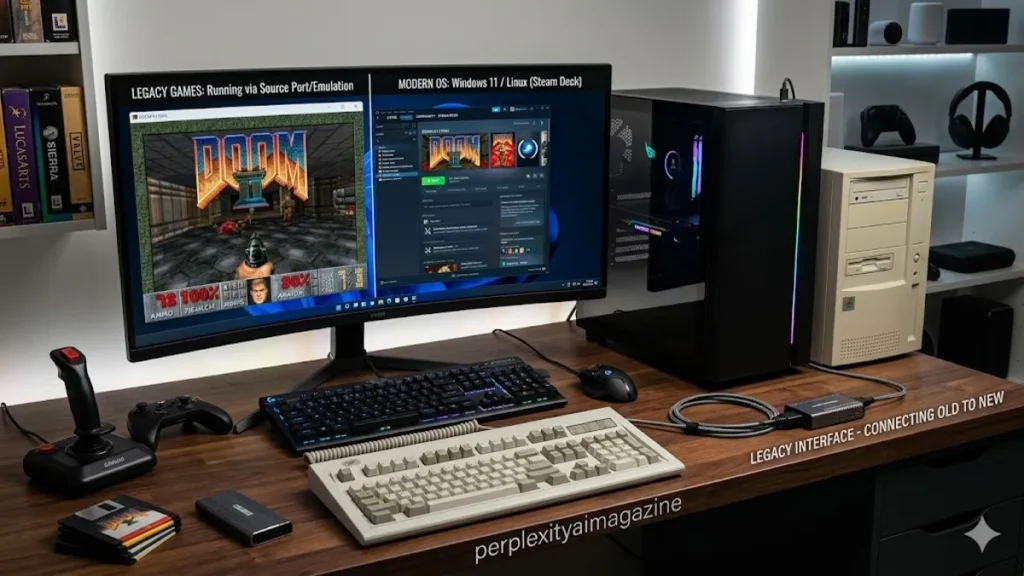
For the modern PC gamer, the phrase “DirectX” is often synonymous with the cutting-edge visuals of ray tracing and high-frame-rate realism. However, a quiet crisis often unfolds when a user attempts to launch a cherished title from the mid-2000s, only to be met with a cryptic error message citing a missing DLL. The solution is almost always the DirectX End-User Runtime Web Installer. This utility serves a singular, vital purpose: it downloads and installs the legacy “side-by-side” libraries (such as D3DX9, XAudio 2.7, and XInput 1.3) that are not included by default in modern Windows 10 or 11 installations. By bridging this gap, the installer ensures that fifteen years of gaming history remain playable on contemporary hardware.
Despite the sophistication of DirectX 12, many legacy applications rely on specific iterations of the Application Programming Interface (API) that were frozen in time around June 2010. The Web Installer, often identified by its executable name dxwebsetup.exe, acts as a smart probe. It scans the user’s system, identifies which of these specific vintage components are missing, and fetches only the necessary files from Microsoft’s servers. It does not “downgrade” the system or replace the core DirectX 12 files that come pre-baked into Windows; rather, it populates a library of historical tools that sit quietly in the background until an older game calls upon them to render a frame or play a sound.
Architecture of the Legacy Bridge
The technical underpinnings of the DirectX End-User Runtime are rooted in the “Redistributable” model of the early 2010s. Unlike modern Windows Updates, which are pushed automatically, these components were originally designed to be bundled on physical game discs. As the industry pivoted to digital distribution, the Web Installer became the primary method for maintaining this software heritage. The installer focuses on the “D3DX” series of helper libraries. These libraries were once used by developers to perform complex mathematical calculations and texture management. Because each version was slightly different, a game built for D3DX9_43.dll cannot simply use D3DX9_42.dll, making the full suite provided by the installer indispensable for broad compatibility.
When a user initiates the installation process, they are interacting with a piece of software history. The installer itself has remained largely unchanged for over a decade, a testament to its stability. It is available through official Microsoft channels, specifically via Download ID 35. For those operating in environments without internet access—a common scenario for retro-gaming enthusiasts or secure corporate workstations—Microsoft offers a counterpart: the June 2010 Redistributable (ID 8109). This version contains the entire 95MB payload in a single package, allowing for a completely offline deployment of the same critical libraries.
Comparative Deployment Methods
| Feature | Web Installer (dxwebsetup.exe) | Offline Redistributable (June 2010) |
| Download Size | ~2 MB (initial) / Variable (final) | 95.6 MB |
| Internet Required | Yes, during the installation process | Only for the initial download |
| Ideal Use Case | Single home PC with stable internet | Multiple PCs, offline builds, or imaging |
| System Impact | Updates only missing components | Extracts all files before installation |
| Package ID | 35 | 8109 |
Navigating the Installation Labyrinth
While the installation of the DirectX End-User Runtime is generally straightforward, it is not without its historical quirks. One notable relic of the “adware era” is the occasional inclusion of the Bing Bar checkbox within the installer wizard. Expert users consistently recommend unchecking this option to maintain a clean system environment. Once the license is accepted, the utility performs a “Component Initialization” phase. This is the moment where the software communicates with Microsoft’s servers to verify the integrity of the local System32 and SysWOW64 folders. It is a surgical process, adding files without overwriting the core OS architecture.
Transitions between Windows versions have occasionally sparked rumors that legacy DirectX support has been dropped. However, as noted by Microsoft’s own documentation, the runtime is fully compatible with Windows 11. “The DirectX End-User Runtime does not change the version of DirectX on your computer,” explains a technical lead at a major game engine firm, “it simply provides the legacy hooks that older software expects to see.” This side-by-side execution is what allows a modern machine to run Cyberpunk 2077 on DirectX 12 in one window and Age of Empires II on DirectX 9 in another without any cross-process interference.
Typical Error Resolution Path
| Error Symptom | Potential Root Cause | Recommended Action |
| Internal System Error | Corrupted cabinet (.cab) files | Clear Temp folder and use Offline Redist |
| 0x80070057 | Incorrect parameter or registry clog | Run sfc /scannow and DISM repair |
| Missing d3dx9_43.dll | Incomplete previous installation | Re-run Web Installer with Admin rights |
| Setup failing at start | Antivirus interference | Temporarily disable real-time protection |
The Diagnostic Ritual: Beyond the Setup
When the installer fails, the seasoned administrator turns to the logs. Windows stores the forensic evidence of these failures in DXError.log and DirectX.log, typically located in the C:\Windows directory. These files provide a line-by-line account of the API calls made during the setup. Often, the culprit is a corrupted .NET Framework installation or a permissions issue within the Windows Component Store. In such cases, the installer acts as a canary in the coal mine, signaling deeper OS health issues that might otherwise go unnoticed until a catastrophic system failure occurs.
Industry experts emphasize the importance of using official sources for these files. “There is a persistent trend of ‘DLL-fixer’ websites that offer individual DirectX files,” warns cybersecurity analyst Thomas Reed. “These are often vectors for malware. The only safe way to restore a missing DirectX library is through the official Microsoft End-User Runtime.” This caution is particularly relevant in an era of increased supply chain attacks, where even a seemingly benign utility can be weaponized if sourced from an unverified third-party repository.
The Future of the Past
As we move further into the decade, the question arises: how long will Microsoft support these legacy runtimes? With the advent of Windows 11 24H2 and beyond, the architecture of the OS continues to evolve, yet the commitment to backward compatibility remains a core pillar of the Windows brand. The DirectX End-User Runtime is more than just a collection of DLLs; it is a bridge to the past that ensures the creative works of developers from decades ago are not lost to the march of progress. It allows for a continuum of software utility that is rarely seen in other computing ecosystems.
The balance of maintaining this legacy code without creating security vulnerabilities is a delicate act. Microsoft manages this by keeping the runtime libraries static. Since they are no longer being actively developed or changed, their attack surface is well-understood and heavily mitigated by modern Windows security features like Memory Integrity and Core Isolation. Thus, the Web Installer remains a safe, essential, and highly specialized tool in the arsenal of any user who values the vast library of software that defined the first two decades of the twenty-first century. – directx end-user runtime web installer.
Key Takeaways
- Targeted Solution: The installer provides legacy DLLs (DX9, 10, 11) that modern Windows versions omit by default.
- System Safety: It works “side-by-side” and does not replace or downgrade your core DirectX 12 installation.
- Compatibility: Fully supported on Windows 10 and Windows 11, including the latest builds.
- Offline Availability: The “June 2010 Redistributable” serves as the offline equivalent for systems without internet.
- Critical Diagnosis: Installation failures usually point to corrupted system files or .NET Framework issues rather than the installer itself.
- Official Sources Only: Only download from Microsoft (ID 35 or 8109) to avoid malware from third-party “DLL fix” sites.
A Reflective Conclusion on Software Longevity
The DirectX End-User Runtime Web Installer stands as a quiet monument to the endurance of PC architecture. In a tech landscape where “new” often means “incompatible with the old,” this utility represents a deliberate choice to preserve functionality. It reminds us that software is a cumulative achievement. When we run the installer, we are not just fixing an error; we are maintaining the accessibility of digital history. Whether it is for a niche simulation used in industry or a classic game that defines a generation, the “Mo USO” of the graphics world—the DirectX Runtime—ensures that the transition to the future does not require burning the bridges to our digital past. As hardware continues to leap forward, these small, essential libraries provide the anchor that keeps our legacy applications grounded and functional.
READ: Remote Work Setup: Practical Guide From 5+ Years of Experience
FAQs
Does installing this change my DirectX 12 to an older version?
No. Modern Windows versions use DirectX 12 as the core system component. The End-User Runtime simply adds “side-by-side” libraries for older versions (9, 10, and 11). These libraries sit in your system folders and are only used when an older game specifically calls for them. Your system will continue to use DirectX 12 for all modern tasks and games.
Why does my game say a DLL is missing even though I have DirectX 12?
DirectX 12 is not backward compatible with the helper libraries of previous versions. Many games from the 2005–2010 era require specific files like d3dx9_43.dll or XAudio2_7.dll. These files were never part of the core Windows installation and must be added via the End-User Runtime Web Installer or the June 2010 Redistributable.
What is the difference between the Web Installer and the June 2010 Redistributable?
The Web Installer (dxwebsetup.exe) is a small file that downloads only the specific components your system is missing. The June 2010 Redistributable is a larger, 95MB package that contains every legacy library. The latter is better for offline use or if the web installer is failing due to network issues.
Can I use this on Windows 11?
Yes. Despite its age, the DirectX End-User Runtime is fully compatible with Windows 11. It is frequently the recommended fix for gamers encountering “DirectX Runtime” errors on new hardware. If you encounter errors during installation on Windows 11, they are usually due to system file corruption rather than OS incompatibility.
How do I fix the “Internal System Error” during installation?
This error often occurs due to a corrupted temporary folder or a conflict with antivirus software. To fix it, clear your Windows Temp folder (Win + R, type %temp%), temporarily disable your antivirus, and run the installer as an Administrator. If that fails, try using the offline June 2010 Redistributable instead.
References
- Microsoft. (2021, February 20). DirectX End-User Runtime Web Installer. Microsoft Download Center. https://www.microsoft.com/en-us/download/details.aspx?id=35
- Microsoft. (2010, June 7). DirectX End-User Runtimes (June 2010). Microsoft Download Center. https://www.microsoft.com/en-us/download/details.aspx?id=8109
- Microsoft. (2023). DirectX Graphics and Gaming. Microsoft Learn. https://learn.microsoft.com/en-us/windows/win32/directx
- Walrath, J. (2018). The evolution of DirectX: From 1.0 to 12. PC Gamer. https://www.pcgamer.com/the-history-of-directx/
