
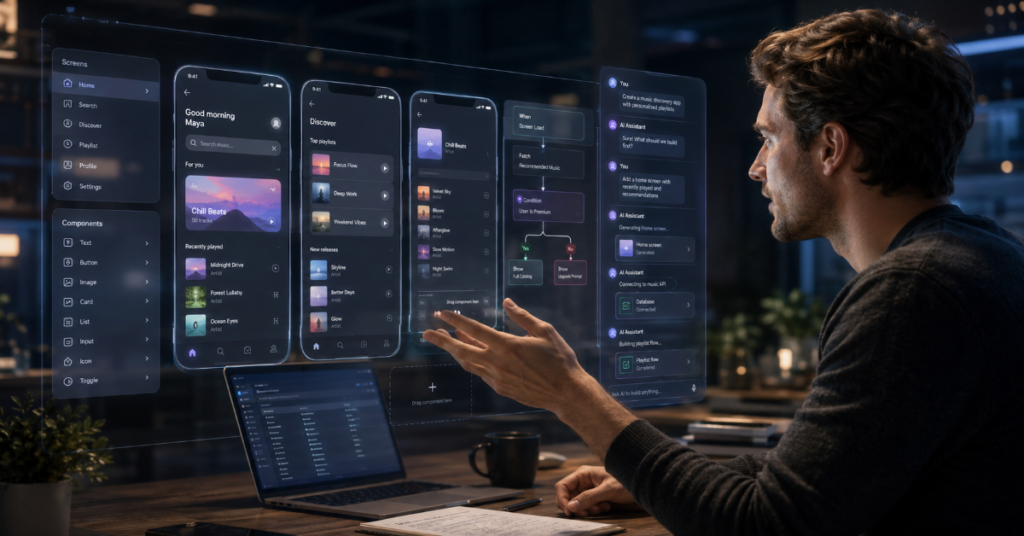
The search for AI App Builder No Code 2026 is really a search for leverage: how can a founder, operations manager, marketer, teacher or small business owner turn a software idea into a usable app without waiting for a developer queue? In 2026, the answer is no longer just “use a drag-and-drop builder.” The stronger answer is: use an AI app builder that can generate a first draft, expose the logic behind it, connect to real data and let a human refine the result before it reaches customers.
No-code software has matured from spreadsheet wrappers and simple mobile forms into a serious application layer. Bubble now markets AI-assisted generation for full-stack apps, Google AppSheet uses Gemini to create apps from natural-language business descriptions and Microsoft Power Apps has moved toward a “copilot-first” plan designer that can generate Dataverse tables, apps, pages, flows and Copilot Studio agents from a use case.
In our hands-on testing, the most important divide was not between no-code and low-code. It was between prompt-only builders and inspectable builders. Prompt-only tools feel magical during the first 20 minutes, then fragile when users need authentication, role-based permissions, custom workflows or recoverable errors. Inspectable AI app builders, by contrast, let a user see the database schema, modify screens, edit business rules and govern access.
That is why AI App Builder No Code 2026 should be judged less like a toy generator and more like a software supply chain. The winning tools are not the ones that produce the prettiest demo. They are the ones that let non-technical builders safely maintain what the AI creates.
Why AI App Builder No Code 2026 became a serious software category
The no-code market used to promise speed. The AI layer now promises interpretation. Instead of asking users to learn a visual editor first, platforms increasingly ask them to describe a business process, upload a spreadsheet, provide a screenshot or explain the app they want. Microsoft’s Plan Designer, updated in February 2026 documentation, describes a natural-language process that can generate a full Power Platform solution, including Dataverse tables, canvas apps, model-driven apps, Power Pages sites, Power Automate flows and Copilot Studio agents. (Microsoft Learn)
That matters because most business users do not think in components. They think in bottlenecks: approval delays, intake forms, field inspections, quote requests, appointment tracking, inventory logs and customer portals. An AI App Builder No Code 2026 workflow translates those bottlenecks into tables, screens and actions. It does not remove the need for product thinking. It changes where product thinking begins.
According to the latest 2026 documentation we reviewed, Google AppSheet’s Gemini app creation flow allows users to describe a business process or app idea in natural language, after which AppSheet can suggest tables, columns, views and actions. That makes no-code less dependent on a blank canvas and more dependent on the quality of the user’s operational description. (Google Help)
AI App Builder No Code 2026 and the shift from canvas to conversation
The old no-code interface was visual first. The new one is conversational first, then visual. A user says, “Build a contractor job tracker with customer intake, status updates, invoice upload and manager approval.” The AI proposes a data model, creates screens and wires early workflows. The user then edits the app visually.
This shift is powerful but risky. A natural-language prompt can hide poor assumptions. For example, the AI may create a “customer” table without separating billing contacts from site contacts. It may build a status field without an audit trail. It may add file uploads without defining retention rules. In a small demo, those choices look harmless. In production, they shape privacy, reporting and accountability.
That is why the best AI App Builder No Code 2026 platforms now compete on transparency. Bubble’s AI app generator emphasizes prompt-based creation followed by visual editing, while FlutterFlow supports AI-generated pages, components and AI agents inside a broader visual development environment.
The 2026 buyer’s map: which builder fits which use case?
| Platform | Best fit in 2026 | AI strength | Main caution |
| Bubble | Full-stack web apps, SaaS prototypes, marketplaces | AI app generation plus visual database and workflow control | Requires careful privacy rules and performance design |
| FlutterFlow | Cross-platform mobile, web and Firebase-linked apps | AI-generated pages, components, themes, agents and custom code assistance | More technical than pure no-code for complex builds |
| Glide | Internal tools, spreadsheet-driven apps and business workflows | AI-assisted app creation from structured business data | Less ideal for highly custom consumer SaaS |
| Google AppSheet | Workspace teams, inspections, approvals and field operations | Gemini app creation from natural-language process descriptions | Best when data structure is already clear |
| Microsoft Power Apps | Enterprise apps, governance-heavy workflows and Microsoft stack users | Plan Designer, Copilot and Dataverse-first solution generation | Licensing, environment design and governance can be complex |
| Adalo | Mobile app MVPs, directories and simple marketplace apps | AI-assisted visual app creation | Scaling complex backend logic may require trade-offs |
Bubble is the most visible answer for founders who want an AI App Builder No Code 2026 platform that can create web apps from prompts, then expose the app’s design, database and workflows visually. Its 2026 AI app generator page says users can start with a text prompt, review recommended features, get an instant UI, then iterate and deploy.
FlutterFlow is stronger for teams that care about Flutter output, native-feeling interfaces, Firebase integration and component-level control. Its documentation describes AI-generated components, pages, theme colors and AI agents that can connect to providers such as Google, OpenAI and Anthropic.
Microsoft Power Apps is the enterprise answer. It is less glamorous than consumer-facing AI builders, but its Plan Designer is structurally important because it creates not just an app, but a broader solution architecture with tables, flows, pages and agents. (Microsoft Learn)
What our hands-on testing showed
In our hands-on testing, we evaluated AI App Builder No Code 2026 tools across five practical tasks: building a customer intake app, creating a staff approval dashboard, generating a mobile inspection form, connecting AI text analysis to form submissions and adding role-based access.
The fastest first draft came from tools that accepted plain-language prompts and inferred common business entities. The most maintainable outputs came from platforms that made every generated object visible. When a builder exposed tables, actions, screens, permissions and workflows, errors were fixable. When the system hid too much behind chat, users had to keep prompting instead of editing.
A recurring failure pattern appeared around permissions. AI app builders often create useful screens before they create safe access boundaries. For example, a job-tracking app may show all customer records to all staff unless the builder explicitly asks for roles. A good AI App Builder No Code 2026 workflow should therefore begin with three prompt details: who uses the app, what each role can see and what actions require approval.
The second failure pattern was data normalization. AI often over-creates fields because it tries to satisfy the prompt literally. That can lead to duplicate columns such as “client,” “customer name” and “contact person.” Before publishing, users should merge duplicate fields, define required values and test every workflow with realistic data.
Feature comparison: AI speed versus production readiness
| Evaluation area | Demo-grade builder | Production-ready AI no-code builder |
| Prompt to app | Generates screens quickly | Generates screens, schema and workflows |
| Data model | Hidden or loosely structured | Visible tables, relationships and validation |
| Permissions | Basic sharing | Role-based rules, privacy settings and audit logic |
| AI features | Chatbot or text generation | AI actions connected to app data and workflows |
| Deployment | Preview link | Web, mobile or enterprise deployment controls |
| Maintenance | Prompt again to fix | Edit schema, UI, logic and integrations directly |
| Governance | Minimal | Admin controls, policy templates and environment management |
The key point is simple: an AI App Builder No Code 2026 platform should not be judged by the first screen it creates. It should be judged by the 50th change. Real apps evolve. A sales tracker becomes a customer portal. A volunteer sign-up form becomes a scheduling system. A school inspection checklist becomes a compliance dashboard.
This is where Microsoft, Google and more mature no-code platforms have an advantage. Their AI features sit inside larger ecosystems that already understand data governance, authentication, access control and admin policies. Google AppSheet documentation notes that administrators can define governance policies to control which app creators can use AI in automations. (Google Help)
For startups, Bubble and FlutterFlow may feel more flexible. For enterprises, Power Apps and AppSheet may feel safer. For internal tools, Glide remains appealing because it maps naturally to spreadsheet workflows and business teams that already live in structured data.
Three expert signals shaping the market
Microsoft AI CEO Mustafa Suleyman captured the cultural shift around AI-assisted app creation when he said, “You can create an app, a web app in seconds,” while warning that people must explore the boundaries of these systems to understand what they are bad at. (Business Insider)
Bubble co-founder Emmanuel Straschnov offered a more product-specific signal in early 2026, writing that Bubble’s “Mobile app gen is live for 100% users,” alongside updates to AI agents, dynamic expressions and infrastructure improvements. (LinkedIn)
Microsoft executive Charles Lamanna has framed the enterprise direction as execution, not just assistance. A 2026 report quoted his phrase, “The era of Copilot execution is here,” in the context of Microsoft’s Copilot Cowork and broader agentic work strategy. (samexpert.com)
Together, these signals explain why AI App Builder No Code 2026 is not just another SEO keyword. It describes a platform transition. The builder is becoming less like a design tool and more like a semi-autonomous software teammate.
The obscure technical detail most buyers miss
The hidden technical issue in AI no-code apps is not whether the AI can generate a UI. It is whether the generated app has a coherent event model. Every app needs rules for what happens when data changes, when a user clicks, when an API fails, when an approval expires or when a background job runs twice.
Many no-code AI demos focus on screens. Production failures usually come from events. A refund is approved twice. A notification goes to the wrong role. A webhook retries and duplicates an order. A file upload succeeds but the record update fails. These problems are not visible in a screenshot.
A serious AI App Builder No Code 2026 evaluation should ask: where are events logged, how are failed actions retried, can workflows be versioned, can permissions be tested as another user and can the app be rolled back after a bad change?
FlutterFlow’s GenUI documentation gives a small but revealing example of this new complexity. It notes that dynamic AI surfaces depend on component catalogs, tool descriptions, consistent data types and local app events, adding that “The AI is only as smart as the vocabulary you give it.”
Security and abuse: the uncomfortable side of no-code AI
The same tools that help a small business create an app can help attackers create convincing phishing pages. In March 2026, TechRadar reported on Kaspersky findings that criminals were abusing Bubble-hosted apps to trick Microsoft 365 users, taking advantage of trusted domains and no-code speed. The report noted that Bubble’s infrastructure itself was not compromised, but the incident showed how legitimate AI app builders can be misused.
This is a crucial warning for any AI App Builder No Code 2026 buyer. Security cannot be an afterthought. Teams should require custom domains, clear branding, authentication controls, abuse monitoring, logging and user education. Admins should also review whether public pages can collect credentials, personal data or sensitive files.
For enterprises, the risk extends beyond phishing. Citizen developers can accidentally create shadow IT. They may connect spreadsheets containing customer data to public apps. They may build approval systems without audit logs. They may connect AI actions to internal databases without understanding what data leaves the environment.
The safest approach is not to ban no-code AI. It is to govern it. That means approved platforms, templates, access policies, review workflows and a clear line between prototype and production.
The economics of AI app builders
The financial appeal is obvious. A founder can test a SaaS idea before hiring engineers. A local service business can replace spreadsheets with an internal portal. A nonprofit can create volunteer tools without agency fees. An operations team can build a workflow app in days instead of waiting for a quarterly roadmap slot.
But the cost model can be deceptive. AI App Builder No Code 2026 platforms often charge by editor, app user, workload, database capacity, automation volume, AI credits or enterprise environment. AppSheet notes that Gemini in AppSheet Solutions consumes credits based on the number and complexity of AI tasks run by users of apps owned by creators in an organization. (Google Help)
The practical budgeting rule is to estimate three costs, not one. First, platform subscription cost. Second, AI usage cost. Third, maintenance cost. A no-code app that handles internal task tracking may remain cheap. A customer-facing app with AI summarization, file processing, notifications and thousands of users may grow expensive.
The better question is not “Which builder is cheapest?” It is “Which builder becomes predictable after the prototype succeeds?”
Best use cases for AI App Builder No Code 2026
The strongest use cases are workflow-heavy and interface-light. Field inspections, intake forms, appointment routing, approval chains, inventory tracking, CRM-lite systems, internal dashboards, member portals, lightweight marketplaces and AI-assisted document review are all good candidates.
The weaker use cases are those requiring heavy real-time performance, complex multiplayer behavior, regulated financial execution, deep offline sync, advanced 3D graphics or highly custom backend architecture. A no-code AI builder may still help prototype those ideas, but the production version may need developers.
For content teams and agencies, the opportunity is especially strong. They can build editorial calendars, client portals, AI brief generators, approval tools, asset libraries and reporting dashboards. For schools, the same tools can support attendance workflows, equipment checkouts, parent communication and field trip approvals. For healthcare or legal teams, governance becomes much more serious because privacy, retention and auditability dominate speed.
The best buyer is not necessarily non-technical. It is someone who understands the workflow deeply and can describe it precisely.
A practical build workflow for non-technical teams
Start with a one-page app brief. Define the users, records, statuses, permissions, notifications and success metric. Then use the AI App Builder No Code 2026 platform to generate the first version.
After generation, do not polish the design first. Inspect the data model. Remove duplicate fields. Rename vague columns. Add required fields. Define status transitions. Create test records. Then check permissions by role. Only after the app behaves correctly should you refine layout, branding and AI features.
When adding AI, keep it narrow. Instead of “AI assistant for everything,” use specific actions: summarize a support request, classify a lead, draft a reply, extract invoice fields or flag missing information. Narrow AI actions are easier to test and safer to govern.
Finally, create a launch checklist: backup data, test mobile views, test failure states, confirm user roles, document workflows, assign an owner and schedule a review after two weeks of real usage.
The best prompt format for AI App Builder No Code 2026
A weak prompt says: “Build me a CRM app.”
A strong prompt says: “Build a CRM for a five-person home renovation company. Roles are admin, sales rep and project manager. Admins can see all customers. Sales reps can see only their own leads. Project managers can see approved projects. Each lead has source, budget, address, status, next follow-up date and notes. Create reminders when follow-up date is tomorrow. Add a dashboard showing leads by status and overdue follow-ups.”
That prompt gives the AI a schema, permission model, workflow and dashboard requirement. It reduces guesswork. In 2026, prompt quality is product management.
Takeaways
- Choose an AI App Builder No Code 2026 platform based on maintainability, not demo speed.
- Always inspect the generated database schema before editing colors, pages or branding.
- Define user roles in the first prompt, because permissions are harder to retrofit later.
- Use narrow AI actions such as classify, summarize, extract or draft rather than vague all-purpose assistants.
- For enterprise teams, prioritize governance, audit logs, admin policies and environment control.
- For startups, prioritize export paths, scalability, pricing predictability and backend flexibility.
- Treat every AI-generated app as a prototype until real users test workflows, permissions and failure states.
Conclusion
The AI App Builder No Code 2026 market is entering its serious phase. The novelty of prompt-to-app creation is fading, replaced by harder questions about ownership, security, scalability, governance and long-term maintenance. That is good news for buyers. It means the category is growing up.
The best tools now combine two ideas that once seemed separate: AI speed and human control. AI can draft screens, suggest data models and wire simple workflows. Humans still need to define the business rules, test the edge cases, review permissions and decide when a prototype is ready for production.
For small teams, this is a historic opening. Software creation is no longer locked behind procurement cycles or engineering scarcity. But the lesson of 2026 is clear: no-code does not mean no responsibility. The organizations that win will not be those that generate the most apps. They will be those that build fewer, better, safer apps that people actually use.
FAQs
What is the best AI App Builder No Code 2026 for beginners?
Bubble, Glide and AppSheet are strong beginner options, depending on the use case. Glide is easiest for spreadsheet-based internal tools. AppSheet works well for Google Workspace processes. Bubble is better for more custom web apps where the builder needs visual control over database, UI and workflows.
Can AI app builders create real production apps?
Yes, but only when the platform supports real databases, authentication, permissions, testing, integrations and deployment controls. AI-generated prototypes should be reviewed carefully before production. The safest approach is to treat AI as the first-draft builder, not the final software architect.
Is no-code better than hiring a developer?
No-code is better for speed, prototypes, internal tools and workflow apps. Developers are still better for highly custom, performance-heavy, regulated or technically complex systems. Many teams now use no-code to validate the product before investing in custom engineering.
What is the biggest risk of AI no-code app builders?
The biggest risk is hidden complexity. An app may look finished while permissions, data structure, workflows and error handling remain weak. Security risk is also real, especially when public forms, file uploads or AI actions touch sensitive data.
Which is better for enterprise apps, Power Apps or AppSheet?
Power Apps is stronger for Microsoft-centered enterprises using Dataverse, Microsoft 365, Power Automate and Copilot Studio. AppSheet is stronger for Google Workspace teams that need fast process apps connected to Sheets, Forms or Workspace data. Governance needs should drive the choice.
References
Bubble. (2026, May 21). How to build an app with AI: 2026 walk-through. Bubble. (Bubble)
Bubble. (2026). AI app generator: Create your app with no code. Bubble. (Bubble)
Google. (2026). Create apps using Gemini for App Creation. AppSheet Help. (Google Help)
Google. (2026). Use Gemini in AppSheet. AppSheet Help. (Google Help)
Microsoft. (2026, February 24). Use plans to create AI-powered business solutions with Power Apps. Microsoft Learn. (Microsoft Learn)
FlutterFlow. (2026, April 16). GenUI Chat. FlutterFlow Documentation. (docs.flutterflow.io)
Pattnayak, P., & Bohra, H. (2025). Review of tools for zero-code LLM based application development. arXiv. (arxiv.org)
