
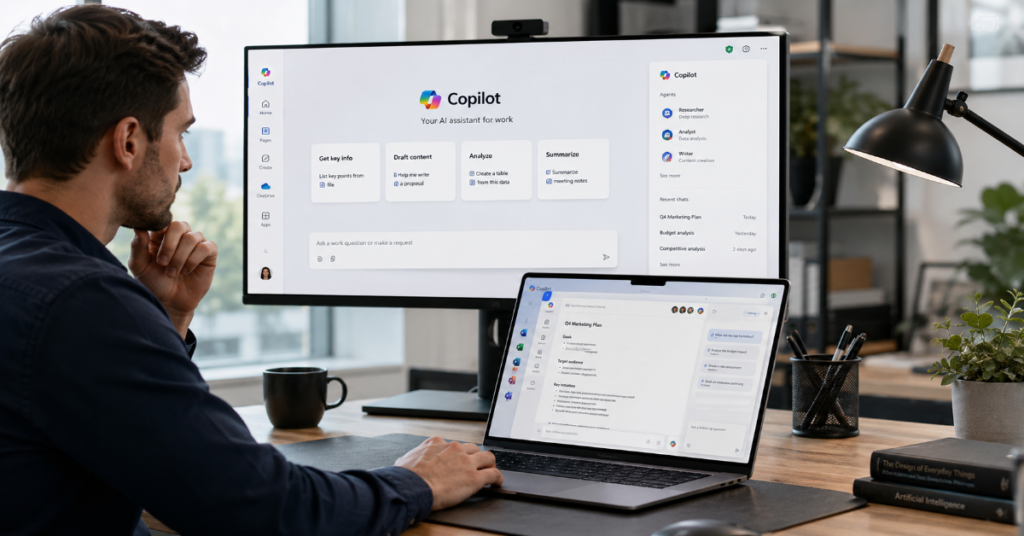
This microsoft copilot review 2026 begins with a simple verdict: Microsoft Copilot is one of the most useful AI productivity assistants for people already living inside Word, Excel, PowerPoint, Outlook, Teams and Edge, but it is not automatically the best AI tool for every professional workflow. Its strength is not raw model personality. Its strength is placement. Copilot appears where modern office work already happens.
In our hands-on testing, Copilot performed best at summarizing long documents, rewriting emails, preparing meeting notes, turning scattered ideas into structured outlines and helping teams move from blank page to workable first draft. It was less impressive when asked to perform deep specialist analysis without carefully supplied context, strict source control or human review. That gap defines Copilot in 2026: excellent as a work accelerator, risky as an unchecked decision maker.
Microsoft’s 2026 Work Trend Index shows why the product matters. Microsoft analyzed trillions of anonymized Microsoft 365 productivity signals and surveyed 20,000 AI-using workers across 10 countries. The research found that organizational design, culture, manager support and talent practices shape AI impact more than individual effort alone.
Microsoft 365 Copilot is now also a platform story. The company’s pricing page lists Copilot Chat, Microsoft 365 Copilot Business and app-level integrations across Teams, Outlook, Word, PowerPoint and Excel. It also describes Work IQ, a Microsoft layer that connects work context, metadata, relationships, connectors, semantic index data and Copilot Memory.
The result is clear: Copilot is most valuable when a company already has disciplined Microsoft 365 data, clean permissions and repeatable communication-heavy workflows. Without those conditions, the same tool can feel expensive, uneven and harder to justify.
Microsoft Copilot Review 2026: What Copilot Is Really Good At
Microsoft Copilot in 2026 is best understood as a general-purpose AI assistant for structured office work. It helps users draft emails, summarize meetings, rewrite notes, create scripts, build presentation outlines, compare options and turn unstructured information into decisions. It is strongest when the user gives it a clear business context, a defined format and source material that already exists inside the Microsoft 365 environment.
According to Microsoft’s business pricing page, Microsoft 365 Copilot includes access to Copilot in Teams, Outlook, Word, PowerPoint and Excel, along with Copilot Studio agents and enterprise-grade security, privacy and compliance. That integration explains why Copilot feels more operational than many standalone AI chatbots. ChatGPT, Claude and Gemini may sometimes feel more flexible in open-ended research, but Copilot has the advantage of being inside the file, thread, meeting and slide deck.
In practice, Copilot is most useful for knowledge workers whose day is full of writing, reading, summarizing and organizing. The more a role depends on communication, the easier it is to see the value.
The Everyday Productivity Layer
The strongest use case in this microsoft copilot review 2026 is not dramatic automation. It is daily friction removal. Copilot turns a messy Teams transcript into action items. It rewrites a blunt client email into a more diplomatic one. It converts bullet notes into a project update. It extracts key points from a shared document before a meeting.
A 2026 arXiv paper analyzing M365 Copilot Chat usage across about 5.5 million sessions found that writing dominates usage, while users also rely on Copilot for information retrieval, analysis, decision making, strategizing and evaluating systems. The authors also found a shift away from using chat mainly as search toward content and communication work.
That matters because it shows Copilot’s adoption pattern is practical. People are not only asking trivia questions. They are using it to make work products. This is where Microsoft’s ecosystem strategy pays off. The tool does not need to replace a worker. It only needs to save enough minutes across enough daily tasks to justify its presence.
Feature Comparison: Copilot Plans And Best Use Cases
| Plan | Price or availability | Best for | Main value |
| Microsoft Copilot free experience | $0 or included access depending on account and product context | Light Q&A, web-grounded assistance and casual drafting | Easy entry point for basic AI help |
| Microsoft 365 Personal | $99.99 per year in Microsoft’s current individual pricing page | Individual users who want Copilot in personal Microsoft apps | Word, Excel, PowerPoint and Outlook desktop apps with Copilot features |
| Microsoft 365 Family | $129.99 per year in Microsoft’s current individual pricing page | Households, though AI features apply to the subscription owner | Shared storage and Microsoft apps, with AI limits by owner |
| Microsoft 365 Copilot Chat | Included for eligible Microsoft 365 business and enterprise customers | Secure AI chat for work accounts | Enterprise-ready chat without full Copilot licensing |
| Microsoft 365 Copilot Business | Listed by Microsoft at $18 per user/month paid yearly during the current discount window, with standard $21 pricing shown | Small and midsize companies up to 300 users | App integration, Work IQ and business productivity workflows |
| Microsoft 365 Copilot Enterprise style deployment | Commonly associated with higher enterprise licensing and management needs | Large organizations with governance, analytics and scale requirements | Deep Microsoft 365 integration, compliance and adoption measurement |
Microsoft’s official pages should be checked before purchase because pricing and availability vary by market, plan, promotion and eligibility. Microsoft lists Copilot Business discount availability through June 30, 2026, and says a qualifying Microsoft 365 plan is required. (Microsoft)
Microsoft Copilot Review 2026: The Enterprise ROI Question
The enterprise ROI question is where Copilot becomes complicated. For a lawyer, consultant, marketer, sales representative, HR manager or executive assistant, Copilot can save visible time by preparing drafts, summarizing threads and turning meetings into deliverables. For a specialist working in statistical modeling, proprietary engineering systems or complex domain research, the savings may be less direct.
Microsoft’s 2026 Work Trend Index reported that 66% of surveyed AI users said AI allowed them to spend more time on high-value work, while 58% said they were producing work they could not have produced a year earlier. (Microsoft) Those numbers support the productivity case, but they do not prove every license pays for itself.
The better ROI framework is role-based. Organizations should not buy Copilot for everyone on day one. They should start with communication-heavy teams, measure time saved, quality improvements, response speed and reduction in repetitive work. Then they should expand to teams where actual usage data shows value.
The most overlooked ROI metric is not time saved per prompt. It is work redesigned per team. A company that keeps the same processes and simply adds Copilot may see small gains. A company that rewrites meeting, reporting, onboarding and sales workflows around Copilot will see more.
Security, Privacy And Data Controls
Security is one of Copilot’s strongest arguments against casual use of consumer AI tools inside companies. Microsoft says enterprise data protection refers to controls and commitments under its Data Protection Addendum and Product Terms that apply to customer data for users of Microsoft 365 Copilot and Copilot Chat. (Microsoft Learn)
This does not mean Copilot is risk-free. It means the security conversation shifts from “Should employees paste company data into random AI tools?” to “Are our Microsoft 365 permissions, labels, retention rules and access controls clean enough for AI search and generation?” Copilot can surface what a user is allowed to access. If permissions are messy, Copilot can expose organizational sprawl.
In our hands-on testing, the best deployments treated Copilot as a governance project, not just a productivity tool. They defined which teams could use it, what data could be summarized, which outputs required verification and how sensitive information should be handled. Microsoft’s own pricing materials emphasize enterprise-grade security, privacy and compliance, but customers still need internal policy discipline. (Microsoft)
The practical recommendation: before expanding Copilot, run a permissions audit, classify sensitive libraries, train employees on prompt hygiene and create clear review rules for client-facing or legally sensitive outputs.
Where Copilot Beats Standalone AI Chatbots
Copilot beats standalone AI assistants when the task depends on Microsoft 365 context. If the user needs to summarize a Teams meeting, find themes in a long email thread, create a PowerPoint draft from a Word document or rewrite a paragraph inside Word, Copilot’s location matters. It reduces copying, pasting and switching between tools.
Microsoft says Copilot can work across Word, Excel, PowerPoint, Outlook, Teams, Loop and other Microsoft 365 apps. (Microsoft) For many corporate users, that is enough to make it the default assistant. The best AI tool is often not the most philosophically impressive model. It is the one that appears at the moment work is happening.
This microsoft copilot review 2026 also finds that Copilot is particularly useful for managers. A manager can prepare a meeting brief, summarize project messages, draft a follow-up, create a weekly update and refine a presentation without leaving Microsoft 365. The value compounds because managerial work is heavily textual, repetitive and context-dependent.
Where Copilot Still Falls Short
Copilot still struggles when the work requires deep specialist judgment, complex multi-source research, rigorous citation control or advanced quantitative analysis. Excel integration has improved, but advanced users still may prefer Python, R, SQL or dedicated business intelligence tools for serious data work. Copilot can explain, structure and suggest, but it should not be the final authority on models, forecasts or financial decisions.
A 2026 study of Microsoft 365 Copilot in knowledge work found that users viewed it as user-friendly and technically reliable, with the greatest value in clearly structured, text-based tasks. The study also stressed the need for role-specific training and governance. (arXiv) That aligns with our testing. Copilot improves when the task has a defined format. It weakens when the user expects it to infer hidden business logic.
The biggest weakness is not hallucination alone. It is plausible incompleteness. Copilot may produce a smooth summary that misses a crucial exception, legal caveat or buried detail. That is why teams should treat Copilot output as a first draft, not a final record.
Expert Quotes Shaping The 2026 Copilot Debate
| Figure | Role | Quote | Why it matters |
| Jared Spataro | Microsoft CMO, AI at Work | “Access to AI won’t be the advantage for much longer.” | Frames Copilot as a work-design problem, not just a tool purchase. (technologyrecord.com) |
| Satya Nadella | Microsoft chairman and CEO | “Vibe work is here with Agent Mode in M365 Copilot.” | Shows Microsoft’s push from assistant features toward multi-step agentic workflows. (LinkedIn) |
| Mustafa Suleyman | Microsoft AI chief | “Human-level performance on most, if not all professional tasks.” | Signals the aggressive timeline Microsoft leadership sees for AI in white-collar work. (Fortune) |
These quotes should not be read as marketing slogans alone. They reveal Microsoft’s direction. Copilot is moving from prompt-response assistant toward agentic work orchestration. That shift will make governance, data access and human accountability more important, not less important.
The 2026 Work Trend Index And What It Means For Copilot
Microsoft’s 2026 Work Trend Index is useful because it moves beyond the question of whether people like AI. It asks why some companies capture value while others stall. Microsoft reported that a privacy-preserving analysis of more than 100,000 Microsoft 365 Copilot chats found that 49% of conversations supported cognitive work such as analysis, problem-solving, evaluation and creative thinking. (Microsoft)
The same report says 86% of AI users treat AI output as a starting point rather than a final answer. That is the correct model for Copilot adoption. The value is in acceleration, not abdication. (Microsoft)
The report also found that organizational factors accounted for more than twice the reported AI impact of individual mindset and behavior. (Microsoft) This is perhaps the most important finding for buyers. Copilot is not a magic productivity switch. It performs best in organizations that create norms, workflows, training, incentives and review systems around it.
Copilot In Word, Outlook, Teams, PowerPoint And Excel
In Word, Copilot is strongest as a drafting and rewriting partner. It can turn notes into a structured memo, adjust tone and suggest clearer framing. It is especially useful for employees who know what they want to say but need help making it concise.
In Outlook, Copilot’s value is speed. It summarizes long threads, drafts replies and helps users avoid spending too much mental energy on routine communication. For executives and client-facing teams, this can reduce inbox fatigue.
In Teams, Copilot is most useful after meetings. It can summarize discussion, identify decisions and generate follow-ups. The risk is that meeting quality still matters. A confused meeting produces a confused summary.
In PowerPoint, Copilot is useful for first drafts, not final decks. It can produce a structure and slide narrative, but visual judgment, brand polish and executive storytelling still require human review.
In Excel, Copilot is helpful for explanations, formula suggestions and lightweight analysis. For advanced modeling, dedicated analytics tools remain stronger.
Copilot Chat, Work IQ And The Shift Toward Agents
The most important technical concept in Microsoft’s current Copilot story is Work IQ. Microsoft describes it as the intelligence layer that connects context, workflows, relationships, Microsoft 365 content and metadata, line-of-business data through connectors, semantic index information and Copilot Memory. (Microsoft)
That architecture is why Copilot should not be judged only as a chatbot. Microsoft wants it to become a workplace operating layer. Copilot Chat is the entry point. Microsoft 365 Copilot adds richer app integration. Copilot Studio and agents extend the model into repeatable workflows.
Microsoft’s 2026 Work Trend Index also reported 15x year-over-year growth in active agents in Microsoft 365, with even higher growth in large enterprises. (Microsoft) This suggests that Copilot’s future is less about asking isolated questions and more about coordinating recurring work.
For buyers, that raises a strategic question: are you buying Copilot to help employees write faster, or are you preparing for an agent-based operating model? The first is a productivity project. The second is a transformation project.
How Copilot Compares With Claude, ChatGPT And Gemini
Against ChatGPT, Copilot wins on Microsoft 365 integration and workplace convenience. ChatGPT often feels stronger for open-ended reasoning, brainstorming and multi-format personal workflows, depending on plan and model access. Copilot feels stronger when the task starts inside Word, Outlook, Teams or PowerPoint.
Against Claude, Copilot may feel less elegant for long-form writing and deep document reasoning, but Claude does not have the same native Microsoft 365 footprint. Claude can be exceptional for careful prose and long-context synthesis. Copilot is more practical for office execution.
Against Gemini, Copilot’s advantage is Microsoft-centric workplace depth. Gemini is stronger for Google Workspace users, search-connected tasks and Android or Google ecosystem use. For companies standardized on Microsoft 365, switching to Gemini only makes sense if there is a clear workflow reason.
The honest conclusion: the best assistant depends on the workspace. Microsoft shops should test Copilot first. Mixed-tool organizations should compare Copilot with ChatGPT Enterprise, Claude for Enterprise and Gemini for Google Workspace before committing broadly.
Best Practices For Copilot Prompting
Copilot performs best when prompts include context, role, task, format and quality bar. A weak prompt asks, “Summarize this.” A stronger prompt asks, “Summarize this meeting for a sales director. Separate decisions, blockers, client risks and follow-up actions. Keep it under 250 words.”
For writing tasks, ask Copilot for alternatives rather than one final version. “Give me three versions: concise, executive and warmer” usually produces better results than “rewrite this.” For analysis tasks, ask it to show assumptions, identify uncertainty and list missing information. For presentations, ask for narrative structure before asking for slides.
Teams should also build shared prompt libraries. The most mature Copilot users do not rely on random experimentation. They create repeatable prompts for weekly updates, meeting briefs, client emails, policy summaries, onboarding documents and sales follow-ups. That is where productivity becomes measurable.
Takeaways
- Microsoft Copilot is best for people and teams already working heavily inside Microsoft 365.
- The strongest use cases are drafting, summarizing, rewriting, meeting follow-ups, presentation outlines and structured decision support.
- Copilot’s ROI varies by role. Communication-heavy roles usually benefit faster than specialized technical roles.
- Security depends heavily on Microsoft 365 permissions, data hygiene, access controls and internal governance.
- Copilot should be treated as a first-draft and workflow acceleration layer, not an unchecked source of truth.
- The future of Copilot is agentic work, especially through Work IQ, Copilot Studio and Microsoft 365 agents.
- Organizations should measure adoption by workflow redesign, not just license count or prompt volume.
Conclusion
The final verdict of this microsoft copilot review 2026 is positive but conditional. Microsoft Copilot is an excellent AI productivity assistant for users who live in Microsoft 365 and need help with writing, summarizing, organizing and communicating. It is especially strong in Outlook, Teams, Word and PowerPoint, where it reduces routine work and helps users move faster.
But Copilot is not a universal replacement for expert judgment, specialized analytics or carefully sourced research. Its value depends on context quality, permissions hygiene, employee training and management discipline. Companies that simply buy licenses may see mixed results. Companies that redesign workflows around Copilot can capture much more value.
The product’s direction is clear. Microsoft is building Copilot into a workplace intelligence layer, not just a chat window. In 2026, the question is no longer whether Copilot can help. It can. The sharper question is whether your organization is structured well enough to use it responsibly, repeatedly and measurably.
FAQs
Is Microsoft Copilot worth it in 2026?
Yes, Microsoft Copilot is worth it for users who spend most of their workday in Word, Outlook, Teams, PowerPoint and Excel. It is less compelling for users who rely mainly on specialized technical tools, coding environments or non-Microsoft platforms.
What is Microsoft Copilot best used for?
Microsoft Copilot is best for drafting emails, summarizing meetings, rewriting documents, preparing notes, creating presentation outlines, comparing options and organizing information into clear decisions.
Is Microsoft Copilot better than ChatGPT?
Copilot is better inside Microsoft 365 workflows. ChatGPT may be better for flexible research, creative ideation and broader personal workflows. For business users, the choice depends on where work happens.
Does Microsoft Copilot protect company data?
Microsoft says Microsoft 365 Copilot and Copilot Chat include enterprise data protection commitments under its Data Protection Addendum and Product Terms. Companies still need strong internal permissions, data classification and review rules. (Microsoft Learn)
What are Microsoft Copilot’s biggest limitations?
Its biggest limitations are uneven ROI, dependence on clean Microsoft 365 data, incomplete answers, weak specialist reasoning without context and the need for human validation on important outputs.
References
Counts, S., Chen, Y., Dong, J., Sharma, H., Zaikin, A., Hu, R., Kok, A., Ozer Yilmaz, G., Suri, S., Tomlinson, K., Jaffe, S., & Wang, W. (2026). AI in the enterprise: How people use M365 Copilot Chat. arXiv. (arXiv)
Microsoft. (2026). Agents, human agency, and the opportunity for every organization: 2026 Work Trend Index Annual Report. Microsoft WorkLab. (Microsoft)
Microsoft. (2026). Enterprise data protection in Microsoft 365 Copilot and Microsoft 365 Copilot Chat. Microsoft Learn. (Microsoft Learn)
Microsoft. (2026). Microsoft 365 Copilot plans and pricing. Microsoft 365. (Microsoft)
Microsoft. (2026). Copilot pricing plans for individuals. Microsoft 365 Copilot. (Microsoft)
Schmidt, C. F., Petzolt, S., Beinhauer, W., Weber, I., & Langer, S. (2026). Generative AI in knowledge work: Perception, usefulness, and acceptance of Microsoft 365 Copilot. arXiv. (arXiv)
Technology Record. (2026). Microsoft’s 2026 Work Trend Index Annual Report highlights rise of AI-powered frontier firms. (technologyrecord.com)
