
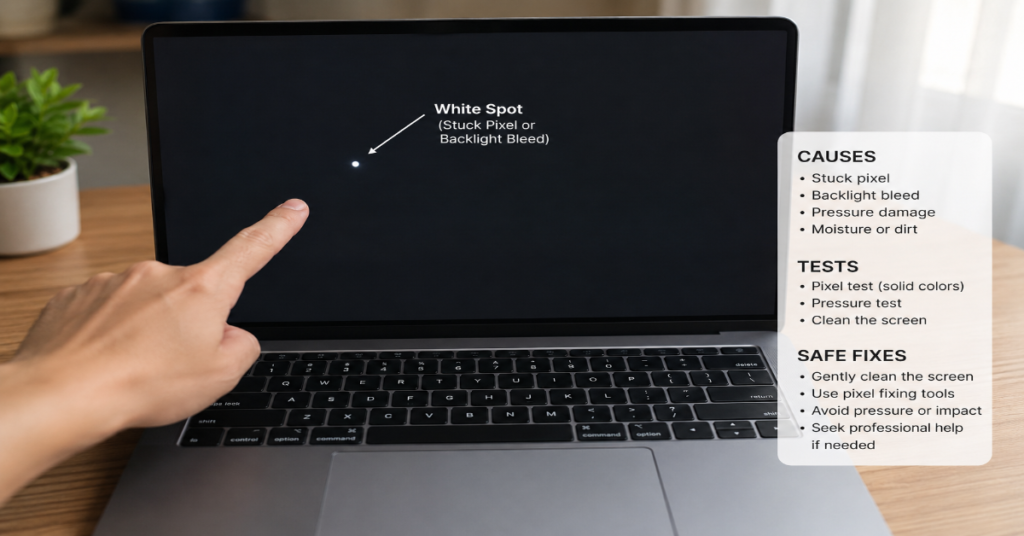
A screen white spot is usually caused by pressure damage, uneven backlight diffusion, a stuck or bright pixel, debris inside the panel or liquid trapped between display layers. The right fix depends on the shape, size and behavior of the mark.
A tiny fixed dot that glows on a black background may be a pixel defect. A pale circular patch that stays visible on every color is more likely a pressure mark or optical-layer issue. A cloudy white area on a TV or large monitor can also come from a shifted reflector or diffuser inside the backlight assembly. ViewSonic’s LCD pixel policy explains that bright dot defects can be checked on a full black pattern because the affected pixel allows light through continuously.
The most important rule is simple: diagnose before you press, heat, disassemble or run repair tools for hours. Some white marks are harmless annoyances. Others signal panel damage. On laptops, a new bright area near the lower bezel can even be related to battery swelling, which Dell describes as a condition that needs careful handling rather than casual use or DIY force.
What a White Spot Usually Means
A white mark on a display is not one problem. It is a symptom. LCD, LED, OLED and mini-LED screens all create images differently, so the same-looking mark can have different causes.
The most common causes are:
| Cause | What it looks like | Best first test | Likely fix |
| Pressure mark | Pale circular or uneven bright patch | Check on black, white, red, green and blue screens | Often permanent, sometimes reduced by very gentle pressure |
| Bright or stuck pixel | Tiny fixed dot, often one pixel or subpixel | Full black screen test | Pixel cycling may help if stuck, not if dead |
| Backlight reflector or diffuser issue | Cloudy white patch or halo | Bright background and angled viewing | Professional repair or panel/backlight work |
| Debris or liquid under panel | Discolored or uneven spot | Tilt device and inspect edge changes | Professional cleaning or panel replacement |
| Swollen battery pressure | Screen bulge, lifted casing or trackpad distortion | Inspect chassis, lid, keyboard and touchpad | Stop use and seek service |
A screen white spot that appeared after a drop, backpack pressure, keyboard contact or lid compression is usually mechanical. A mark that appeared gradually after years of TV use may be backlight related. A single pixel that never moves and appears only on dark backgrounds is more likely a pixel defect.
Quick Tests Before You Try a Fix
Start with controlled images. Do not rely on a random wallpaper, browser window or video.
- Open a full black image in full-screen mode.
- Open a full white image.
- Repeat with red, green and blue screens.
- Look at the mark from straight ahead and from both sides.
- Take a photo of the screen for comparison before any attempt to fix it.
- Check whether the mark changes when brightness is lowered.
If the spot is most visible on black, suspect a bright pixel or backlight leakage. If it is visible on every color, suspect pressure damage, debris, delamination or internal diffusion problems. If the mark changes shape from different angles, it is probably not a simple pixel issue.
Lenovo’s display support material describes bright subpixels as red, green or blue subpixels that remain bright and are visible as colored dots on a black screen. That distinction matters because a pixel-level fault is much smaller than a cloudy panel mark.
How to Tell the Main Causes Apart
Pressure or Impact Marks
Pressure marks often look like pale bruises. They can be round, oval or irregular. They usually stay in the same position and remain visible across multiple colors.
Common triggers include:
• A laptop lid pressed inside a backpack
• A monitor hit during moving
• A tablet stored under books
• A laptop battery pushing against the screen assembly
• A keyboard or trackpad pressing into the panel when closed
Pressure can disturb LCD layers, polarizer films or diffuser spacing. Once that happens, cleaning the glass will not remove the mark because the defect is inside the panel stack.
Stuck, Hot or Bright Pixels
A stuck pixel is tiny. If you can see a large cloudy area from normal viewing distance, it is probably not a stuck pixel.
The ISO 9241-307 display defect framework is widely used by manufacturers to classify bright and dark pixel faults, though warranty rules vary by brand and model. EIZO, for example, describes pixel faults and bright subpixel faults in its own pixel policy rather than treating every tiny defect the same way.
A pixel-fixing tool is only worth trying when the mark is extremely small and pixel-shaped. It will not repair a damaged diffuser, cracked panel layer or backlight reflector.
Backlight or Diffuser Problems
LCD and LED-backlit displays use a light source behind the image layer. If a diffuser sheet shifts, a reflector separates or the backlight becomes uneven, the result can be a white patch. This is common on some televisions where internal reflector lenses detach and create bright halos or dots. Bajaj Finserv’s TV repair guide notes that white dots on LED and LCD TVs can result from dislodged reflector discs that scatter light unevenly.
This type of screen white spot is not fixed by software. It usually needs disassembly, backlight repair or panel replacement.
Dirt, Adhesive or Liquid Inside the Display
Surface dirt is easy to test. Turn the device off and inspect the glass under side lighting. If the mark disappears when the screen is off, it is internal or light-related. If it remains visible as a smudge on the surface, cleaning may solve it.
Apple recommends disconnecting power and using a soft, lint-free cloth dampened with water for display cleaning. It also warns not to spray cleaner directly onto the screen because liquid can enter the display and cause damage.
Safe DIY Steps
A safe attempt follows the least invasive order.
| Step | Risk level | Use when | Stop if |
| Clean outer glass | Low | Spot may be residue or oil | Liquid enters edges or coating reacts |
| Run black and color tests | Low | Any display mark | None |
| Try pixel cycling | Low to moderate | One tiny bright dot | Screen heats up or flicker bothers you |
| Very gentle pressure test | Moderate | Small suspected pressure mark | Spot spreads, colors distort or glass flexes |
| Open device | High | Only if trained and out of warranty | Battery, glass or cables are exposed |
First, power off the device and clean the surface. Use a microfiber cloth. Use minimal moisture. Never spray cleaner directly onto a screen.
Second, test for a pixel defect. If the mark is one tiny dot, run a pixel-cycling tool for 10 to 30 minutes. Longer sessions may be unnecessary if nothing changes.
Third, only if you suspect a minor pressure mark, place a microfiber cloth over the area with the screen off and apply very light circular pressure for a few seconds. The purpose is not to “push the spot out.” It is to see whether the mark reacts. Hard pressure can permanently worsen the panel.
Do not use heat guns, strong solvents, sharp tools or suction cups on a normal display defect. These methods can turn a repairable issue into a cracked panel.
When to Stop Immediately
Stop using the device and seek repair if:
• The screen or chassis is bulging
• The trackpad is lifted or hard to click
• The keyboard deck is warped
• The mark is expanding
• Multiple white spots appear quickly
• The display shows lines, flicker or black areas
• The device smells unusual, feels hot near the battery or makes crackling sounds
Dell’s swollen battery guidance explains that swelling can happen as lithium-ion polymer batteries age and that users should follow safety guidance rather than continue normal handling.
A battery-related screen white spot is a safety issue first and a display issue second.
Repair Options and Cost Logic
The right repair depends on the device type.
For a laptop, the usual professional fix is panel replacement. A technician may also inspect hinges, lid pressure, battery swelling and frame alignment. If the battery is swollen, that must be addressed before replacing the screen.
For a monitor, repair usually depends on panel cost. Many consumer monitors are cheaper to replace than repair once the LCD panel is damaged.
For a TV, the situation is mixed. Some white dots come from backlight lenses or reflectors that can be repaired by a shop. But opening a TV panel is risky because the LCD glass is thin and fragile.
For a phone or tablet, a white patch usually means pressure damage, liquid intrusion, OLED panel damage or backlight separation. Professional screen assembly replacement is often the cleanest fix.
The practical threshold is this: if the repair quote is more than 40 to 60 percent of the device’s replacement cost, replacement may make more sense unless the device is premium, color-critical or under warranty.
Real-World Impact: Why Small White Spots Matter
A small screen white spot is not always urgent. For casual browsing, it may be tolerable. For photo editing, video grading, coding, design work or gaming, it can become a daily distraction.
There is also a resale issue. Buyers treat display defects as visible wear, even when the device works normally. On laptops, visible panel defects can lower resale value more than cosmetic lid scratches because the screen is part of every use session.
The hidden risk is misdiagnosis. Many users run pixel tools for large cloudy marks that are not pixel defects. Others press too hard on LCD panels and turn a small pressure mark into a larger distortion. The smarter workflow is to classify the spot first, then choose the least risky action.
The Future of Screen White Spot Diagnosis in 2027
By 2027, screen diagnosis will likely become more automated, especially on premium laptops, phones and TVs. Built-in display diagnostics already exist in many support ecosystems, but they often focus on obvious color, touch or pixel faults. The next step is camera-assisted analysis: users photograph a display test pattern and software estimates whether the defect resembles a pixel fault, backlight issue or pressure mark.
Warranty language may also become clearer. Display makers already use ISO-style pixel defect categories, but consumers often misunderstand the difference between a bright subpixel, a full bright pixel and a cloudy optical-layer defect. ViewSonic’s policy shows how manufacturers define bright dot defects and test them against black patterns, which is useful but still technical for most buyers.
Repairability will remain uneven. TVs may stay repairable when the issue is backlight hardware. Phones, tablets and thin laptops will likely continue moving toward full display assembly replacement because bonded panels are difficult to separate cleanly.
Takeaways
• A single tiny bright dot is different from a cloudy white patch. Treat them as separate problems.
• Full black, white, red, green and blue screens reveal more than normal app use.
• Pixel-fixing tools only make sense for pixel-sized defects.
• Cleaning helps only when the mark is on the outer glass.
• Bulging batteries can create display pressure and should be treated as a safety concern.
• Large or growing white patches usually need professional inspection.
• Warranty rules depend on the manufacturer’s pixel and panel defect policy.
Conclusion
A screen white spot is frustrating because it sits directly in the user’s line of sight, but the fix should never start with force. The first job is classification. Is it one bright pixel, a pressure bruise, an uneven backlight patch or a sign that the device is physically swelling?
Safe testing can answer most of that without opening the device. Use full-screen color tests, clean the surface carefully and compare the spot across brightness levels and viewing angles. Try pixel cycling only when the mark is truly pixel-sized. Avoid strong pressure, heat or liquid.
If the mark is large, spreading or linked to a bulging laptop body, stop DIY attempts. At that point, professional inspection is not just about image quality. It protects the panel, the battery and the rest of the device.
FAQ
What causes a screen white spot?
A screen white spot is usually caused by pressure damage, stuck or bright pixels, uneven backlight diffusion, internal debris, liquid damage or a swollen battery pressing against the display assembly.
Can a white spot on a screen go away by itself?
A stuck pixel may disappear after pixel cycling or normal use. Pressure marks, diffuser issues, delamination and internal backlight problems usually do not go away permanently without repair.
Is a white spot a dead pixel?
Not always. A dead pixel is usually black. A bright or stuck pixel can appear white or colored. A larger cloudy mark is more likely a panel, pressure or backlight issue.
Is it safe to press on the screen?
Only very light pressure through a microfiber cloth is acceptable as a diagnostic test. Hard pressure can crack the panel, spread the mark or create new display damage.
Can software fix a white spot?
Software can help only if the problem is a stuck pixel. It cannot repair pressure damage, liquid damage, delamination, reflector faults or a damaged LCD layer.
Should I replace the screen?
Consider replacement if the spot is large, spreading, visible during normal work or confirmed as panel damage. If the device is under warranty, contact the manufacturer before trying DIY fixes.
Methodology
This article was drafted from the provided Perplexityaimagazine.com production brief and the supplied keyword intent. Information was validated against manufacturer and repair-policy sources, including Apple display cleaning guidance, Dell swollen battery guidance, ViewSonic pixel policy material, Lenovo pixel support language and display-industry explanations of LCD defect categories. The analysis avoids invented testing claims. No device was physically tested for this article. Repair costs are discussed as decision thresholds rather than fixed quotes because pricing varies by model, country, panel availability and warranty status.
References
Apple. (n.d.). How to clean your Apple products.
Dell. (2025). Swollen Battery Information and Guidance.
EIZO. (2016). Pixel Policy.
Lenovo. (n.d.). What if defective pixel is found on your monitor.
ViewSonic. (2024). LCD Pixel Policy.
Bajaj Finserv. (2026). How to fix white dot on your TV screen.
