

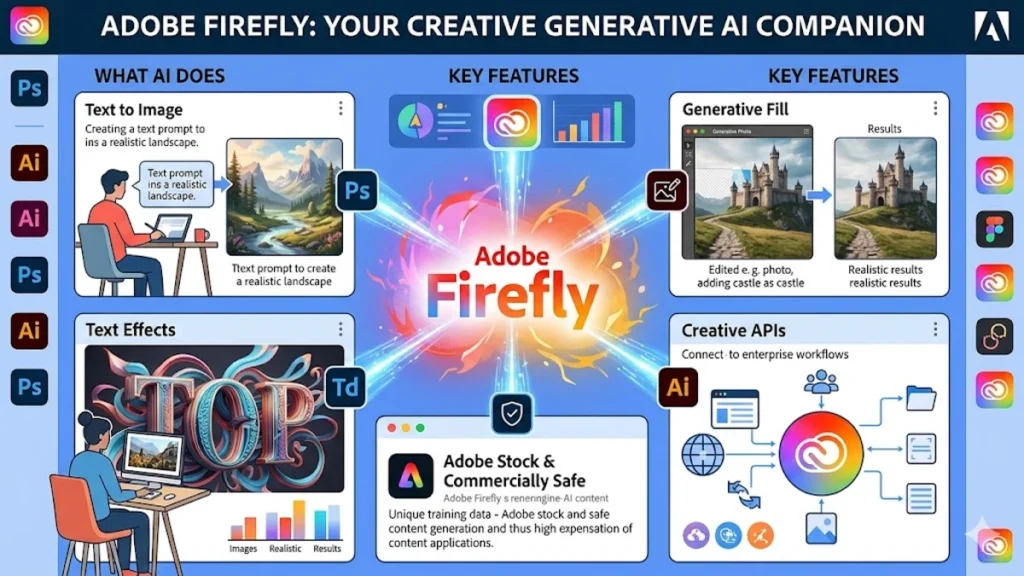
I have watched creative software evolve for decades, but few developments have shifted design workflows as quickly as generative AI. Adobe Firefly represents Adobe’s response to that transformation. The platform integrates artificial intelligence directly into tools designers already rely on, offering capabilities such as text-to-image generation, generative fill editing, and automated recoloring for vector graphics.
For designers exploring AI-assisted creation, Firefly answers two pressing questions immediately. First, it provides fast visual ideation through simple text prompts that transform ideas into images. Second, it integrates natively with Creative Cloud applications such as Photoshop, Illustrator, and Adobe Express, allowing those generated visuals to move smoothly into professional workflows.
Unlike many AI image generators that rely on massive datasets scraped from the web, Adobe built Firefly using licensed images, public-domain works, and Adobe Stock content. This approach prioritizes commercial safety, which is crucial for agencies, marketing teams, and brand designers working with clients. Adobe first announced Firefly in March 2023 and began embedding it across Creative Cloud soon afterward (Adobe, 2023).
In practical terms, Firefly functions as both an experimentation engine and a production tool. Designers can generate concepts, refine compositions, extend backgrounds, recolor vector artwork, and build visual assets without leaving their creative environment. By combining generative models with traditional editing tools, Adobe is attempting something ambitious: turning AI from a novelty generator into a reliable part of professional design infrastructure.
The result is not merely a new app but an ecosystem of AI-powered features that reshape how designers sketch ideas, refine visuals, and deliver finished work.
The Emergence of Generative AI in Design
Generative AI has changed how creative professionals approach visual exploration. Instead of beginning every concept with a blank canvas, designers can now generate rough visual directions in seconds. Firefly emerged during a period when generative models such as Stable Diffusion and Midjourney were gaining rapid adoption among artists and designers.
Adobe introduced Firefly with a clear strategy: integrate AI into existing design tools rather than forcing designers into separate platforms. According to Adobe’s official announcement, Firefly models were trained using licensed datasets, including Adobe Stock imagery and public-domain content, helping avoid copyright concerns that affected other generative tools (Adobe, 2023).
Creative professionals quickly recognized the implications. Designers could generate moodboards, textures, and layout experiments rapidly before refining them in Photoshop or Illustrator. This combination of AI generation and traditional editing created a hybrid workflow that merged exploration with precision.
Ethan Mollick, a professor studying artificial intelligence and creativity, has argued that generative AI should be seen as a “co-creation tool rather than a replacement for human creativity” (Mollick, 2023). Firefly reflects this philosophy by positioning AI as a collaborator embedded within professional tools.
The impact has been especially visible in marketing, product design, and digital media. Teams that once required multiple brainstorming sessions now generate dozens of visual directions within minutes. The designer’s role shifts from producing every pixel manually to curating, refining, and directing AI output toward a coherent visual vision.
Read: Flux AI Review: Is it the new king of open-source AI art?
Getting Started with Adobe Firefly
For newcomers, accessing Firefly requires surprisingly little setup. I usually recommend beginning directly through the Firefly web interface or within Creative Cloud applications where the features appear automatically once the software is updated.
Users can visit Firefly’s web portal and sign in with an Adobe account. The dashboard reveals a modular interface that includes several creative tools such as text-to-image generation, generative fill, text effects, and template creation. Adobe’s inspiration gallery provides prompt examples that help designers understand how descriptive prompts influence the generated output.
Within the interface, designers can experiment with prompts, upload reference images, or explore style presets. These presets include lighting styles, color themes, camera perspectives, and artistic treatments.
The onboarding process emphasizes experimentation. Adobe provides a free tier with a limited number of generative credits each month, enabling users to test the system before committing to paid plans. Credits refresh monthly, which allows designers to explore AI features without immediate cost.
A typical first workflow looks like this:
- Enter a descriptive prompt into the text-to-image module.
- Select aspect ratio, lighting style, and visual effects.
- Generate four image variations.
- Export promising results into Photoshop for refinement.
This simple process introduces designers to the broader Firefly ecosystem without overwhelming them with technical complexity.
Core Feature: Text-to-Image Generation
Text-to-image generation forms the foundation of the Firefly platform. Designers enter descriptive prompts that specify subjects, environments, and visual styles, and Firefly generates images based on those descriptions.
In practice, the prompts function more like scene descriptions than instructions. For example:
“Cyberpunk cityscape, neon reflections on wet pavement, futuristic skyline, cinematic lighting.”
Firefly then produces multiple variations based on the prompt. Designers can refine the results using style settings such as:
- Illustration or photographic rendering
- Lighting conditions
- Camera angles
- Color themes
- Depth of field effects
Adobe’s system also supports aspect ratios tailored for different design outputs. A square format works well for social posts, while a 16:9 ratio suits presentations or video thumbnails.
What makes Firefly distinctive is its consistency. Unlike some AI tools that prioritize surreal or highly stylized outputs, Firefly often produces images optimized for brand visuals, marketing graphics, and editorial design.
Creative director Jessica Walsh has described generative AI as “a rapid prototyping tool for visual storytelling” (Walsh, 2023). Text-to-image generation exemplifies that concept by turning written ideas into visual starting points.
Designers rarely use the images exactly as generated. Instead, the AI output becomes the foundation for further editing, compositing, and refinement.
Core Feature: Generative Fill in Photoshop
Generative Fill may be the most transformative Firefly feature for professional designers because it operates directly inside Photoshop.
This tool allows users to select a region within an image and describe how it should change. Designers can add new elements, remove objects, or extend backgrounds seamlessly.
The workflow typically follows three steps:
- Select an area using the Lasso or Marquee tool.
- Enter a descriptive prompt.
- Generate variations within a new layer.
Photoshop then creates several options that blend naturally with the surrounding pixels. The edits remain non-destructive, meaning designers can modify or remove them later.
For example, a photographer editing a product image might select an empty background area and prompt:
“Minimalist studio backdrop, soft shadows.”
Firefly generates several realistic options that match the lighting and perspective of the original image.
According to Adobe’s product team, Generative Fill uses contextual awareness to analyze surrounding pixels before generating new elements (Adobe, 2023). This helps maintain realistic lighting and composition.
Designers frequently use the feature for background extension, object removal, scene expansion, and visual storytelling. What once required advanced retouching techniques now happens with a few prompt-driven edits.
Core Feature: Generative Recolor for Vector Graphics
Vector graphics often require multiple color explorations before designers find the right palette. Firefly simplifies this process through Generative Recolor inside Adobe Illustrator.
Designers upload or create vector artwork and then enter color prompts such as:
“Pastel spring palette, soft greens and pinks.”
The system generates multiple color variations instantly, allowing designers to test different aesthetic directions.
This tool proves especially valuable in branding and UI design, where color exploration is essential. Instead of manually recoloring dozens of vector layers, designers receive automated palette suggestions aligned with the prompt.
Adobe introduced this feature to streamline creative experimentation while maintaining full vector editability. Designers can apply a palette, refine it manually, or generate additional variations.
In marketing design workflows, teams often use Generative Recolor to quickly adapt visuals across campaigns with different seasonal or regional color schemes.
Text Effects and Template Generation
Beyond image generation, Firefly includes tools for typography and design templates.
The Text Effects module allows designers to apply complex visual textures to typography. A prompt such as:
“Chrome metal lettering with neon glow”
produces stylized type treatments suitable for posters, social media graphics, or promotional artwork.
Firefly also integrates with Adobe Express to generate templates for digital content. Designers can create layouts for Instagram posts, event flyers, or marketing banners automatically.
These templates often serve as starting points rather than final designs. Designers refine typography, adjust spacing, and replace placeholder elements before publishing.
According to Adobe’s design research, automation tools like templates can reduce repetitive production tasks by up to 30 percent, freeing designers to focus on concept development (Adobe, 2023).
Advanced Features and Creative Boards
Adobe expanded Firefly’s capabilities with tools designed for ideation and collaborative design.
Firefly Boards function as AI-powered moodboards where designers collect references, generate variations, and organize visual ideas. The boards can export directly to Photoshop or Illustrator for further editing.
Reference images play an important role in maintaining stylistic consistency. Designers can upload examples to guide Firefly’s generation process, ensuring that outputs match specific visual directions.
Adobe has also experimented with generative video and audio tools, although these remain in early stages. Video generation models allow users to produce short clips from text prompts, hinting at future multimedia workflows.
As AI models improve, Firefly may expand into motion graphics, 3D asset creation, and interactive design elements.
Comparison: Adobe Firefly vs Midjourney
Designers frequently compare Firefly with Midjourney, another widely used AI image generator. While both tools generate visuals from text prompts, their design philosophies differ significantly.
| Aspect | Adobe Firefly | Midjourney |
|---|---|---|
| Best Use | Production design and editing | Artistic concept exploration |
| Integration | Built into Adobe apps | Discord-based interface |
| Training Data | Licensed and public domain | Mixed dataset sources |
| Editing Tools | Native Photoshop and Illustrator integration | Requires external editing |
| Community | Professional design ecosystem | Strong online creative community |
Midjourney often produces highly stylized images with dramatic artistic flair. Firefly, by contrast, focuses on reliability and integration within professional design environments.
For agencies and corporate designers, Firefly’s commercial safety and editing workflow often make it the preferred tool.
Firefly Pricing and Generative Credit System
Adobe uses a generative credit system to regulate usage across Firefly features.
| Plan | Monthly Credits | Price | Best For |
|---|---|---|---|
| Free | 2,000 | $0 | Beginners and testing |
| Firefly Standard | 2,000 | $9 | Casual creative work |
| Firefly Pro | 4,000 | $19 | Individual designers |
| Firefly Premium | 50,000 | $199 | Teams and agencies |
Credits reset monthly, and additional credits can be purchased when needed. Many Creative Cloud plans also include generative credits as part of the subscription.
Adobe has gradually increased limits as AI infrastructure improves. The company has also introduced unlimited generative fill usage inside some Creative Cloud applications.
Prompt Design: Avoiding Common Mistakes
Successful Firefly prompts follow a descriptive structure rather than a command-based one.
Instead of writing instructions such as:
“Create a mountain landscape”
designers describe the visual outcome:
“Misty alpine mountains at sunrise, golden light, cinematic landscape.”
The most effective prompts typically follow this structure:
subject + descriptors + style + composition
Keeping prompts concise improves consistency. Firefly tends to ignore overly long or complex prompts, especially those exceeding roughly seventy-five words.
Designers should also avoid negative instructions such as “no fog” or “remove shadows,” because Firefly’s models do not reliably interpret negative prompts.
Iterative testing remains essential. Designers generate multiple variations, refine prompts, and gradually guide the AI toward the desired visual direction.
Designing UI Elements with Firefly
Firefly also functions as a rapid asset generator for interface design. Designers can create icons, backgrounds, and layout concepts that serve as foundations for digital products.
A typical UI prompt structure might look like:
“Minimal mobile app icon, emerald green palette, rounded square shape, flat vector style, centered composition.”
The generated image can then be imported into Photoshop or Illustrator and converted into editable vector elements.
Common use cases include:
- Dashboard layout concepts
- Mobile app icons
- Background illustrations
- UI texture patterns
Firefly works best when designers describe visual attributes clearly while leaving room for interpretation.
As design strategist John Maeda once observed, “Design is not just what it looks like and feels like. Design is how it works” (Maeda, 2020). Firefly supports this philosophy by accelerating visual experimentation while leaving final refinement to human designers.
Key Takeaways
- Adobe Firefly integrates generative AI directly into Creative Cloud design tools.
- The platform emphasizes commercially safe training data from licensed sources.
- Core features include text-to-image generation, generative fill, recoloring, and text effects.
- Photoshop integration enables powerful non-destructive AI editing workflows.
- Prompt structure significantly influences output quality and consistency.
- Firefly differs from tools like Midjourney by focusing on professional design workflows.
Conclusion
Generative AI continues to reshape creative industries, but tools succeed only when they integrate naturally into existing workflows. Adobe Firefly demonstrates how that integration can work in practice.
Rather than replacing traditional design software, Firefly extends it. Designers still rely on composition, typography, color theory, and visual judgment. AI simply accelerates experimentation and removes repetitive production steps.
For agencies and creative teams, Firefly’s biggest advantage may be its emphasis on commercially safe training data. In an industry increasingly concerned about intellectual property and licensing, this approach offers a practical path forward for AI-assisted design.
Yet the platform remains in an early phase of evolution. Future updates will likely expand its capabilities into motion graphics, video production, and immersive media.
For now, Firefly represents a compelling glimpse of how artificial intelligence might reshape the designer’s toolkit. Instead of replacing human creativity, it amplifies it, allowing designers to move faster from concept to final composition.
FAQs
What is Adobe Firefly used for?
Adobe Firefly is a generative AI platform that helps designers create images, edit photos, recolor vector graphics, and generate templates using text prompts within Adobe Creative Cloud applications.
Is Adobe Firefly safe for commercial use?
Yes. Adobe trained Firefly models primarily on licensed content, Adobe Stock images, and public-domain material, which helps reduce copyright concerns for professional design work.
Do designers need coding knowledge to use Firefly?
No. Firefly uses simple text prompts and visual controls, making it accessible to designers without technical or programming experience.
Can Firefly replace Photoshop or Illustrator?
No. Firefly complements these tools by generating and editing visuals with AI. Designers still refine results using traditional design software.
Is Adobe Firefly free?
Firefly offers a free tier with limited generative credits each month. Paid plans increase credit limits and unlock advanced features.
