

📋 Executive Summary
Technology: AI picture to video generation now supports multiple models, each delivering distinct animation styles, movement patterns and visual quality, giving creators far greater flexibility than single model tools.
Platform: Framia Pro brings together leading AI video models including Seedance, Kling, Veo, Wan and Gemini in one conversational workspace, removing the need to switch between multiple production platforms.
Model Choice: The best AI model depends on whether your project prioritises cinematic movement, realistic scene transitions, expressive animation or a distinctive artistic style rather than relying on one tool for every task.
Editing: Conversational AI editing replaces traditional timeline controls by letting creators refine motion, lighting, visual effects and style through natural language instructions while preserving project context.
Workflow: Framia Pro combines video, image, music and voice generation within a single creative canvas, reducing workflow fragmentation from the initial idea through final production.
Now, AI picture-to-video technology has gone beyond just one model and is allowing for more creative possibilities. The various generation models create different styles of animation, different patterns of movement and different visual qualities. Framia Pro integrates several of the most advanced AI video models into a single conversational workspace, eliminating the need to switch back and forth between tools during production. For efficient project management, Framia Pro provides a one-stop solution for video, image, music and voice generation.
Why Multiple AI Models Improve AI Picture-to-Video Generation
The use of several AI models increases creative freedom, as each one handles prompts differently — some focus on cinematic movement, others on realistic movement, or artistic interpretation. If a particular creative goal is tied to a model, the quality of the output may improve, and repeated revisions may be eliminated. Flexibility also helps to balance realness, creativity, motion accuracy and visual consistency between projects. Rather than going with one generation, creators can compare options before committing to content. This versatility renders AI picture to video production an ideal choice for marketing efforts, educational resources, promotional materials, and creative storytelling, all while empowering creative vision.

Exploring the Leading AI Video Models Available in Framia Pro
Framia Pro offers a range of top-tier AI video models in a single package, enabling creators to pick the best technology for their particular production requirements. Seedance is all about camera moves and seamless visual storytelling. Kling’s ability to perform energetic, expressive animation is a strength. Veo is focused on believable scene transitions and realistic environmental movement. Wan can be used in a variety of creative ways for a range of content types. Prompt understanding is improved by understanding the natural language with more context, provided by Gemini. Creators can effectively test outputs without having to switch to different platforms. This versatility is beneficial for marketing teams, educators, designers, and content creators to produce high-quality videos with minimal workflow disruptions.
Factors to Consider Before Choosing an AI Generation Model
There are a number of practical production requirements that will help you choose the best model, rather than popularity. The visual style should always be aligned with the project goals, whether they are realistic, cinematic, artistic or promotional. The level of complexity of the movements also has an impact on the appropriate choice of model, since simple movements can be processed differently than dramatic camera movements. Rendering performance and output quality are dependent on resolution, aspect ratio, and intended length of video. Prompt compatibility is also crucial, as models will interpret prompts differently. It increases the accuracy of the comparison of several outputs by using the same prompt structure. Depending on the needs of a campaign, some creators also use a lyric video generator together with the generated visuals when performing more general multimedia productions.

Steps to Generate Videos with Multiple AI Models Using AI Picture to Video
Step 1: Access the video agent and compare AI models
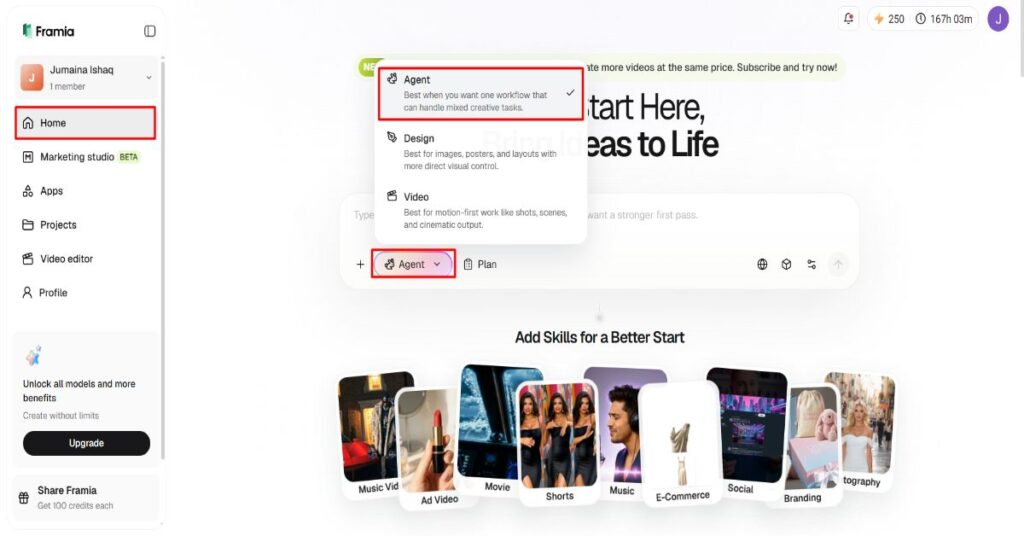
Sign up for Framia Pro first. Then open the “Home” tab from the left vertical menu bar. Next, choose “Agent” from the drop-down menu in the left bottom corner of the dialogue box.
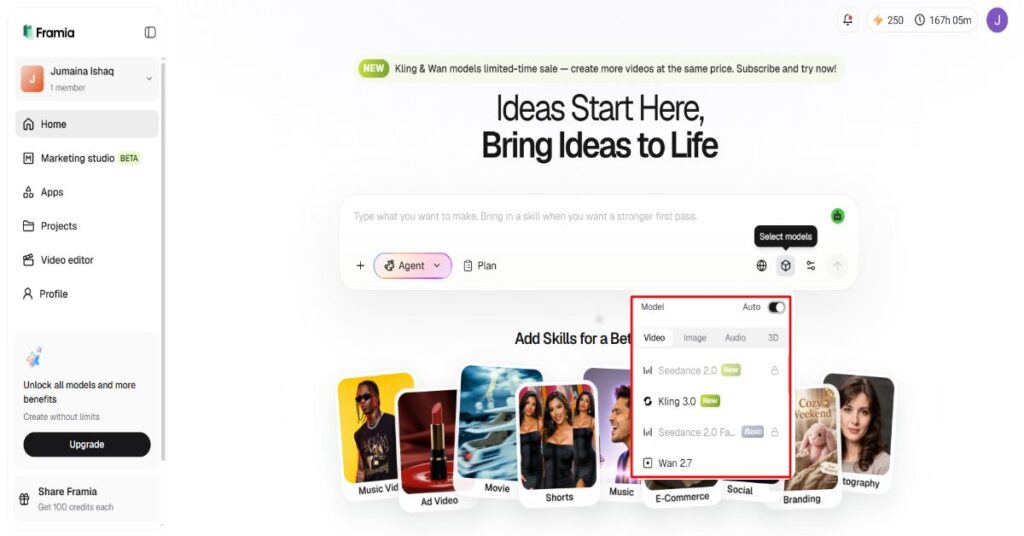
Select the AI model you would like to use for video generation.
Under the “Select models” menu, choose the “Video” option.
Choose from powerful models such as “Seedance”, “Kling”, “Veo”, “Wan”, or “Gemini”.
Step 2: Upload reference images and customize the output
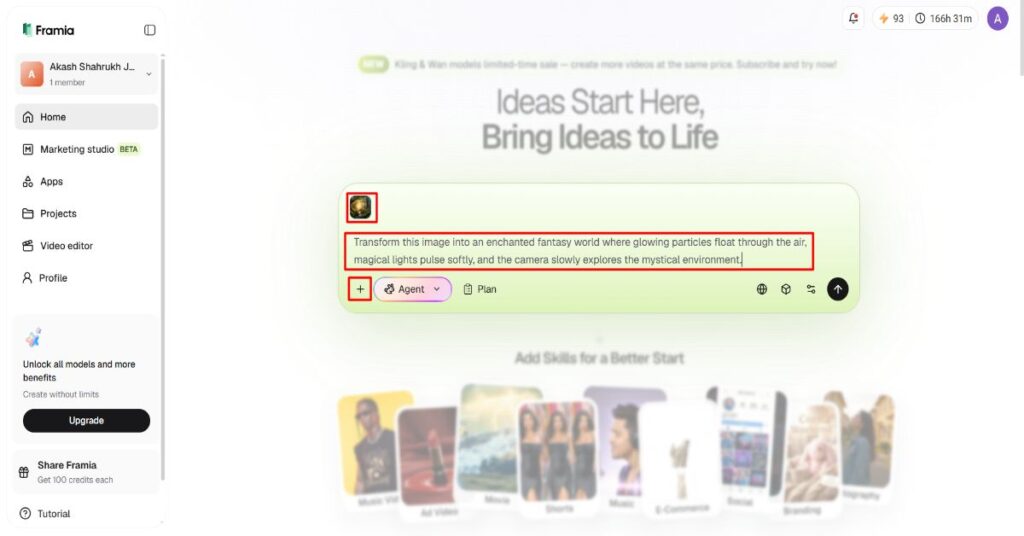
Click the “+” tab to upload one or more photos from your device as references.
Type a clear prompt in the dialogue box describing how the uploaded image should become a video.
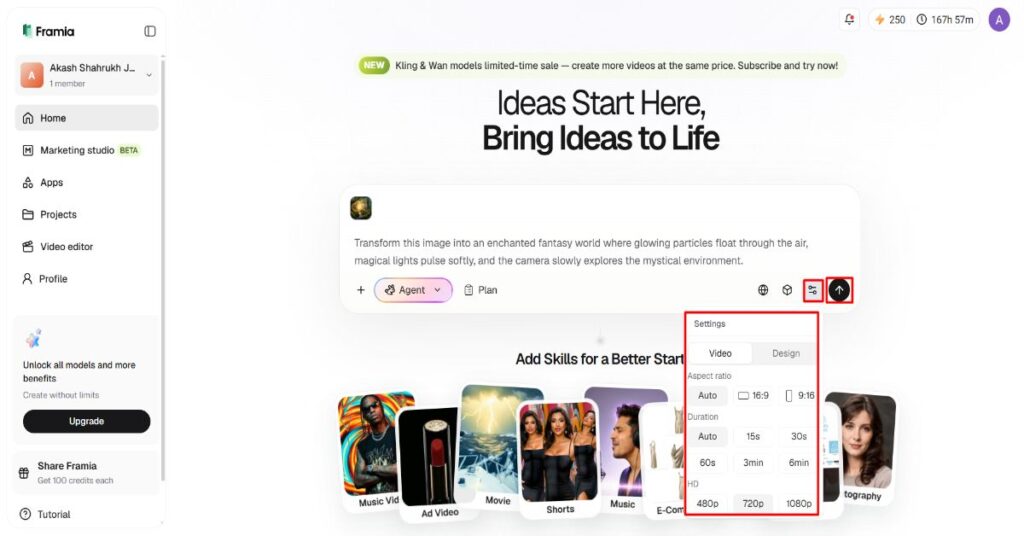
Open the “Settings” tab to select the aspect ratio, video duration, and video resolution.
Click the “Generate” tab to produce your AI video with the selected model.
Step 3: Review, improve, and download
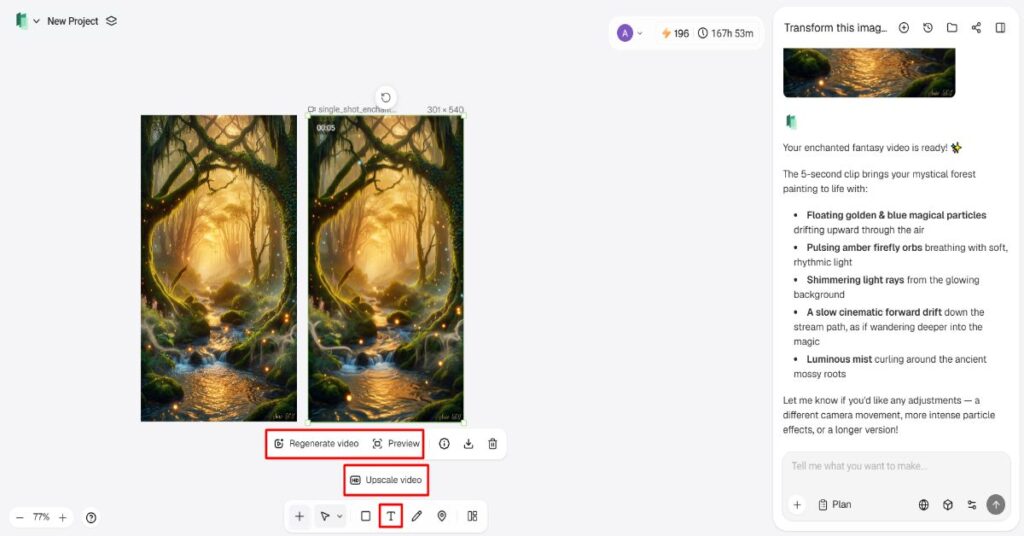
Open “Preview” to review the generated video. Continue editing through the tools available in the bottom menu bar if required.
You can “Upscale video”, “Regenerate video”, or update the video using additional text prompts.
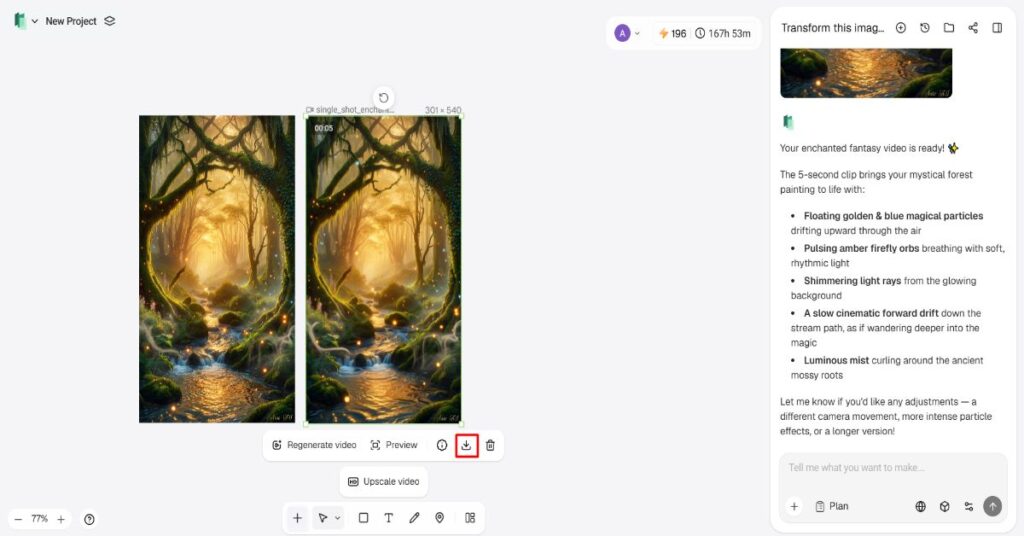
After finishing the edits, click the “Download” tab below the video to save it to your local device.
Best Practices for Getting Consistent Results Across Multiple AI Models
Consistent outputs depend on careful planning instead of repeated random generation. Consider these practical recommendations:
- Provide detailed prompts for movement, lighting, direction of the camera and composition of the scene.
- Use sharp JPEG/PNG images for better animation quality.
- Make comparisons between outputs from different models to choose a final version.
- Follow the same prompt structures for accurate performance evaluation.
- Try various video lengths and sizes to find a balance between quality and performance.
- Use conversational editing to further narrow down the results rather than starting over on each project.
How Conversational AI Editing Simplifies Multi-Model Workflows
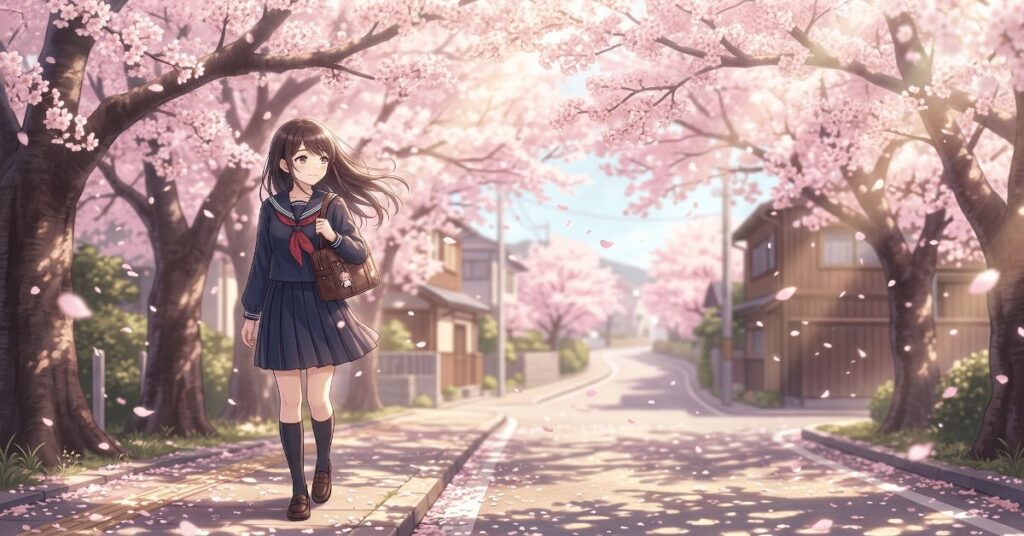
Conversational editing eliminates a lot of the gobbledygook of traditional timeline software. Rather than having to tinker with a myriad of editing controls, creators edit videos with natural language instructions. Changes are made via text-based conversations, which makes motion refinement, lighting, visual effects, and stylistic changes quicker. This process also allows for creative consistency in multiple revisions as the edits are tied to the original project context. Framia Pro also enables coordinated changes in various generation models, enabling smoother experimentation without compromising the visual direction. There are also times when some creators opt to use the output from the anime generator along with some stylized animation ideas, for entertainment or even promotional purposes.
Framia Pro Canvas for Smart Content Production
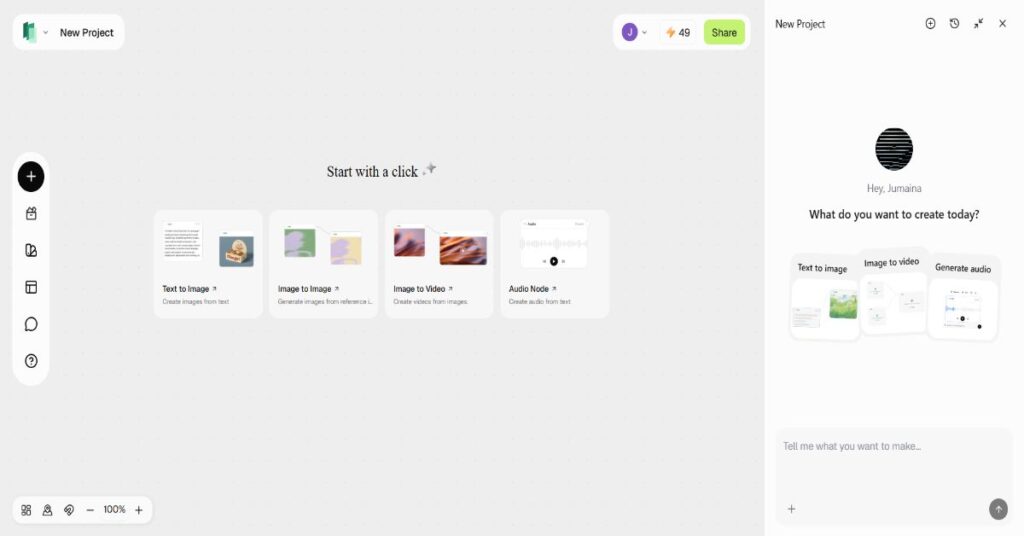
Framia Pro features a smart production canvas focused on AI agent workflows rather than individual creative tools. Production stages are automatically arranged in an efficient sequence thanks to a simple project description. The workflow produces marketing copy, develops promotional graphics, generates social media visuals and develops commercial video clips from supported models such as Seedance, Kling, Veo, Wan and Gemini. Voice narration, background music and final video assembly are still kept in the same environment. The editing agent automatically generates assets and brings them together into a single, refined production to eliminate manual coordination and help streamline the entire creative process.
Advantages of an All-in-One AI Creative Platform
Video, image, music and voice generation are all integrated into a single creative platform, which boosts efficiency. AI agents can be specialized for various production needs, such as ads, promotional videos, educational content, music videos, and short-form media. Consistency in character appearances helps keep the look of characters recognizable in longer projects. For more compelling visual storytelling, the motion transfer technology carries over the realism of movement from one scene to the next. Centralized conversational editing also makes revisions easier as the assets stay connected during production. Framia Pro eliminates the fragmentation of workflows by having generation, refinement, and final assembly in one coordinated creative environment.
Conclusion
There are various AI generation models, each with its own strengths and ideal use cases, offering more creative flexibility. The comparison of the outputs helps to make decisions on the quality of the motion, realism, cinematic presentation and artistic expression. Framia Pro makes this easier by combining the best-of-breed video models, conversational editing and built-in creative tools into a unified production experience. This streamlined process eliminates needless complexity and enables efficient video production from idea to delivery without the need for separate video editing workflows.
For broader context on how AI tools are transforming creative production and content workflows in 2026, see our coverage of how AI is reshaping how creators and businesses produce digital content.
