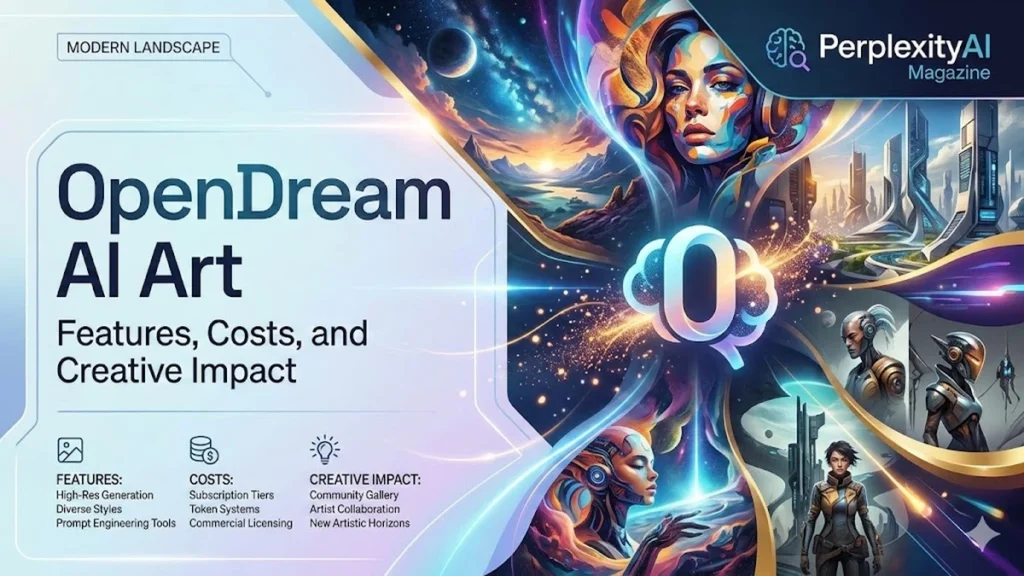
If you are searching for OpenDream AI Art, you likely want a quick way to generate images from text without installing software or learning complex tools. OpenDream is a cloud-based text-to-image generator. You type a description, choose a style or template, set an aspect ratio, then click generate. In seconds, you get multiple AI-made images you can download as PNG or JPEG and reuse for concept work, social posts or creative experiments.
I have seen creative work change as AI tools move from novelty to daily utility. OpenDream stands out because it aims to remove friction. It is built for people who want results fast, including hobbyists, indie game developers, marketers and designers who need draft visuals on demand. The system rewards clarity. The more specific the prompt, the more consistent the output. Over time, users learn a new kind of craft: writing like an art director. They describe subject, setting, mood, lighting and composition, then use settings like guidance scale and seed to refine or reproduce a look.
This article explains what OpenDream is, how to use it step by step, how to write prompts that consistently work, and how to manage credits and settings without getting lost. It also compares OpenDream with Midjourney in practical terms and explains why OpenDream’s “good enough, quickly” approach fits modern content needs.
What OpenDream AI Art Is
OpenDream AI Art is an online image generator that creates artwork from text prompts. Users enter a description, such as “a futuristic city at sunset, cyberpunk style,” and the tool renders one or more images based on that request. It is positioned as an accessible platform for creators who want concept art, illustrations, mockups or social visuals without needing advanced drawing skills. – opendream ai art
Because it is cloud-based, OpenDream runs in a browser. That makes it appealing for users who want fast iteration and a simple workflow rather than a complicated setup. It also makes it easier to move from idea to output in a single session. For many users, OpenDream functions as a rapid sketchpad. It produces draft visuals that can be posted directly, used as references or combined later in design software.
OpenDream’s core promise is speed with control. It offers style presets, templates and adjustable parameters, allowing beginners to start quickly while giving advanced users tools to refine and reproduce results.
Main Features That Shape Results
OpenDream’s features fall into three practical categories: generation, guidance and reuse. The first is text-to-image generation with style controls. Users can choose looks such as realistic, painterly, anime or vector-like. These presets influence composition, textures and color treatment.
The second is parameter adjustment. OpenDream typically offers settings like seed, iterations or steps, guidance scale and resolution. These controls help users fine-tune how strictly the tool follows the prompt, how much detail emerges in the render and whether a composition can be reproduced.
The third is workflow support through templates and galleries. These presets are designed for common use cases, including banners, thumbnails, concept art and product-style scenes. Templates reduce guesswork, especially for users who want reliable output formats such as 16:9 for a banner or 1:1 for a social post.
Together, these features create a system that is meant to be used repeatedly. The most successful users save prompts and settings that work, then reuse them as a foundation for future projects.
Read: RedGifs Not Working? Complete Fix Guide
How to Use OpenDream Step by Step
The standard workflow begins with sign-up and a dashboard. From there, users start a new project or create a new image. Projects help organize outputs by purpose, such as “Blog Banners,” “Game Characters” or “Album Covers.”
Next comes format. Users choose an aspect ratio that matches the final use. A square works for many social platforms, while 16:9 suits banners and thumbnails. Selecting the right format early prevents awkward cropping later.
Then comes the prompt. OpenDream works best when prompts are detailed but organized. A good prompt includes subject, environment, mood, composition and style. For example: “a futuristic city at sunset, neon lights, cyberpunk style, cinematic, highly detailed.” If the tool supports a negative prompt, users add constraints like “no text, no logos, no extra limbs.”
After choosing a style preset and leaving most settings at default, users click generate. The best practice is to generate multiple variations, review them closely, then refine the prompt or settings until the output matches the intent.
The Prompt Structure That Consistently Works
OpenDream rewards structured prompts. The most reliable format follows a predictable order: subject and action, context, composition, lighting, style and quality tags. This approach reduces vague results and gives the model fewer ways to misunderstand the user’s intent.
Subject and action define the focal point. Context establishes the world. Composition tells the tool how to frame the scene. Lighting defines mood. Style anchors the aesthetic. Quality tags encourage detail and clarity.
Here is a reusable structure that works across most use cases.
| Prompt Layer | What to Specify | Example |
|---|---|---|
| Subject and action | Main character or object and pose | “a futuristic knight standing” |
| Context and scene | Location, weather, time | “rainy rooftop, neon skyline” |
| Composition | Angle, framing, lens feel | “three-quarter view, cinematic framing” |
| Lighting | Mood and light source | “dramatic rim light, foggy glow” |
| Style | Medium or look | “concept art, painterly, cyberpunk” |
| Quality tags | Detail and clarity | “highly detailed, sharp focus” |
A prompt does not need to be long. It needs to be specific. Users get better results by adding one clear detail at a time rather than stacking unrelated style keywords.
Settings That Matter Most
OpenDream includes settings that help control output. These options can be understood without technical jargon.
Guidance scale affects how closely the tool follows the prompt. Higher guidance usually increases prompt adherence, but it can also reduce creative variation. Lower guidance can produce surprising outcomes, but it may drift away from the description.
Steps or iterations affect refinement. More steps can produce more detail, but they may also increase render time and credit cost. For many users, a moderate steps setting balances quality and speed.
Seed controls reproducibility. When users find a composition they like, they save the seed and generate variations that keep the basic layout while changing details. This is essential for consistent brand visuals or a character series.
Resolution and aspect ratio should match the final platform. A banner should be generated as a banner, not cropped from a square. Format decisions affect composition as much as they affect pixels.
Templates and Presets for Real Use Cases
Templates are especially valuable for non-designers. A template can be tailored to an Instagram post, a YouTube thumbnail or a wide banner. It nudges the composition toward the correct layout and leaves room for text overlays if needed.
For marketers, this reduces production time. For indie developers, templates provide consistent concept frames that help build a coherent visual world. For hobbyists, presets remove friction and make experimentation feel approachable.
Templates also help teams. If multiple people generate assets, a shared set of templates can keep outputs visually consistent. This matters for brands that need recognizable style across posts and campaigns.
OpenDream’s template approach reflects its positioning. It is built to support quick creation and repeatable output rather than one-off fine art.
Credits, Free Use and Practical Limits
OpenDream offers a free plan with daily credits. That allows users to generate images without paying, but the free allowance is limited. Once daily credits are used, users either wait for the reset or upgrade to a paid plan.
Paid tiers typically increase the monthly or daily credit pool and may improve generation speed and access to additional models or settings. This structure encourages casual experimentation while reserving high-volume workflows for subscribers.
In practice, credits shape behavior. Users who treat OpenDream as a production tool learn to save successful prompt recipes, reduce wasted generations and plan batches. The free tier works well for occasional use, while paid tiers suit creators who need steady volume for content schedules.
The key is not whether it is free. The key is how much output a user needs to produce on a regular basis.
OpenDream vs. Midjourney in Practical Terms
Users often compare OpenDream with Midjourney because both tools produce striking images quickly. The difference is workflow and access. Midjourney is widely seen as strong in raw polish, particularly in cinematic looks and stylized illustration. OpenDream is often described as easier for beginners because it is browser-based and template-driven.
OpenDream’s free plan is another point of contrast. Users who want quick, low-cost generation often choose OpenDream first. Users who prioritize high-end consistency may invest in Midjourney.
From a practical standpoint, OpenDream is suited for thumbnails, social banners, drafts and concept images. Midjourney often appeals to users building portfolios or client-grade visuals where subtle lighting and detail control matter more.
The better choice depends on the task. OpenDream excels when speed and convenience are the priority.
Common Problems and How Users Fix Them
OpenDream users commonly encounter the same issues seen across AI image generators: unwanted text artifacts, strange anatomy, cluttered backgrounds and inconsistent style.
The fastest fixes are prompt-based. If text appears, add “no text, no logos” to a negative prompt if available. If anatomy looks wrong, simplify the prompt and reduce competing style tags. If the image is cluttered, specify clean backgrounds and add composition constraints like “minimal” or “negative space.”
If outputs vary too widely, lock the seed and slightly raise guidance. If outputs feel too rigid, lower guidance and regenerate with new seeds.
Most problems can be solved by changing one thing at a time. OpenDream is an iterative tool. It rewards controlled experimentation rather than random regeneration.
Takeaways
- OpenDream AI Art is a browser-based text-to-image generator built for fast visuals.
- Strong prompts follow a clear structure: subject, scene, composition, lighting and style.
- Guidance scale, steps and seed are the settings that most influence quality and consistency.
- Templates help users create banners, thumbnails and social images without layout guesswork.
- Free daily credits allow casual use, while paid tiers support high-volume creation.
- OpenDream is often chosen for convenience, while Midjourney is often chosen for premium polish.
- The best results come from saving prompt recipes and adjusting one variable at a time.
Conclusion
I think OpenDream’s real impact is how quickly it turns an idea into something visible. That shift matters for modern creative work, where speed often determines whether a concept gets explored or abandoned. OpenDream makes visual exploration cheap and immediate. It encourages a new skill set: writing prompts like creative briefs, selecting styles like a director and refining settings like a technician.
The tool is not a substitute for taste. It is a way to test taste faster. The strongest creators use OpenDream as an early-stage studio. They generate drafts, select the strongest directions, then refine them through editing and design. Whether the final use is a marketing banner, a game concept or a personal project, the workflow is the same: describe, generate, choose, adjust, repeat. That is the new rhythm of fast visual creation.
FAQs
What is OpenDream AI Art?
It is an online tool that generates images from text prompts, offering style presets and templates for quick creation.
How do I write a good OpenDream prompt?
Describe subject, setting, composition, lighting and style. Add constraints like “no text” if unwanted lettering appears.
What settings matter most?
Guidance scale affects prompt adherence, steps affect refinement and detail, and seed allows reproducible compositions.
Can I use OpenDream for social media?
Yes. It is commonly used for banners, thumbnails and posts, especially when paired with templates and the right aspect ratio.
Is OpenDream free?
It typically offers a free plan with daily credits. Higher volume usage requires paid tiers.