
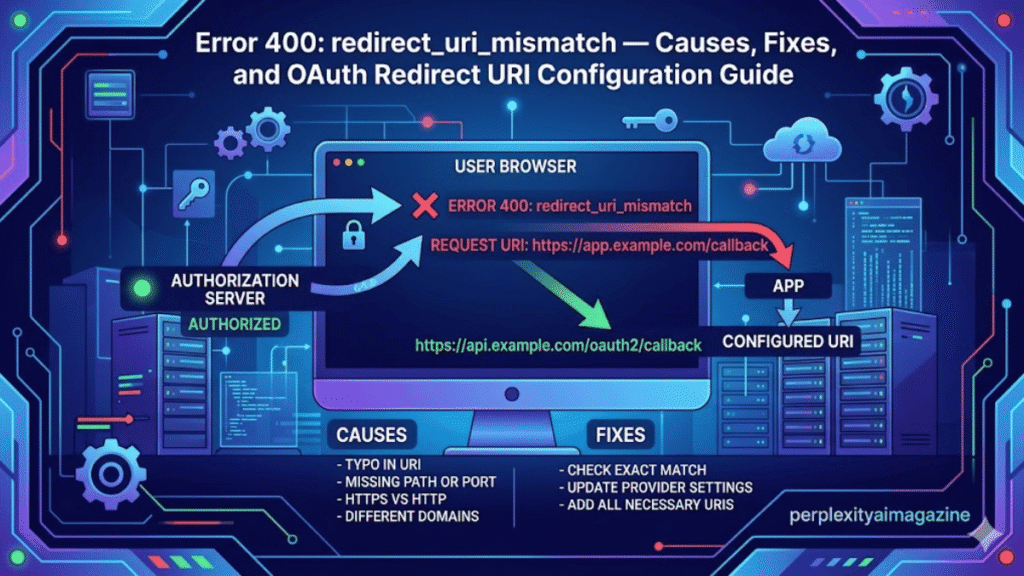
I have watched developers spend hours chasing a mysterious authentication error that ultimately came down to a single misplaced slash. The message appears simple enough: “Error 400: redirect_uri_mismatch.” Yet behind that short phrase lies one of the most common stumbling blocks in OAuth-based authentication systems used by Google, Microsoft, GitHub, and countless other platforms.
At its core, the error occurs when the redirect URI sent during an OAuth authorization request does not exactly match one of the URIs registered in the provider’s application settings. Even tiny differences can trigger the failure: a missing trailing slash, the use of 127.0.0.1 instead of localhost, an incorrect port number, or the use of https instead of http during local development.
OAuth providers enforce this strict matching rule for security reasons. Redirect URIs determine where authentication tokens are sent after a user grants permission. If attackers could manipulate these URLs, they could intercept access tokens and gain unauthorized access to user data.
The result is a system that is intentionally unforgiving. Applications integrating Google APIs, Gmail authentication, Microsoft Azure Active Directory, or other OAuth providers must configure redirect URIs precisely in both the application code and the provider’s console settings.
Understanding why this mismatch happens, how OAuth uses redirect URIs, and how developers fix the issue reveals a deeper lesson about modern identity infrastructure. Behind every login button lies a careful choreography of URLs, security policies, and configuration details that must align perfectly before authentication succeeds. – error 400: redirect_uri_mismatch.
Why OAuth Requires Exact Redirect URI Matching
OAuth 2.0, introduced in 2012 as RFC 6749, was designed to allow third-party applications to access user data without sharing passwords (Hardt, 2012). Instead of credentials, applications request authorization tokens through a standardized flow involving a browser redirect.
When a user clicks “Sign in with Google,” the application redirects the browser to the provider’s authorization endpoint. The request includes several parameters, including:
- client_id
- response_type
- scope
- redirect_uri
Once the user grants permission, the provider sends the authorization response back to the redirect URI.
Because this URI receives sensitive tokens or authorization codes, OAuth requires providers to verify that the redirect location belongs to the registered application. If the URI does not match exactly, the request is rejected.
The OAuth specification explicitly requires this validation:
“The authorization server MUST ensure that the redirection URI received matches the registered URI.” (Hardt, 2012)
This strict comparison protects users from malicious redirection attacks. If attackers could modify redirect locations, they could capture authentication tokens before they reach legitimate applications.- error 400: redirect_uri_mismatch.
The Anatomy of the Redirect URI Mismatch Error
When a redirect mismatch occurs, the OAuth provider returns a browser error page. In Google’s case, the message typically reads:
Error 400: redirect_uri_mismatch
This error indicates that the redirect URI supplied in the authorization request does not match any authorized URI configured for the OAuth client.
Common mismatches involve seemingly trivial differences:
| Requested URI | Registered URI | Result |
|---|---|---|
| http://localhost:8080/cb | http://localhost:8080/ | Failure |
| http://127.0.0.1:3000/callback | http://localhost:3000/callback | Failure |
| https://localhost:8080 | http://localhost:8080 | Failure |
| http://localhost:8080/ | http://localhost:8080/ | Success |
Even differences in capitalization or trailing slashes can trigger the mismatch.
Google’s documentation warns developers that redirect URIs must match exactly, including protocol, port, and path (Google Developers, 2024).
For developers unfamiliar with OAuth’s strict requirements, this behavior can feel unnecessarily rigid. Yet the rule exists precisely because redirect endpoints handle sensitive authorization tokens. – error 400: redirect_uri_mismatch.
The Role of Redirect URIs in OAuth Security
Redirect URIs function as trust anchors within the OAuth protocol. They define the destination where authorization codes or tokens are delivered after a user grants access.
Without strict validation, attackers could exploit authorization flows through open redirect attacks. In such scenarios, a malicious application might register a legitimate domain but redirect tokens to an attacker-controlled endpoint.
OAuth security researchers have repeatedly highlighted the importance of strict redirect validation. The OAuth 2.0 Security Best Current Practice document stresses that authorization servers must validate redirect URIs precisely to prevent token leakage (Lodderstedt, Fett, & Bradley, 2019).
Security engineer Aaron Parecki explains:
“Redirect URI validation is one of the most important checks in OAuth. If it fails, attackers can intercept authorization codes.” (Parecki, 2017)
Strict validation therefore protects both users and service providers from token theft. – error 400: redirect_uri_mismatch.
The Most Common Causes of redirect_uri_mismatch
Developers typically encounter this error during early integration stages or while testing applications locally. Several common configuration mistakes trigger the mismatch.
One of the most frequent causes is confusion between localhost and 127.0.0.1. While both refer to the same machine, OAuth providers treat them as distinct URIs.
Another frequent issue involves mismatched ports. Local development servers often run on ports such as 3000, 8080, or 5000. If the port in the authorization request differs from the registered URI, authentication fails.
Trailing slashes also matter. A URI ending with /callback differs from /callback/.
The following table summarizes typical mistakes developers encounter.
| Configuration Element | Correct Example | Common Error |
|---|---|---|
| Protocol | http://localhost:8080 | https during local dev |
| Hostname | localhost | 127.0.0.1 mismatch |
| Port | :3000 | missing or incorrect port |
| Path | /auth/callback | missing callback path |
| Trailing Slash | /callback/ | /callback |
Because OAuth providers compare redirect URIs as literal strings, even small formatting differences lead to failure. – error 400: redirect_uri_mismatch.
Fixing the Error in Google Cloud Console
Most redirect mismatches occur when developers forget to register the redirect URI in the provider’s console configuration.
For Google services, the fix typically involves editing OAuth credentials inside the Google Cloud Console.
Developers must navigate to:
APIs & Services → Credentials → OAuth 2.0 Client IDs
After selecting the appropriate client ID, the developer adds the correct redirect URI to the Authorized redirect URIs section.
For example:
http://localhost:3000/callback
After saving changes, Google’s system may take several minutes to propagate the update.
Google documentation emphasizes that developers must copy the redirect URI exactly as it appears in the authorization request (Google Developers, 2024).
Failure to do so results in the same mismatch error repeating even after configuration changes.error 400: redirect_uri_mismatch
Local Development and the Special Case of localhost
Local development introduces unique complications because OAuth providers normally require secure HTTPS connections. However, Google and several other providers allow HTTP when using localhost.
This exception exists because local machines typically lack valid TLS certificates.
Google’s OAuth documentation explicitly states that HTTP is permitted for localhost during development, while production environments must use HTTPS (Google Developers, 2024).
Developers commonly use redirect URIs such as:
http://localhost:8080http://localhost:3000/callbackhttp://127.0.0.1:3000/callback
However, whichever URI appears in the authorization request must also appear exactly in the registered configuration.
Some frameworks automatically choose random ports for local testing, which complicates redirect registration. In these cases, developers must either fix the port number or register multiple URIs. – error 400: redirect_uri_mismatch.
OAuth Client Type Misconfiguration
Another common source of redirect mismatches arises from incorrect OAuth client types.
Google Cloud Console allows developers to create several OAuth client categories:
- Web application
- Desktop application
- Android
- iOS
Each client type expects different redirect patterns.
For example, Gmail API quickstart scripts often assume the client type is Desktop application. In this configuration, Google automatically uses loopback addresses such as:
http://localhost:[random-port]/
If the client is mistakenly configured as a Web application, the redirect may fail because the expected URI pattern differs.
OAuth documentation from Google notes that desktop clients typically use loopback IP redirects rather than traditional web callback endpoints (Google Developers, 2024).
Correct client type selection therefore plays an essential role in avoiding redirect mismatch errors.
OAuth Across Platforms: Google, Azure, and Beyond
Although Google’s error message is widely recognized, redirect URI mismatches occur across nearly every OAuth provider.
Microsoft Azure Active Directory, GitHub, Okta, and Auth0 all enforce similar redirect validation rules.
Azure documentation similarly requires exact URI registration for application authentication. Developers must register redirect URIs in the Azure portal under App registrations (Microsoft, 2024).
Auth0 documentation warns that redirect URLs must match configured callback URLs exactly to avoid authentication failures (Auth0, 2023).
Despite minor differences in terminology, the underlying principle remains consistent across identity platforms: authentication responses can only be delivered to trusted destinations.
As identity systems expanded during the rise of cloud computing in the 2010s, these rules became standard practice for protecting authorization flows.
Debugging OAuth Redirect Issues
Debugging redirect mismatch errors often requires careful inspection of authorization requests.
Developers frequently examine the URL generated during the login process. Within the query parameters lies the redirect_uri value used by the application.
Comparing that URI with the one configured in the provider console typically reveals the mismatch.
Specialized debugging tools can also help. OAuth testing utilities allow developers to simulate authorization requests and inspect responses.
Security researcher Aaron Parecki recommends verifying redirect URIs early during OAuth development:
“Always confirm that the redirect URI in your authorization request matches the one registered with the provider before troubleshooting anything else.” (Parecki, 2017)
Another common troubleshooting step involves clearing stored tokens or deleting local credential files such as token.json. Cached tokens sometimes cause outdated redirect URIs to persist during testing.
OAuth’s Evolution and the Future of Redirect Validation
Redirect URI validation has remained largely unchanged since OAuth 2.0’s introduction in 2012. However, modern identity standards continue to strengthen redirect security.
OAuth 2.1 drafts propose additional safeguards such as requiring Proof Key for Code Exchange (PKCE) for public clients. PKCE protects authorization codes from interception during redirect flows.
Security researchers increasingly emphasize strict redirect validation as an essential component of identity infrastructure.
The growing adoption of single sign-on and third-party authentication means redirect endpoints now carry enormous security responsibility. Billions of authentication flows occur daily across web and mobile platforms.
What once seemed like a minor configuration detail has become a foundational component of modern internet security architecture.
Key Takeaways
- The redirect_uri_mismatch error occurs when the redirect URI in an OAuth request differs from the registered URI.
- OAuth providers enforce exact matching to prevent token interception and security attacks.
- Differences in hostname, port, protocol, path, or trailing slash commonly cause mismatches.
- Developers must register redirect URIs precisely in provider consoles such as Google Cloud or Azure Portal.
- Local development often uses HTTP with localhost, while production environments require HTTPS.
- Debugging typically involves inspecting authorization URLs and comparing redirect URIs carefully.
Conclusion
Authentication systems rarely attract attention when they work correctly. Yet when a redirect URI mismatch appears, the invisible machinery behind modern identity suddenly becomes visible. A small configuration oversight can halt an entire login process.
The strictness of OAuth redirect validation reflects the immense responsibility placed on authentication systems. These mechanisms protect access to email accounts, cloud storage, financial applications, and enterprise platforms. Redirect endpoints act as gateways where sensitive tokens pass between systems.
Developers integrating OAuth services therefore operate within a carefully designed security model. Precision matters. A misplaced slash or incorrect hostname is not merely a formatting error but a potential security vulnerability.
Understanding why redirect URI mismatches occur transforms the error from frustration into insight. It reveals how identity providers defend against token interception and malicious redirects.
In a digital world where authentication powers nearly every online service, the smallest URL details carry enormous significance.
Read: Linux nofile Limit Explained for High Performance Servers
FAQs
What causes the redirect_uri_mismatch error?
It occurs when the redirect URI in an OAuth authorization request does not exactly match the URI registered in the provider’s application settings.
Does localhost work with OAuth redirect URIs?
Yes. Most providers allow HTTP for localhost during development, but production environments typically require HTTPS.
Why does localhost differ from 127.0.0.1?
OAuth providers treat them as separate URIs even though they refer to the same machine. Both must be registered separately if used.
How long do configuration changes take in Google Cloud Console?
Updates usually propagate within five to ten minutes, though delays can vary depending on Google’s infrastructure.
Can trailing slashes cause redirect mismatches?
Yes. OAuth systems compare redirect URIs as exact strings, so a missing or extra slash can trigger the error.
