
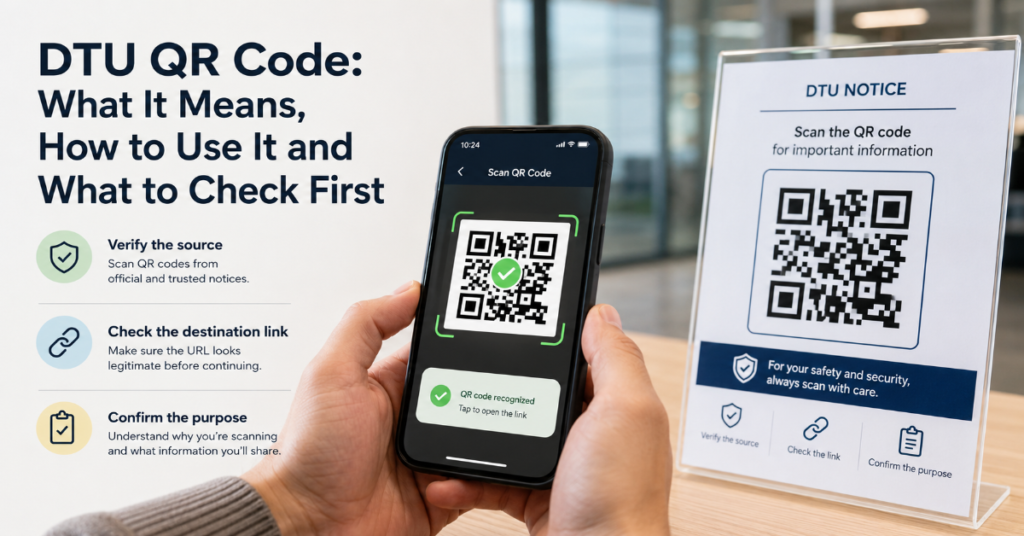
The phrase dtu qr code looks simple, but it can point to three very different things. For students, it may mean a QR code used to access a university app, exam notice, registration page or timetable. For graduates of the Technical University of Denmark, it may mean the QR code embedded in a digital diploma for verification. For engineers, it may refer to a QR code attached to a Data Terminal Unit, a device used to transmit field data from meters, sensors or industrial equipment.
That ambiguity matters. Scanning the wrong QR code, trusting an unofficial portal or sharing a device onboarding code can create real problems. A student could land on a fake login page. A recruiter could misread an edited certificate. A technician could accidentally expose industrial configuration data.
This article explains the main meanings of a dtu qr code, how each one is normally used and what users should verify before scanning. It is written for students, graduates, administrators, recruiters and project teams who need a practical, security-aware explanation rather than a generic QR code definition.
The brief for this article identified the two most common search intents: education-related DTU QR codes and industrial Data Terminal Unit QR codes. The correct answer depends entirely on context, so the first step is to identify which DTU you are dealing with.
What Does DTU QR Code Mean?
A dtu qr code usually means one of four things:
| Context | What the QR Code Usually Does | Typical User | Main Risk |
| Technical University of Denmark | Verifies a digital diploma or certificate | Graduate, employer, university office | Edited PDF or broken verification link |
| Delhi Technological University | Opens student portal, ERP, notice, registration or exam-related resource | Student, applicant, faculty member | Fake login page or outdated notice |
| Industrial Data Terminal Unit | Connects a DTU device to an app, platform or configuration workflow | Engineer, technician, integrator | Device takeover or exposed provisioning data |
| Generic DTU-branded notice | Links to a form, event registration or information page | Public user, student, staff | Shortened link abuse or phishing |
The term is confusing because “DTU” is not owned by one institution or industry. In education, it commonly refers to Delhi Technological University in India or the Technical University of Denmark. In industrial automation, DTU often means Data Terminal Unit.
That difference changes everything. A university QR code is usually a shortcut to a web page, app or verification link. An industrial DTU code may contain device identifiers, activation data, a provisioning URL or configuration parameters.
DTU Denmark: QR Code for Digital Diploma Verification
For the Technical University of Denmark, the clearest official use is diploma verification. DTU states that a digital diploma includes a unique QR code and that this QR code acts as a verification link confirming the authenticity of the diploma. DTU also warns that if the link is removed from the certificate, the document no longer serves as valid documentation of degree results from DTU. (student.dtu.dk)
This is the most formal and high-trust use of a dtu qr code. It is not just a convenience feature. It is part of the authenticity chain.
A recruiter, admissions officer or employer should treat the QR code as a verification pathway, not as decoration on a PDF. If the code opens an official DTU verification page, that is stronger evidence than a static screenshot or forwarded attachment.
How to Verify a DTU Denmark Diploma QR Code
A careful verification process should look like this:
| Step | What to Do | Why It Matters |
| 1 | Open the diploma PDF from the original sender or official digital diploma system | Reduces risk of using a modified copy |
| 2 | Scan the QR code with a trusted phone camera or secure scanner | Avoids unknown QR scanner apps collecting data |
| 3 | Check that the destination is an official DTU domain or authorized diploma verification page | Prevents phishing or spoofed certificate pages |
| 4 | Compare the online record with the PDF details | Confirms name, degree, date and results match |
| 5 | Do not rely on the PDF alone if the verification link is missing | DTU states the link is part of valid documentation |
The strongest signal is not that the QR code exists. It is that the code resolves to a genuine verification source and the details match the document.
Delhi Technological University: Student Portals, ERP and Exam Links
At Delhi Technological University, QR code use is more varied. It may appear in connection with ERP access, app downloads, registration notices, library events, exam-related workflows or student resources.
Delhi Technological University’s ERP page lists student login functions for feedback, attendance, admit cards and results. It also lists Android and iOS mobile application links and a QR code area, although users should always confirm they are on an official DTU domain before using such links. (dtu.ac.in) DTU also maintains student-facing portals for supplementary, feedback, refund, fee concession and scholarship services. (btechstudentportal.dtu.ac.in) Its SAARTHI portal is used for admissions and fee-related links for different academic years. (saarthi.dtu.ac.in)
The practical rule is simple: use the QR code only if it appears on an official DTU page, notice or document. If someone forwards a cropped QR image through WhatsApp, Telegram or email, verify the original notice first.
Common Delhi DTU QR Code Uses
| Use Case | Likely Destination | Safer Practice |
| ERP or student app | DTU ERP or app download page | Start from dtu.ac.in, not from a forwarded image |
| Exam notice | Date sheet, upload workflow or exam instruction | Check the official examination branch or student corner |
| Event registration | Google Form or institutional registration page | Confirm the notice date, department and organizer |
| Admission or fee link | SAARTHI, registration or fee portal | Avoid payment links from unofficial groups |
| Library or workshop notice | Registration page or schedule | Check the official DTU notice source |
This is where students often make mistakes. They scan first and verify later. That order should be reversed.
Industrial DTU QR Code: Data Terminal Unit Onboarding
In industrial systems, DTU usually means Data Terminal Unit. These devices sit between field equipment and a network. They may collect data from meters, sensors, PLCs or remote assets and send it to a cloud platform, SCADA system or local server.
A QR code on an industrial DTU can serve several functions:
• Device identification
• App-based onboarding
• Server connection setup
• Serial number lookup
• Firmware documentation access
• Warranty or maintenance record access
• Secure provisioning workflow
IoT platforms increasingly use QR codes because they reduce manual typing during device onboarding. QR-based onboarding can help users access setup information, activate a device or connect it to an IoT platform more quickly. (2Smart) AWS also provides an IoT Device Lobby architecture that uses QR code onboarding to simplify provisioning of IoT devices into AWS IoT Core. (GitHub)
That convenience is useful in the field. Long serial numbers, MAC addresses and provisioning URLs are easy to mistype. A QR code speeds up installation and reduces configuration errors. But it also concentrates sensitive setup data into a scannable object.
The Security Problem Most Users Miss
A dtu qr code is not automatically safe because it appears on a university page, a certificate or a device label. QR codes are only visual encodings. They can point to a trusted destination or a malicious one.
The biggest risks are:
| Risk | Education Context | Industrial Context | Practical Control |
| Phishing | Fake student login page | Fake cloud provisioning page | Check domain before entering credentials |
| Code replacement | Sticker over official notice | Sticker over device label | Inspect physical label and source document |
| Shortened links | Unknown forms or payment pages | Hidden provisioning URLs | Expand or verify destination first |
| Data leakage | Student ID or exam data in URL | Device ID or token exposed | Avoid posting QR codes publicly |
| Expired code | Old notice or old app link | Retired provisioning token | Check date, version and issuer |
The hidden issue is that QR codes reduce friction, but friction is sometimes what protects users. When a student manually types an official domain, they may notice something suspicious. When they scan a code and tap immediately, they may miss it.
Practical Troubleshooting: Why a DTU QR Code May Not Scan
A QR code may fail for ordinary technical reasons. Before assuming the code is fake, check these causes:
| Problem | Likely Cause | Fix |
| Camera does not detect code | Low light, glare or poor focus | Increase light and hold phone steady |
| Link opens but fails | Expired session or old notice | Find the latest official notice |
| App says invalid code | Wrong app for that QR code type | Use the institution or vendor-recommended app |
| Diploma QR does not verify | Link removed, copied or broken | Request original digital document |
| Industrial DTU not onboarding | Device already claimed or wrong tenant | Reset through vendor workflow or admin console |
| Browser warning appears | Suspicious SSL, redirect or blocked page | Do not proceed until source is verified |
For students, the most common fix is to start from the official university portal rather than relying on a screenshot. For industrial teams, the most common fix is to confirm that the QR code belongs to the correct device, tenant and environment.
Real-World Impact: Why This Small Code Matters
The dtu qr code matters because it sits at the intersection of identity, trust and access.
For DTU Denmark graduates, it can affect employment checks, admissions verification and international credential review. A broken verification link can slow down hiring or academic evaluation. Danish institutions increasingly use digital diploma systems because digital verification is easier to transmit and validate than paper records. Related Danish diploma verification guidance from other universities also emphasizes accessing the document from secure institutional systems rather than trusting an isolated attachment.
For Delhi Technological University students, QR codes can affect exams, attendance, app access, registration and fee workflows. A wrong link can mean missed deadlines or exposure of login credentials.
For industrial teams, QR codes can affect operational reliability. A DTU device onboarded into the wrong account may send telemetry to the wrong server. A publicly shared onboarding code may reveal device metadata. In regulated environments, that can become a compliance problem, not just an IT inconvenience.
Original Insights for Safer Use
First, the safest QR code workflow is not “scan and trust.” It is “source, scan, verify.” The source matters more than the QR pattern itself.
Second, diploma QR codes and industrial onboarding QR codes should not be treated the same. A diploma QR code is usually a verification pointer. An industrial DTU QR code may act more like an installation credential. That makes public sharing much riskier.
Third, QR code expiry is under-discussed. Institutions and vendors should make expiration behavior clear. A permanent diploma verification link serves one purpose. A time-limited provisioning token serves another. Mixing those models creates confusion.
Fourth, students should avoid third-party QR scanner apps when their phone camera can scan the code. Many scanner apps request unnecessary permissions and may log URLs.
Fifth, industrial teams should include QR code handling in asset management policy. A device label is not just a sticker. It may be part of the system’s access pathway.
The Future of DTU QR Code in 2027
By 2027, the dtu qr code will likely become more common, but also more controlled. Universities are moving more administrative functions into digital portals. Students expect mobile-first access to exam schedules, fee receipts, app downloads and registration forms. Digital diplomas are also likely to become more normalized because they reduce paper handling and make authenticity checks easier.
In industrial systems, QR onboarding will continue to grow because field teams need faster installation workflows. Device provisioning is moving toward app-guided setup, cloud registration and identity-based device management. AWS’s QR-based IoT onboarding architecture shows how cloud platforms are already treating QR codes as a serious provisioning tool, not just a marketing convenience. (GitHub)
The challenge will be governance. In education, institutions need clearer notices, official QR code repositories and anti-phishing guidance. In industry, vendors need secure token design, expiration controls, audit logs and physical tamper resistance.
The future is not just more QR codes. It is better-managed QR codes.
Takeaways
• A dtu qr code can mean very different things depending on whether the context is university access, diploma verification or industrial telemetry.
• DTU Denmark’s digital diploma QR code is a verification mechanism and should be checked through an official source.
• Delhi Technological University students should use QR codes only from official domains, notices or portals.
• Industrial DTU device QR codes may contain sensitive onboarding or configuration data.
• The destination URL matters more than the visual appearance of the code.
• QR codes should be handled as access infrastructure, not casual decoration.
• By 2027, QR-based verification and onboarding will likely expand, but safer governance will become more important.
Conclusion
The dtu qr code is useful precisely because it removes friction. It can help a student reach the right portal, help an employer verify a Danish DTU diploma or help an engineer onboard a field device without manually entering long configuration values.
But convenience should not replace verification. A QR code is only as trustworthy as its source, destination and surrounding process. Before scanning, check where the code came from. After scanning, check where it leads. Before entering credentials, payment details or device setup data, confirm that the domain, issuer and context are correct.
For students, the safest path is the official university website or portal. For diploma verification, the safest path is the original digital certificate and its official verification link. For industrial systems, the safest path is a controlled provisioning workflow with audit trails, token expiry and clear ownership.
A QR code is small. The trust decision behind it is not.
FAQs
What is a DTU QR code?
A DTU QR code is a scannable code linked to a DTU-related system. It may refer to Delhi Technological University, the Technical University of Denmark or a Data Terminal Unit in industrial IoT.
Is the DTU Denmark diploma QR code important?
Yes. DTU Denmark says its digital diploma includes a unique QR code that works as a verification link confirming diploma authenticity. If that link is removed, the certificate no longer serves as valid documentation from DTU. (student.dtu.dk)
How do I know if a Delhi DTU QR code is real?
Check whether it came from an official DTU website, student portal, ERP page, department notice or verified university document. Avoid scanning cropped images forwarded through messaging apps.
Can an industrial DTU QR code contain sensitive data?
Yes. It may include a device ID, provisioning URL, server endpoint or setup token. Do not post industrial device QR codes publicly unless the vendor confirms they contain no sensitive information.
Why is my DTU QR code not scanning?
Common causes include poor lighting, damaged print, expired links, wrong scanning app, old notices, already-claimed device codes or blocked browser permissions.
Should I use a third-party QR scanner app?
Usually no. A phone’s built-in camera is safer for basic scanning. Third-party scanner apps may request unnecessary permissions or collect scan history.
What should I do if a scanned QR code opens a suspicious page?
Do not enter credentials or payment details. Close the page, check the official DTU or vendor website manually and report the suspicious code to the relevant office or administrator.
Methodology
This article was developed from the provided production brief for Perplexityaimagazine.com, which defined the core keyword, search intent and required article modules. Factual claims were checked against official DTU Denmark student documentation, Delhi Technological University portal pages and credible IoT onboarding references. The analysis distinguishes between confirmed institutional uses and broader industrial practices.
References
Technical University of Denmark. Exam certificate and diploma information for students. DTU Student. (student.dtu.dk)
Delhi Technological University. Enterprise Resource Planning page. (dtu.ac.in)
Delhi Technological University. Online Student Portal. (btechstudentportal.dtu.ac.in)
Delhi Technological University. DTU SAARTHI Webportal. (saarthi.dtu.ac.in)
2Smart. How to use QR codes in IoT to improve user experience. (2Smart)
AWS Samples. IoT Device Lobby Architecture. GitHub. (GitHub)
University of Southern Denmark. Digital diploma and verification guidance. (mitsdu)
