
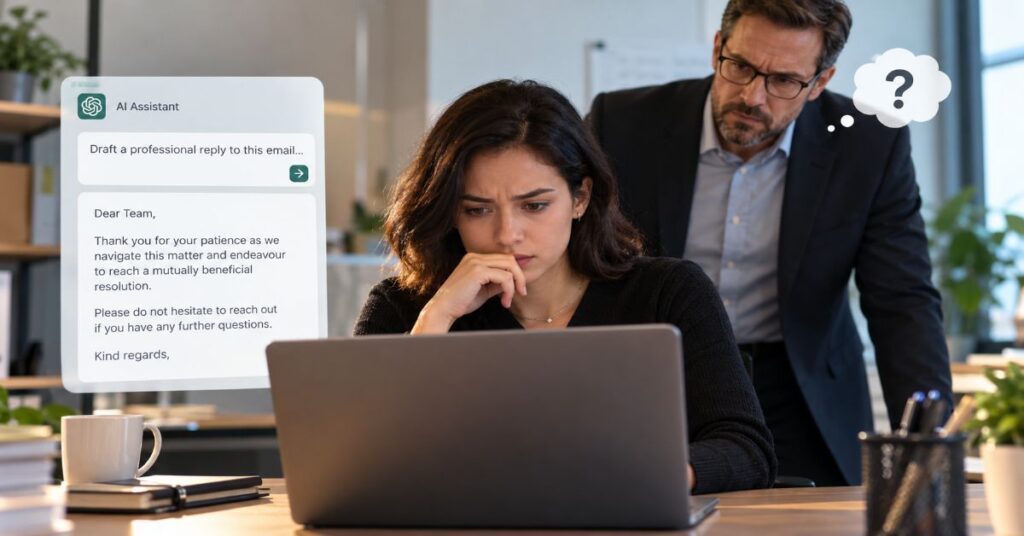
Sometimes, but not reliably: if you are asking “can my boss tell if i used ai to write a work email”, your manager may notice a mismatch in voice or context, but cannot normally prove authorship from the finished email alone. The more consequential possibility is that your organisation already has records of certain workplace AI interactions, or that the message makes a mistake nobody would have made with the full conversation in view.
Consider two emails. One tells a supplier, “We can approve the revised delivery date on Thursday, subject to the finance sign-off discussed yesterday.” The other says, “Thank you for your patience as we navigate this matter and endeavour to reach a mutually beneficial resolution.” Both may be grammatically correct. Only the first demonstrates knowledge of the actual decision. A manager familiar with the supplier thread may doubt the second long before anyone runs a detection tool.
Employees often ask the detection question because they are worried about embarrassment, disciplinary consequences or being considered less capable. Those concerns are understandable, but they contain three different questions: Can someone reasonably suspect AI help? Can software establish which tool wrote a sentence? And can a company inspect approved-tool records or company email under its rules? Each has a different answer.
This guide examines observable workplace signals, the scientific limits of detectors, Microsoft 365 Copilot audit and retention capabilities, confidential-data handling, disclosure decisions and a practical method for producing emails that are accurate rather than merely smooth. It is an editorial explanation, not legal advice, an assurance of privacy or a promise that any wording is “undetectable”.
What Your Boss Can Actually Infer From an Email
Three Signals Managers Notice First
The first signal is discontinuity. A colleague who normally writes three brisk lines suddenly sends five symmetrical paragraphs, complete with a formal greeting and a generic summary. That change may prompt a question, particularly when several messages exhibit the same pattern. Yet a person may also write differently because the subject is sensitive, a template was required or another colleague edited the text. Style alone proves very little.
The second signal is context failure. AI may generate a fluent reply that overlooks the last decision in the thread, misidentifies who owns an action, assumes a meeting took place or fails to distinguish a proposal from a signed commitment. Experienced managers often judge an email by whether it moves work forward, not by sentence rhythm. Missing a sensitive client constraint is therefore more revealing than using a fashionable phrase.
The third signal is unexplained overconfidence. An email might promise a refund, launch date, legal interpretation or security guarantee that nobody approved. Even if the boss never discovers how the draft was written, they still have to correct the business problem. This is why the question “Does this sound AI-generated?” is usually less useful than “What does this message cause someone to believe or do?”
Why Familiar AI Phrases Are Not Evidence
Expressions such as “I hope this email finds you well” or “Please do not hesitate to reach out” existed long before modern chatbots. Employees copy company templates, adopt a supervisor’s preferred style and use built-in proofreading software. Conversely, AI systems can produce concise, natural-sounding text. Neither polished prose nor awkward prose identifies its author reliably.
A manager’s inference becomes more credible when multiple independent observations agree: abrupt changes in tone, repeated context mistakes, a reported policy breach or administrative records. Even then, any serious employment decision should distinguish authenticated records from impressionistic judgments.
The Workplace Evidence Chain: Suspicion Is Not Proof
From Text to a Supported Conclusion
A useful model is to separate evidence into four layers. Textual clues describe what a message looks like. Contextual clues describe whether it fits the task. Operational evidence describes what systems recorded. Policy evidence establishes what conduct was permitted. These layers answer different questions; combining them without care can turn a weak guess into an unfair accusation.
| Evidence | What It May Show | What It Cannot Establish |
| Sudden writing-style change | The email differs from earlier messages | That a particular chatbot drafted it |
| Wrong project detail | The sender missed relevant context | Why the mistake occurred |
| AI-detector score | A tool classified textual patterns | Authenticated authorship of the email |
| Company AI audit record | A logged interaction occurred in a supported system | That every sentence in the final email was copied |
| Company policy and approval | What use was authorised | That an employee knowingly breached the rule |
The distinction matters because managers may need to act on outcomes even without authorship proof. An invented pricing promise can require correction whether it came from AI, an outdated template or simple human misunderstanding. On the other hand, penalising a worker merely because their careful email “sounds like ChatGPT” risks unfair treatment and a culture where people are afraid to improve their writing.
A further complication is partial assistance. An employee might produce the facts themselves, ask for grammar suggestions, keep one suggested sentence and rewrite the rest. The resulting email has no clean binary category of “human” versus “AI”. A more helpful evaluation records the degree of assistance and checks whether responsibility for the message remained human.
Can AI Detectors Prove That an Email Was Written by AI?
Why a Percentage Score Is Not a Verdict
AI writing detectors generally compare features of text against patterns learned or specified by the tool. Their outputs may be presented as probability-like ratings or confidence labels, but an interface score should not be mistaken for the probability that an identifiable employee used a named application. Whether the score is calibrated, which writing domains were tested and how short the sample is all matter.
In a 2023 peer-reviewed study in Patterns, Weixin Liang and colleagues evaluated seven GPT detectors and found an average false-positive rate of 61.3% on a set of essays written by non-native English speakers. This result concerns that research sample, not a measured error rate for 2026 workplace emails. It nonetheless establishes why apparently technical classifications can be unfair when applied outside their validated context. A September 2026 paper by Rosenthal and colleagues likewise reports weaker detector performance on hybrid and revised text and calls for context-dependent interpretation.
Emails pose particular challenges: they are often short, follow house style, reuse standard subject lines and contain standard closings. A company template may look statistically predictable because hundreds of people use it. A carefully edited AI draft may resemble a human email because a human took responsibility for the final version. Neither outcome is surprising.
What a Fair Review Would Ask
Before relying on a detector, a responsible reviewer would ask whether it was evaluated on short workplace emails, whether the reported score has known error rates for that setting, how often human-written examples are flagged, and whether the suspected employee can explain the message and its underlying decisions. Those checks still do not transform the tool into an authorship witness.
The debate has practical consequences for staff who work in a second language or use accessibility and proofreading tools. Treating simple vocabulary or unusually consistent grammar as misconduct could penalise the very people those tools help. The safest interpretation of a detector result is a prompt for proportionate review, not a conclusion.
When Your Employer May Already Have AI-Use Records
What Microsoft 365 Copilot Can Log
Microsoft’s administrator documentation describes Copilot interaction records that can be audited, retained and found through Microsoft Purview and eDiscovery. The documentation refers to prompts, responses, application identity and in some scenarios referenced content. Access depends on product deployment, licensing, permissions and configured governance features. It does not mean a line manager automatically receives an alert whenever an employee asks Copilot to polish an email.
Microsoft also explains that interaction records can be represented as mailbox items and included in supported eDiscovery workflows. This is a different proposition from a text detector reading an outgoing email. One concerns data created by use of a workplace system; the other tries to infer a writing process from text alone. IT, security, legal or compliance staff may have authorised access that ordinary managers do not.
The precise coverage is service-specific. Copilot in Outlook, Copilot Chat and other integrated assistants may generate different types of records. Organisations should check current Microsoft documentation and their own retention settings rather than assuming every product version behaves identically. The practical value of AI at work lies in knowing when a tool is authorised and how to exercise judgement within that workflow.
Does Your Employer Know You Use Personal ChatGPT?
There is no universal answer. A consumer account outside the company environment is not automatically equivalent to a managed Microsoft 365 Copilot session. But using a personal service on a work-managed device, corporate network or browser may create network, endpoint or security telemetry, depending on the organisation’s controls and lawful policies. A final email generally cannot reveal which personal account produced its draft merely by being read.
Avoid the false privacy dichotomy that “personal account means invisible” and “work account means the boss reads everything”. Device management, browser extensions, enterprise integrations, retention and privacy notices all change visibility. Employees should look for actual policy language or ask IT what approved tools and data categories are supported rather than guess.
The Greater Risk Is What You Paste Into the Tool
A Safe Versus Risky Email-Writing Matrix
For many employers, the central concern is not whether the final message contains AI-polished sentences. It is whether an employee sent commercially sensitive, personal or regulated information to an external service without authorisation. That can expose customer records, financial terms, contracts, internal disputes or unreleased plans. Even if no data leak is proven, violating a clear company handling policy may trigger review.
| Email Task | Lower-Risk Practice | Higher-Risk Practice |
| Improve tone | Use a sanitised draft in an approved tool | Paste salary or identifiable HR details into an unapproved tool |
| Reply to a client | Supply non-sensitive facts and check approved commitments | Paste the entire confidential client correspondence |
| Summarise a thread | Use approved enterprise controls or a manual summary | Upload privileged legal or sensitive security conversations |
| Negotiate a deadline | Supply the actual authorised date | Allow a model to invent delivery promises |
| Technical support | Check claims against approved documentation | Send unverified fixes or security guarantees |
Sanitisation is not simply replacing a customer name with “Client A”. A combination of contract value, industry, geography and incident date may still identify the organisation. For sensitive matters, the safer approach may be to ask for a generic email structure without uploading the underlying case details, then write in the facts yourself.
Use the data-classification system your employer already maintains. “Public”, “internal”, “confidential” and “restricted” are common examples, but labels and permitted destinations vary. If you cannot establish whether an input is approved, do not paste it into a consumer chatbot. The relevant question is whether the data leaves an authorised environment, not whether the result looks professional.
How a Perfectly Polished Email Can Still Fail at Work
Context Errors, Invented Promises and Thread Drift
A polished draft can be operationally defective in several ways. It may acknowledge the wrong issue, say “as agreed” when no agreement exists, imply that a client has accepted a concession, or convert a provisional internal estimate into a fixed external deadline. These mistakes are more dangerous than repetitive adjectives. The affected recipient may act on the assertion before anyone checks it.
A useful editorial test is to identify every statement that would require proof if challenged: dates, amounts, owner names, delivery commitments, product claims, legal positions and reported decisions. Find the corresponding source in the real email thread, contract, meeting notes or approved system. If there is no source, rewrite the sentence as a question, conditional statement or explicit uncertainty.
For example, “Your migration will be completed by Friday” is a firm promise. “Our technical team is assessing whether Friday remains feasible; I will confirm after tomorrow’s review” accurately represents uncertainty if those facts are true. No writing model can accept responsibility for the commercial difference between them.
This is where arguments about job replacement become too simplistic. The risk of tasks changing under AI is real, but the ability to recognise an unauthorised commitment and manage a relationship is not captured by the fluency of the draft. Good performance involves knowledge, negotiation and accountability as well as words.
A Better Workflow for Writing AI-Assisted Emails
Start With an Evidence Brief, Not a Blank Prompt
Begin with five elements you know independently: the intended recipient, what has already happened, the decision needed, the next action and the deadline. Include only information you are permitted to provide to the tool. A prompt such as “Make this professional” gives the system freedom to fill contextual gaps; a carefully scoped instruction such as “Improve clarity, do not add facts or commitments, keep under 120 words” narrows that opportunity.
Ask for alternative tones rather than an unquestioned final answer. A customer apology needs different treatment from an internal status update. A concise option may fit a busy executive; a detailed one may be necessary for a disputed decision. Human selection is the important step. Our related discussion of AI writing without losing quality explores why a strong editing process is more valuable than merely producing text quickly.
Review the Draft in Six Passes
First, check factual accuracy against the record. Second, check the recipient and anyone copied. Third, remove commitments that lack approval. Fourth, compare the tone with the relationship and previous messages. Fifth, check whether sensitive context was shared lawfully. Sixth, read the final email as the person receiving it: would they know exactly what you want them to do next?
Where the message is sensitive, save a clean audit trail of approvals and relevant source documents according to workplace rules. Do not create a shadow archive of confidential prompts in an unauthorised location. Where appropriate, a short human review can be better than a more elaborate prompt. The final question is not whether AI helped but whether you can defend every important line.
Should You Tell Your Boss You Used AI?
Disclosure Depends on Policy and Materiality
Using spelling correction or tone suggestions on a message you have already written will often be treated differently from asking a model to generate a customer-facing decision or legal response. However, there is no universal disclosure exemption for “light editing”. Your employer’s rules, your role and the recipient’s expectations take precedence.
A sensible framework asks: Does policy require disclosure? Was the AI contribution substantial? Is the communication external, published or legally important? Does the email contain claims that require specialised review? Could omission of AI assistance mislead the recipient about the nature of the work? The answers affect whether and how to disclose.
| Situation | Reasonable Starting Point | Non-Negotiable Check |
| Grammar or clarity edits | Usually routine assistance | Apply any employer-specific disclosure rule |
| Substantial external draft | Consider a proportionate disclosure | Human verification and client requirements |
| Legal or contract-sensitive email | Use approved process and qualified review | Policy, confidentiality and sign-off |
| Unapproved tool with sensitive data | Stop and escalate via policy | Security or privacy incident procedure |
An employee can be transparent without making a polished paragraph seem like a confession. A direct sentence is sufficient when disclosure is appropriate: “I used an approved AI assistant to help structure the draft; I verified the facts and approved the final wording.” That describes the work performed, not an unsupported claim about the model’s accuracy.
More broadly, business uses of assistants such as Claude illustrate why tool choice is secondary to governance: useful workflows must still specify data access, review and responsibility. A tool does not become safe simply because its output sounds competent.
What to Say If Your Boss Asks Directly
A Clear Answer Is Better Than a Detector Argument
If the question is straightforward and use was permitted, respond straightforwardly: “I used AI to help organise and polish my draft. I checked the details against the thread and made the final decisions about what to send.” Add a factual explanation of your process only when needed. Avoid asserting that AI use is definitely private or that a detector can never identify it; both overstate what can be known.
If the employer has a prohibition or you may have shared restricted information, do not compound the problem by misleading a manager or destroying relevant records. Consult the appropriate internal policy and reporting route, and seek qualified employment or legal advice when the stakes justify it. An honest account of what was entered, when and into which service is more useful than debating whether the final prose sounds natural.
If accused solely on the basis of a detector, ask for the evidence and the applicable policy in a calm, professional manner. Explain any templates, accessibility software or editorial process that might account for your writing. A fair investigation should give you a chance to respond. The 2023 Stanford findings are a warning against treating detector output as conclusive proof, not a guarantee that every accusation is unfounded.
Workplace Monitoring, Privacy and Your Rights
Legal Requirements Vary by Jurisdiction
Work email is commonly subject to organisational administration, but lawful monitoring requirements differ by location, employer and purpose. In the United States, New York Civil Rights Law § 52-c requires specified advance notice for covered electronic monitoring; Connecticut General Statutes § 31-48d also addresses notice and exceptions; Delaware Code title 19, § 705 offers specified notice routes. Those provisions should not be generalised into one nationwide rule.
Elsewhere, privacy, labour and data-protection principles may require transparency, proportionality, lawful purposes and limited access. Whether a manager may inspect a particular mailbox, prompt record or device log is a fact-specific matter. Employees should read privacy notices and acceptable-use guidance rather than assuming all monitoring is lawful or all workplace communication is confidential.
There is also an ethical distinction between governance and surveillance. Organisations may reasonably need records for security, regulatory compliance or litigation. That does not imply every supervisor should have unrestricted access to every draft or prompt. Role-based access, retention limits, documented purposes and review procedures are relevant safeguards.
A Before-You-Send Checklist
Six Questions That Matter More Than Detection
- Is this AI tool approved for the kind of information I entered?
- Did I expose personal, customer, legal, financial or confidential information?
- Can I verify every date, name, number, link and promise?
- Does the message respond to the actual thread and next decision?
- Is the tone right for this particular recipient, rather than generically polished?
- Could I explain and take responsibility for the final email if asked?
If one answer is no, the sensible remedy is to stop and correct that risk before sending. This checklist is intentionally about business quality and data handling rather than evading detection. It is also a useful review routine for wholly human-written emails, because people can make the same expensive errors without AI.
Three Realistic Email Scenarios and What They Reveal
Scenario One: The Suddenly Formal Internal Update
A product manager ordinarily writes short updates with ticket numbers and assigned owners. One Monday, their team receives a long, formally structured status email with no ticket numbers, no owners and no reference to the blocker discussed on Friday. The supervisor suspects outside writing assistance. The appropriate response is to check the content: has the blocker been solved, what decision is required and why are the action items missing? The change in presentation might be caused by AI, a new template or the employee trying to sound more formal. A manager can challenge the email’s usefulness without pretending to know its precise origin.
If the employee acknowledges using an approved assistant, the coaching opportunity is practical. Future prompts should preserve project-specific facts and the final reviewer should check each action against the project board. The lesson is not to write less professionally. It is to maintain operational continuity so a reader can act without reconstructing the entire history of a project.
Scenario Two: A Customer Reply With an Invented Guarantee
A support representative asks a language model to respond to a client whose integration failed. The tool drafts an apology and promises that the customer will face no further downtime. No engineer has authorised that guarantee. The manager notices the promise in the sent message and escalates it. Whether the wording looks automated is immaterial: the external recipient now has an assurance the company might not be able to honour.
The preventive measure is a claims register for the draft, not an AI-detector scan. Mark each sentence as verified fact, approved commitment, courteous acknowledgement or unresolved question. Anything in the unresolved category must not be converted into certainty. A human-only draft deserves the same scrutiny. After the error, the team should correct the customer record and assess whether the prompting process or supervision contributed to the failure.
Scenario Three: A Sensitive HR Message in a Personal Chatbot
An employee wants help wording feedback about a colleague and pastes a complete HR email chain into a consumer service without checking company policy. The final email is respectful and accurate, yet the workflow may have exposed sensitive personal information. The risk is not a detector recognising that the prose came from an AI system. It is the treatment of information that should have remained inside approved channels.
The safer alternative is to request a generic structure with no identifying details or use an authorised internal tool if permitted. Whether a particular past interaction constitutes an incident depends on the data involved, the contract with the tool provider, technical settings and local rules. Employees should not conceal or delete records in an attempt to solve a potential disclosure problem; an appropriate security or privacy contact can determine the next steps.
These scenarios illustrate an important asymmetry. Detectability is mainly about how a message was produced. Professional risk is mainly about whether the process was authorised and whether the message can be trusted. Managers can improve both outcomes by publishing clear guidance for routine editing, confidential data, external assurances and required review, rather than forcing employees to guess which use of AI will be punished.
Our Editorial Verification Process
This article distinguishes scientific evaluations of text detectors from vendor claims about enterprise administration. For detection limits, we consulted Liang and colleagues’ 2023 Patterns paper and the September 2026 research of Rosenthal and colleagues. For workplace-system visibility, we checked Microsoft Learn documentation on Copilot auditing, Purview and eDiscovery. For US monitoring examples, we used published statutes from New York, Connecticut and Delaware. The comparison tables and checklists are editorial frameworks, not results of a controlled workplace experiment.
We did not test an employee tenant, inspect any organisation’s configuration or independently benchmark AI detector products on corporate emails. Therefore no product-specific detection accuracy, employer monitoring deployment or private system visibility is claimed. Source access and product settings may change after October 2026. Editorial sign-off, including any final independent verification claimed by the named author, must be completed by that person before publication. This draft was prepared with AI assistance and has not been represented as personally reviewed by that desk.
Conclusion
A boss can sometimes recognise that an email is out of character. But recognition is an inference, and a detector percentage is not proof of authorship. Where an employer has managed AI tools, a different class of evidence may exist: governance logs, retained interactions and authorised compliance investigations. Neither mechanism establishes a universal rule that every manager can see every prompt or that every AI-assisted email will be identified.
The more important professional question is whether the email is accurate, appropriately authorised and safe for its recipient. A model can reorganise your ideas, offer alternate wording and remove clutter. It cannot confirm an unwritten agreement, approve a discount, decide what client information is shareable or carry responsibility when a promise fails.
As workplace AI becomes routine, organisations will need clearer disclosure rules and fairer assessment methods, while employees will need stronger habits of verification. A good email should withstand questions about the facts, the judgement behind it and how its information was handled. If it does, the discussion becomes less about whether the sentence was drafted with assistance and more about whether the work was done responsibly.
Frequently Asked Questions
Can My Boss Tell If I Used AI to Write a Work Email?
Sometimes your boss can suspect it from a style change or missing context, but the wording of a single email generally cannot prove AI authorship. An employer may also have records from managed AI tools. Consult your company’s AI and acceptable-use policies for what is logged.
Can Employers Detect AI in Emails?
A detector can classify patterns, but it can produce false positives and false negatives. Company audit tools may document certain AI interactions independently of the finished email. Neither should be confused with universal proof about every sentence.
Does My Employer Know If I Use ChatGPT?
It depends on the account, device, network, workplace controls and policy. A personal account is not automatically visible in the same way as an enterprise Copilot record, but company-managed systems may capture relevant activity.
Can Microsoft 365 Copilot Prompts Be Seen by Employers?
Microsoft documents audit, retention and eDiscovery capabilities for supported Copilot interactions. Access depends on organisational configuration, licensing and authorised roles. This does not mean every line manager can routinely read prompts.
Is It Wrong to Use AI to Write Work Emails?
Not necessarily. Approval, data handling, the extent of assistance and the importance of the communication matter. Using an approved assistant for clarity is different from uploading a confidential contract or sending invented promises.
Should I Disclose AI Use in an Email?
Follow company policy first. Consider disclosure when AI substantially drafts external, published or legally significant communication, or when a customer reasonably expects clarity about authorship. Minor editing may not require a separate label unless a rule says otherwise.
What If My Boss Accuses Me Because of an AI Detector?
Ask what evidence and workplace rule are being relied upon, and explain your actual drafting process. Detector results should be interpreted cautiously, especially for short or templated text. Seek relevant advice if formal disciplinary action is possible.
Can an Email Be Both Human-Written and AI-Assisted?
Yes. An employee may write the facts and decisions, obtain wording suggestions and substantially edit the result. This hybrid process makes binary authorship labels misleading; quality, accountability and policy compliance are more useful considerations.
References
Liang, W., Yuksekgonul, M., Mao, Y., Wu, E., & Zou, J. (2023). GPT detectors are biased against non-native English writers. Patterns, 4(7), 100779. https://doi.org/10.1016/j.patter.2023.100779
Rosenthal, S. R., et al. (2026). Interpreting AI text detection outputs: Empirical evaluation and a threshold-based framework. Studies in Educational Evaluation, 90, 101665. https://www.sciencedirect.com/science/article/abs/pii/S0191491X26001082
Microsoft. (2026). How data is protected and audited in Microsoft 365 and Microsoft Copilot. Microsoft Learn. https://learn.microsoft.com/en-us/microsoft-365/copilot/microsoft-365-copilot-architecture-data-protection-auditing
Microsoft. (2026). Search for and delete AI application data in eDiscovery. Microsoft Learn. https://learn.microsoft.com/en-us/purview/edisc-search-copilot-data
Microsoft. (2026). Audit logs for Copilot and AI applications. Microsoft Learn. https://learn.microsoft.com/en-ca/purview/audit-copilot
New York State Senate. (2026). Civil Rights Law § 52-c: Employers engaged in electronic monitoring; prior notice required. https://www.nysenate.gov/legislation/laws/CVR/52-C%2A2
Connecticut General Assembly. (2026). General Statutes § 31-48d. https://www.cga.ct.gov/current/pub/chap_557.htm
State of Delaware. (2026). Delaware Code, title 19, § 705. https://delcode.delaware.gov/title19/c007/sc01/index.html
Reuters Legal News. (2026, October 15). The missing chain of custody for enterprise AI. https://www.reuters.com/legal/legalindustry/missing-chain-custody-enterprise-ai-why-organizations-must-preserve-inputs–pracin-2026-10-15/
