
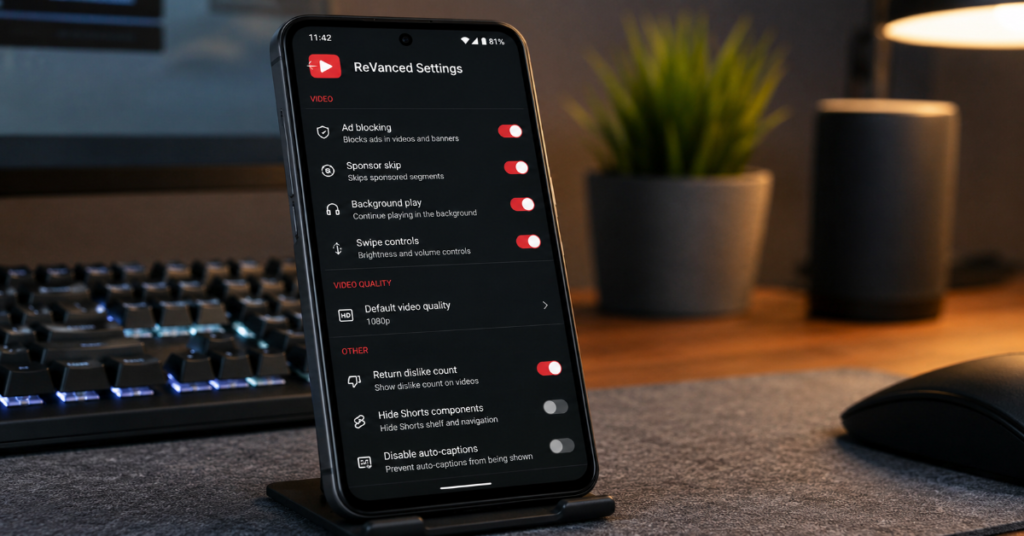
YouTube Vanced settings are usually found by opening the app, tapping the profile picture in the top right, selecting Settings and then choosing Vanced Settings, ReVanced Settings or a similarly named add-on menu. From there, users can adjust ad blocking, SponsorBlock, background playback, layout behavior, swipe gestures, video quality defaults and advanced codec options.
The exact menu names depend on the build. The original Vanced app is no longer maintained, while ReVanced uses a patching system that modifies Android apps to add features, change behavior, block ads and customize the interface. The ReVanced website describes the project as a continuation of Vanced’s legacy after Vanced was discontinued.
That context matters. Many online guides still use “Vanced” as a generic label, but in 2026 most working setups are ReVanced, ReVanced Extended or another fork. The user experience can look familiar, yet the maintenance model is different. Settings may appear only if the right patches were selected during installation. Some features may stop working after a YouTube update. Others may depend on microG or ReVanced GmsCore for account login and notifications.
This guide focuses on the practical settings users actually change, the trade-offs behind them and the safest way to troubleshoot common problems.
Where to Open YouTube Vanced or ReVanced Settings
The normal route is:
- Open the app.
- Tap your profile picture.
- Tap Settings.
- Look for Vanced Settings, ReVanced Settings or ReVanced Extended.
If that entry is missing, the issue is usually not a hidden menu. It often means the installed build did not include the settings patch, the app was installed incorrectly or the wrong package was patched. ReVanced’s patch model allows users to apply small modifications to supported Android apps, which means the final feature set depends on the patches included during build time. (GitHub)
A second check is Android’s app info page. Long-press the app icon, tap App info and confirm that the expected app is installed. On Samsung One UI, also check whether the app is restricted by battery management, because background playback, notifications and account services can behave differently when the phone aggressively limits background activity. Samsung’s own battery optimization guidance shows that Galaxy phones manage syncing, background activity and battery behavior through system settings. (Samsung pl)
Best Settings to Change First
| Setting area | What to change | Why it matters | Trade-off |
| Ad and sponsor controls | Enable ad blocking and SponsorBlock if present | Reduces interruptions and skips submitted sponsor segments | May conflict with YouTube’s ad policies |
| Background playback | Enable play in background | Keeps audio running when the app is minimized | Can increase battery use |
| Video quality | Set mobile and Wi-Fi defaults separately | Avoids repeated manual quality changes | Higher quality uses more data |
| Layout | Adjust comments, shorts, buttons and feed elements | Makes the app feel cleaner | Some UI changes can break after updates |
| Swipe controls | Enable brightness and volume gestures | Faster control during playback | Can interfere with normal screen gestures |
| microG or GmsCore | Allow background activity and notifications | Helps login and notification reliability | Adds another component to maintain |
The highest impact change for most users is default video quality. If mobile data is limited, 720p is a practical ceiling. If the user is on strong Wi-Fi and a modern phone screen, 1080p or higher may make sense. Separating mobile and Wi-Fi defaults is better than forcing one quality setting everywhere.
Ad Blocking and SponsorBlock Settings
The most controversial part of youtube vanced settings is ad control. ReVanced patches list ad blocking, appearance customization and additional features as core examples of what patches can provide. (GitHub)
YouTube’s position is different. Its help page says blocking YouTube ads violates its Terms of Service and that users may be asked to allow ads or sign up for YouTube Premium. It also says playback may be blocked if ad blockers continue to be used. (Google Help)
That creates the central trade-off. From a user-experience perspective, ad blocking reduces interruptions. From a platform perspective, YouTube frames ads as part of creator support and service access. A responsible guide should not pretend this is risk-free.
SponsorBlock is a separate layer. It skips community-submitted segments such as sponsorships, intros or self-promotion. If it stops working, the cause may be a patch issue, service availability or a category setting. ReVanced issue discussions show that SponsorBlock problems can occur and may be build-specific rather than universal. (GitHub)
Background Playback and Picture-in-Picture
Background playback is one of the reasons many users originally adopted Vanced. The discontinued Vanced app was known for features such as ad blocking, background play, picture-in-picture, AMOLED themes, swipe controls and SponsorBlock. (Wikipedia)
In ReVanced, background playback usually appears in the ReVanced settings area or under YouTube’s regular playback settings after patching. If audio stops when the screen turns off, check three things:
- Whether background playback is enabled in the app
- Whether Android has restricted the app’s battery usage
- Whether microG or GmsCore is allowed to run in the background
On Samsung One UI, background restrictions can be more aggressive than users expect. If playback or notifications are unreliable, battery management should be checked before reinstalling the app.
Layout, Comments and Shorts Controls
Layout settings are useful when YouTube changes its interface. Many users disable Shorts buttons, move comments, hide feed components or remove promotional panels. These are quality-of-life changes rather than core playback features.
The hidden limitation is maintenance. YouTube’s interface changes frequently, so a layout patch that works today can fail after an app update. This is why ReVanced’s patching model matters. It is designed for ongoing patch updates, but not every feature is equally stable across versions. ReVanced says its patching system is intended to work on newer app versions with minimal maintenance, but real-world results still depend on the target app and patch compatibility.
A practical workflow is simple: change one layout option at a time, restart the app and confirm the result before changing another. That makes it easier to identify which toggle caused a broken player, missing button or unusual comment layout.
Swipe Controls and Gesture Behavior
Swipe controls usually manage brightness on one side of the screen and volume on the other. Some builds may also include seeking gestures. These controls are helpful on large phones, especially when watching landscape video.
If swipe controls do not work, check whether they are enabled in the Vanced or ReVanced settings menu. Then confirm that Android accessibility overlays, gesture navigation or Samsung edge features are not interfering. On Galaxy phones, gesture navigation, edge panels and display features can all compete for touch behavior.
A useful rule: keep swipe sensitivity moderate. High sensitivity feels fast at first but causes accidental volume spikes, brightness drops and gesture conflicts.
Advanced Codec and Video Quality Settings
Some builds expose advanced codec options only after unlocking developer-style settings. The uploaded brief notes that older Vanced builds sometimes required tapping the About area multiple times to reveal additional codec controls.
These options should be handled carefully. VP9, AV1 and other codec preferences can affect battery drain, heat, buffering and visual quality. A newer flagship phone may decode high-efficiency formats well. An older or mid-range device may stutter, heat up or drain faster.
| Device type | Suggested quality behavior | Codec caution |
| Older budget Android | 720p mobile, 1080p Wi-Fi | Avoid forcing advanced codecs |
| Mid-range phone | 720p or 1080p mobile, 1080p Wi-Fi | Test one codec change at a time |
| New flagship | 1080p or higher on Wi-Fi | Watch heat and battery during long sessions |
| Tablet | 1080p or higher on Wi-Fi | Prioritize stable playback over maximum resolution |
The best setting is not always the highest number. Stable playback beats forced resolution.
Troubleshooting: When Settings Do Not Apply
Start with the least destructive fixes:
- Force stop the app.
- Reopen and test again.
- Restart the phone.
- Clear cache.
- Check battery restrictions.
- Confirm the correct patched app is installed.
- Rebuild or reinstall only after the above steps fail.
Clearing app data can fix broken settings but may also reset preferences. ReVanced Manager issue discussions show that patching errors can occur when selected patches rely on settings support or a target YouTube version does not match expectations. (GitHub)
For Samsung users, also check “Open supported links,” default app settings and battery controls. These system-level switches can make a working install appear broken.
Risks and Real-World Impact
The original Vanced shutdown remains the key historical fact. In March 2022, Vanced announced that it was discontinued and download links would be removed. Reporting at the time said the shutdown followed legal pressure and Vanced’s own message cited legal reasons. (The Verge)
That history affects trust. Users searching for old Vanced downloads may encounter copycat APKs, outdated builds or unsafe mirrors. Because these apps are installed outside the Play Store, source verification matters. Users should avoid random APK pages, especially those that bundle installers, permissions or “premium unlocked” claims.
Suggested internal links to insert after editorial verification:
- Kuroba Android Guide: Features, APK and Safety, for APK installation safety context. (Perplexityaimagazine.com)
- YouTube to MP4 Guide: Safe Methods & Tools Explained, for YouTube workflow and policy-adjacent context. (Perplexityaimagazine.com)
- HBlock Guide: Hosts File Ad Blocking in 2026, for ad-blocking architecture comparisons. (Perplexityaimagazine.com)
- YouTube Deletes AI Slop Channels, for YouTube governance and enforcement context. (Perplexityaimagazine.com)
The Future of YouTube Vanced Settings in 2027
By 2027, the future of youtube vanced settings will likely be shaped by three forces: YouTube’s anti-ad-blocking enforcement, Android’s background restriction model and ReVanced’s patch maintenance pace.
YouTube has already stated that ad blockers violate its Terms of Service and may lead to playback interruption. (Google Help) ReVanced, meanwhile, continues to present itself as a patch-based customization project rather than a single static app. (revanced.app)
The most likely direction is more fragmentation. Some users will use YouTube Premium for stability. Others will use ReVanced for customization. Power users may move toward device-level DNS blocking, open-source front ends or browser-based workflows. The fragile middle ground is old Vanced APKs. Those should become less reliable over time because they are no longer maintained.
Takeaways
- ReVanced is the more relevant name in 2026, even when users search for Vanced.
- Missing settings usually mean missing patches, incorrect installation or version mismatch.
- Background playback problems often come from Android battery restrictions rather than the app itself.
- Ad blocking creates a clear policy conflict with YouTube’s stated position.
- Layout and gesture tweaks are useful but more likely to break after YouTube interface changes.
- Old Vanced APKs carry higher trust and security risk than maintained patch workflows.
Conclusion
YouTube Vanced settings are best understood as a practical customization layer, not a magic switchboard. The useful options are straightforward: enable background playback, set sensible video quality defaults, tune SponsorBlock, adjust layout controls and check battery permissions. The hard part is context. Original Vanced is discontinued. ReVanced is patch-based. YouTube’s policy stance on ad blocking is explicit. Android skins such as Samsung One UI can also interfere with background behavior.
For most users, the safest approach is conservative: use maintained sources, change one setting at a time, avoid random APK mirrors and understand the trade-offs before relying on any modified YouTube client as a daily app.
FAQ
Where are YouTube Vanced settings located?
Open the app, tap your profile picture, choose Settings and look for Vanced Settings, ReVanced Settings or ReVanced Extended. If the entry is missing, the installed build may not include the settings patch.
Why are ReVanced settings not showing?
The most common reasons are an incomplete patch set, a mismatched YouTube version, a failed install or using the official YouTube app instead of the patched one.
What video quality should I choose?
Use 720p on mobile data if bandwidth matters. Use 1080p or higher on Wi-Fi if the phone can handle it without heat, buffering or battery drain.
Is YouTube Vanced still official?
No. The original Vanced project was discontinued in 2022. Most current guides refer to ReVanced or related forks. (The Verge)
Does ad blocking violate YouTube rules?
YouTube says blocking ads violates its Terms of Service and may result in playback being blocked unless users allow ads or subscribe to YouTube Premium. (Google Help)
Why does background playback stop on Samsung?
Samsung’s battery management may restrict background activity. Check app battery settings, notification permissions and microG or GmsCore background access.
Methodology
This article was built from the provided production brief, then checked against official ReVanced pages, ReVanced GitHub repositories, YouTube Help pages, Samsung support material and reporting on the original Vanced shutdown. Limitations remain: ReVanced settings vary by build, selected patches, Android version and device skin. No live device testing was conducted for this draft, so final publication should include hands-on verification on at least one Samsung One UI device and one stock Android device.
References
Android Central. (2022, March 14). Google’s legal threat forces YouTube Vanced app to shut down.
ReVanced. (2026). ReVanced official website.
ReVanced. (2026). ReVanced Patches GitHub repository.
Samsung. (2026). Galaxy Battery Optimization support page.
The Verge. (2022, March 13). YouTube Vanced is shutting down “due to legal reasons.”
YouTube Help. (2026). Allow ads on videos that you watch.
