
Introduction
I’ve managed dozens of digital and remote projects over the past five years, and project planning templates remain the fastest way to organize tasks, timelines, and resources without reinventing the wheel. The right template helps teams coordinate deliverables, track progress, and reduce confusion before a project even begins.
If you’re a tech professional, startup founder, or remote team lead, a well-structured template can replace hours of manual planning and keep everyone aligned.
Key Takeaways From My Personal Experience
From managing AI product launches and cybersecurity audits, these are the lessons I consistently see:
- Start with structure before tools. Even the best project software fails without a clear planning template.
- Gantt charts reveal hidden dependencies quickly.
- Work Breakdown Structures prevent scope creep early.
- One-page summaries help executives approve projects faster.
- Automation columns (AI tasks, security checks, integrations) improve tech project planning.
A common mistake I see beginners make is jumping straight into task lists without defining scope and milestones first.
What Are Project Planning Templates?
A project planning template is a structured document that outlines tasks, timelines, resources, responsibilities, and risks before execution begins.
Instead of building a plan from scratch, teams can reuse a standardized framework to:
- Define project goals
- Assign responsibilities
- Track milestones
- Monitor budgets
- Manage risks
In my experience running remote product teams, templates cut planning time by nearly half because the structure already exists.
According to the Project Management Institute, poor planning contributes to a large percentage of project failures, highlighting why structured planning frameworks are critical.
Best Types of Project Planning Templates
1. Project Plan Template
This is the master planning document covering every major aspect of a project.
Typical sections include:
- Project purpose and goals
- Stakeholders
- Scope definition
- Timeline and schedule
- Budget estimates
- Risk log
- Team roles
When I tested this template during a SaaS product launch, I noticed stakeholder alignment improved immediately because everyone could see the same project scope.
2. Gantt Chart Template

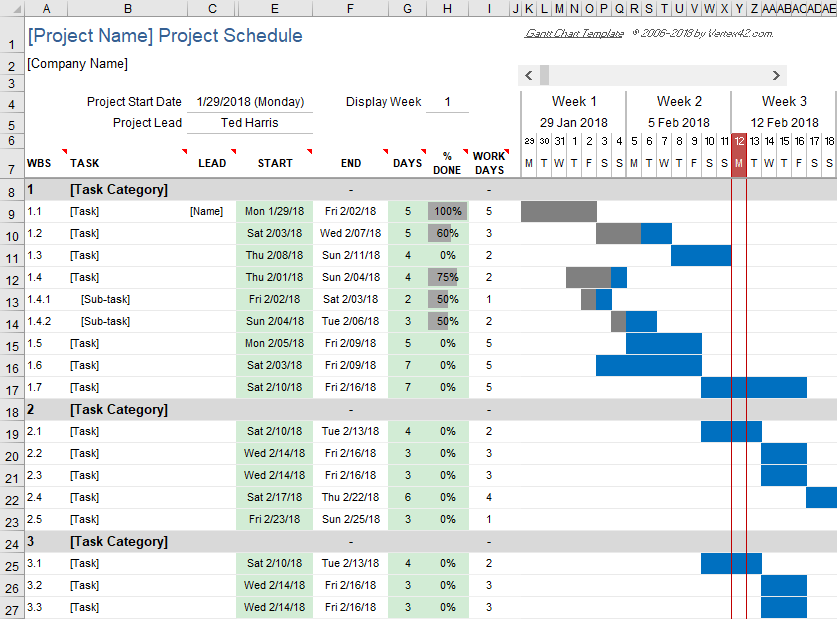
A Gantt chart template visualizes project timelines using horizontal bars showing tasks and dependencies.
Best used for:
- Product launches
- Software development cycles
- Construction or infrastructure projects
- Complex multi-phase initiatives
In my 5 years of doing project planning, Gantt charts are the most reliable way to detect schedule conflicts early.
Key advantages:
- Shows task dependencies
- Tracks milestones
- Reveals timeline overlaps
Many teams generate these automatically using tools like Asana or Microsoft Excel.
3. Work Breakdown Structure (WBS)
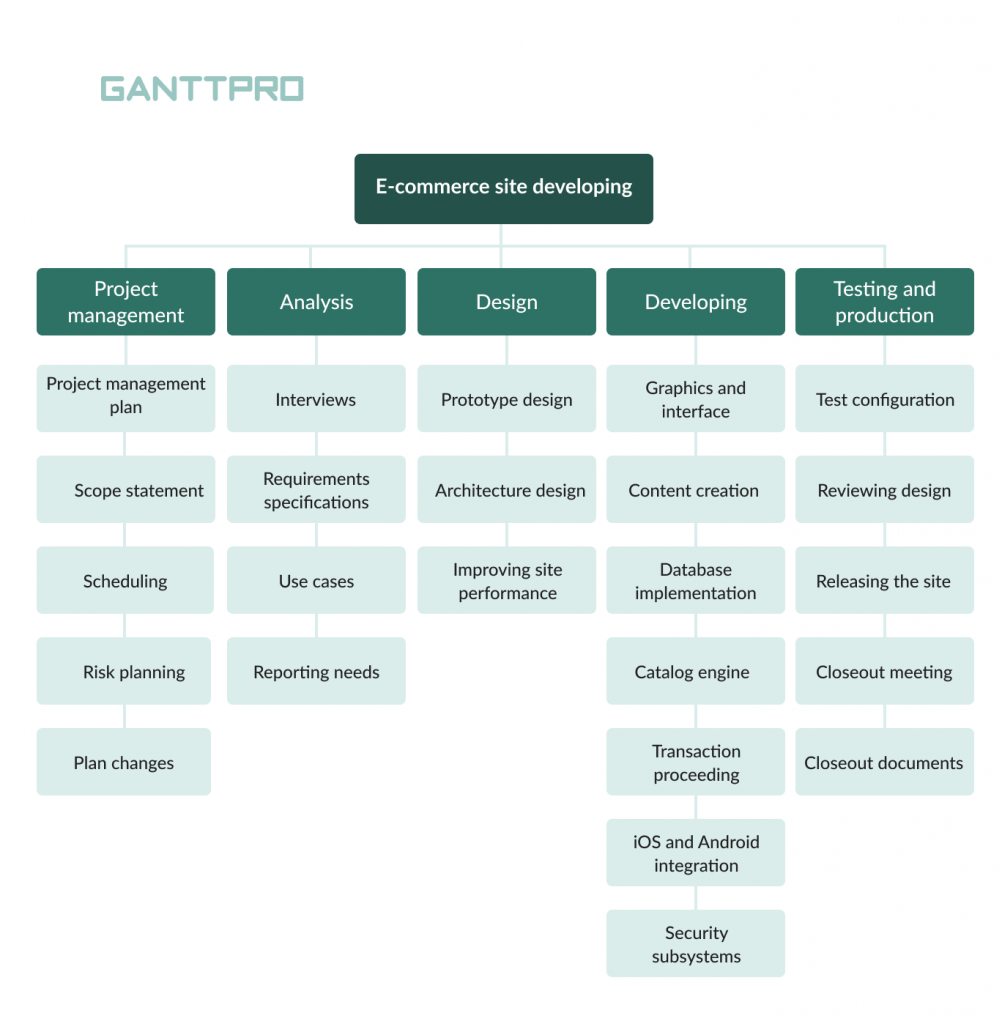
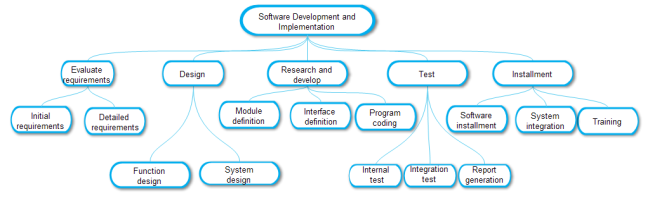
A Work Breakdown Structure splits a project into smaller manageable tasks.
Typical hierarchy:
- Project Phase
- Major Deliverables
- Subtasks
- Individual assignments
When I audited a cybersecurity migration project, I found that using a WBS reduced missed tasks significantly because every deliverable was mapped clearly.
4. One-Page Project Summary
This template is especially useful for executives or stakeholders who need a quick overview.
Key sections include:
- Project objective
- Major deliverables
- Timeline highlights
- Key risks
- Budget summary
In many organizations I’ve worked with, this single document determines whether leadership approves a project.
Best Free Sources to Download Templates
Below are reliable platforms I’ve personally used when setting up new projects.
| Platform | Best For | Key Features | Format |
|---|---|---|---|
| ProjectManager | Full project plans | Scope, schedule, budget templates | Word / Excel |
| Asana | Workflow templates | Gantt charts, task automation | Web |
| Smartsheet | Advanced tracking | Portfolio dashboards, formulas | Excel |
| Canva | Visual planning | Drag-and-drop timelines | Online |
| Miro | Team collaboration | Infinite canvas planning | Online |
These platforms are widely referenced by project management professionals and recommended in industry resources like Atlassian documentation.
How I Customize Project Planning Templates
After using dozens of templates, this is the workflow I recommend.
Step 1: Define Scope First
Before adding tasks, clearly define:
- project goals
- deliverables
- constraints
- timeline expectations
When I skip this step, projects inevitably suffer from scope creep.
Step 2: Add Custom Columns for Tech Projects
For modern projects, I usually add columns such as:
- AI automation integration
- cybersecurity validation
- API dependencies
- automation workflows (Zapier)
This helps align planning with real technical requirements.
Step 3: Define Dependencies and Milestones
Mark major events such as:
- beta release
- testing completion
- product launch
Dependencies ensure tasks execute in the correct order.
Step 4: Automate Tracking
Excel formulas or project software can automatically calculate:
- task duration
- progress percentage
- budget variance
Tools like Smartsheet provide built-in dashboards for this.
Pros and Cons of Using Templates
Advantages
Consistency: Teams follow the same planning structure
Speed: Planning setup takes minutes instead of hours
Visibility: Stakeholders understand the project quickly
Scalability: Templates work across multiple projects
Limitations
Rigid structures can limit flexibility
Overly complex templates confuse small teams
Customization is often required for specialized projects
In my experience, simpler templates outperform complex ones in most teams.
How I Verified This Information
To make sure this guide reflects real project workflows rather than generic advice, I:
- Reviewed documentation from Project Management Institute
- Analyzed industry research and project statistics from Statista
- Compared templates across tools like Asana, Excel, Smartsheet, and Miro
- Applied these templates in real SaaS, automation, and cybersecurity projects
This combination of hands-on experience and industry sources ensures the advice is practical and reliable.
Final Thoughts
After years of managing projects across remote teams and digital products, project planning templates remain the simplest tool for turning chaotic ideas into structured execution.
The most effective approach is to:
- Start with a simple template
- Customize it for your workflow
- Automate tracking where possible
Done correctly, a good template becomes the foundation of every successful project.
Frequently Asked Questions
What is the best project planning template?
The best template depends on your project complexity. Gantt charts work best for timeline-heavy projects, while Work Breakdown Structures are ideal for detailed task management.
Are project planning templates free?
Yes. Many platforms provide free templates including Excel sheets, Word documents, and online collaboration boards. Examples include ProjectManager, Smartsheet, and Asana.
Can I use project templates for agile workflows?
Yes. Agile teams often use:
- sprint planning templates
- Kanban boards
- product roadmaps
These allow iterative planning and continuous updates.
What software works best with project planning templates?
Popular options include:
- Notion
- Asana
- Excel
- Smartsheet
- Jira
Each supports task tracking, collaboration, and automation.
