
I still remember the first time a spreadsheet failed me at a critical moment. A simple column shift broke an entire reporting model, and the culprit was a familiar one: VLOOKUP. For years, Excel users accepted that fragility as the price of working with data. XLOOKUP changed that expectation. In the first hundred words of this story, I want to be clear about why it matters. XLOOKUP is not just a new formula. It represents a philosophical shift in how spreadsheet software understands intent, structure, and human error.
Released with Excel 365 and later Excel 2021, XLOOKUP unified decades of workaround culture into a single, readable function. It searches left or right, defaults to exact matches, handles missing data gracefully, and scales to modern datasets without demanding ritualistic sorting. For analysts, accountants, journalists, and students alike, it removed the fear that one structural change could quietly poison results.
Beyond mechanics, XLOOKUP reflects how spreadsheets have evolved from static ledgers into decision engines. Data today moves faster, grows larger, and connects across systems. A lookup function that assumes perfect order no longer fits that reality. What follows is a deep look at how XLOOKUP works, why it replaced older formulas, and what its design reveals about the future of everyday data tools.

The Long Road From VLOOKUP to XLOOKUP
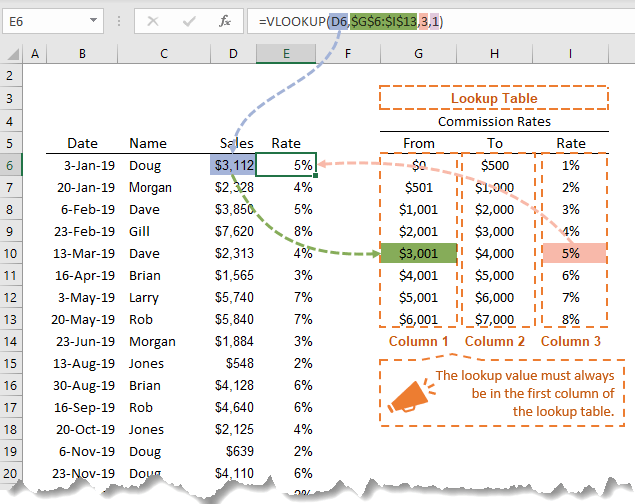
I often think of VLOOKUP as a product of its time. Introduced when spreadsheets were smaller and more linear, it assumed that data flowed from left to right and stayed neatly sorted. That assumption held for years, until real-world spreadsheets began to resemble living documents rather than static tables.
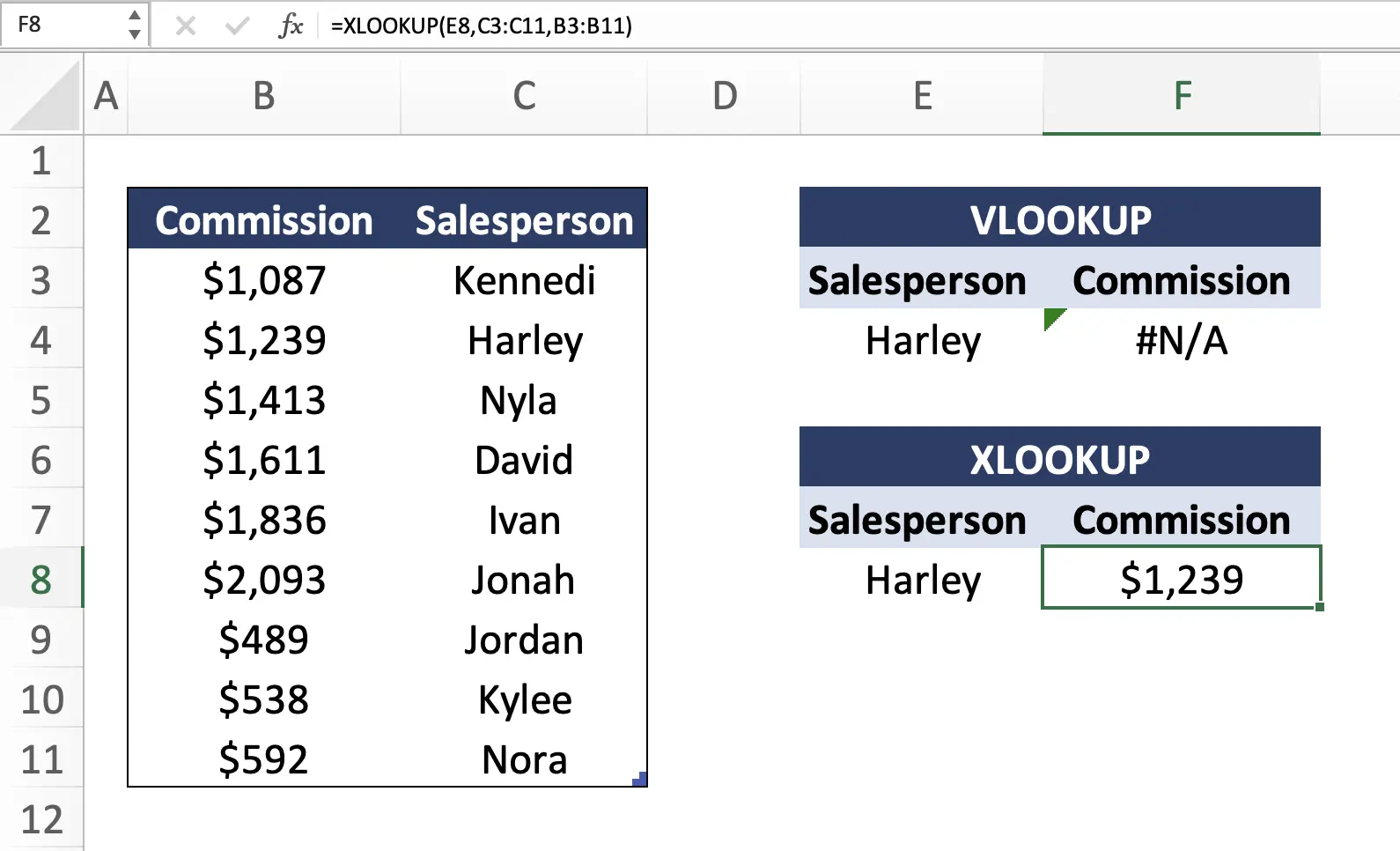
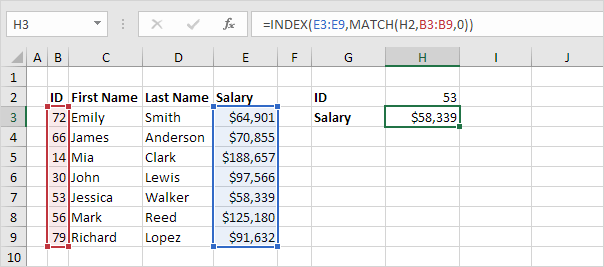
HLOOKUP tried to extend the idea horizontally, but it shared the same brittleness. INDEX and MATCH offered flexibility, yet required nesting functions in ways that obscured meaning. Many professionals learned them by rote, not by intuition. That gap between what users wanted to express and what formulas demanded became increasingly obvious.
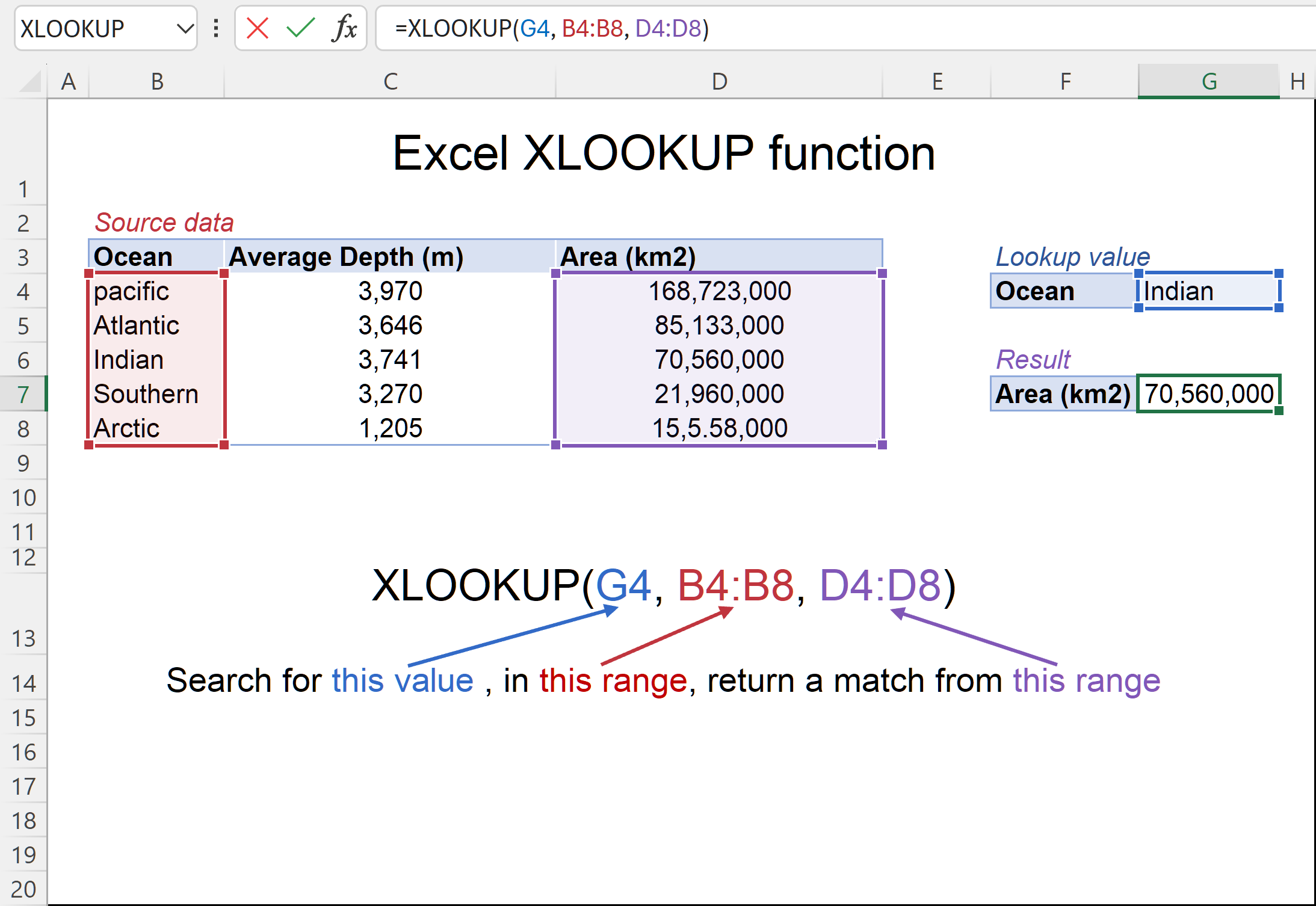
XLOOKUP emerged as Microsoft’s response to that gap. It collapses multiple mental steps into a single expression. Instead of asking users to describe how to navigate a table, it asks what they want to find and what they want back. That subtle shift reduced errors and made formulas readable months later, even by someone who did not write them.
Read: Best API Search Company’s Homepage Guide for Developers

Understanding the XLOOKUP Syntax as Human Language
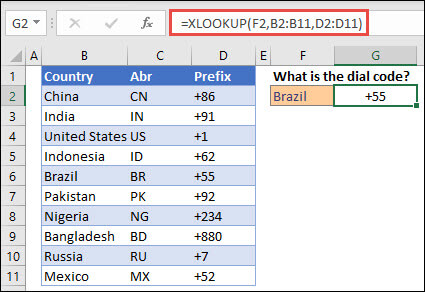
When I teach XLOOKUP, I describe its syntax as a sentence rather than a command.=XLOOKUP(lookup_value, lookup_array, return_array, [if_not_found], [match_mode], [search_mode])
Each argument answers a natural question. What am I looking for. Where should Excel look. What should it return. What should happen if nothing appears. Optional arguments refine behavior instead of patching failures.
That design matters because spreadsheets are collaborative artifacts. Clear formulas reduce cognitive load and make audits easier. In regulated industries, readability is not a luxury but a requirement. XLOOKUP supports that by eliminating positional column indexes and replacing them with explicit ranges.
An Excel program manager once noted that most formula errors come from silent failures. XLOOKUP’s default exact match and custom “not found” responses directly address that problem. The function fails loudly and clearly, which is often the most responsible behavior software can have.

Why Match Mode Quietly Changed Approximate Lookups
Approximate lookups used to be dangerous territory. I have seen financial models drift by millions because a column was not properly sorted. XLOOKUP’s match_mode argument made that risk explicit.
By separating exact, next larger, next smaller, and wildcard behavior into a dedicated parameter, Excel forces the user to acknowledge intent. Sorted data becomes a conscious requirement, not an implied assumption. That change alone has likely prevented countless silent errors.
Wildcard matching also gained new relevance. Text data is messy. Product names vary, human input is inconsistent, and partial matches are often the goal rather than the exception. Match mode 2 embraces that reality without resorting to convoluted helper columns.

Search Mode and the Rise of Large Datasets
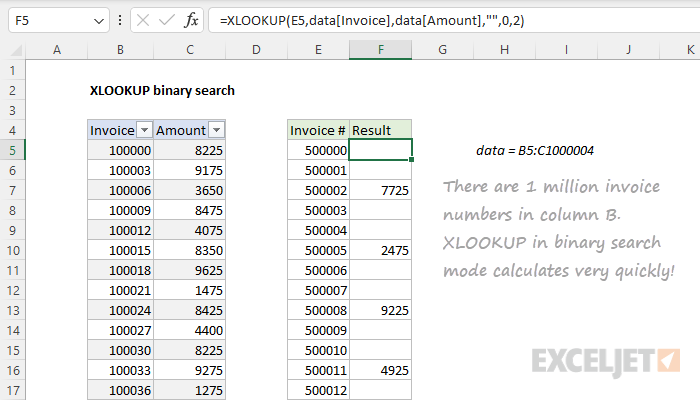
As datasets grew, performance became a real constraint. Search_mode addresses that directly. Binary searches in sorted data reduce lookup time dramatically, especially in files with tens of thousands of rows. That matters in finance, logistics, and analytics environments where recalculation speed affects workflow.
Reverse searches solved another long-standing frustration. Finding the most recent entry used to require helper columns or array formulas. With search_mode set to -1, the last occurrence becomes trivial to retrieve. This feature alone reshaped how many professionals track changes over time.
I see this as Excel acknowledging that spreadsheets now sit closer to databases than notebooks. XLOOKUP bridges that gap without asking users to learn SQL or abandon familiar tools.

Comparison Table: XLOOKUP and Its Predecessors
| Feature | XLOOKUP | VLOOKUP | INDEX MATCH |
|---|---|---|---|
| Lookup direction | Any direction | Right only | Any |
| Default match | Exact | Approximate | Exact |
| Error handling | Custom text | #N/A | #N/A |
| Column stability | Safe | Breaks | Safe |
| Readability | High | Medium | Low |
Practical Examples That Changed Daily Work
In newsroom analytics, XLOOKUP simplified audience dashboards that update hourly. In accounting, it reduced reconciliation errors caused by structural changes. In education, it lowered the barrier for students learning data logic.
A financial analyst I spoke with described it plainly: “I stopped being afraid of touching old spreadsheets.” That emotional shift is not trivial. Confidence in tools affects how people explore data and question assumptions.
Another Excel educator noted that beginners now learn one lookup instead of three. That consolidation frees time to focus on interpretation rather than syntax.
Expert Perspectives on Why XLOOKUP Matters
A senior data journalist once told me that spreadsheet errors are the most common cause of published corrections. Tools that reduce hidden fragility directly improve public trust.
A corporate auditor emphasized that transparent formulas shorten review cycles and reduce compliance risk.
A university instructor highlighted that XLOOKUP aligns better with how students think about problems, not how software once forced them to think.
Takeaways
- XLOOKUP replaced multiple legacy functions with a single expressive tool
- Defaults prioritize accuracy and clarity over convenience
- Match and search modes make assumptions explicit
- Performance scales to modern datasets
- Readability improves collaboration and auditing
- The function reflects a broader shift toward human-centered software
Conclusion
I see XLOOKUP as more than an Excel upgrade. It represents a quiet maturation of everyday software. Instead of assuming perfect data and expert users, it assumes reality: messy tables, changing structures, and humans under pressure. By aligning functionality with intent, it reduces the gap between what users mean and what spreadsheets do.
That alignment matters because spreadsheets remain one of the most influential technologies in the world. They shape budgets, policies, research, and personal decisions. A small improvement in reliability can ripple outward in meaningful ways. XLOOKUP does not eliminate mistakes, but it makes them harder to hide and easier to fix. In that sense, it sets a standard future tools would do well to follow.
FAQs
Is XLOOKUP available in all Excel versions?
It is available in Excel 365 and Excel 2021. Older versions require INDEX and MATCH alternatives.
Can XLOOKUP return multiple columns?
Yes, it can spill results across multiple columns when the return_array includes them.
Does XLOOKUP require sorted data?
Only for approximate match modes or binary search options.
Is XLOOKUP faster than VLOOKUP?
In many cases yes, especially with binary search on large datasets.
Can XLOOKUP replace INDEX MATCH entirely?
For most common use cases, yes, with clearer syntax and fewer errors.
